Skip to content
ImagesFree

Cinematic Four-Shot Video Prompt From Performance Reference

A prompt template for generating a photorealistic 7.000-second cinematic video with four timecoded shots and clean hard cuts, recreating a man's garden performance from a reference video, with a drone-canopy camera angle inspired by a reference still. Requires uploading a performance video and a framing image, and preserves speech, audio and continuity across every cut.

Image generation

Source previews

These example images come from the original source. DROPIDEA has not independently tested these examples; results depend on the model and settings.

Ready to personalize

Your prompt

English

Replace the red variables with your information. Copy the full prompt and use it with your preferred agent.

TXT MD English version
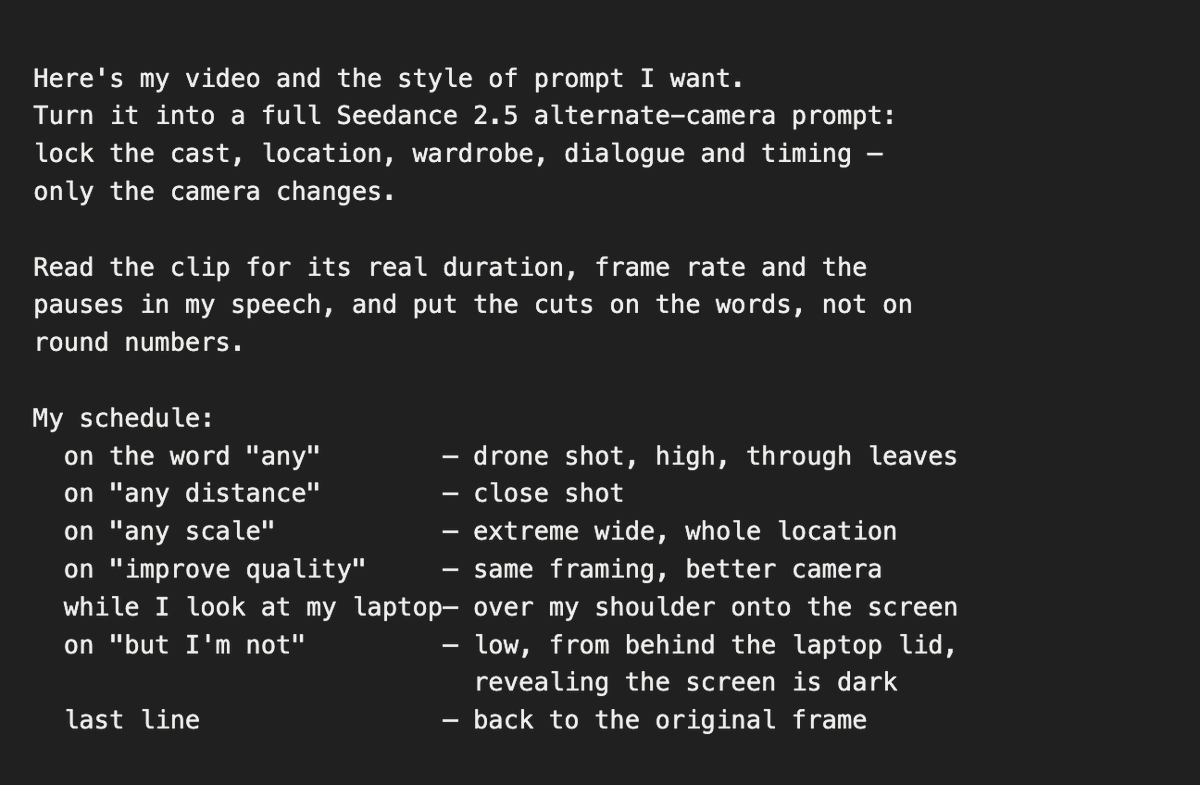
Give to Claude Code a short instruction like that (Image attached) and It will return a super detailed timestamps prompt like that. And you give this one to Seedance 2.5 with your video. That's all: REFERENCE INPUTS <<<video_1>>> = the reference performance video. <<<image_1>>> = a drone-framing reference still, used for camera vantage and composition only: an elevated, long-lens view looking down at a lone man at his table, shot through a mass of dark, heavily out-of-focus leaves and branches that frame the edges of the picture. Take nothing from it but that camera position and that foreground-foliage framing. Its location, its people, its props, its colour and its light must not appear in the output. The camera order and timestamps below follow the first 7.000 seconds of the supplied 13.334-second source clip, 1920x1080, 30 fps. MASTER DIRECTION Create one photorealistic, cinematic 7.000-second, 16:9 video containing the four shots below, separated by three clean hard cuts at the specified times. Recreate the same garden piece-to-camera as <<<video_1>>>, as if all four camera setups captured the same take simultaneously. The performance continues through every cut: output time t depicts the corresponding reference time t. Preserve the original speech, speed, gestures, pauses, gaze changes and action order, and keep the original voice and location audio in sync. Do not restart the performance when the camera changes. Keep every cut time exactly; end at 7.000 seconds without speeding up, freezing or adding a fade. CONTINUITY Use <<<video_1>>> for the single man on screen: his exact face, short dark cropped curly hair, full dark beard and mustache, age and build; his olive-green quarter-zip knit sweater with the small embroidered chest logo, the black t-shirt collar beneath it, the small black clip-on wireless microphone at that collar, and his light-blue jeans. Preserve the open dark grey laptop resting on his thighs, the light wooden garden bench with its thick cream cushions and matching cream-topped wooden side seat at frame right, the horizontal wooden slat fence, the tall bamboo at the left, the dense variegated broadleaf shrubs behind and right, the small potted plant beside the seat, and the soft, cool, overcast daylight with no harsh shadows. The camera may change position, height and screen direction; the man, the bench, the laptop and the planting retain their fixed physical positions in the garden. Match object states across every cut: laptop lid angle, hand positions and contacts, the microphone, the sweater's folds, and where his gaze is pointed at that instant. Do not add another person, a new prop, a second laptop, or any element absent from <<<video_1>>>. TIMECODED CAMERA SEQUENCE 01 | 0.000-1.302 seconds | Original frontal medium, locked off Begin exactly on the reference framing: a static eye-level medium shot, the man centred, seated on the bench with the open laptop on his lap, the bench arm and cushions filling the lower left, the cream side seat at frame right, bamboo and shrubs filling the background. He looks straight into the lens and begins the sentence, hands resting above the keyboard. No camera movement, matching the reference's tripod stillness and lens. This shot exists only to establish the original angle before it is replaced. 02 | 1.302-3.903 seconds | Elevated drone view, through the foliage Hard cut on the exact frame he says the word "any", so the new angle is already fully in place on that word. Move to a high drone-style camera hanging well above and in front of him, looking down at roughly 45-55 degrees, positioned as in <<<image_1>>>: a near foreground mass of dark, heavily out-of-focus leaves and branches crowds the top, the left edge and the lower corners, so the shot reads as though filmed from inside a tree canopy. He sits small in the clean centre gap, alone, still in the olive-green quarter-zip with the laptop open on his lap, and from this height the whole set is revealed around him: the light wooden bench, the cream cushions, the cream-topped side seat, the slat fence, the paving and the beds of bamboo and broadleaf shrubs. Long-lens compression, a slow gentle drone drift with a slight descent, no orbit and no snap zoom. He keeps speaking and gesturing toward the original camera position, which sits below and in front of him, so he never looks up into this camera. Keep the garden's own cool, soft, overcast daylight and its natural colour: do not borrow the warm hazy grade of <<<image_1>>>. 03 | 3.903-6.055 seconds | Close shot Hard cut to a tight eye-level close-up: head and the top of his shoulders only, shallow depth of field, the greenery behind him dissolved into soft blur. Cover the pause and the spoken line about distance, and hold through the short silence that follows it. Keep his facial proportions, beard and hairline exactly as the reference, with his gaze returning to the lens. Nearly fixed framing, no zoom. 04 | 6.055-7.000 seconds | Extreme wide, elevated Hard cut on the exact frame he begins the words "any scale", so the change of scale lands on the word. Move to a high, distant wide shot of the whole garden from above and behind the original camera: the man and the bench occupy a small portion of the lower-centre frame, with the full fence line, the bamboo, the paving and the surrounding planting revealed around them. He remains mid-sentence and mid-gesture at natural scale for this distance. Hold a stable, gently floating composition; no crash zoom. Hold this framing through the short silence after his line and end cleanly on it at 7.000 seconds, with no fade, no push in and no speed change. FINISH Preserve the reference's natural photographic texture, cool daylight colour, light direction, lens character, motion blur, focus behaviour and original audio through 7.000 seconds. Keep the drone-canopy framing only in shot 02. No additional cuts, transition morphs, invented actions, altered wardrobe, duplicated limbs or props, added titles, subtitles, captions, graphics, music, slow motion or speed changes. One finished 7.000-second video; one performance reference and one framing reference only.
Preview results

Your prompt

Give to Claude Code a short instruction like that (Image attached) and It will return a super detailed timestamps prompt like that. And you give this one to Seedance 2.5 with your video. That's all: REFERENCE INPUTS <<<video_1>>> = the reference performance video. <<<image_1>>> = a drone-framing reference still, used for camera vantage and composition only: an elevated, long-lens view looking down at a lone man at his table, shot through a mass of dark, heavily out-of-focus leaves and branches that frame the edges of the picture. Take nothing from it but that camera position and that foreground-foliage framing. Its location, its people, its props, its colour and its light must not appear in the output. The camera order and timestamps below follow the first 7.000 seconds of the supplied 13.334-second source clip, 1920x1080, 30 fps. MASTER DIRECTION Create one photorealistic, cinematic 7.000-second, 16:9 video containing the four shots below, separated by three clean hard cuts at the specified times. Recreate the same garden piece-to-camera as <<<video_1>>>, as if all four camera setups captured the same take simultaneously. The performance continues through every cut: output time t depicts the corresponding reference time t. Preserve the original speech, speed, gestures, pauses, gaze changes and action order, and keep the original voice and location audio in sync. Do not restart the performance when the camera changes. Keep every cut time exactly; end at 7.000 seconds without speeding up, freezing or adding a fade. CONTINUITY Use <<<video_1>>> for the single man on screen: his exact face, short dark cropped curly hair, full dark beard and mustache, age and build; his olive-green quarter-zip knit sweater with the small embroidered chest logo, the black t-shirt collar beneath it, the small black clip-on wireless microphone at that collar, and his light-blue jeans. Preserve the open dark grey laptop resting on his thighs, the light wooden garden bench with its thick cream cushions and matching cream-topped wooden side seat at frame right, the horizontal wooden slat fence, the tall bamboo at the left, the dense variegated broadleaf shrubs behind and right, the small potted plant beside the seat, and the soft, cool, overcast daylight with no harsh shadows. The camera may change position, height and screen direction; the man, the bench, the laptop and the planting retain their fixed physical positions in the garden. Match object states across every cut: laptop lid angle, hand positions and contacts, the microphone, the sweater's folds, and where his gaze is pointed at that instant. Do not add another person, a new prop, a second laptop, or any element absent from <<<video_1>>>. TIMECODED CAMERA SEQUENCE 01 | 0.000-1.302 seconds | Original frontal medium, locked off Begin exactly on the reference framing: a static eye-level medium shot, the man centred, seated on the bench with the open laptop on his lap, the bench arm and cushions filling the lower left, the cream side seat at frame right, bamboo and shrubs filling the background. He looks straight into the lens and begins the sentence, hands resting above the keyboard. No camera movement, matching the reference's tripod stillness and lens. This shot exists only to establish the original angle before it is replaced. 02 | 1.302-3.903 seconds | Elevated drone view, through the foliage Hard cut on the exact frame he says the word "any", so the new angle is already fully in place on that word. Move to a high drone-style camera hanging well above and in front of him, looking down at roughly 45-55 degrees, positioned as in <<<image_1>>>: a near foreground mass of dark, heavily out-of-focus leaves and branches crowds the top, the left edge and the lower corners, so the shot reads as though filmed from inside a tree canopy. He sits small in the clean centre gap, alone, still in the olive-green quarter-zip with the laptop open on his lap, and from this height the whole set is revealed around him: the light wooden bench, the cream cushions, the cream-topped side seat, the slat fence, the paving and the beds of bamboo and broadleaf shrubs. Long-lens compression, a slow gentle drone drift with a slight descent, no orbit and no snap zoom. He keeps speaking and gesturing toward the original camera position, which sits below and in front of him, so he never looks up into this camera. Keep the garden's own cool, soft, overcast daylight and its natural colour: do not borrow the warm hazy grade of <<<image_1>>>. 03 | 3.903-6.055 seconds | Close shot Hard cut to a tight eye-level close-up: head and the top of his shoulders only, shallow depth of field, the greenery behind him dissolved into soft blur. Cover the pause and the spoken line about distance, and hold through the short silence that follows it. Keep his facial proportions, beard and hairline exactly as the reference, with his gaze returning to the lens. Nearly fixed framing, no zoom. 04 | 6.055-7.000 seconds | Extreme wide, elevated Hard cut on the exact frame he begins the words "any scale", so the change of scale lands on the word. Move to a high, distant wide shot of the whole garden from above and behind the original camera: the man and the bench occupy a small portion of the lower-centre frame, with the full fence line, the bamboo, the paving and the surrounding planting revealed around them. He remains mid-sentence and mid-gesture at natural scale for this distance. Hold a stable, gently floating composition; no crash zoom. Hold this framing through the short silence after his line and end cleanly on it at 7.000 seconds, with no fade, no push in and no speed change. FINISH Preserve the reference's natural photographic texture, cool daylight colour, light direction, lens character, motion blur, focus behaviour and original audio through 7.000 seconds. Keep the drone-canopy framing only in shot 02. No additional cuts, transition morphs, invented actions, altered wardrobe, duplicated limbs or props, added titles, subtitles, captions, graphics, music, slow motion or speed changes. One finished 7.000-second video; one performance reference and one framing reference only.

Variable guide

<<<video_1>>>

The reference performance video the scene is recreated from; must be uploaded with the prompt.

The token <<<video_1>>> appears four times in total: once in the REFERENCE INPUTS section, once in MASTER DIRECTION (the phrase 'as in <<<video_1>>>'), and twice in CONTINUITY (first and last sentences). Replace all four with the same video identifier.

Example value

Your clip of the man in the olive-green sweater seated on the garden bench talking to camera

<<<image_1>>>

A reference still used only for drone camera vantage and composition; its location, colour and lighting must be ignored; must be uploaded with the prompt.

The token <<<image_1>>> appears three times in total: once in REFERENCE INPUTS, once in shot 02 of the timecoded camera sequence (the phrase 'as in <<<image_1>>>'), and once at the end of shot 02 (the warm hazy grade sentence). Replace all three with the same image identifier.

Example value

An elevated long-lens shot through dark out-of-focus foliage framing the frame edges

What you get

  • A photorealistic cinematic 7.000-second 16:9 video with four shots separated by three precisely timed clean hard cuts
  • A faithful recreation of the reference performance: face, wardrobe, furniture, planting and cool overcast daylight
  • Varied camera angles: original frontal medium, drone-canopy elevated view, shallow close-up, and an elevated extreme wide
  • Original speech, gestures, pauses and location audio kept in sync through every cut

Use cases

  • Producing multi-angle, broadcast-style talking-head pieces from a single reference shoot
  • Creating cinematic educational or promotional content from one personal performance clip
  • Turning a simple static video into a compositionally varied scene without reshooting
  • Testing aerial and close-up framings on an existing speech while keeping audio in sync

How to use

  • Upload your reference performance video (<<<video_1>>>) and your drone-framing still (<<<image_1>>>) to Claude Code with a short instruction asking for a super detailed timestamps prompt like this template.
  • Copy the full template and replace <<<video_1>>> in all four of its locations with your performance video identifier, leaving every timestamp and shot number untouched.
  • Replace <<<image_1>>> in all three of its locations with your aerial framing image, keeping the instructions that forbid borrowing its colour and lighting exactly as written.
  • Give the resulting prompt to Seedance 2.5 together with the same reference video as the performance and audio source.
  • Leave all numbers, timecodes and resolution settings (1920x1080, 30 fps) unchanged, since they are technical constraints governing timing and cuts.
  • Review the output to confirm the four cut times are respected and it ends cleanly at 7.000 seconds with no fade or speed change.

Related prompts