Skip to content
ImagesFree

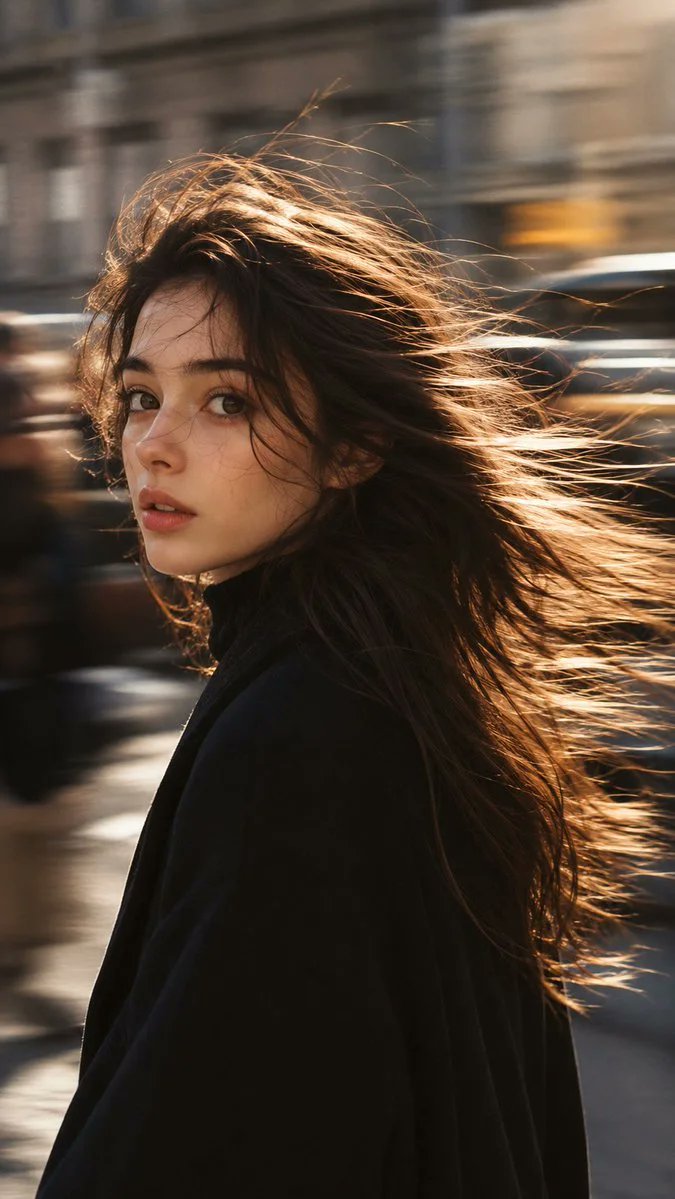
Realistic Fashion Street Portrait with City Motion

Full Arabic template for generating a realistic candid editorial-style street fashion portrait of a young woman in a busy city, with natural panning motion blur, wind-blown hair, and elegant urban wardrobe.

OpenAI

Source previews

These example images come from the original source. DROPIDEA has not independently tested these examples; results depend on the model and settings.

Ready to personalize

Your prompt

English

Replace the red variables with your information. Copy the full prompt and use it with your preferred agent.

TXT MD English version
Create a realistic fashion street portrait in a busy city, vertical 9:16. A young woman is captured in a candid editorial-style street moment. Her face and eyes remain sharp and expressive, with a quiet emotional gaze, while the surrounding city moves around her. Use a panning motion-blur photography effect: blurred pedestrians, passing traffic, soft light streaks, and slightly distorted urban architecture in the background. The motion blur should feel natural and photographic, not like a filter. Her hair is a key visual element: natural wind-blown hair, layered strands, flyaway hairs, soft movement, and glowing backlit edges. The hair should feel real, loose, and slightly messy, not like perfect studio hair. The image should feel like a real fashion street snap, not a studio portrait and not an obvious AI beauty image. Keep the skin realistic with natural texture, subtle imperfections, and a living human presence. Wardrobe should feel elegant, urban, and editorial, such as a black coat, camel trench, plaid coat, light summer shirt, sleeveless top, or refined ci…
Preview results

Your prompt

Create a realistic fashion street portrait in a busy city, vertical 9:16. A young woman is captured in a candid editorial-style street moment. Her face and eyes remain sharp and expressive, with a quiet emotional gaze, while the surrounding city moves around her. Use a panning motion-blur photography effect: blurred pedestrians, passing traffic, soft light streaks, and slightly distorted urban architecture in the background. The motion blur should feel natural and photographic, not like a filter. Her hair is a key visual element: natural wind-blown hair, layered strands, flyaway hairs, soft movement, and glowing backlit edges. The hair should feel real, loose, and slightly messy, not like perfect studio hair. The image should feel like a real fashion street snap, not a studio portrait and not an obvious AI beauty image. Keep the skin realistic with natural texture, subtle imperfections, and a living human presence. Wardrobe should feel elegant, urban, and editorial, such as a black coat, camel trench, plaid coat, light summer shirt, sleeveless top, or refined ci…

Variable guide

black coat

Editable wardrobe choice while keeping the elegant urban character.

Wardrobe paragraph in the Arabic template

Example value

Replace «معطف أسود» with «long grey wool coat»

young woman

Editable subject description while keeping the face and eyes sharp and expressive.

Second paragraph of the Arabic template

Example value

Replace «امرأة شابة» with «a middle-aged man»

9:16

Technical aspect ratio, keep 9:16 unchanged.

First line of the Arabic template

Example value

Do not modify

What you get

  • A realistic portrait of a young woman in a candid editorial street moment.
  • A city background with natural motion blur (pedestrians, traffic, light streaks).
  • Natural wind-blown hair with glowing backlit edges.
  • Realistic skin with natural texture and subtle imperfections, plus elegant urban wardrobe.
  • A vertical 9:16 image.

Use cases

  • Fashion social media posts (Reels and Stories).
  • Editorial street photography and modeling inspiration.
  • Marketing content for urban clothing brands.
  • Visual references for fashion designers and photographers.
  • Covers for modern magazine articles about street elegance.

How to use

  • Copy the full Arabic template and paste it into your preferred image generation tool.
  • Edit the wardrobe choice within the options list to match your creative vision.
  • Keep the 9:16 aspect ratio unchanged to ensure a vertical image.
  • Generate the image and review the result for natural motion blur and realistic hair and skin.
  • Regenerate with slight description adjustments until you achieve the desired candid shot.

Related prompts