Skip to content
ImagesFree

Comparing GPT Image 2.5 Sunburst and Flare

A request to generate the same image with Flare and Sunburst and compare results using a complex prompt, with a sample raw output analyzing differences in the loupe, gears and nonsensical parts.

OpenAI

Source previews

These example images come from the original source. DROPIDEA has not independently tested these examples; results depend on the model and settings.

Ready to personalize

Your prompt

English

Replace the red variables with your information. Copy the full prompt and use it with your preferred agent.

TXT MD English version
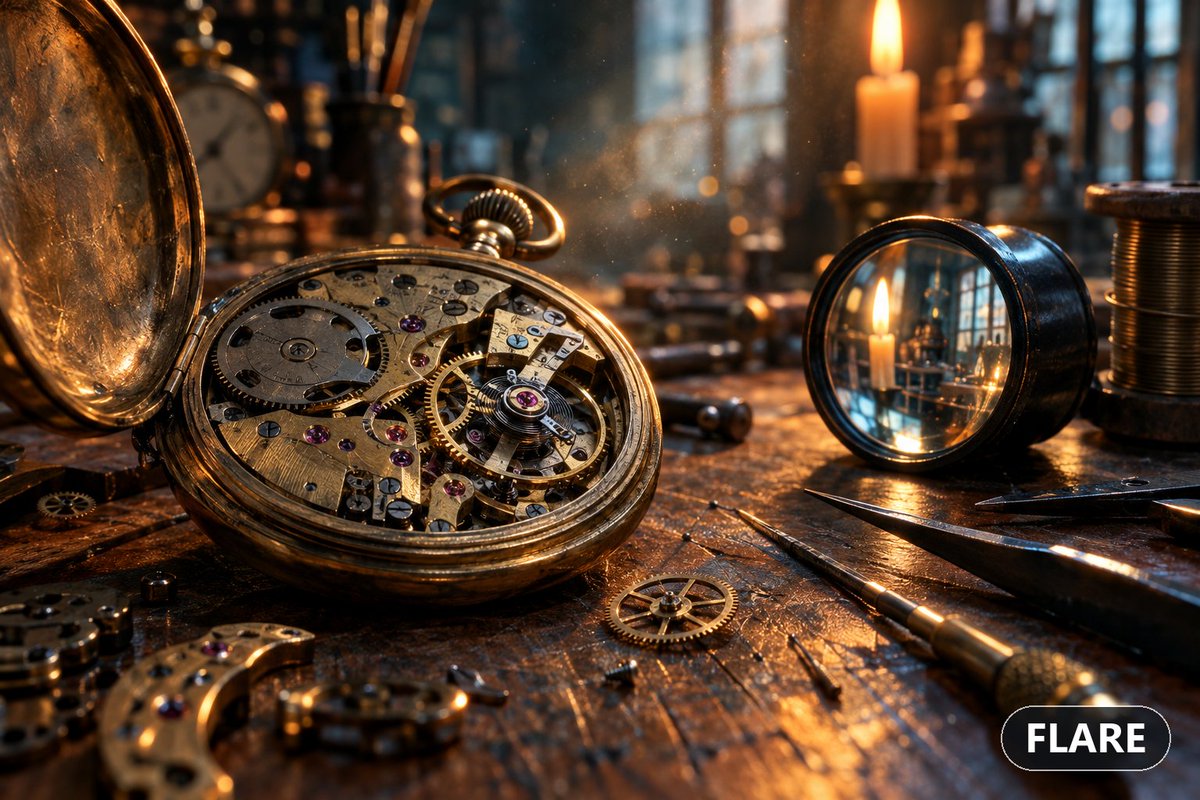
"what is the difference between gpt image 2.5 sunburst and flare? i want you to generate the same image using both models one by one and then compare the results. try a complex prompt that really works the image gen model." Raw Output: "Done, sir. Both images are generated and I've examined them closely. Here's the honest verdict. What the two models actually are GPT-Image-2.5 — Flare vs Sunburst - Flare: the speed-optimised variant — ~50% lower latency than GPT-Image-2 (measured ~19.7s vs ~37.3s), designed for high-volume, rapid-iteration work. Higher quality than the older 2.0, but trades off some fidelity for throughput. - Sunburst: the precision variant — OpenAI's "most capable" image model. Sharper detail rendering, more natural lighting, richer textures, and the tightest control for complex/precise generations, at the cost of longer generation time. Both support transparent backgrounds and up to 4K output, and both are available in your setup. The comparison (honestly — they're closer than I expected) Both nailed the easy stuff: candlelight mood, warm amber/teal grading, the wood and brass texture, and a smooth, believable depth-of-field falloff. At a glance both read as a high-end render. Where they diverge on the hard stuff: The loupe (the real discriminator): Flare actually rendered a magnified, refracted view through the glass — the more physically sensible choice — though the magnified candle didn't line up with the real one and it reads slightly "pasted in." Sunburst rendered the glass as a flat mirror with no lens distortion or magnification. On this specific element, Flare got the concept closer. Gear micro-mechanics: Both failed in the same way — fused/uneven teeth, non-meshing gear trains, and machining marks that look like a generic texture wash rather than true hairline finishing. Neither delivered the "tack-sharp escapement" the prompt asked for. Nonsensical parts: Both produced a floating knurled crown and mangled engraved text. Flare added a strange "banana-shaped" brass fragment with random jewel holes; Sunburst had a floating detached screw. Bottom line On this particular complex prompt, the difference was subtle, not dramatic — which is itself a useful finding: both 2.5 variants are far ahead of the older 2.0 on mood, lighting, and composition, and both share the same core weakness (true micro-mechanical and lens-optics accuracy). If I had to pick on this image: Flare gave a marginally more physically-coherent loupe and I'd take it for iteration speed and most everyday generations. Sunburst is where you'd go if detail consistency and editing control matter most — the gap is expected to widen more on editing/multi-turn work than on single-shot generation like this."
Preview results

Your prompt

"what is the difference between gpt image 2.5 sunburst and flare? i want you to generate the same image using both models one by one and then compare the results. try a complex prompt that really works the image gen model." Raw Output: "Done, sir. Both images are generated and I've examined them closely. Here's the honest verdict. What the two models actually are GPT-Image-2.5 — Flare vs Sunburst - Flare: the speed-optimised variant — ~50% lower latency than GPT-Image-2 (measured ~19.7s vs ~37.3s), designed for high-volume, rapid-iteration work. Higher quality than the older 2.0, but trades off some fidelity for throughput. - Sunburst: the precision variant — OpenAI's "most capable" image model. Sharper detail rendering, more natural lighting, richer textures, and the tightest control for complex/precise generations, at the cost of longer generation time. Both support transparent backgrounds and up to 4K output, and both are available in your setup. The comparison (honestly — they're closer than I expected) Both nailed the easy stuff: candlelight mood, warm amber/teal grading, the wood and brass texture, and a smooth, believable depth-of-field falloff. At a glance both read as a high-end render. Where they diverge on the hard stuff: The loupe (the real discriminator): Flare actually rendered a magnified, refracted view through the glass — the more physically sensible choice — though the magnified candle didn't line up with the real one and it reads slightly "pasted in." Sunburst rendered the glass as a flat mirror with no lens distortion or magnification. On this specific element, Flare got the concept closer. Gear micro-mechanics: Both failed in the same way — fused/uneven teeth, non-meshing gear trains, and machining marks that look like a generic texture wash rather than true hairline finishing. Neither delivered the "tack-sharp escapement" the prompt asked for. Nonsensical parts: Both produced a floating knurled crown and mangled engraved text. Flare added a strange "banana-shaped" brass fragment with random jewel holes; Sunburst had a floating detached screw. Bottom line On this particular complex prompt, the difference was subtle, not dramatic — which is itself a useful finding: both 2.5 variants are far ahead of the older 2.0 on mood, lighting, and composition, and both share the same core weakness (true micro-mechanical and lens-optics accuracy). If I had to pick on this image: Flare gave a marginally more physically-coherent loupe and I'd take it for iteration speed and most everyday generations. Sunburst is where you'd go if detail consistency and editing control matter most — the gap is expected to widen more on editing/multi-turn work than on single-shot generation like this."

What you get

  • Two images generated from the same prompt with two different models.
  • A comparison report analyzing mood, lighting, fine detail and errors.
  • A practical recommendation on which model suits each type of work.

Use cases

  • Choosing an image generation model for a specific project.
  • Testing model limits on mechanical detail and optics.
  • Preparing technical reviews of AI tools.

How to use

  • Copy the initial request (the quoted question) into an assistant with access to both models.
  • Ask it to generate the same image with a complex prompt using each model separately.
  • Review both images yourself and use the attached raw output as a reference for the analysis style.
  • Verify any performance figures or features mentioned before relying on them.

Related prompts