Skip to content
ImagesFree

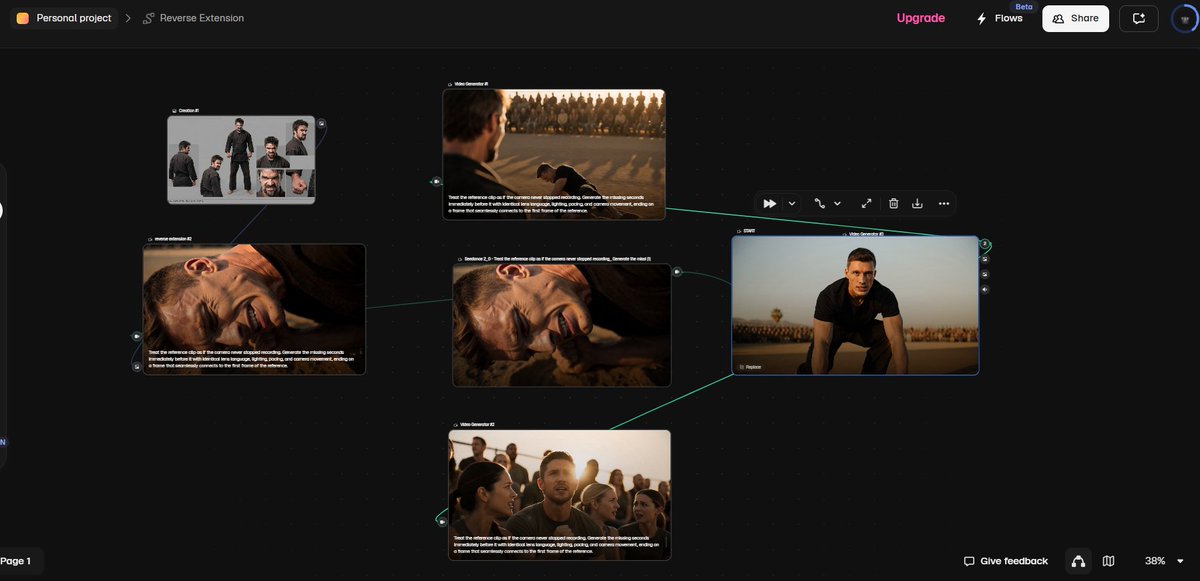
Base prompt for generating seconds before a reference clip

A video template using a reference clip to generate the missing preceding seconds with identical camera language, lighting and continuity, with an option to fully direct the missing scene or let Seedance decide.

Image generation

Source previews

These example images come from the original source. DROPIDEA has not independently tested these examples; results depend on the model and settings.

Ready to personalize

Your prompt

English

Replace the red variables with your information. Copy the full prompt and use it with your preferred agent.

TXT MD English version
Here's the base prompt I use for every "Reverse Extension": [clip reference] + Treat the reference clip as if the camera never stopped recording. Generate the missing seconds immediately before it with identical lens language, lighting, pacing, camera movement and continuity, ending on a frame that seamlessly connects to the first frame of the reference clip. Build a natural cause-and-effect sequence that logically explains why the reference begins exactly as it does. Preserve the same characters, wardrobe, nvironment, camera language and visual continuity throughout. The final frame must visually match the first frame of the reference clip as if it were one uninterrupted take + [prompt scene ] This is the foundation. You can either let Seedance decide what happened before… or completely direct the missing sequence yourself.
Preview results

Your prompt

Here's the base prompt I use for every "Reverse Extension": [clip reference] + Treat the reference clip as if the camera never stopped recording. Generate the missing seconds immediately before it with identical lens language, lighting, pacing, camera movement and continuity, ending on a frame that seamlessly connects to the first frame of the reference clip. Build a natural cause-and-effect sequence that logically explains why the reference begins exactly as it does. Preserve the same characters, wardrobe, nvironment, camera language and visual continuity throughout. The final frame must visually match the first frame of the reference clip as if it were one uninterrupted take + [prompt scene ] This is the foundation. You can either let Seedance decide what happened before… or completely direct the missing sequence yourself.

Variable guide

[clip reference]

The reference clip the seconds before it are generated from.

Start of the template, replacing [clip reference].

Example value

A clip of a person running through a rainy night alley

[prompt scene ]

Description of the missing scene if you want to direct generation.

After the + sign at the end of the line before "This is the foundation", replacing [prompt scene ].

Example value

The person rushes out of the café and drops their cup

What you get

  • Generated seconds immediately preceding the reference clip.
  • Identical lens language, lighting, pacing, camera movement and visual continuity.
  • A final frame that visually matches the first frame of the reference clip as one uninterrupted take.
  • A natural cause-and-effect sequence explaining how the reference begins.

Use cases

  • Generating a cinematic intro for an existing short clip.
  • Completing fragmented shots into one continuous take.
  • Creating before/after content for motion graphics and short stories.
  • Extending existing scenes longer without losing continuity.

How to use

  • Upload your reference clip to the video tool (e.g. Seedance) and confirm it can be referenced.
  • Replace [clip reference] with your clip or a clear reference to it.
  • If you want to direct the result, replace [prompt scene ] with a detailed description of the missing sequence, or leave it to let Seedance decide what happened before.
  • Paste the full prompt into the model and run it.
  • Review the final frame and confirm it connects seamlessly with the first frame of the reference clip, retrying with an adjusted description if needed.

Related prompts