Result 1Gemini
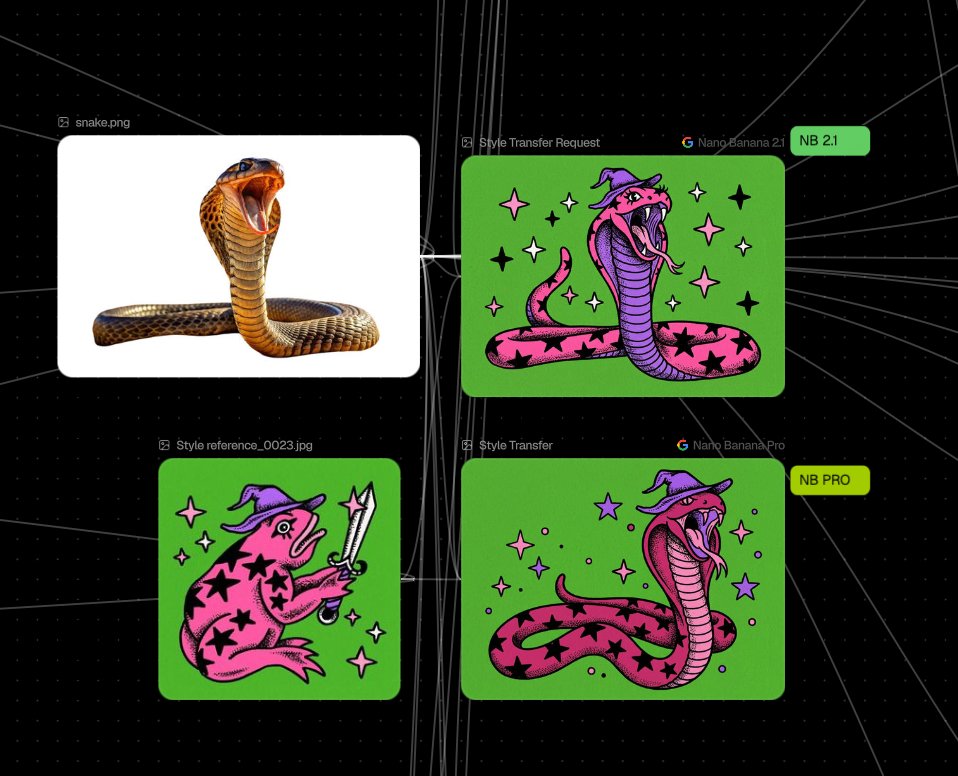
A dedicated prompt designed to transfer artistic medium, palette, mood, and texture from a secondary reference image onto the subject matter of a primary image.
These example images come from the original source. DROPIDEA has not independently tested these examples; results depend on the model and settings.

Replace the red variables with your information. Copy the full prompt and use it with your preferred agent.
[image 1]The primary image defining subject matter and content
Replace [image 1] or provide the reference image containing the subject content
Example value[image 1]
[image 2]The secondary image providing the artistic style and palette
Replace [image 2] or provide the reference image containing the style aesthetic
Example value[image 2]
A photographic prompt crafted to generate hyper-realistic, unposed smartphone snapshots taken by a friend at a nigh...
Prompt generating an ultra-realistic photo of a young man wearing white Shalwar Kameez by a lake at sunset, specify...
An advanced cinematic AI video prompt crafting a 15-second seamless loop psychedelic Japanese horror music video fe...
Prompt to generate a photorealistic character reference sheet for a young medieval village woman featuring multi-an...