Skip to content
ImagesFree

Step 1 — Three-Panel Character Reference Sheet

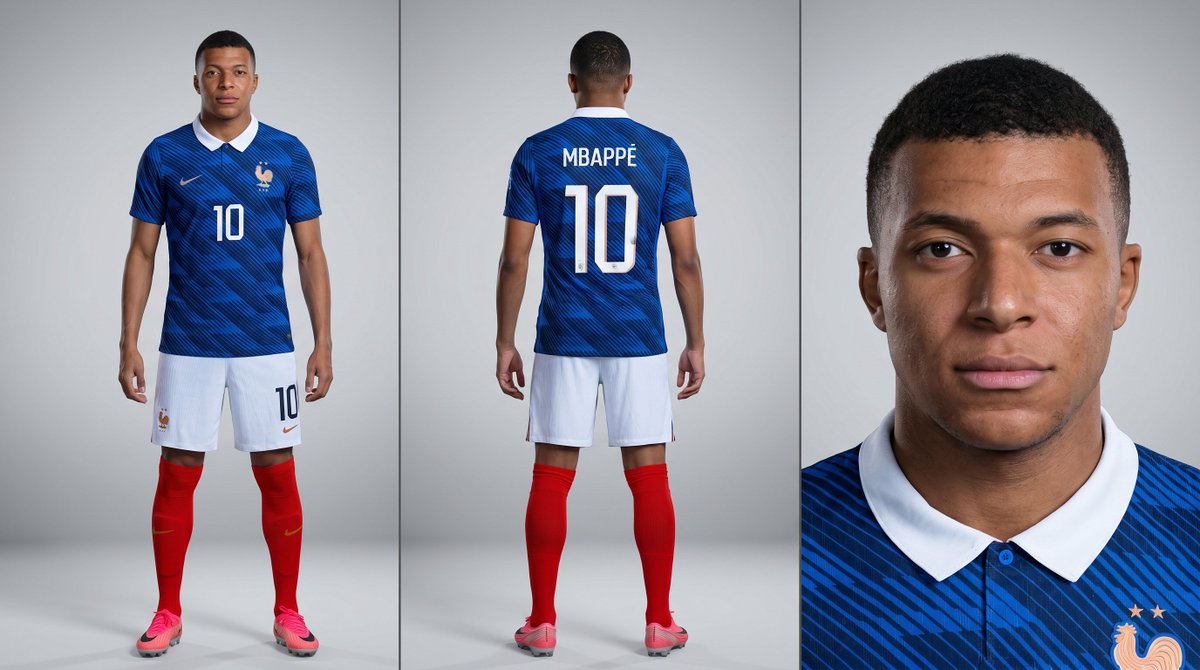
A prompt for generating a professional character reference sheet with Nano Banana 2 Edit: three vertical panels (full-body front, full-body back, face close-up), strict identity consistency from an uploaded reference image, uniform lighting, neutral gray background, and no on-image text.

Gemini

Source previews

These example images come from the original source. DROPIDEA has not independently tested these examples; results depend on the model and settings.
Ready to personalize

Your prompt

English

Replace the red variables with your information. Copy the full prompt and use it with your preferred agent.

TXT MD English version
Step 1 — Character cards (Nano Banana 2 Edit) Reference images + web search ON. NB2 grounds the real faces, you lock what matters: kits and shirt numbers. Mbappé = deep navy #10. Haaland = red #9. Flag colors, so red vs blue reads instantly in a fast FPV shot. Prompt 👇 Create a professional character reference sheet based strictly on the uploaded reference image. Use a clean, neutral plain background (light-to-dark gray gradient) and present the sheet as a technical model turnaround while matching the exact realistic visual style of the reference — same realism level, rendering approach, skin/fabric texture, color treatment, and overall aesthetic. # COMPOSITION Arrange the sheet into three equal-width vertical panels side-by-side, each spanning the full height of the frame, with a thin clean gutter between panels. All three panels share the same background and same camera distance-to-subject ratio. PANEL 1 (left) — Full-body front view: subject facing the camera directly, standing naturally, head-to-toe fully visible. PANEL 2 (center) — Full-body back view: subject facing away from the camera, same pose and scale as Panel 1, head-to-toe fully visible. PANEL 3 (right) — Face close-up: a single large front-facing portrait, cropped from top of hair to shoulders, centered in the frame, looking straight at the camera. # IDENTITY CONSISTENCY Maintain perfect identity consistency across all three panels: same face, hairstyle, hair color, skin tone, body proportion, outfit, accessories, and footwear. Treat the reference image as the absolute source of truth — do not invent new details, do not change clothing, do not add jewelry that isn't in the reference. # POSE & FRAMING Keep the subject in a relaxed, neutral standing pose for both full-body panels, with identical scale and head-height alignment between front and back views. Accurate anatomy, clear silhouette, feet flat on the ground. The face close-up should match the same facial expression and head angle as the front full-body view, just scaled up. # LIGHTING Consistent lighting across all three panels — same direction, intensity, and softness. Natural, controlled shadows that preserve detail. No dramatic mood lighting, no rim lights, no colored gels. # ON-IMAGE TEXT Do not include any text, titles, logos, watermarks, labels, or decorative banners anywhere on the sheet. The sheet should contain only the character imagery and clean background. # OUTPUT Crisp, print-ready reference sheet look. Sharp details, high resolution. Production-grade character design document.
Preview results

Your prompt

Step 1 — Character cards (Nano Banana 2 Edit) Reference images + web search ON. NB2 grounds the real faces, you lock what matters: kits and shirt numbers. Mbappé = deep navy #10. Haaland = red #9. Flag colors, so red vs blue reads instantly in a fast FPV shot. Prompt 👇 Create a professional character reference sheet based strictly on the uploaded reference image. Use a clean, neutral plain background (light-to-dark gray gradient) and present the sheet as a technical model turnaround while matching the exact realistic visual style of the reference — same realism level, rendering approach, skin/fabric texture, color treatment, and overall aesthetic. # COMPOSITION Arrange the sheet into three equal-width vertical panels side-by-side, each spanning the full height of the frame, with a thin clean gutter between panels. All three panels share the same background and same camera distance-to-subject ratio. PANEL 1 (left) — Full-body front view: subject facing the camera directly, standing naturally, head-to-toe fully visible. PANEL 2 (center) — Full-body back view: subject facing away from the camera, same pose and scale as Panel 1, head-to-toe fully visible. PANEL 3 (right) — Face close-up: a single large front-facing portrait, cropped from top of hair to shoulders, centered in the frame, looking straight at the camera. # IDENTITY CONSISTENCY Maintain perfect identity consistency across all three panels: same face, hairstyle, hair color, skin tone, body proportion, outfit, accessories, and footwear. Treat the reference image as the absolute source of truth — do not invent new details, do not change clothing, do not add jewelry that isn't in the reference. # POSE & FRAMING Keep the subject in a relaxed, neutral standing pose for both full-body panels, with identical scale and head-height alignment between front and back views. Accurate anatomy, clear silhouette, feet flat on the ground. The face close-up should match the same facial expression and head angle as the front full-body view, just scaled up. # LIGHTING Consistent lighting across all three panels — same direction, intensity, and softness. Natural, controlled shadows that preserve detail. No dramatic mood lighting, no rim lights, no colored gels. # ON-IMAGE TEXT Do not include any text, titles, logos, watermarks, labels, or decorative banners anywhere on the sheet. The sheet should contain only the character imagery and clean background. # OUTPUT Crisp, print-ready reference sheet look. Sharp details, high resolution. Production-grade character design document.

Variable guide

#10

Mbappé's locked shirt number; change it if you want a different number while keeping the kit color

In the intro line 'Mbappé = deep navy #10' — replace #10 with the desired shirt number, keeping the # symbol intact

Example value

#7

#9

Haaland's locked shirt number; change it if you want a different number while keeping the color

In the intro line 'Haaland = red #9' — replace #9 with the desired shirt number, keeping the # symbol intact

Example value

#23

What you get

  • A three-panel vertical reference sheet: full-body front view, full-body back view, and face close-up.
  • Perfect consistency of face, hairstyle, skin tone, outfit, accessories, and footwear across all three panels.
  • A neutral gray gradient background with uniform soft lighting and no dramatic shadows.
  • A clean sheet with no text, logos, or watermarks, at print-ready quality.

Use cases

  • Preparing character cards for sports stars before fast FPV shots where players are distinguished by color.
  • Keeping a character's identity consistent across multiple scenes, ads, or sequential images.
  • Creating precise design references for creative teams in photographic production and sports marketing.

How to use

  • Enable web search in Nano Banana 2 Edit before starting.
  • Upload a clear reference image of the real person (full face, body, and outfit) so identity is grounded accurately.
  • Copy the full prompt and paste it into the prompt field, adjusting the shirt numbers or colors in the intro lines if needed.
  • Attach the reference images to the request, then submit and wait for the three-panel reference sheet to be generated.
  • Use the resulting sheet as a unified identity reference for later steps (such as fast FPV shots).

Related prompts