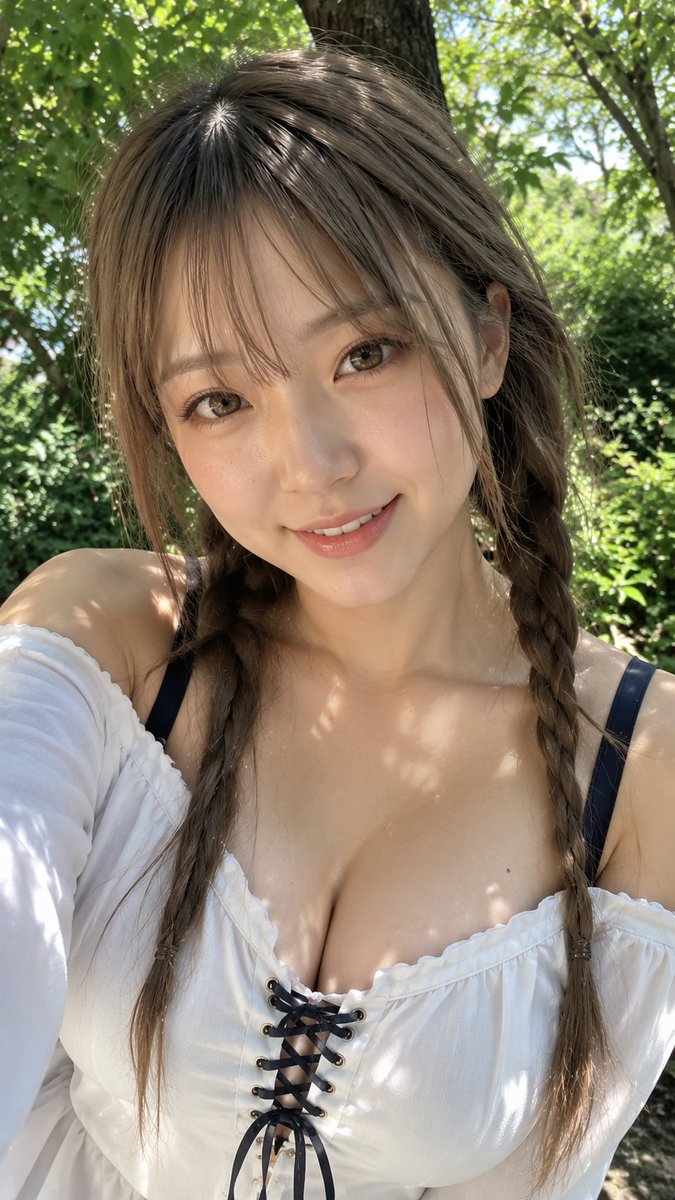
Result 1OpenAI
A prompt for generating a hyper-realistic vertical 9:16 portrait of a Japanese woman in her early 20s in a summer outfit: loose twin braids, white off-shoulder blouse, sun-dappled light through leaves, and a blurred green garden background, styled as a natural, unpolished smartphone photo.
These example images come from the original source. DROPIDEA has not independently tested these examples; results depend on the model and settings.
Replace the red variables with your information. Copy the full prompt and use it with your preferred agent.
white off-shoulder summer blouseThe summer blouse color and design; change the color or blouse type while keeping the fabric description and the tasteful tone
Third paragraph at "She is wearing a ..." and the Important details section at "white off-shoulder lace-up blouse" — update both
Example valuea light blue off-shoulder summer blouse
outdoor Japanese garden or leafy park settingThe shooting location in the background; replace with any other outdoor location while keeping the strong blur and summer mood
The "Background:" section, first sentence
Example valuea sunny seaside beach
two loose braidsThe hairstyle; swap for another style while keeping the natural texture and flyaway strands description
Second paragraph at "styled into two loose braids" and Important details at "twin loose braids"
Example valuea loose low ponytail
A prompt for creating a premium vertical four-panel streetwear campaign collage from an uploaded facial identity re...
A photorealistic image-generation prompt for a vertical summer portrait of a fictional adult Japanese woman in a st...
A prompt for a photorealistic fantasy fashion portrait featuring a woman with elven details, black and orange cloth...
An ultra-photorealistic fashion editorial prompt featuring a low-angle outdoor portrait in a suburban setting with...