Skip to content
ImagesFree

Universal Character Sheet with Reference Identity Lock

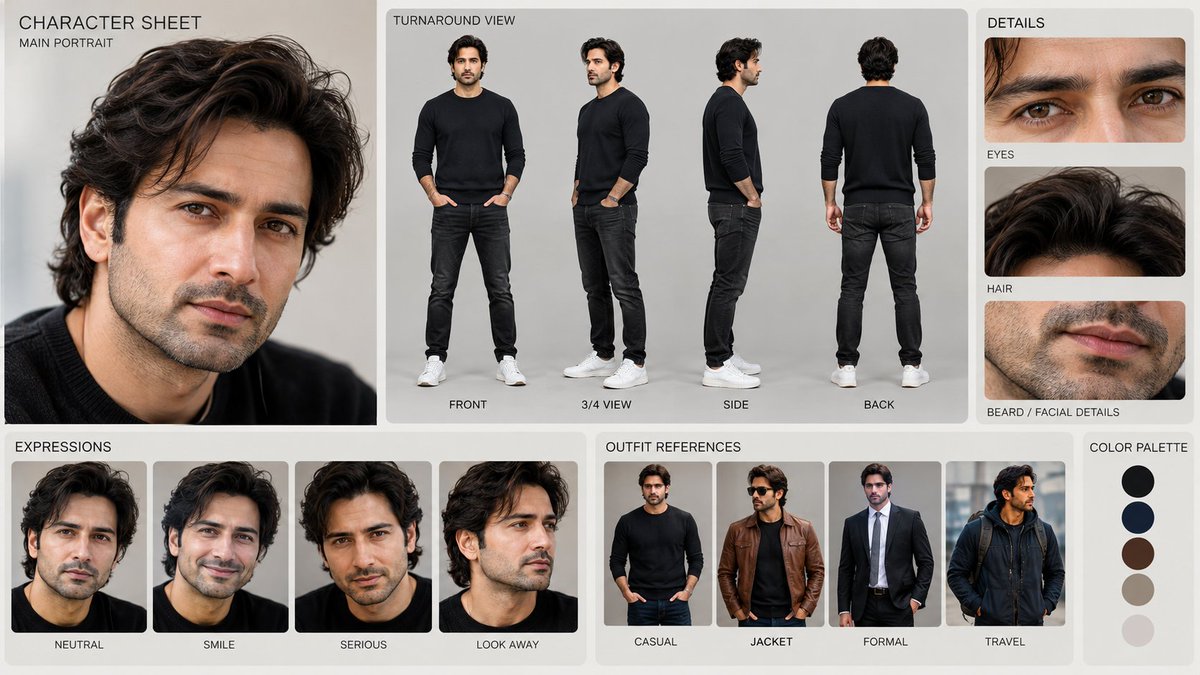
An advanced prompt for generating a clean, professional character reference sheet at 16K resolution, preserving exact identity, turnaround views, expressions, and clothing styles from an input image.

Image generation

Source previews

These example images come from the original source. DROPIDEA has not independently tested these examples; results depend on the model and settings.

Ready to personalize

Your prompt

English

Replace the red variables with your information. Copy the full prompt and use it with your preferred agent.

TXT MD English version
UNIVERSAL CHARACTER SHEET — REFERENCE LOCK Use the provided reference image as the ONLY identity source. Create a clean, simple, professional character sheet of the exact person shown in the reference image. The subject may be male or female; automatically preserve the person's actual gender, age appearance, facial structure, hairstyle, skin tone, body proportions, and overall identity exactly as shown in the reference. IDENTITY LOCK: - Preserve the exact face and facial structure from the reference. - Preserve eyes, eyebrows, nose, lips, jawline, cheekbones, ears, hairline, hairstyle, and facial hair if present. - Preserve natural skin texture, complexion, age details, and distinctive facial features. - Do NOT beautify, idealize, masculinize, feminize, age up, age down, or alter the person. - No face morphing, no identity drift, no plastic skin. - The same person must remain recognizable in every panel. CHARACTER SHEET LAYOUT: Create a neat professional presentation board with: 1. MAIN PORTRAIT A high-quality natural portrait of the reference person. 2. TURNAROUND Show the same person in: Front view 3/4 view Side profile Back view 3. EXPRESSIONS Show the same person with: Neutral Happy / subtle smile Serious Thoughtful 4. DETAILS Close-up references of: Eyes Hair Face / facial features Skin texture 5. OUTFIT REFERENCES Show 3–4 simple outfit variations appropriate for the person's gender, age, appearance, and overall style while keeping the exact same identity. VISUAL STYLE: Minimal, clean, professional character-design presentation. Neutral light background. Soft studio lighting. Consistent framing. Realistic photography. Natural proportions. Premium production-design aesthetic. No unnecessary decorative elements. No clutter. IMPORTANT: Every panel must represent THE SAME PERSON from the reference image. Do not create a new character. Do not change the person's identity. Maintain consistent facial features, hairstyle, body proportions, and appearance across all views and expressions. OUTPUT: A polished professional character sheet suitable for AI image generation, AI video generation, filmmaking, animation, and character reference work. RESOLUTION LOCK: Generate final image in 16K resolution — 15360 × 8640 pixels, 16:9 aspect ratio.
Preview results

Your prompt

UNIVERSAL CHARACTER SHEET — REFERENCE LOCK Use the provided reference image as the ONLY identity source. Create a clean, simple, professional character sheet of the exact person shown in the reference image. The subject may be male or female; automatically preserve the person's actual gender, age appearance, facial structure, hairstyle, skin tone, body proportions, and overall identity exactly as shown in the reference. IDENTITY LOCK: - Preserve the exact face and facial structure from the reference. - Preserve eyes, eyebrows, nose, lips, jawline, cheekbones, ears, hairline, hairstyle, and facial hair if present. - Preserve natural skin texture, complexion, age details, and distinctive facial features. - Do NOT beautify, idealize, masculinize, feminize, age up, age down, or alter the person. - No face morphing, no identity drift, no plastic skin. - The same person must remain recognizable in every panel. CHARACTER SHEET LAYOUT: Create a neat professional presentation board with: 1. MAIN PORTRAIT A high-quality natural portrait of the reference person. 2. TURNAROUND Show the same person in: Front view 3/4 view Side profile Back view 3. EXPRESSIONS Show the same person with: Neutral Happy / subtle smile Serious Thoughtful 4. DETAILS Close-up references of: Eyes Hair Face / facial features Skin texture 5. OUTFIT REFERENCES Show 3–4 simple outfit variations appropriate for the person's gender, age, appearance, and overall style while keeping the exact same identity. VISUAL STYLE: Minimal, clean, professional character-design presentation. Neutral light background. Soft studio lighting. Consistent framing. Realistic photography. Natural proportions. Premium production-design aesthetic. No unnecessary decorative elements. No clutter. IMPORTANT: Every panel must represent THE SAME PERSON from the reference image. Do not create a new character. Do not change the person's identity. Maintain consistent facial features, hairstyle, body proportions, and appearance across all views and expressions. OUTPUT: A polished professional character sheet suitable for AI image generation, AI video generation, filmmaking, animation, and character reference work. RESOLUTION LOCK: Generate final image in 16K resolution — 15360 × 8640 pixels, 16:9 aspect ratio.

What you get

  • A multi-panel professional studio character sheet at ultra-high resolution.
  • A primary natural portrait preserving the exact facial features and skin texture.
  • Full 4-angle turnaround (front, 3/4, profile, and back views).
  • Facial expression studies, close-up feature shots, and consistent outfit variations.

Use cases

  • Character consistency for film production, pre-visualization, and digital doubles.
  • Turnaround model sheets for 3D sculptors, game artists, and animators.
  • Maintaining persistent actor identity across multiple scenes in AI video pipelines.

How to use

  • Upload your reference subject image into the AI generation platform supporting image-to-image or identity control.
  • Copy and paste the entire prompt text directly into the prompt box without weakening the identity constraints.
  • Ensure the aspect ratio is set to 16:9 and enable identity/character reference controls if supported by your tool.
  • Generate the image to receive a complete production-ready presentation board.

Related prompts