Skip to content
ImagesFree

Procedural Particle Simulation Engine Template

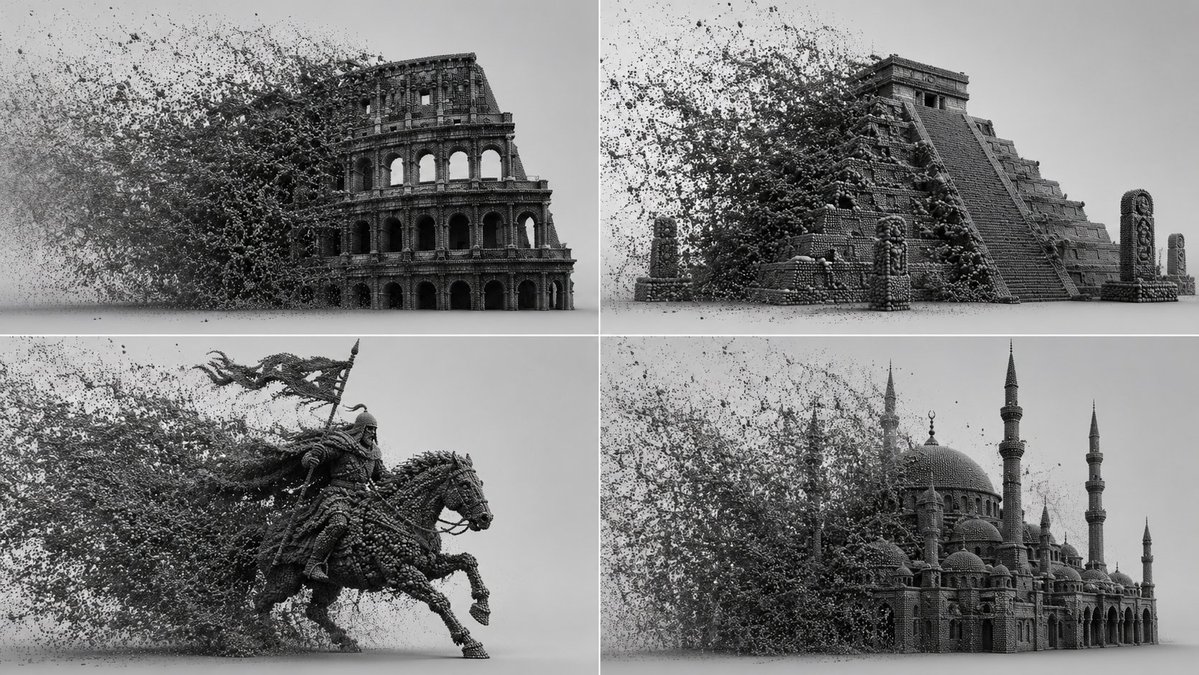
A Python-style class template describing a 3D scene where a chosen subject is voxelized into thousands of tiny dense particles, driven by a kinetic force narrative (wind, turbulence, attractors) with AI-inferred motion direction, rendered in octane render with path tracing and deep micro-shadows.

Image generation

Source previews

These example images come from the original source. DROPIDEA has not independently tested these examples; results depend on the model and settings.

Ready to personalize

Your prompt

English

Replace the red variables with your information. Copy the full prompt and use it with your preferred agent.

TXT MD English version
: class procedural_particle_sim: def __init__(self, subject="[$subject]", particle="[$particle_type]"): self.canvas = "infinite light-grey 3d void, soft shadow-catcher floor, studio ambient occlusion." self.geometry = f"a 3d mesh of {self.subject} completely voxelized into thousands of tiny, dense {self.particle}s." def apply_kinetic_forces(self, narrative="[$force_narrative]"): # ai auto-inference: calculate wind, turbulence, and attractors force_vector = infer_directional_velocity(narrative) swarm_logic = f"a massive, dense cloud of {self.particle}s filling the left frame, trailing and interacting with the {self.subject} via {force_vector}." return swarm_logic def render_settings(self): return "octane render, path tracing, perfectly spherical particles, deep micro-shadows between intersecting points, monochrome dark grey material." render_simulation(procedural_particle_sim())
Preview results

Your prompt

: class procedural_particle_sim: def __init__(self, subject="[$subject]", particle="[$particle_type]"): self.canvas = "infinite light-grey 3d void, soft shadow-catcher floor, studio ambient occlusion." self.geometry = f"a 3d mesh of {self.subject} completely voxelized into thousands of tiny, dense {self.particle}s." def apply_kinetic_forces(self, narrative="[$force_narrative]"): # ai auto-inference: calculate wind, turbulence, and attractors force_vector = infer_directional_velocity(narrative) swarm_logic = f"a massive, dense cloud of {self.particle}s filling the left frame, trailing and interacting with the {self.subject} via {force_vector}." return swarm_logic def render_settings(self): return "octane render, path tracing, perfectly spherical particles, deep micro-shadows between intersecting points, monochrome dark grey material." render_simulation(procedural_particle_sim())

Variable guide

[$subject]

The object transformed into particles in the scene.

Replace [$subject] in subject="[$subject]" inside def __init__.

Example value

a human skull

[$particle_type]

The type of particles forming the swarm.

Replace [$particle_type] in particle="[$particle_type]" inside def __init__.

Example value

glass cubes

[$force_narrative]

The kinetic force narrative used to infer motion direction.

Replace [$force_narrative] in narrative="[$force_narrative]" inside def apply_kinetic_forces.

Example value

strong wind from the right pushing the swarm toward a central vortex

What you get

  • A 3D scene in an infinite light-grey void with a studio shadow-catcher floor.
  • A subject fully voxelized into thousands of tiny, dense monochrome dark grey spherical particles.
  • A massive particle cloud filling the left frame, interacting with the subject via narratively inferred forces.
  • An octane render look with path tracing and deep micro-shadows between intersecting points.

Use cases

  • Music album covers and abstract artistic posters.
  • Cinematic video intros and visual effects.
  • Brand identity backgrounds and 3D portfolio pieces.
  • Tech advertising designs and virtual reality platforms.

How to use

  • Replace [$subject] with the object you want voxelized into particles, such as a skull, statue, or vehicle.
  • Replace [$particle_type] with the desired particle type such as spheres, cubes, or metal shards.
  • Write in [$force_narrative] a description of the kinetic forces (wind direction, turbulence, attractors) so the AI infers the motion vector.
  • Keep the technical settings unchanged: the light-grey canvas and render_settings like octane render, path tracing, and the monochrome dark grey material.
  • Paste the complete template into your supported image generator and submit it to get the final scene.
  • Try different kinetic narratives while keeping the subject fixed to explore varied swarm formations.

Related prompts