Skip to content
ImagesFree

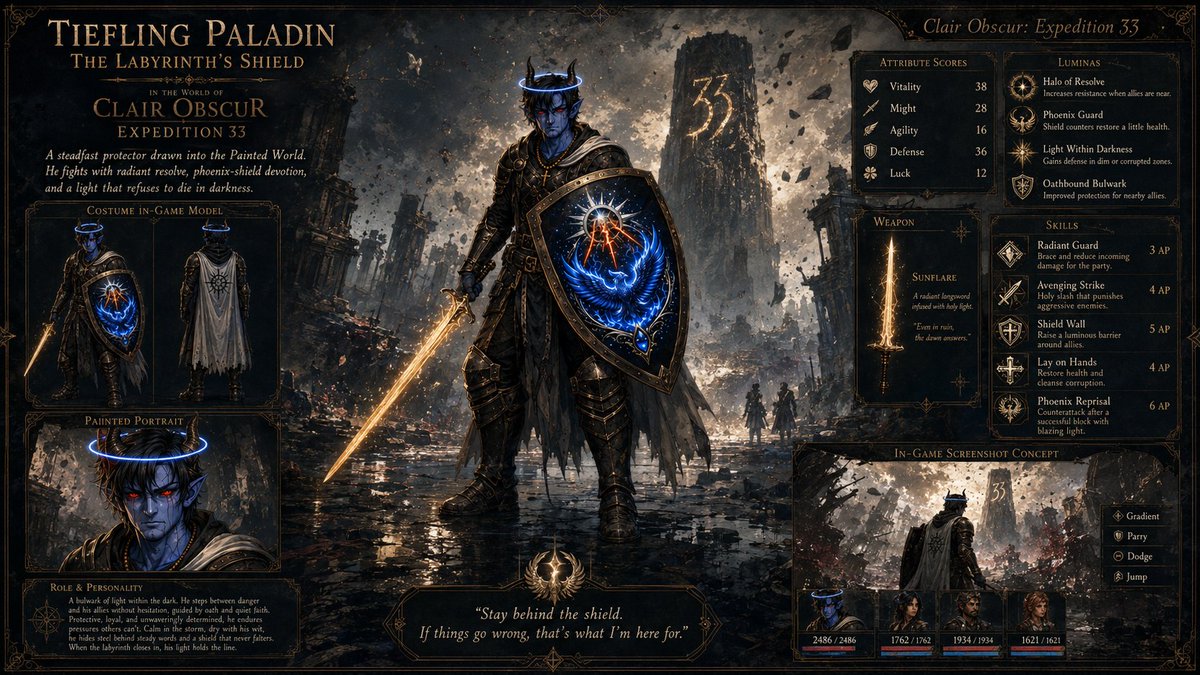
Clair Obscur Style Character Dossier Poster

English template that turns an uploaded character reference sheet into a wide 16:9 cinematic promotional dossier in the style of Clair Obscur: Expedition 33, preserving the character's identity with dark RPG stat panels, weapons, and skills.

Image generation

Source previews

These example images come from the original source. DROPIDEA has not independently tested these examples; results depend on the model and settings.

Ready to personalize

Your prompt

English

Replace the red variables with your information. Copy the full prompt and use it with your preferred agent.

TXT MD English version
Use the uploaded CHARACTER REFERENCE SHEET as the absolute identity authority. Create a wide 16:9 cinematic fantasy RPG dossier poster showing how the referenced character would appear in the world of Clair Obscur: Expedition 33. Do NOT redesign the character. Preserve the character’s: - mask / face structure - silhouette - body type - outfit shapes - main color palette - emblems, symbols, motifs, weapons, accessories - personality and role - material finishes from the reference sheet The character should be reinterpreted as a high-end dark fantasy expedition member, but still instantly recognizable as the same character from the reference sheet. STYLE AND WORLD Dark surreal Belle Époque fantasy RPG aesthetic, painterly cinematic realism, dramatic chiaroscuro lighting, stormy ash-filled sky, ruined expedition battlefield, floating debris, cracked stone, mist, shattered monuments, glowing magical particles, elegant gothic UI panels, gold serif typography, black parchment interface, ornate thin borders, premium collector’s-edition character dossier presentation. The mood is beautiful, tragic, heroic, mysterious, and theatrical. MAIN COMPOSITION Create a horizontal cinematic character sheet / promotional game dossier. Center: A full-body heroic front-facing illustration of the character standing confidently in a ruined painted world. The character is large and dominant in the composition. Their coat, armor, accessories, symbols, and weapon details are visible and faithful to the reference sheet. Add subtle fantasy expedition upgrades only if they match the reference design. Background: A devastated surreal fantasy landscape with distant ruins, cliffs, fog, silhouettes of explorers, floating rubble, and a massive distant stone monolith with the glowing number “33” carved or painted on it. The environment should feel like a playable area from a dark fantasy RPG. Top left: Large elegant title text: “[CHARACTER NAME]” Under it: “IN THE WORLD OF” “CLAIR OBSCUR” “EXPEDITION 33” Below the title, add a short lore blurb based on the character’s personality: “A [CHARACTER ROLE / ARCHETYPE] drawn into the Painted World. They fight with [KEY TRAITS], [MOTIF], and a touch of beautiful chaos.” Top right: A smaller Clair Obscur: Expedition 33 style title treatment. Do not use a flat modern logo; use elegant gold serif lettering integrated into the UI. Left side panels: 1. “COSTUME IN-GAME MODEL” Show small front and back model views of the character, like a game asset preview. 2. “PAINTED PORTRAIT” Show a close-up portrait of the character’s face / mask / head, rendered in the same dark fantasy painterly style. Bottom center: Add a quote box with an ornate border and a small emblem from the character reference sheet. Quote should be character-specific, witty, dramatic, or heroic: “[CHARACTER QUOTE]” Bottom right: Add an “IN-GAME SCREENSHOT CONCEPT” panel showing the character from behind in the same ruined landscape, with a small RPG party HUD and simple combat options such as: Gradient Parry Dodge Jump Right side UI panels: Create several dark ornate RPG stat panels with readable headings: “ATTRIBUTE SCORES” Vitality Might Agility Defense Luck “LUMINAS” List 3–4 passive abilities inspired by the character’s motifs, personality, symbols, role, or powers. “WEAPON” Show the character’s signature weapon or an adapted weapon based on the reference sheet. Include a short description and one italic flavor quote. “SKILLS” List 4–5 named combat skills inspired by the character. Each skill should include: - skill name - short effect - AP cost The UI should look polished, readable, elegant, and game-authentic. CHARACTER ADAPTATION RULES Infer the following from the reference sheet: - [CHARACTER NAME] - [ROLE / PERSONALITY] - [PRIMARY COLORS] - [SECONDARY COLORS] - [MAIN SYMBOLS / EMBLEMS] - [SIGNATURE WEAPON OR PROP] - [CULTURAL / FACTION MOTIFS] - [CATCHPHRASE OR QUOTE STYLE] - [MATERIALS: fabric, armor, leather, metal, glow effects] Translate these into a Clair Obscur-style expedition member while keeping the original identity intact. Do not replace the character with a generic fantasy hero. Do not remove their signature symbols. Do not alter their color identity. Do not change their mask, face, body type, or iconic silhouette. Do not make the UI cluttered or unreadable. Do not create random extra characters in the foreground. Do not make the image look like a plain reference sheet; it should feel like a premium fantasy RPG promotional dossier. IMAGE QUALITY Ultra detailed, cinematic, painterly, high contrast, sharp character rendering, atmospheric depth, ornate UI design, readable text where possible, professional game art presentation, 16:9 aspect ratio.
Preview results

Your prompt

Use the uploaded CHARACTER REFERENCE SHEET as the absolute identity authority. Create a wide 16:9 cinematic fantasy RPG dossier poster showing how the referenced character would appear in the world of Clair Obscur: Expedition 33. Do NOT redesign the character. Preserve the character’s: - mask / face structure - silhouette - body type - outfit shapes - main color palette - emblems, symbols, motifs, weapons, accessories - personality and role - material finishes from the reference sheet The character should be reinterpreted as a high-end dark fantasy expedition member, but still instantly recognizable as the same character from the reference sheet. STYLE AND WORLD Dark surreal Belle Époque fantasy RPG aesthetic, painterly cinematic realism, dramatic chiaroscuro lighting, stormy ash-filled sky, ruined expedition battlefield, floating debris, cracked stone, mist, shattered monuments, glowing magical particles, elegant gothic UI panels, gold serif typography, black parchment interface, ornate thin borders, premium collector’s-edition character dossier presentation. The mood is beautiful, tragic, heroic, mysterious, and theatrical. MAIN COMPOSITION Create a horizontal cinematic character sheet / promotional game dossier. Center: A full-body heroic front-facing illustration of the character standing confidently in a ruined painted world. The character is large and dominant in the composition. Their coat, armor, accessories, symbols, and weapon details are visible and faithful to the reference sheet. Add subtle fantasy expedition upgrades only if they match the reference design. Background: A devastated surreal fantasy landscape with distant ruins, cliffs, fog, silhouettes of explorers, floating rubble, and a massive distant stone monolith with the glowing number “33” carved or painted on it. The environment should feel like a playable area from a dark fantasy RPG. Top left: Large elegant title text: “[CHARACTER NAME]” Under it: “IN THE WORLD OF” “CLAIR OBSCUR” “EXPEDITION 33” Below the title, add a short lore blurb based on the character’s personality: “A [CHARACTER ROLE / ARCHETYPE] drawn into the Painted World. They fight with [KEY TRAITS], [MOTIF], and a touch of beautiful chaos.” Top right: A smaller Clair Obscur: Expedition 33 style title treatment. Do not use a flat modern logo; use elegant gold serif lettering integrated into the UI. Left side panels: 1. “COSTUME IN-GAME MODEL” Show small front and back model views of the character, like a game asset preview. 2. “PAINTED PORTRAIT” Show a close-up portrait of the character’s face / mask / head, rendered in the same dark fantasy painterly style. Bottom center: Add a quote box with an ornate border and a small emblem from the character reference sheet. Quote should be character-specific, witty, dramatic, or heroic: “[CHARACTER QUOTE]” Bottom right: Add an “IN-GAME SCREENSHOT CONCEPT” panel showing the character from behind in the same ruined landscape, with a small RPG party HUD and simple combat options such as: Gradient Parry Dodge Jump Right side UI panels: Create several dark ornate RPG stat panels with readable headings: “ATTRIBUTE SCORES” Vitality Might Agility Defense Luck “LUMINAS” List 3–4 passive abilities inspired by the character’s motifs, personality, symbols, role, or powers. “WEAPON” Show the character’s signature weapon or an adapted weapon based on the reference sheet. Include a short description and one italic flavor quote. “SKILLS” List 4–5 named combat skills inspired by the character. Each skill should include: - skill name - short effect - AP cost The UI should look polished, readable, elegant, and game-authentic. CHARACTER ADAPTATION RULES Infer the following from the reference sheet: - [CHARACTER NAME] - [ROLE / PERSONALITY] - [PRIMARY COLORS] - [SECONDARY COLORS] - [MAIN SYMBOLS / EMBLEMS] - [SIGNATURE WEAPON OR PROP] - [CULTURAL / FACTION MOTIFS] - [CATCHPHRASE OR QUOTE STYLE] - [MATERIALS: fabric, armor, leather, metal, glow effects] Translate these into a Clair Obscur-style expedition member while keeping the original identity intact. Do not replace the character with a generic fantasy hero. Do not remove their signature symbols. Do not alter their color identity. Do not change their mask, face, body type, or iconic silhouette. Do not make the UI cluttered or unreadable. Do not create random extra characters in the foreground. Do not make the image look like a plain reference sheet; it should feel like a premium fantasy RPG promotional dossier. IMAGE QUALITY Ultra detailed, cinematic, painterly, high contrast, sharp character rendering, atmospheric depth, ornate UI design, readable text where possible, professional game art presentation, 16:9 aspect ratio.

Variable guide

[CHARACTER NAME]

The character's name in the large top-left title.

Quoted text "[CHARACTER NAME]" at top left.

Example value

Astrid

[CHARACTER ROLE / ARCHETYPE]

The character's role or archetype in the lore blurb.

Inside the lore quote below the title.

Example value

exiled knight

[KEY TRAITS]

The main traits the character fights with.

Inside the lore quote below the title.

Example value

relentless precision

[MOTIF]

The character's signature motif in the lore blurb.

Inside the lore quote below the title, once.

Example value

a silver moth emblem

[CHARACTER QUOTE]

A character-specific quote in the quote box.

Quote box at bottom center.

Example value

Even ashes remember who I was.

What you get

  • A horizontal 16:9 cinematic promotional dossier poster in Clair Obscur: Expedition 33 style.
  • A full-body illustration of the character preserving face, silhouette, colors, and symbols.
  • A devastated background with a stone monolith bearing the glowing number "33".
  • Side panels: costume model views, painted portrait, ornate quote box, and in-game screenshot concept with HUD.
  • RPG stat panels: ATTRIBUTE SCORES, LUMINAS, WEAPON, and SKILLS with AP costs.

Use cases

  • Promotional character dossier for Clair Obscur: Expedition 33 fans.
  • Concept art for adapting existing characters into a dark RPG style.
  • Marketing assets for fan pages or game promotion.
  • Character showcases in artist portfolios or social campaigns.

How to use

  • Upload a clear character reference sheet showing the mask/face, silhouette, colors, symbols, and signature weapon; it is the absolute identity authority.
  • Replace [CHARACTER NAME] with the character's name, fill [CHARACTER ROLE / ARCHETYPE], [KEY TRAITS], and [MOTIF] in the lore blurb, and write a fitting [CHARACTER QUOTE].
  • Keep the quoted UI text (EXPEDITION 33, ATTRIBUTE SCORES, LUMINAS, etc.) in English as required parts of the design.
  • Run the template in an image generator that supports 16:9 and let it render the full poster with side panels and stats.
  • Compare the result with the reference sheet to confirm silhouette, colors, and symbols match, then regenerate with minor tweaks if needed.

Related prompts