Use my uploaded photo as the EXACT facial identity reference. Preserve my real identity with extremely high accuracy. Keep my facial structure, face shape, forehead, eyes, eyebrows, nose, lips, jawline, cheekbones, beard/facial hair, skin texture, and natural proportions recognizable and consistent with my reference photo.
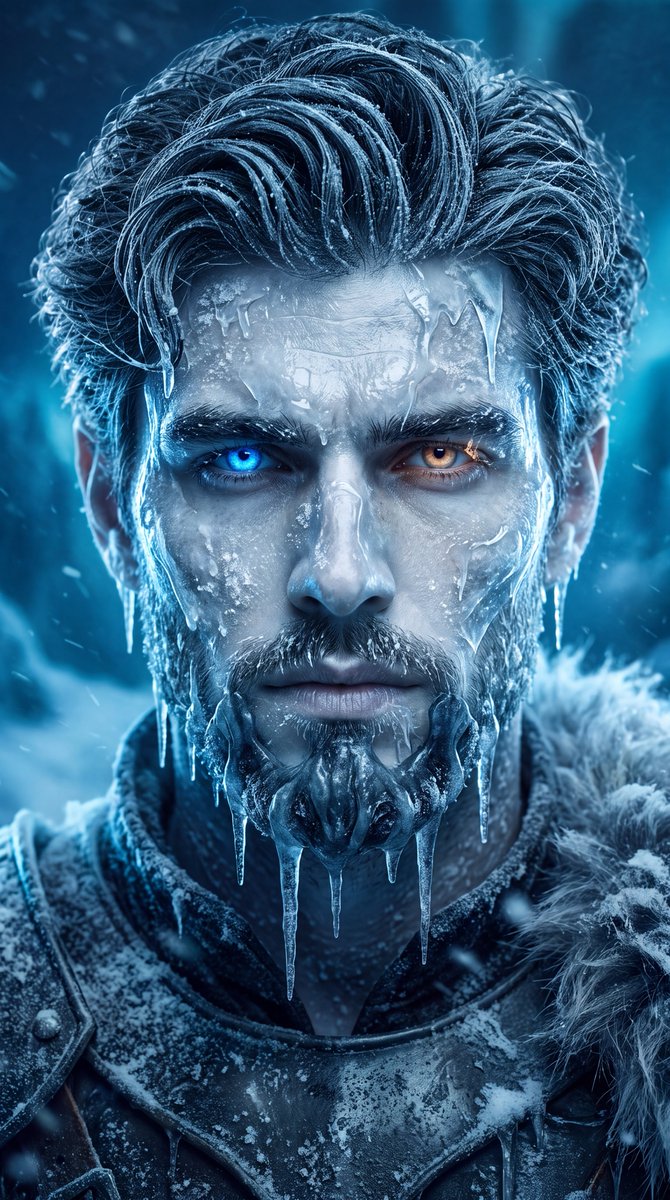
Transform me into an ultra-realistic ancient glacial ice warrior, inspired by a terrifying supernatural frozen king. Do NOT replace my face with another person's face. My face must remain clearly recognizable as me.
COMPOSITION:
Create a dramatic cinematic vertical 4:5 portrait. Head-and-shoulders framing, centered composition, facing directly toward the camera. The camera is positioned at eye level with a slightly intimidating perspective. Strong symmetrical facial composition. My expression is cold, powerful, intimidating and emotionless, with an intense supernatural stare.
GLACIAL TRANSFORMATION:
My skin appears extremely pale, frozen and slightly translucent, as if my entire body has been exposed to centuries of supernatural winter. Preserve realistic human skin anatomy underneath the transformation.
Cover parts of my face with naturally formed translucent white-blue ice. Create intricate frozen textures around the forehead, temples, cheekbones, eyebrows, beard and jaw. The ice should look physically attached to my skin, with realistic thickness, transparency, frost crystals, tiny cracks and subtle internal depth.
Do not completely cover my face. My facial identity must remain visible and recognizable.
EYES:
Make my eyes extremely striking and supernatural while retaining the original shape and proportions of my eyes. One eye can have an icy electric-blue glow while the other has a subtle pale amber/orange supernatural glow. The glow must be realistic and integrated into the eyes, not cartoonish.
HAIR:
Transform my real hairstyle into long, thick, windswept frozen hair while preserving the general character of my original hair. Hair should appear naturally coated with frost and tiny ice crystals. Individual strands must remain highly detailed and photorealistic.
FACIAL ICE:
Add dramatic frozen formations around portions of the forehead, cheekbones and jaw. Create thin translucent ice sheets, frost patterns and delicate icicles extending naturally from the beard/jaw area.
MOUTH / LOWER FACE:
Create a dark supernatural frozen respirator-like ice formation over the lower mouth and chin area, constructed entirely from translucent white and blue ice. It should feel organically grown from the frozen environment rather than like a manufactured mask. Keep enough of my facial structure visible to maintain my identity.
CLOTHING:
Transform my clothing into a dark ancient winter-warrior outfit covered with layers of frost and translucent ice. Add realistic frozen fabric, icy armor-like textures and subtle crystalline details around the shoulders and neck.
ENVIRONMENT:
Place me in a massive frozen glacial environment. Background filled with deep icy-blue atmosphere, falling snow, floating frost particles, distant frozen mountains and subtle mist. The background should remain slightly out of focus so that my face is the primary subject.
LIGHTING:
Use dramatic cinematic cold lighting. Strong icy-blue rim light around my hair and shoulders. Soft frontal illumination revealing the details of my face and ice textures. Subtle white highlights reflecting through translucent ice. Extremely realistic light scattering through the frozen crystals.
MATERIAL QUALITY:
Ultra-photorealistic skin, realistic pores, individual hair strands, microscopic frost crystals, translucent ice, realistic refraction, subsurface scattering, physically accurate reflections and atmospheric depth.
COLOR PALETTE:
Dominantly cold white, silver, cyan and deep glacial blue, with very subtle warm amber/orange in one eye for contrast.