Skip to content
ImagesFree

Anime Opening Freeze-Frame Starring Your OC

Turns your original character into an anime opening star: a cinematic 16:9 freeze-frame with an invented original anime title and a starring credit showing your OC's name, while fully preserving the reference identity and look.

Image generation

Source previews

These example images come from the original source. DROPIDEA has not independently tested these examples; results depend on the model and settings.

Ready to personalize

Your prompt

English

Replace the red variables with your information. Copy the full prompt and use it with your preferred agent.

TXT MD English version
Roses are red, they stand for love some say, look at the clock...IT'S JOLLY'S PROMPT OF THE DAY! Do you ever wish your OC had their own Show like what is shown in all my Good Mornings? WELL NOW YOU CAN SEE WHAT THAT WOULD LOOK LIKE! this is the title freeze frame you have always wanted. Special Thanks to: @oQUETZALCOATLo , @celestiumart , and @CattyHomesteadr Don't forget to put your name in at the top :-) --- Opening Credits Freeze Frame by Jolly Joebean PROMPT STARTS HERE ----------------------------- Designate the attached character reference as @Image1. @Image1 = the only character identity and visual reference. OCName = [Enter the OC’s name here.] Create a high-quality, widescreen 16:9 anime opening freeze-frame featuring @Image1 in a spectacular character-introduction moment. The completed image must include this exact two-line title structure: [AI-generated name of the anime] Starring [OCName] Replace the bracketed information with the finished anime title and entered OC name. Do not display brackets, instructions, variable names, or placeholder text in the image. Reference Rules Carefully analyze and preserve @Image1’s: Face and facial structure Hairstyle and hair color Exact eye color Skin tone Body type and proportions Species traits Outfit design and accessories Signature colors, symbols, and motifs Personality and emotional energy Recognizable silhouette Overall visual identity The final character must remain unmistakably the same person. Do not use characters, outfits, names, or information from previous prompts or conversations. Anime Title Creation Invent an original anime series title based entirely on the OC’s appearance, personality, implied abilities, genre, motifs, and emotional atmosphere. The anime title should sound memorable, polished, and believable. It may suggest action, adventure, comedy, fantasy, science fiction, supernatural drama, romance, mystery, or another genre that naturally fits the OC. Do not use the title of an existing anime, manga, film, television program, game, or franchise. Keep the title concise enough to remain large and readable. Typography Design the title lettering specifically around the OC. Derive the font treatment, colors, outlines, shadows, symbols, decorative marks, and graphic accents from the character’s visual identity. Examples of adaptive styling include: Mechanical lettering for a technological OC Elegant script accents for a refined character Rough impact lettering for a fighter Playful rounded lettering for a comedic character Glowing magical typography for a supernatural character Western lettering for a cowboy-themed character Gothic typography for a dark or mysterious character The title must still be readable. Do not allow decoration to distort the words. Place Starring [OCName] directly beneath or near the anime title as a clear secondary credit. Spell “Starring” correctly and reproduce the entered OC name exactly. Freeze-Frame Action Automatically choose a dynamic action that fits the OC’s personality, abilities, occupation, equipment, and implied story. Possible moments include: Leaping toward the next adventure Turning dramatically toward the camera Drawing or raising a signature weapon Racing through a character-specific environment Landing after an attack Casting a spell Dodging an unseen threat Reaching toward the viewer Striking a heroic, comedic, mysterious, or rebellious pose Standing calmly while action erupts around them The selected action must feel personal to the OC rather than randomly dramatic. Capture the exact peak moment as though the anime opening suddenly froze to introduce the star. Camera And Composition Use a cinematic 16:9 horizontal composition. Choose a dynamic camera angle suited to the character, such as: Dramatic low angle Tilted Dutch angle Wide-angle perspective Fast side-tracking view Overhead action angle Close three-quarter introduction shot Foreshortened approach toward the camera Keep @Image1 large, sharp, recognizable, and dominant in the frame. Leave intentional visual space for the anime title and starring credit. Do not cover the character’s face, hands, or signature features with text. Use layered foreground, middle-ground, and background elements to create depth. Opening-Credits Effects Create the energy of a premium anime opening using controlled visual effects: Bloom lighting Bright rim light Lens flare Motion streaks Wind-swept hair and clothing Floating particles Speed lines Energy trails Graphic color shapes Light leaks Atmospheric haze Momentary motion blur around the sharply frozen character The bloom effect should make bright areas glow beautifully without washing out the face, colors, or outfit details. The character should look sharply frozen while surrounding motion continues visually around them. Environment Automatically create a setting that suggests the OC’s imagined anime world. The location should reinforce the character’s story and may include a city skyline, battlefield, rodeo arena, school rooftop, fantasy kingdom, supernatural landscape, futuristic station, country road, stage, forest, or another fitting environment. Do not use a generic background. Build the environment from the OC’s themes, colors, abilities, profession, and personality. Expression Give the OC a strong introduction expression suited to their personality. They may appear confident, joyful, mischievous, determined, heroic, mysterious, rebellious, calm, or comically overwhelmed. The expression should make viewers immediately curious about the character and their story. Visual Style Create a polished anime-opening illustration with crisp linework, expressive features, cinematic cel shading, vivid color grading, energetic composition, controlled motion effects, strong lighting, and professional title design. Preserve the reference’s recognizable style and identity while elevating it into an anime opening presentation. Do Not Do not change the OC’s identity, eye color, species traits, or signature design. Do not use a character name from memory or a previous prompt. Do not misspell the entered OC name. Do not display OCName, brackets, instructions, or placeholder text. Do not copy an existing anime title, logo, opening sequence, or franchise design. Do not add unrelated featured characters. Do not create clones or alternate versions of the OC. Do not make the character small or hidden. Do not cover the face with typography or lighting. Do not make the title generic or unrelated to the OC. Do not create a static portrait with no implied movement. Do not make it resemble a trading card, magazine cover, movie poster, or game interface. Do not overcrowd the frame with excessive credits. Do not use unreadable decorative lettering. Do not overexpose the image with excessive bloom. Do not create malformed hands, extra limbs, distorted anatomy, muddy textures, or incoherent text. The final image should feel like the unforgettable instant in an anime opening when the action freezes, the music hits its strongest beat, and the audience is formally introduced to the story and its star. ------------------------ PROMPT ENDS HERE
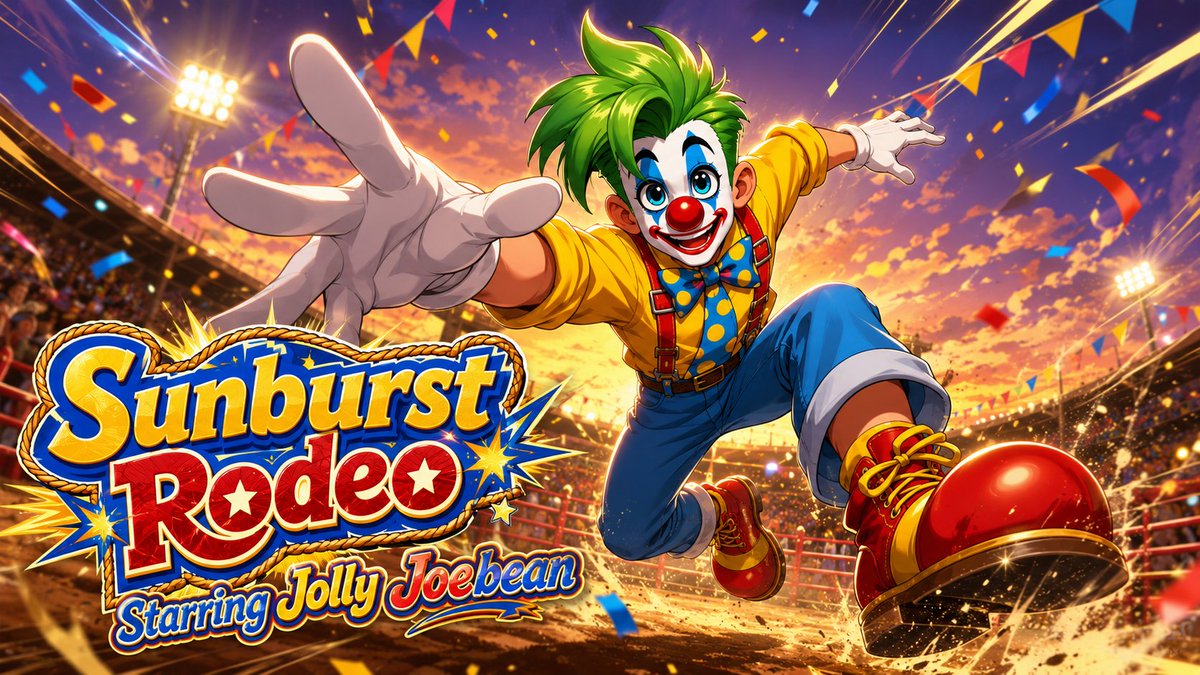
Preview results

Your prompt

Roses are red, they stand for love some say, look at the clock...IT'S JOLLY'S PROMPT OF THE DAY! Do you ever wish your OC had their own Show like what is shown in all my Good Mornings? WELL NOW YOU CAN SEE WHAT THAT WOULD LOOK LIKE! this is the title freeze frame you have always wanted. Special Thanks to: @oQUETZALCOATLo , @celestiumart , and @CattyHomesteadr Don't forget to put your name in at the top :-) --- Opening Credits Freeze Frame by Jolly Joebean PROMPT STARTS HERE ----------------------------- Designate the attached character reference as @Image1. @Image1 = the only character identity and visual reference. OCName = [Enter the OC’s name here.] Create a high-quality, widescreen 16:9 anime opening freeze-frame featuring @Image1 in a spectacular character-introduction moment. The completed image must include this exact two-line title structure: [AI-generated name of the anime] Starring [OCName] Replace the bracketed information with the finished anime title and entered OC name. Do not display brackets, instructions, variable names, or placeholder text in the image. Reference Rules Carefully analyze and preserve @Image1’s: Face and facial structure Hairstyle and hair color Exact eye color Skin tone Body type and proportions Species traits Outfit design and accessories Signature colors, symbols, and motifs Personality and emotional energy Recognizable silhouette Overall visual identity The final character must remain unmistakably the same person. Do not use characters, outfits, names, or information from previous prompts or conversations. Anime Title Creation Invent an original anime series title based entirely on the OC’s appearance, personality, implied abilities, genre, motifs, and emotional atmosphere. The anime title should sound memorable, polished, and believable. It may suggest action, adventure, comedy, fantasy, science fiction, supernatural drama, romance, mystery, or another genre that naturally fits the OC. Do not use the title of an existing anime, manga, film, television program, game, or franchise. Keep the title concise enough to remain large and readable. Typography Design the title lettering specifically around the OC. Derive the font treatment, colors, outlines, shadows, symbols, decorative marks, and graphic accents from the character’s visual identity. Examples of adaptive styling include: Mechanical lettering for a technological OC Elegant script accents for a refined character Rough impact lettering for a fighter Playful rounded lettering for a comedic character Glowing magical typography for a supernatural character Western lettering for a cowboy-themed character Gothic typography for a dark or mysterious character The title must still be readable. Do not allow decoration to distort the words. Place Starring [OCName] directly beneath or near the anime title as a clear secondary credit. Spell “Starring” correctly and reproduce the entered OC name exactly. Freeze-Frame Action Automatically choose a dynamic action that fits the OC’s personality, abilities, occupation, equipment, and implied story. Possible moments include: Leaping toward the next adventure Turning dramatically toward the camera Drawing or raising a signature weapon Racing through a character-specific environment Landing after an attack Casting a spell Dodging an unseen threat Reaching toward the viewer Striking a heroic, comedic, mysterious, or rebellious pose Standing calmly while action erupts around them The selected action must feel personal to the OC rather than randomly dramatic. Capture the exact peak moment as though the anime opening suddenly froze to introduce the star. Camera And Composition Use a cinematic 16:9 horizontal composition. Choose a dynamic camera angle suited to the character, such as: Dramatic low angle Tilted Dutch angle Wide-angle perspective Fast side-tracking view Overhead action angle Close three-quarter introduction shot Foreshortened approach toward the camera Keep @Image1 large, sharp, recognizable, and dominant in the frame. Leave intentional visual space for the anime title and starring credit. Do not cover the character’s face, hands, or signature features with text. Use layered foreground, middle-ground, and background elements to create depth. Opening-Credits Effects Create the energy of a premium anime opening using controlled visual effects: Bloom lighting Bright rim light Lens flare Motion streaks Wind-swept hair and clothing Floating particles Speed lines Energy trails Graphic color shapes Light leaks Atmospheric haze Momentary motion blur around the sharply frozen character The bloom effect should make bright areas glow beautifully without washing out the face, colors, or outfit details. The character should look sharply frozen while surrounding motion continues visually around them. Environment Automatically create a setting that suggests the OC’s imagined anime world. The location should reinforce the character’s story and may include a city skyline, battlefield, rodeo arena, school rooftop, fantasy kingdom, supernatural landscape, futuristic station, country road, stage, forest, or another fitting environment. Do not use a generic background. Build the environment from the OC’s themes, colors, abilities, profession, and personality. Expression Give the OC a strong introduction expression suited to their personality. They may appear confident, joyful, mischievous, determined, heroic, mysterious, rebellious, calm, or comically overwhelmed. The expression should make viewers immediately curious about the character and their story. Visual Style Create a polished anime-opening illustration with crisp linework, expressive features, cinematic cel shading, vivid color grading, energetic composition, controlled motion effects, strong lighting, and professional title design. Preserve the reference’s recognizable style and identity while elevating it into an anime opening presentation. Do Not Do not change the OC’s identity, eye color, species traits, or signature design. Do not use a character name from memory or a previous prompt. Do not misspell the entered OC name. Do not display OCName, brackets, instructions, or placeholder text. Do not copy an existing anime title, logo, opening sequence, or franchise design. Do not add unrelated featured characters. Do not create clones or alternate versions of the OC. Do not make the character small or hidden. Do not cover the face with typography or lighting. Do not make the title generic or unrelated to the OC. Do not create a static portrait with no implied movement. Do not make it resemble a trading card, magazine cover, movie poster, or game interface. Do not overcrowd the frame with excessive credits. Do not use unreadable decorative lettering. Do not overexpose the image with excessive bloom. Do not create malformed hands, extra limbs, distorted anatomy, muddy textures, or incoherent text. The final image should feel like the unforgettable instant in an anime opening when the action freezes, the music hits its strongest beat, and the audience is formally introduced to the story and its star. ------------------------ PROMPT ENDS HERE

Variable guide

[Enter the OC’s name here.]

Your original character's name, shown in the starring credit line

In the line: OCName = [Enter the OC’s name here.] — write the name inside the brackets; it replaces [OCName] in the Starring [OCName] line

Example value

Example: Rin

@Image1

A clear reference image of your character that must be attached to the message

Attach it with the prompt message; it is referenced as @Image1 throughout the template

Example value

Example: a full-body image of your OC in signature outfit

What you get

  • A cinematic widescreen 16:9 freeze-frame in professional anime-opening style
  • An invented original anime title with typography derived from your OC's identity
  • A clear secondary Starring credit displaying your OC's exact name
  • Full preservation of the reference character's face, hair, exact eye color, outfit, and signature traits
  • Anime-opening effects such as bloom glow, speed lines, floating particles, and motion blur

Use cases

  • Hero showcase images for original characters on social media
  • Covers and templates for channels, streams, or character introductions
  • Fan art and comic or anime story projects
  • Stylish character cards for games or creative communities
  • Wallpapers and artwork for sharing creative content

How to use

  • Attach a clear reference image of your original character to the message before sending.
  • Replace [Enter the OC’s name here.] with your OC's actual name inside the brackets.
  • Send the prompt to generate a widescreen 16:9 freeze-frame with an invented original anime title and a Starring credit showing your OC's name.
  • Review the result: for a different title or action, retry with the same reference image and OC name.
  • Use the output as a cover, background, or showcase content.

Related prompts