Image Editing Models Compared Against Original
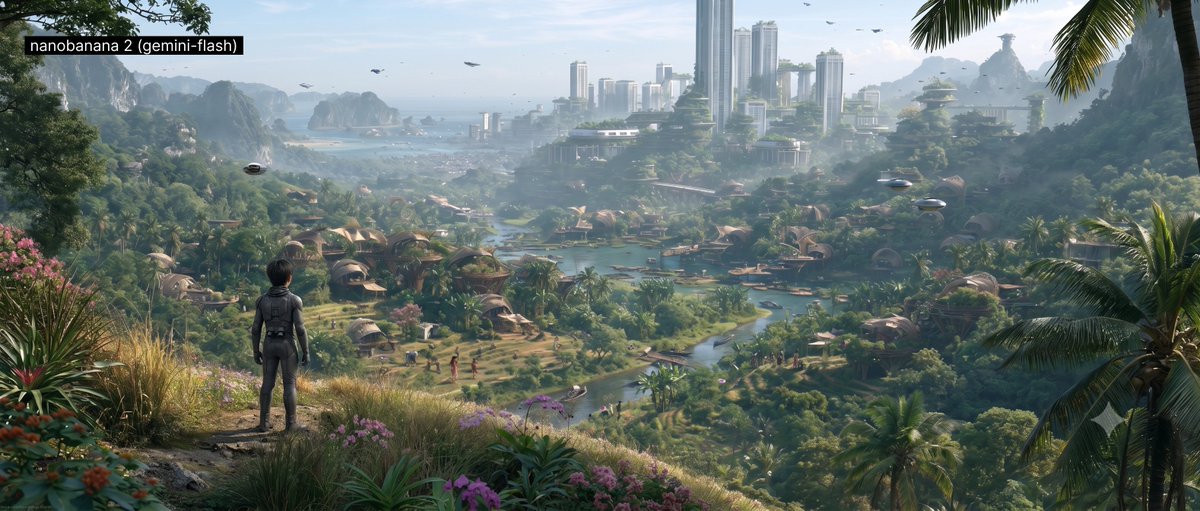
A review post comparing one edit prompt across NanoBanana Flash, NanoBanana Pro, and GPT Image 2 against the original MidJourney render, noting loss of fine textures and degradation of composition and lighting, and calling significant edits with perfect preservation the weakest link in the AI filmmaking pipeline.
Source previews
These example images come from the original source. DROPIDEA has not independently tested these examples; results depend on the model and settings.
Your prompt
Replace the red variables with your information. Copy the full prompt and use it with your preferred agent.
Variable guide
"Replace the kid on the cliff with Kai (character sheet reference image) and keep same acting posture as he is looking towards the valley. Fix some of the small people scale who look bigger than their houses down in the valley."The complete quoted edit instruction at the top of the post; replaceable with another edit instruction while keeping quotation marks
Start of the English template, the text inside the quotation marks in the first line
Example value"Replace the kid on the cliff with Kai (character sheet reference image)..."
What you get
- A complete Arabic translation of a review post documenting a single-image edit experiment.
- The original edit prompt preserved as a replaceable quoted block.
- A direct comparison between NanoBanana Flash, NanoBanana Pro, and GPT Image 2.
- A three-bullet list detailing degradation points (textures, materials, design, art direction drift).
- An evaluative conclusion about the weakest link in the AI filmmaking pipeline.
Use cases
- Sharing image-editing model comparisons on social media.
- Guiding AI filmmakers when choosing a model for keyframe preparation.
- Documenting current editing model limits in technical blogging.
- A baseline for re-testing the same prompt on newly released models.
How to use
- Read the quoted edit prompt at the top and decide whether to adapt it for your own test.
- Upload the original MidJourney image and a character sheet reference image for the replacement character when replicating the experiment.
- Run the prompt as-is, or replace the EDIT_PROMPT variable with your modified instruction while keeping the quotation marks.
- Execute the same prompt across multiple models (Flash then Pro) using the same reference image for a fair comparison.
- Compare the original and results side by side, focusing on texture, lighting, and composition.
- Use the closing remarks to decide which model suits your workflow (speed vs cinematic quality).
Related prompts
Floating Party Near the Spillway
A detailed 30-second seamless video generation prompt capturing a handheld raw smartphone loop of three men partyin...
Minimal Post with an External Link
A brief post contains only a downward arrow symbol and an external link.
Realistic Selfie Benchmark for Image Models
A detailed English prompt generating a hyper-realistic 9:16 front-camera selfie of a young woman against a festive...
Bold Nike Running Campaign Digital Collage Poster
Complete art-direction prompt generating a premium Nike running campaign poster: explosive editorial runner, hero s...
