Skip to content
ImagesFree

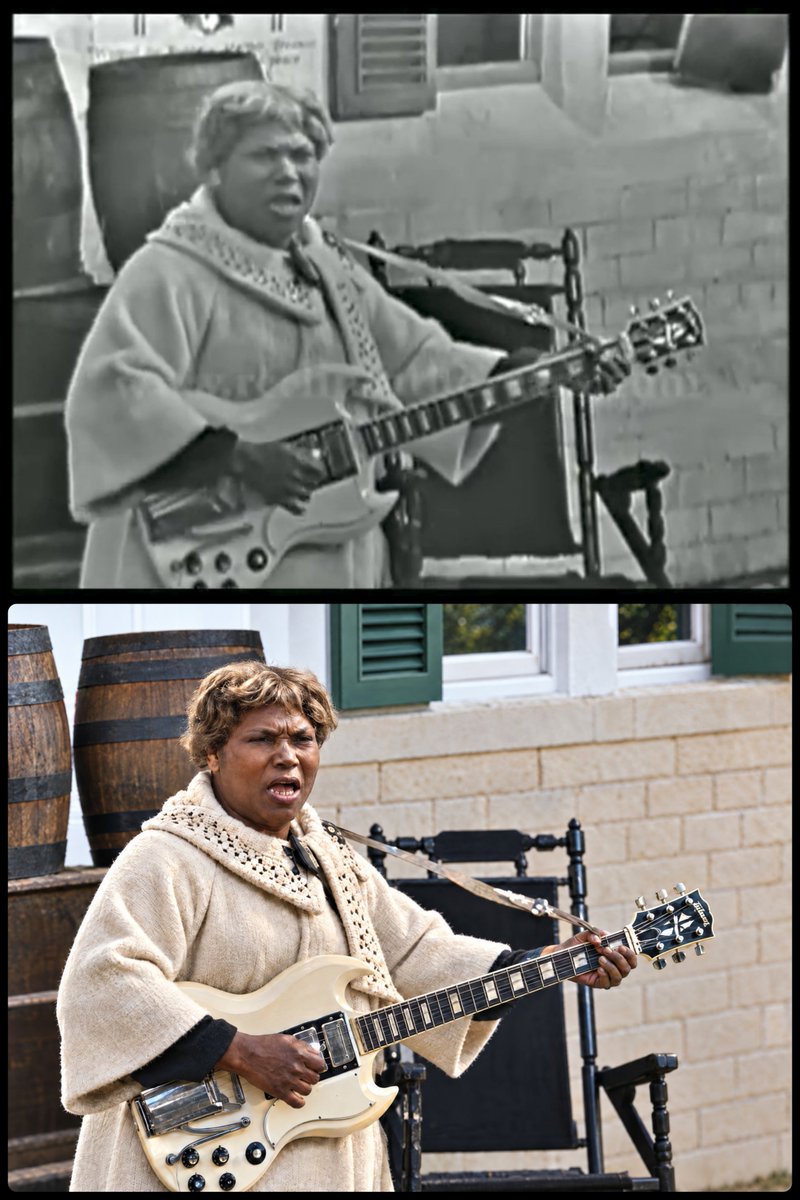
Ultra-Realistic Vintage Photo Restoration and 4K Upscale

Advanced two-step prompt workflow for restoring damaged vintage portraits with strict 99% facial identity preservation, paired with a lossless 4K detail upscaler prompt.

OpenAI

Source previews

These example images come from the original source. DROPIDEA has not independently tested these examples; results depend on the model and settings.

Ready to personalize

Your prompt

English

Replace the red variables with your information. Copy the full prompt and use it with your preferred agent.

TXT MD English version
Ultra-realistic restoration and recreation of the uploaded old vintage photograph. Preserve the exact same person and original facial identity with 99% likeness — same facial structure, eyes, eyebrows, nose, lips, jawline, hairstyle, expression, age, skin tone, pose, body proportions, and camera angle. Do not alter, beautify, redesign, or replace the person. Repair scratches, dust, stains, fading, blur, discoloration, noise, creases, and damaged details while keeping the photograph authentic.Transform it into a clean, sharp, high-quality modern digital portrait with naturally updated, vibrant colors, realistic skin texture, fine facial details, balanced contrast, and soft natural lighting. Upgrade the clothing and background into a clean, refined modern aesthetic while preserving the original outfit style, composition, pose, expression, and emotional character of the photograph. Keep all restored details believable and historically respectful. No artificial-looking skin, face distortion, identity drift, excessive smoothing, exaggerated colors, or unrealistic features. Photorealistic, professionally restored, ultra-detailed, high resolution. • Upscale prompt: Upscale this exact image @[Image 1] to 4K resolution. Preserve the original image completely — same face, same identity, same facial structure, same expression, same gaze direction, same head angle, same skin texture and wrinkles, same lighting, same shadows, same colours, same clothing, same background, same composition and framing. Change nothing. Only increase resolution and recover fine detail: sharpen existing skin pores, stubble and beard hairs, eyelashes, fabric weave and the edges already present in the image. No stylization, no beautification, no smoothing, no skin retouching, no wrinkle removal, no colour grading, no relighting, no added detail that is not already in the original, no change to face shape or proportions, no change to expression.
Preview results

Your prompt

Ultra-realistic restoration and recreation of the uploaded old vintage photograph. Preserve the exact same person and original facial identity with 99% likeness — same facial structure, eyes, eyebrows, nose, lips, jawline, hairstyle, expression, age, skin tone, pose, body proportions, and camera angle. Do not alter, beautify, redesign, or replace the person. Repair scratches, dust, stains, fading, blur, discoloration, noise, creases, and damaged details while keeping the photograph authentic.Transform it into a clean, sharp, high-quality modern digital portrait with naturally updated, vibrant colors, realistic skin texture, fine facial details, balanced contrast, and soft natural lighting. Upgrade the clothing and background into a clean, refined modern aesthetic while preserving the original outfit style, composition, pose, expression, and emotional character of the photograph. Keep all restored details believable and historically respectful. No artificial-looking skin, face distortion, identity drift, excessive smoothing, exaggerated colors, or unrealistic features. Photorealistic, professionally restored, ultra-detailed, high resolution. • Upscale prompt: Upscale this exact image @[Image 1] to 4K resolution. Preserve the original image completely — same face, same identity, same facial structure, same expression, same gaze direction, same head angle, same skin texture and wrinkles, same lighting, same shadows, same colours, same clothing, same background, same composition and framing. Change nothing. Only increase resolution and recover fine detail: sharpen existing skin pores, stubble and beard hairs, eyelashes, fabric weave and the edges already present in the image. No stylization, no beautification, no smoothing, no skin retouching, no wrinkle removal, no colour grading, no relighting, no added detail that is not already in the original, no change to face shape or proportions, no change to expression.

Variable guide

@[Image 1]

Image reference token pointing to the first restored image output for the upscaling stage

Inside the '• Upscale prompt:' section, right after 'Upscale this exact image '

Example value

@[Image 1]

What you get

  • A pristine, modern high-fidelity digital portrait maintaining a 99% exact identity match without AI waxy skin.
  • Complete removal of physical flaws including cracks, noise, stains, fading, and optical blur.
  • A razor-sharp 4K upscale recovering natural skin pores, eyelashes, and fabric micro-textures.

Use cases

  • Restoring heirloom family photographs for large-format modern wall prints.
  • Archival and museum digitization of historical portraits with historically accurate fidelity.
  • Genealogy projects and historical media documentation requiring realistic clarity.

How to use

  • Upload your vintage or damaged photograph to an AI model supporting image-to-image workflows.
  • Run the first prompt section to restore, clean, and colorize the portrait while strictly locking facial identity.
  • Take the resulting generated portrait and apply the second prompt section (Upscale prompt) referencing @[Image 1] to enhance it to 4K resolution.

Related prompts