Skip to content
ImagesFree

Cinematic Dark-Fantasy Boss AI Video Workflow

A full workflow for creating a cinematic dark-fantasy boss character, building its world, generating consistent video shots in Seedance 2.5, and compiling them in CapCut, from character sheet to final edit.

Image generation

Source previews

These example images come from the original source. DROPIDEA has not independently tested these examples; results depend on the model and settings.

Ready to personalize

Your prompt

English

Replace the red variables with your information. Copy the full prompt and use it with your preferred agent.

TXT MD English version
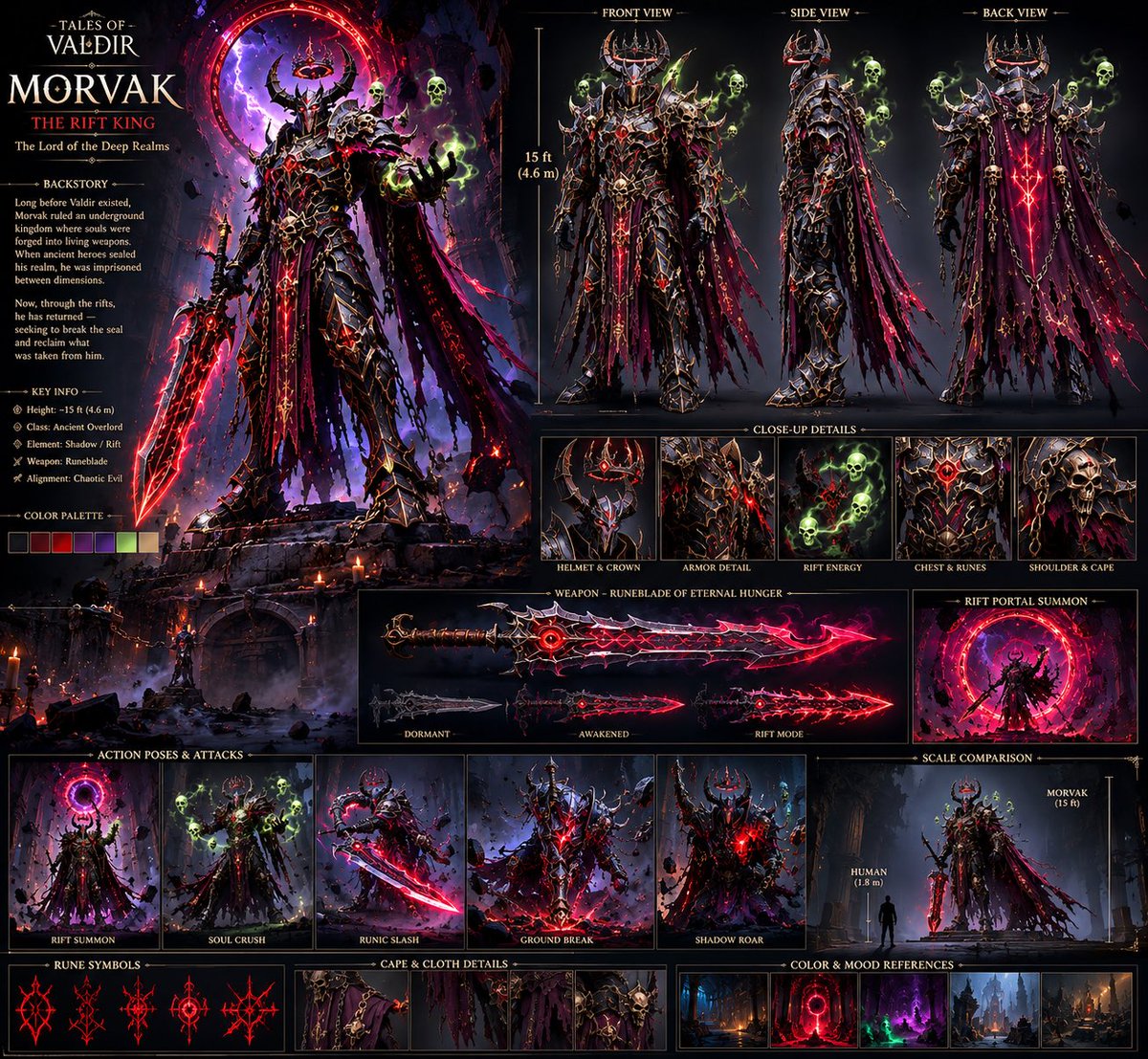
“Create a cinematic dark-fantasy boss character sheet, front/side/back views, consistent 15-foot armored demon king, black rune-covered armor, horned crown, shredded purple cape, glowing red runes, spectral green skulls, massive cursed sword, highly detailed, realistic AAA game concept art.” 2. Build the World Once the character was locked, I created the environments around him instead of throwing him into random backgrounds. Cursed forests Ancient gothic cathedrals Underground kingdoms Massive Rift portals Deep realm cities Example prompt: “Vast underground gothic kingdom, colossal ruined cathedral, ancient stone bridges, hanging chains, burning braziers, red dimensional Rift portal glowing in the distance, dark blue atmospheric lighting, cinematic fantasy environment, realistic AAA game world.” 3. Generate the Shots in Seedance 2.5 This is where everything starts moving. I didn’t try to generate the entire movie in one prompt. I broke the story into individual cinematic shots and kept the character references consistent. Example: “MORVAK slowly walks toward the camera through a ruined cathedral, his shredded cape moving in the wind, red runes pulsing across his armor, green spectral skulls circling him, camera slowly pushes forward, cinematic lighting, dark fantasy, realistic movement, epic scale.” Then I’d generate different shots for: Establishing shots Character entrances Walking/attacking Rift activation Close-ups Power moments Final boss reveal 4. Compile Everything in CapCut After generating the clips: Import all the shots Arrange them according to the story Cut out weak frames Match the pacing Add transitions/sound design Adjust the overall look Then upscale the final edit for a cleaner output. The important part is that CapCut comes at the end. I don’t use editing to fix a bad generation. I build the character → build the world → generate controlled shots → then edit everything together. My biggest tip: Don’t start by asking AI to “make me a movie.” Build the world first. Build the character second. Then make the movie. That workflow alone can make your AI videos feel way more intentional and cinematic. Bizzy
Preview results

Your prompt

“Create a cinematic dark-fantasy boss character sheet, front/side/back views, consistent 15-foot armored demon king, black rune-covered armor, horned crown, shredded purple cape, glowing red runes, spectral green skulls, massive cursed sword, highly detailed, realistic AAA game concept art.” 2. Build the World Once the character was locked, I created the environments around him instead of throwing him into random backgrounds. Cursed forests Ancient gothic cathedrals Underground kingdoms Massive Rift portals Deep realm cities Example prompt: “Vast underground gothic kingdom, colossal ruined cathedral, ancient stone bridges, hanging chains, burning braziers, red dimensional Rift portal glowing in the distance, dark blue atmospheric lighting, cinematic fantasy environment, realistic AAA game world.” 3. Generate the Shots in Seedance 2.5 This is where everything starts moving. I didn’t try to generate the entire movie in one prompt. I broke the story into individual cinematic shots and kept the character references consistent. Example: “MORVAK slowly walks toward the camera through a ruined cathedral, his shredded cape moving in the wind, red runes pulsing across his armor, green spectral skulls circling him, camera slowly pushes forward, cinematic lighting, dark fantasy, realistic movement, epic scale.” Then I’d generate different shots for: Establishing shots Character entrances Walking/attacking Rift activation Close-ups Power moments Final boss reveal 4. Compile Everything in CapCut After generating the clips: Import all the shots Arrange them according to the story Cut out weak frames Match the pacing Add transitions/sound design Adjust the overall look Then upscale the final edit for a cleaner output. The important part is that CapCut comes at the end. I don’t use editing to fix a bad generation. I build the character → build the world → generate controlled shots → then edit everything together. My biggest tip: Don’t start by asking AI to “make me a movie.” Build the world first. Build the character second. Then make the movie. That workflow alone can make your AI videos feel way more intentional and cinematic. Bizzy

Variable guide

consistent 15-foot armored demon king, black rune-covered armor, horned crown, shredded purple cape

The boss appearance and height in the character sheet; edit it as one unit and keep linked details (glowing red runes, shredded cape) consistent in the shot prompt.

Inside the first quoted prompt, between "front/side/back views," and "glowing red runes".

Example value

consistent 15-foot armored demon king, black rune-covered armor, horned crown, shredded purple cape

MORVAK

The boss name in the shot prompt; replace it in uppercase and keep it matching your character reference.

In the shot prompt, after "slowly" context: replace the word before "slowly walks toward the camera".

Example value

MORVAK

Vast underground gothic kingdom, colossal ruined cathedral, ancient stone bridges, hanging chains, burning braziers, red dimensional Rift portal glowing in the distance

The location and architecture in the environment prompt; edit it to change the world while keeping lighting and style.

Example environment prompt, from "Vast" to "in the distance".

Example value

Vast underground gothic kingdom, colossal ruined cathedral, ancient stone bridges, hanging chains, burning braziers, red dimensional Rift portal glowing in the distance

MORVAK slowly walks toward the camera through a ruined cathedral, his shredded cape moving in the wind

The boss motion in the shot prompt; change it per shot while keeping the character's appearance elements fixed.

Shot prompt after "Example:", from "MORVAK" to "in the wind".

Example value

MORVAK slowly walks toward the camera through a ruined cathedral, his shredded cape moving in the wind

What you get

  • A ready prompt for a boss character sheet with front/side/back views in realistic AAA game concept-art style.
  • A cinematic environment prompt for building a coherent dark-fantasy world.
  • A cinematic shot prompt with character motion, camera movement, and lighting.
  • A list of shot types needed to cover the full story.
  • Clear CapCut editing steps from arrangement to upscaling.

Use cases

  • Creating a short cinematic final-boss video in AAA game style.
  • Building a coherent dark-fantasy world for AI visual storytelling.
  • Designing promos for games or fantasy projects.
  • Producing character-consistent cinematic footage across multiple shots.

How to use

  • Copy the character sheet prompt (the first prompt) and adjust the boss description if needed, then generate a consistent character reference image.
  • Pick or adapt the environment prompt to build a coherent world around your character (cursed forests, gothic cathedrals, underground kingdoms...).
  • In Seedance 2.5, generate shots one by one using the shot prompt, keeping the character references consistent across all shots (establishing shots, entrances, attacks, boss reveal...).
  • Import the generated clips into CapCut, arrange them according to the story, cut weak frames, and match the pacing.
  • Add transitions and sound design, adjust the overall look, then upscale the final edit.

Related prompts