Skip to content
ImagesFree

Workflow to Fix Waxy AI Skin for Photorealism

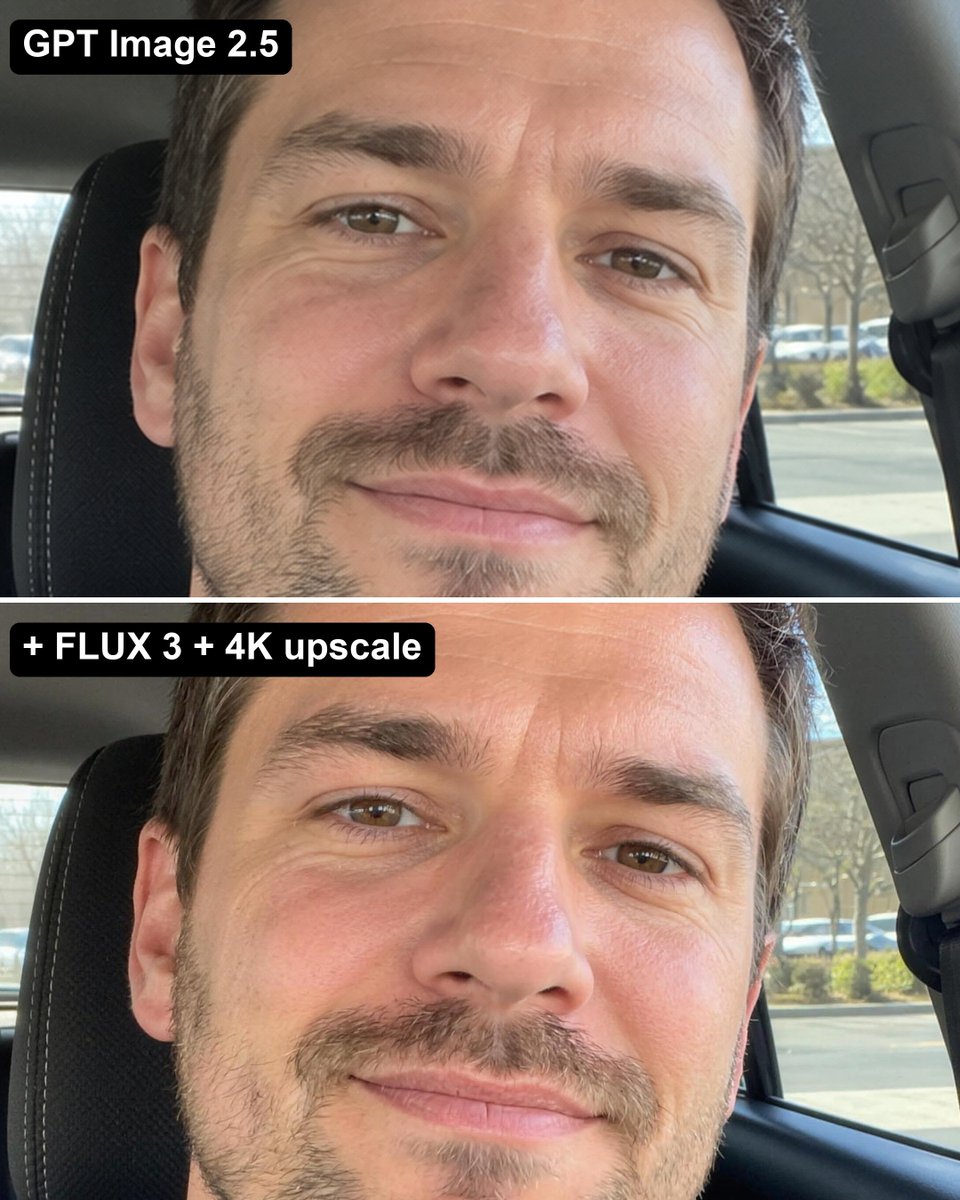
A practical 3-step pipeline to eliminate the waxy, clay-like skin artifact from GPT 2.5 by transforming it into an unretouched iPhone photo using FLUX 3 and upscaling to 4K.

OpenAI

Source previews

These example images come from the original source. DROPIDEA has not independently tested these examples; results depend on the model and settings.
Ready to personalize

Your prompt

English

Replace the red variables with your information. Copy the full prompt and use it with your preferred agent.

TXT MD English version
No matter how you prompt GPT Image 2.5, people come out with that same waxy, clay-like AI skin. Here's how to fix it... 1. Generate the image in GPT 2.5 like normal (it's still the best at composition & following your prompt) 2. Run it through FLUX 3 with the GPT image as reference: "Recreate this exact photo as a real unretouched iPhone photo: same person, same face, same hair, same clothes, same pose, same framing and light. Real skin pores, fine lines, natural colour, slight sensor grain. No text." 3. Upscale it to 4K with Bytedance Upscale Now it looks like an actual photo.
Preview results

Your prompt

No matter how you prompt GPT Image 2.5, people come out with that same waxy, clay-like AI skin. Here's how to fix it... 1. Generate the image in GPT 2.5 like normal (it's still the best at composition & following your prompt) 2. Run it through FLUX 3 with the GPT image as reference: "Recreate this exact photo as a real unretouched iPhone photo: same person, same face, same hair, same clothes, same pose, same framing and light. Real skin pores, fine lines, natural colour, slight sensor grain. No text." 3. Upscale it to 4K with Bytedance Upscale Now it looks like an actual photo.

Variable guide

real unretouched iPhone photo

Camera aesthetic or texture profile to simulate for realistic skin rendering

Inside the quoted prompt in Step 2 after 'Recreate this exact photo as a '

Example value

real unretouched iPhone photo

What you get

  • A hyper-realistic portrait free of clay-like or plastic AI skin artifacts.
  • Preserved subject pose, clothing, and framing combined with genuine camera grain and skin textures.

Use cases

  • Social media lifestyle and influencer portrait generation.
  • Fashion and commercial campaigns requiring human realism rather than stylized 3D looks.
  • Photography mockups simulating unretouched mobile camera shots.

How to use

  • Generate your composition and character in GPT Image 2.5 to leverage its prompt adherence and framing capabilities.
  • Upload the generated image as an image-to-image reference into FLUX 3.
  • Run the reference prompt in FLUX 3 to retain the subject while introducing natural skin pores and realistic lighting.
  • Upscale the final output to 4K resolution using Bytedance Upscale to sharpen sensor grain and micro-textures.

Related prompts