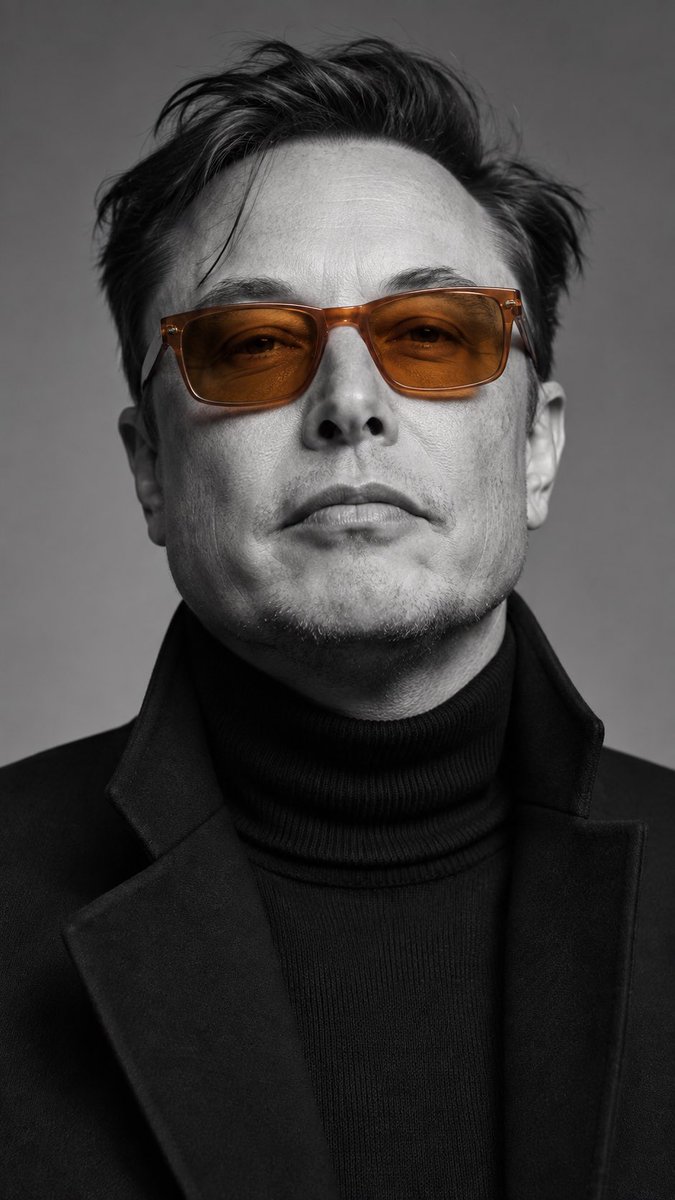
Result 1Gemini
A prompt that generates a 9:16 vertical studio-style editorial portrait, locking the subject's identity from an uploaded facial-features reference with no face swaps or beauty retouching. The scene is monochrome black-and-white with only orange acetate sunglasses and amber gradient lenses kept in color, top lighting, an f/2.0, ISO 100, 1/125s camera feel, and real skin texture.
These example images come from the original source. DROPIDEA has not independently tested these examples; results depend on the model and settings.

Replace the red variables with your information. Copy the full prompt and use it with your preferred agent.
[INPUT]Mandatory structural marker that opens the input section; keep it unchanged.
In the template, immediately after the "————" divider, before the "FACE_REF = ..." line.
Example value[INPUT]
(Uploaded reference photo of a person's facial features/face image, used for identity lock)The uploaded identity reference used to lock the subject's features.
In the [INPUT] section on the "FACE_REF = ..." line; replace the parenthesized text.
Example value(clear frontal face photo of the user, uploaded in the reference image field)
(If you have a reference of the same orange frame, you can upload it; ignore if you don't have one)Optional reference for the orange frame if available.
In the [INPUT] section on the "(Optional) GLASSES_REF = ..." line; replace or delete the line.
Example value(reference photo of a rectangular orange acetate frame)
A prompt for creating a premium vertical four-panel streetwear campaign collage from an uploaded facial identity re...
A photorealistic image-generation prompt for a vertical summer portrait of a fictional adult Japanese woman in a st...
A prompt for a photorealistic fantasy fashion portrait featuring a woman with elven details, black and orange cloth...
An ultra-photorealistic fashion editorial prompt featuring a low-angle outdoor portrait in a suburban setting with...