Skip to content
ImagesFree

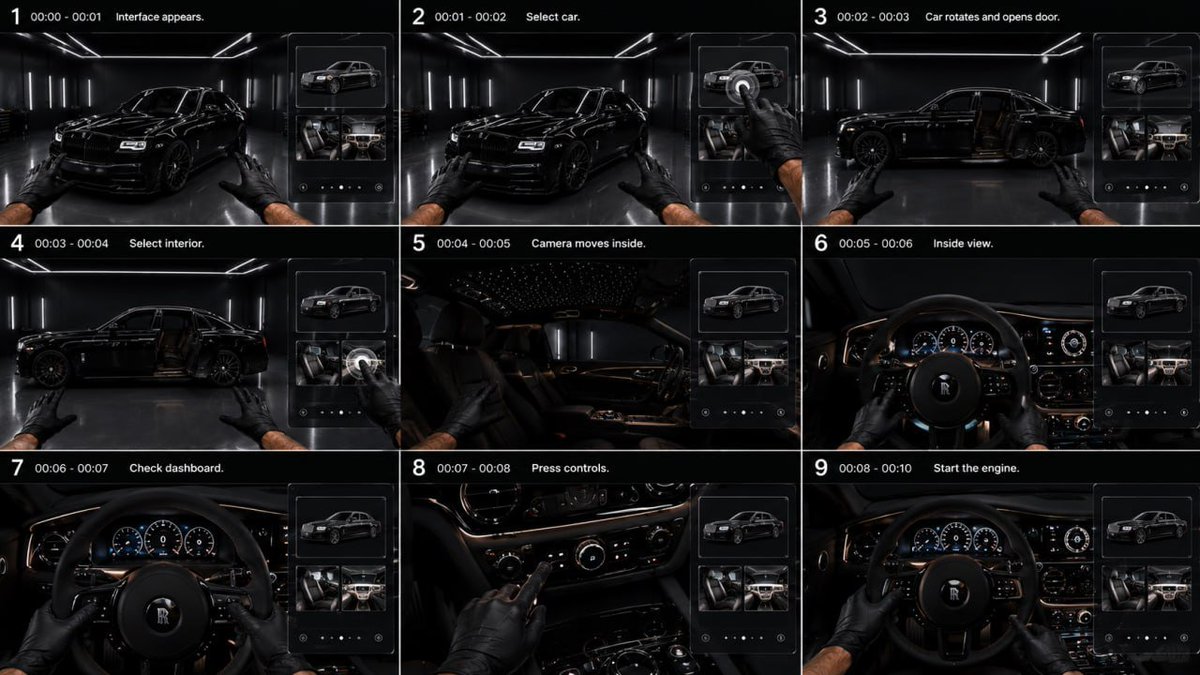
Reference Storyboard for Luxury Black Sedan

A 10-second 9:16 ultra-realistic automotive commercial prompt: a transparent glass UI for exterior and interior selection, a camera entering the cabin in driver POV, ending with a V12-style engine start inside a minimalist black garage.

OpenAI

Source previews

These example images come from the original source. DROPIDEA has not independently tested these examples; results depend on the model and settings.

Ready to personalize

Your prompt

English

Replace the red variables with your information. Copy the full prompt and use it with your preferred agent.

TXT MD English version
GPT image 2 × Gemini Omni flash Prompt - REFERENCE STORYBOARD: Follow the uploaded storyboard strictly. Preserve the exact shot order, timing, first-person POV, vehicle identity, garage, interface design and interior continuity. DURATION: 10 sec. ASPECT RATIO: 9:16 STYLE: Ultra-realistic premium automotive commercial. Black minimalist luxury garage, glossy dark floor, thin white LED ceiling and wall lights, cinematic reflections, deep blacks. Same glossy black luxury sedan throughout. Two male hands in black gloves. Smooth natural movement. INTERFACE: Minimal transparent glass UI appears only on the right side. No text, no numbers, no logos. Show only high-quality 3D thumbnails: exterior car, front seats, dashboard/interior. Thin white outlines, subtle glass reflections. Interface must never cover the main vehicle. 0.0–1.0s — INTERFACE APPEARS First-person view facing the black sedan at a front three-quarter angle. A slim transparent interface smoothly slides in from the right. Top tile shows a 3D exterior model; lower tiles show luxury seats and dashboard. Both gloved hands remain visible. 1.0–2.0s — SELECT CAR Right hand reaches toward the interface and taps the exterior-car thumbnail with the index finger. A subtle circular selection pulse appears exactly under the fingertip. 2.0–3.0s — ROTATE + OPEN DOOR Immediately after the tap, the real car smoothly rotates in place into a perfect side profile. The rear-hinged driver door automatically opens outward, revealing the dark premium interior. Camera remains outside. 3.0–4.0s — SELECT INTERIOR Right hand taps the interior/dashboard thumbnail. The selected tile responds with a subtle glow. The open door remains visible. 4.0–5.0s — ENTER INTERIOR Camera smoothly moves forward through the open driver door into the cabin in one continuous motion. The interface fades away during the transition. No cut through solid geometry. 5.0–6.0s — DRIVER POV Camera settles naturally in the driver seat. First-person view of black leather steering wheel, premium analog/digital instrument cluster, polished metal controls, dark leather dashboard and subtle warm ambient lighting. Both gloved hands move onto the steering wheel. 6.0–7.0s — CHECK DASHBOARD Camera stays in driver POV. Hands slightly turn the steering wheel. Instrument cluster wakes up smoothly: gauges illuminate, needles perform a short startup sweep, dashboard ambient lighting activates. 7.0–8.2s — PRESS CONTROLS Right hand leaves the steering wheel and presses several physical center-console buttons sequentially. Each button reacts immediately with subtle illumination. Left hand remains on the wheel. Show tactile realistic finger contact. 8.2–10.0s — START ENGINE Right hand presses the engine START button once. Engine starts with a deep luxury V12-style rumble. Dashboard fully illuminates, gauge needles rise and stabilize. Subtle vibration passes through steering wheel and hands. Exterior lights softly reflect across the garage through the windshield. End on a centered first-person cockpit view with both hands on the steering wheel and engine running. STRICT: Exact sequence: interface → exterior selection → car rotates → door opens → interior selection → camera enters cabin → dashboard inspection → controls → engine start. No extra people. No floating hands. No duplicated fingers. No random camera cuts. No exterior redesign. No text or logos in UI. No interface after entering the cabin. Keep identical car, interior, hands and environment throughout. Realistic physical interactions and premium cinematic motion.
Preview results

Your prompt

GPT image 2 × Gemini Omni flash Prompt - REFERENCE STORYBOARD: Follow the uploaded storyboard strictly. Preserve the exact shot order, timing, first-person POV, vehicle identity, garage, interface design and interior continuity. DURATION: 10 sec. ASPECT RATIO: 9:16 STYLE: Ultra-realistic premium automotive commercial. Black minimalist luxury garage, glossy dark floor, thin white LED ceiling and wall lights, cinematic reflections, deep blacks. Same glossy black luxury sedan throughout. Two male hands in black gloves. Smooth natural movement. INTERFACE: Minimal transparent glass UI appears only on the right side. No text, no numbers, no logos. Show only high-quality 3D thumbnails: exterior car, front seats, dashboard/interior. Thin white outlines, subtle glass reflections. Interface must never cover the main vehicle. 0.0–1.0s — INTERFACE APPEARS First-person view facing the black sedan at a front three-quarter angle. A slim transparent interface smoothly slides in from the right. Top tile shows a 3D exterior model; lower tiles show luxury seats and dashboard. Both gloved hands remain visible. 1.0–2.0s — SELECT CAR Right hand reaches toward the interface and taps the exterior-car thumbnail with the index finger. A subtle circular selection pulse appears exactly under the fingertip. 2.0–3.0s — ROTATE + OPEN DOOR Immediately after the tap, the real car smoothly rotates in place into a perfect side profile. The rear-hinged driver door automatically opens outward, revealing the dark premium interior. Camera remains outside. 3.0–4.0s — SELECT INTERIOR Right hand taps the interior/dashboard thumbnail. The selected tile responds with a subtle glow. The open door remains visible. 4.0–5.0s — ENTER INTERIOR Camera smoothly moves forward through the open driver door into the cabin in one continuous motion. The interface fades away during the transition. No cut through solid geometry. 5.0–6.0s — DRIVER POV Camera settles naturally in the driver seat. First-person view of black leather steering wheel, premium analog/digital instrument cluster, polished metal controls, dark leather dashboard and subtle warm ambient lighting. Both gloved hands move onto the steering wheel. 6.0–7.0s — CHECK DASHBOARD Camera stays in driver POV. Hands slightly turn the steering wheel. Instrument cluster wakes up smoothly: gauges illuminate, needles perform a short startup sweep, dashboard ambient lighting activates. 7.0–8.2s — PRESS CONTROLS Right hand leaves the steering wheel and presses several physical center-console buttons sequentially. Each button reacts immediately with subtle illumination. Left hand remains on the wheel. Show tactile realistic finger contact. 8.2–10.0s — START ENGINE Right hand presses the engine START button once. Engine starts with a deep luxury V12-style rumble. Dashboard fully illuminates, gauge needles rise and stabilize. Subtle vibration passes through steering wheel and hands. Exterior lights softly reflect across the garage through the windshield. End on a centered first-person cockpit view with both hands on the steering wheel and engine running. STRICT: Exact sequence: interface → exterior selection → car rotates → door opens → interior selection → camera enters cabin → dashboard inspection → controls → engine start. No extra people. No floating hands. No duplicated fingers. No random camera cuts. No exterior redesign. No text or logos in UI. No interface after entering the cabin. Keep identical car, interior, hands and environment throughout. Realistic physical interactions and premium cinematic motion.

Variable guide

10 sec.

Total video length in seconds, appears once in the duration line.

Top of the prompt, right after "DURATION:" (Arabic: «المدة:»).

Example value

15 sec.

9:16

Vertical aspect ratio, keep it in number:number format.

The line immediately after duration, after "ASPECT RATIO:".

Example value

1:1

glossy black luxury sedan

Description of the car used throughout the video; color or class may change while keeping continuity.

In the STYLE section, inside "Same glossy black luxury sedan throughout."

Example value

dark grey luxury SUV

Black minimalist luxury garage

Description of the garage/background governing the whole scene.

Start of the STYLE section, first environment description sentence.

Example value

minimalist white showroom with dim lighting

black gloves

Color of the gloves on the two visible male hands throughout the video.

In the STYLE section, inside "Two male hands in black gloves."

Example value

white gloves

V12

Engine sound style at startup in the final shot; keep the alphanumeric code.

In the 8.2–10.0s — START ENGINE shot, inside "deep luxury V12-style rumble".

Example value

V8

What you get

  • A 10-second 9:16 ultra-realistic luxury automotive commercial video
  • Exact sequence: glass UI → exterior selection → car rotation and door opening → interior selection → camera entry → dashboard inspection → controls → engine start
  • First-person POV with gloved hands and realistic tactile interactions on the UI and buttons
  • A transparent 3D-thumbnail UI with no text or logos, ending with a V12-style engine rumble

Use cases

  • Vertical luxury car ads for social media such as Reels and TikTok
  • Interactive showroom-style vehicle configuration showcases
  • Marketing content for dealerships and automotive interior/exterior detailing
  • Creative first-person short-film concept studies

How to use

  • Upload the required reference storyboard file before submitting, since the prompt demands following it strictly.
  • Adjust the editable values such as duration, aspect ratio, vehicle description, garage, glove color and engine style for your campaign.
  • Copy the full prompt and paste it into your video generation tool supporting GPT image 2 × Gemini Omni flash.
  • Keep all strict constraints and time codes unchanged, as they guarantee shot order and scene continuity.
  • Submit and verify the UI appears only on the right and the camera enters the cabin without random cuts.

Related prompts