Skip to content
ImagesFree

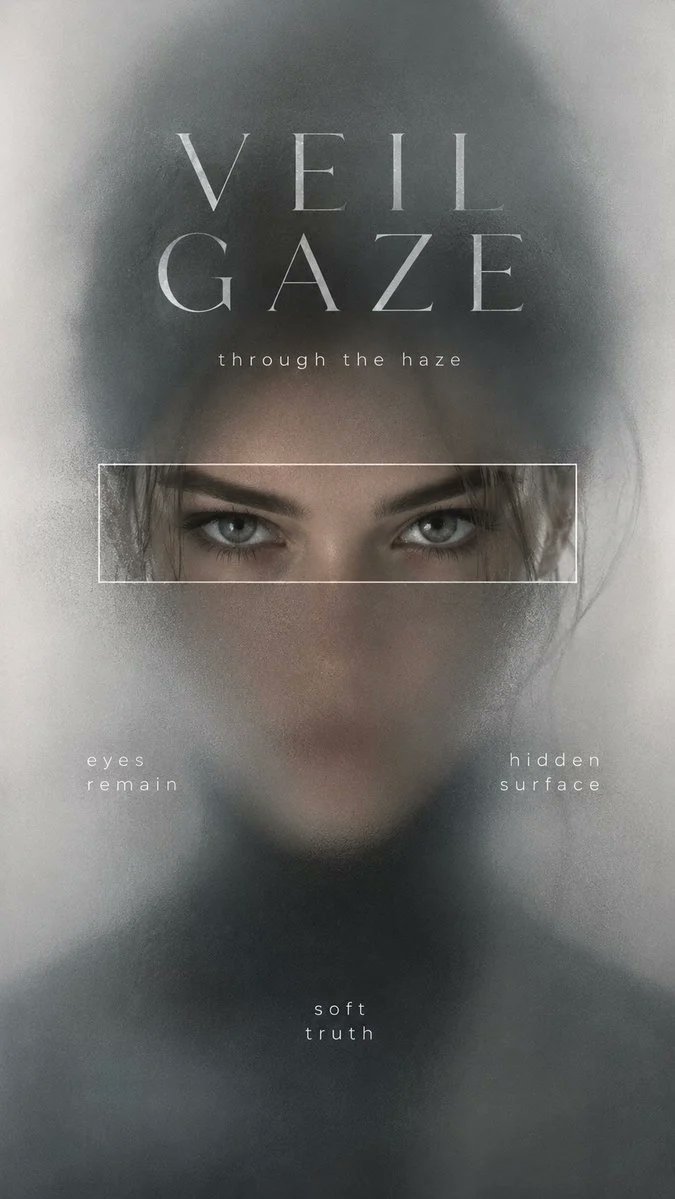
Cinematic Blurred Reveal Portrait Poster

A 9:16 vertical poster template contrasting a blurred portrait with one sharp reveal area in a refined editorial cinematic style, with editable theme, subject, palette, and text options.

OpenAI

Source previews

These example images come from the original source. DROPIDEA has not independently tested these examples; results depend on the model and settings.

Ready to personalize

Your prompt

English

Replace the red variables with your information. Copy the full prompt and use it with your preferred agent.

TXT MD English version
Create a 9:16 high-end blurred reveal portrait poster with a cinematic identity-poster feeling. Fill in the concept: Theme: [RED WINDOW / VEIL GAZE / HALF SIGNAL / DISSOLVE IN GRAY] Subject: [female model / male model / artist / fashion figure] Color palette: [charcoal gray / fog white / black / deep red / silver gray] Reveal area: [vertical frame / horizontal eye band / half-face window / profile focus box] Main title: [custom original title] Supporting text: [3–5 short original phrases] The poster should be built around a strong contrast between a blurred portrait and one sharp reveal area. Most of the face or body should feel hidden by soft focus, fog, grain, shadow, or translucent blur, while one selected fragment stays sharp and memorable: the eyes, half of the face, a red clothing detail, a hand gesture, or a profile detail. Use a clean editorial layout with refined typography, thin frame lines, soft film grain, muted contrast, and strong negative space. The typography should feel custom, minimal, cinematic, and integrated into…
Preview results

Your prompt

Create a 9:16 high-end blurred reveal portrait poster with a cinematic identity-poster feeling. Fill in the concept: Theme: [RED WINDOW / VEIL GAZE / HALF SIGNAL / DISSOLVE IN GRAY] Subject: [female model / male model / artist / fashion figure] Color palette: [charcoal gray / fog white / black / deep red / silver gray] Reveal area: [vertical frame / horizontal eye band / half-face window / profile focus box] Main title: [custom original title] Supporting text: [3–5 short original phrases] The poster should be built around a strong contrast between a blurred portrait and one sharp reveal area. Most of the face or body should feel hidden by soft focus, fog, grain, shadow, or translucent blur, while one selected fragment stays sharp and memorable: the eyes, half of the face, a red clothing detail, a hand gesture, or a profile detail. Use a clean editorial layout with refined typography, thin frame lines, soft film grain, muted contrast, and strong negative space. The typography should feel custom, minimal, cinematic, and integrated into…

Variable guide

[RED WINDOW / VEIL GAZE / HALF SIGNAL / DISSOLVE IN GRAY]

Pick the design theme from the available options

The "Theme:" line in the template

Example value

RED WINDOW

[female model / male model / artist / fashion figure]

Define the portrait subject

The "Subject:" line in the template

Example value

artist

[charcoal gray / fog white / black / deep red / silver gray]

Choose the color palette

The "Color palette:" line in the template

Example value

deep red

[vertical frame / horizontal eye band / half-face window / profile focus box]

Define the single sharp reveal area

The "Reveal area:" line in the template

Example value

half-face window

[custom original title]

A custom original title

The "Main title:" line in the template

Example value

THE SILENT FRAME

[3–5 short original phrases]

3–5 short original phrases

The "Supporting text:" line in the template

Example value

half the face / gray fog

What you get

  • A refined cinematic 9:16 vertical poster.
  • A contrast between a blurred portrait and one sharp reveal area.
  • A clean editorial layout with minimal typography, thin frame lines, and soft film grain.

Use cases

  • Visual identity posters for photographers and models.
  • Fashion campaign or art exhibition covers.
  • Vertical cinematic social media posts.

How to use

  • Choose the theme, subject, and reveal area from the listed options and locate them in the template.
  • Replace the main title bracket with your own original title.
  • Prepare 3–5 short original phrases and substitute them for the supporting text bracket.
  • Submit the completed template to an image generation model while keeping the 9:16 ratio.
  • Review the result and ensure only one sharp reveal area contrasts with the blurred portrait.

Related prompts