Skip to content
ImagesFree

GPT Image 2 Prompt for Woman Portrait

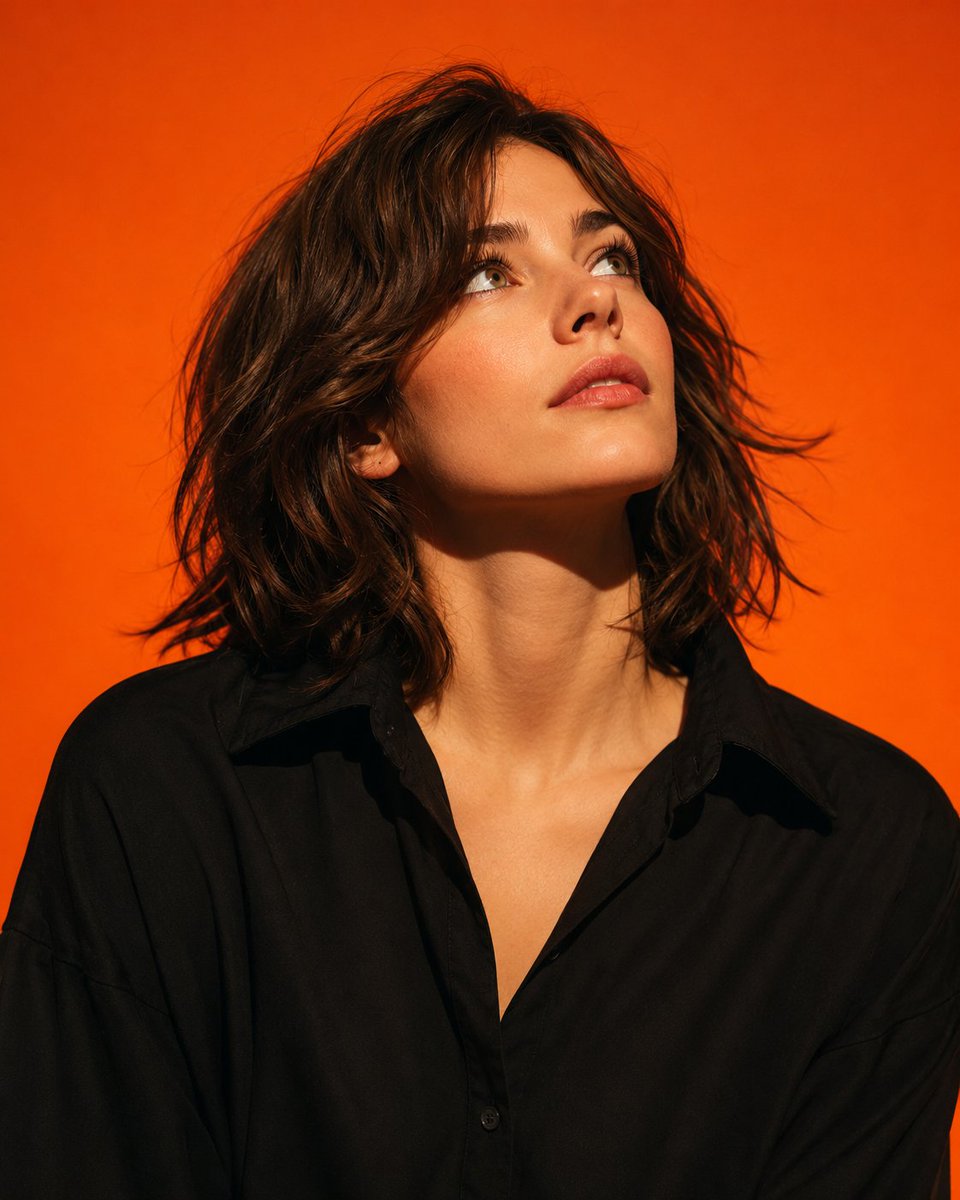
A photographic prompt in the style of GPT image 2 on Chatgpt: a medium close-up portrait of a woman with shoulder-length brown hair gazing upward against a vibrant orange backdrop, with warm lighting, soft shadows, and a polished cinematic studio aesthetic.

OpenAI

Source previews

These example images come from the original source. DROPIDEA has not independently tested these examples; results depend on the model and settings.

Ready to personalize

Your prompt

English

Replace the red variables with your information. Copy the full prompt and use it with your preferred agent.

TXT MD English version
GPT image 2 on Chatgpt Prompt 👇 A woman with shoulder-length brown hair gazes upward against a vibrant orange background. Subject: A woman with fair skin and shoulder-length brown hair that falls loosely around her face. Clothing: She wears a black collared shirt with a visible collar and button placket. Action: Her head is tilted slightly to the side, and she looks up and away from the camera with a neutral expression. Lighting: The scene features warm lighting that casts soft shadows on the left side of her face and neck, creating a dramatic contrast against the bright orange backdrop. Environment: A solid, smooth orange background fills the frame behind the subject. Camera: The shot is a medium close-up portrait with a shallow depth of field that keeps the focus sharply on the woman's face. Style Details: The image has a cinematic quality with high color saturation and a polished studio photography aesthetic.
Preview results

Your prompt

GPT image 2 on Chatgpt Prompt 👇 A woman with shoulder-length brown hair gazes upward against a vibrant orange background. Subject: A woman with fair skin and shoulder-length brown hair that falls loosely around her face. Clothing: She wears a black collared shirt with a visible collar and button placket. Action: Her head is tilted slightly to the side, and she looks up and away from the camera with a neutral expression. Lighting: The scene features warm lighting that casts soft shadows on the left side of her face and neck, creating a dramatic contrast against the bright orange backdrop. Environment: A solid, smooth orange background fills the frame behind the subject. Camera: The shot is a medium close-up portrait with a shallow depth of field that keeps the focus sharply on the woman's face. Style Details: The image has a cinematic quality with high color saturation and a polished studio photography aesthetic.

Variable guide

shoulder-length brown hair

Hair length and color; edit it in both the opening line and the Subject line.

Opening line and "Subject:" line

Example value

short black hair

orange

Background color; edit it in all three places: opening, Lighting and Environment.

Opening line, "Lighting:" and "Environment:" lines

Example value

sky-blue background

a black collared shirt with a visible collar and button placket

Clothing description in the Clothing line.

"Clothing:" line

Example value

a white silk blouse

What you get

  • A medium close-up portrait of a woman looking up and away from the camera.
  • A solid orange background filling the frame behind the subject.
  • Warm lighting and soft shadows on one side of the face creating dramatic contrast.
  • Cinematic quality with high color saturation and a polished studio photography aesthetic.

Use cases

  • Professional portrait images for social media.
  • Marketing materials and studio-style visual presentations.
  • References for color and lighting experiments in photography.
  • Artwork and poster designs with a cinematic look.

How to use

  • Open Chatgpt, select the GPT image 2 model and start a new image generation.
  • Copy the full prompt and paste it into the prompt field without removing any line.
  • To customize, edit variables such as hair color or background color, keeping the description consistent across all mentions.
  • Leave technical settings like GPT image 2 and the shallow depth of field unchanged.
  • Generate the image; for a different result, adjust the background color or lighting and try again.

Related prompts