Skip to content
ImagesFree

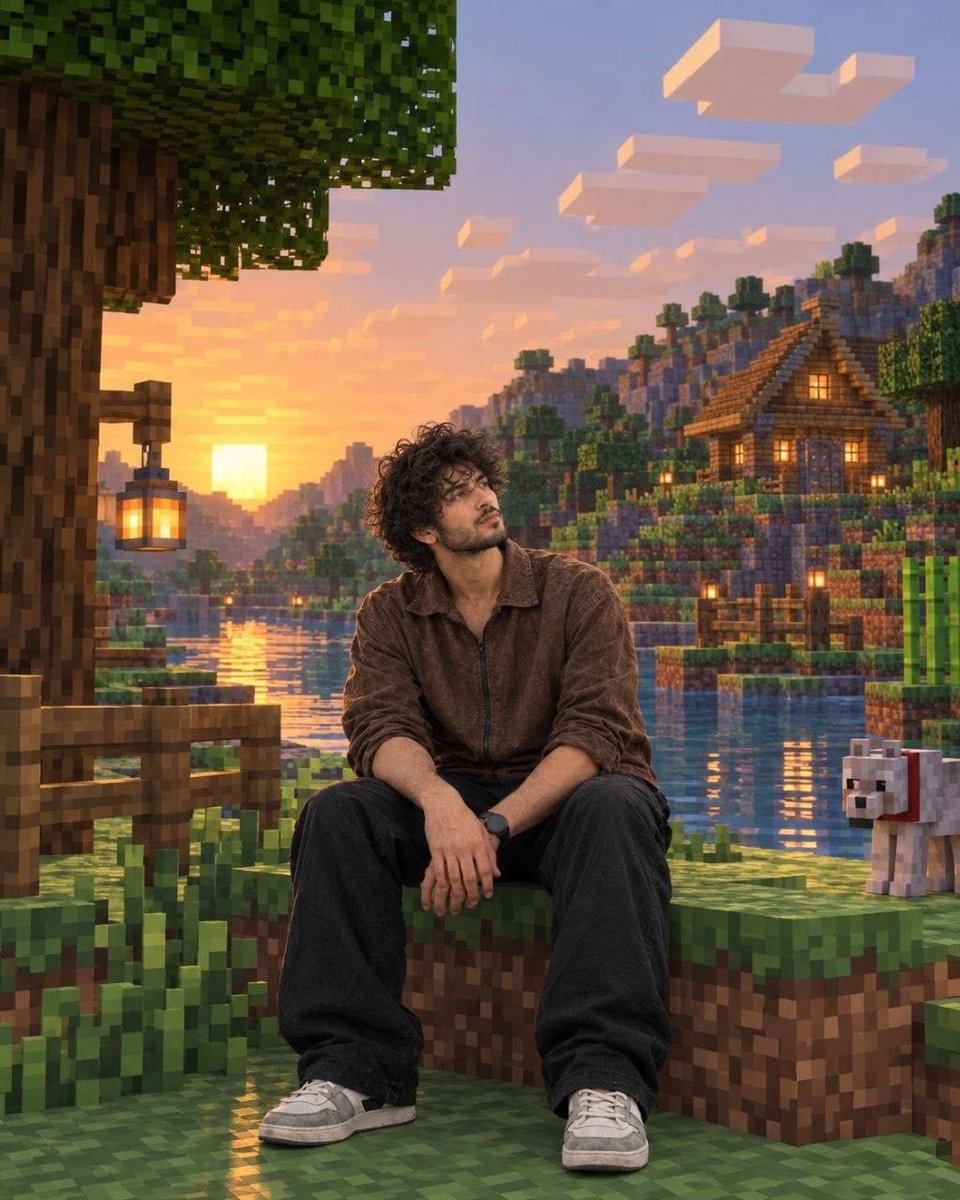
Photorealistic Subject in Minecraft Voxel World Background

An advanced image generation prompt that preserves a human subject with 100% photorealistic realism while reconstructing the real-world environment into an exact Minecraft block voxel replica.

Gemini

Source previews

These example images come from the original source. DROPIDEA has not independently tested these examples; results depend on the model and settings.

Ready to personalize

Your prompt

English

Replace the red variables with your information. Copy the full prompt and use it with your preferred agent.

TXT MD English version
Keep the human subject 100% photorealistic and completely untouched. No pixel filter, stylization, or lighting remap on the skin. Preserve exact facial details, pores, fabric weave, hair strands, natural shadows, expression, and posture. Rebuild the background as a structurally accurate Minecraft voxel replica of the original location without reinterpretation. Match the exact layout, spacing, depth, geometry, perspective, horizon line, camera height, focal distance, framing, and subject scale. Replicate paths with the same curve and width, trees with matching trunk positions, height, and canopy spread, buildings with accurate silhouettes, windows, and roof angles, and rocks, benches, fences, and signs as Minecraft block equivalents while preserving their exact position and proportions. Any object touching the subject must be converted logically into Minecraft geometry. You dropping your photo in, or still scared it’ll cube your face?
Preview results

Your prompt

Keep the human subject 100% photorealistic and completely untouched. No pixel filter, stylization, or lighting remap on the skin. Preserve exact facial details, pores, fabric weave, hair strands, natural shadows, expression, and posture. Rebuild the background as a structurally accurate Minecraft voxel replica of the original location without reinterpretation. Match the exact layout, spacing, depth, geometry, perspective, horizon line, camera height, focal distance, framing, and subject scale. Replicate paths with the same curve and width, trees with matching trunk positions, height, and canopy spread, buildings with accurate silhouettes, windows, and roof angles, and rocks, benches, fences, and signs as Minecraft block equivalents while preserving their exact position and proportions. Any object touching the subject must be converted logically into Minecraft geometry. You dropping your photo in, or still scared it’ll cube your face?

What you get

  • A 100% photorealistic subject preserving skin pores, hair strands, fabric weave, and facial expressions.
  • A structurally accurate Minecraft voxel replica of the original background matching horizon and camera depth.
  • Seamless integration where foreground objects touching the subject adapt logically into blocky geometry.

Use cases

  • Creative avatars and profile banners for Minecraft gamers and streamers.
  • Engaging gaming marketing assets and social media concept posts blending reality with block games.
  • Artistic conversions of real-world travel photos into sandbox gaming scenery.

How to use

  • Upload your reference photograph into your image-to-image or inpainting capable AI generation tool.
  • Paste the prompt into the generation input box.
  • Apply a mask to the background or ensure the model focuses on subject preservation according to your tool's settings.
  • Generate the image to transform the real-life environment into accurate Minecraft voxel blocks while leaving the subject untouched.

Related prompts