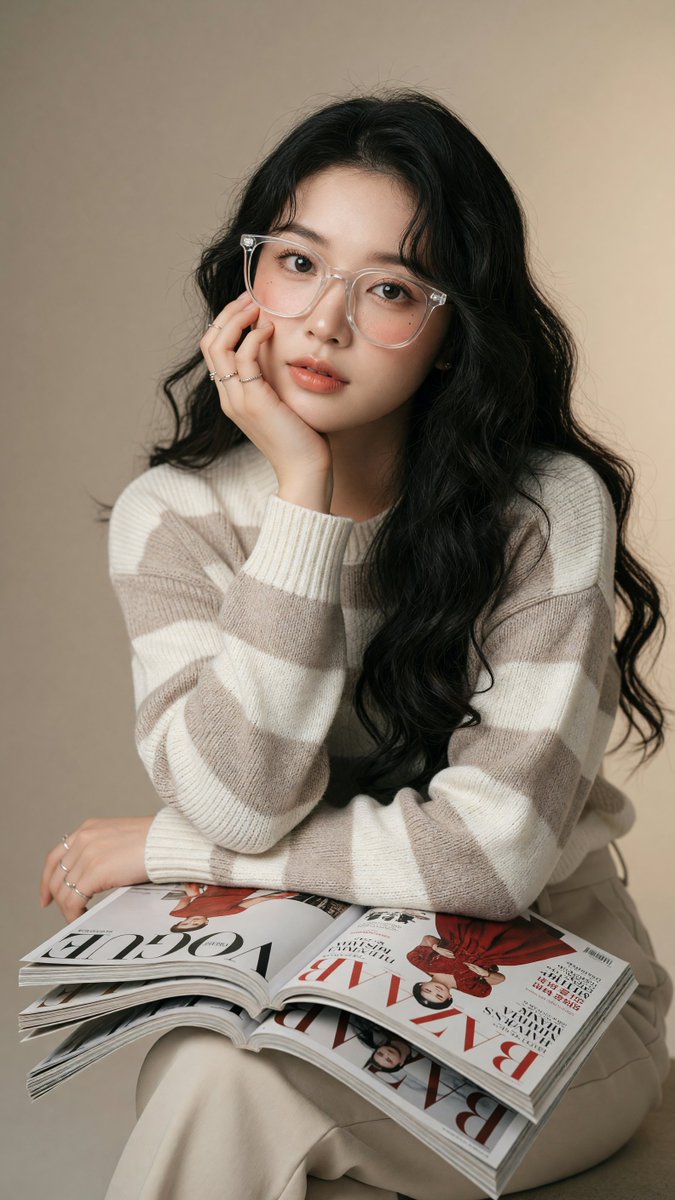
Result 1Midjourney
A Grok Imagine image prompt in vertical 9:16 at 2K quality: a photorealistic high-end portrait of a young East Asian woman in her 20s with oversized clear glasses and a striped knit sweater, seated with open Vogue and Harper's Bazaar magazines in a soft beige studio with warm diffused editorial lighting and shallow depth of field.
These example images come from the original source. DROPIDEA has not independently tested these examples; results depend on the model and settings.

Replace the red variables with your information. Copy the full prompt and use it with your preferred agent.
Young East Asian woman in her early-to-mid 20sThe main subject description in the full prompt. When changing it, update all related descriptors (skin tone, pronouns, makeup) so the prompt stays coherent.
At the start of the first section of the full version, replace only the token_en phrase, then adjust dependent descriptors such as skin tone, hair and pronouns to match. Note: the condensed version below uses different wording ("beautiful young East Asian woman") and must also be edited manually.
Example valueYoung Middle Eastern woman in her early-to-mid 20s
cozy long-sleeved knitted sweater in wide horizontal stripes of cream/off-white and light beige/taupeThe full sweater description including the horizontal stripe colors in the full prompt. Change the sweater and its colors together to avoid contradictory color instructions.
In the "Outfit:" section of the full version, replace the entire token_en phrase including the color names. Note: the condensed version says "cream-and-beige horizontal striped knit sweater" and must be updated manually to match the new colors.
Example valuecozy long-sleeved knitted sweater in wide horizontal stripes of blue/white
clean soft beige/cream studio background with gentle gradientThe studio background description in the full prompt; you may change its color or character while keeping the gentle gradient.
In the "Setting & lighting:" section of the full version, replace the token_en phrase. Note: the condensed version uses different wording ("Soft beige studio background") and needs a matching manual edit.
Example valueclean soft light-grey studio background with gentle gradient
--stylize 250 --v 6Technical style modifiers for Midjourney; keep them as-is for Midjourney or replace them with modifiers suited to your model.
In the last line of the prompt after "for example:"; replace the numeric value or flags according to your generation model while keeping the technical flag syntax.
Example value--stylize 400 --v 6
A prompt for creating a premium vertical four-panel streetwear campaign collage from an uploaded facial identity re...
A photorealistic image-generation prompt for a vertical summer portrait of a fictional adult Japanese woman in a st...
A prompt for a photorealistic fantasy fashion portrait featuring a woman with elven details, black and orange cloth...
An ultra-photorealistic fashion editorial prompt featuring a low-angle outdoor portrait in a suburban setting with...