Skip to content
ImagesFree

The Complete AI Image Generation Guide

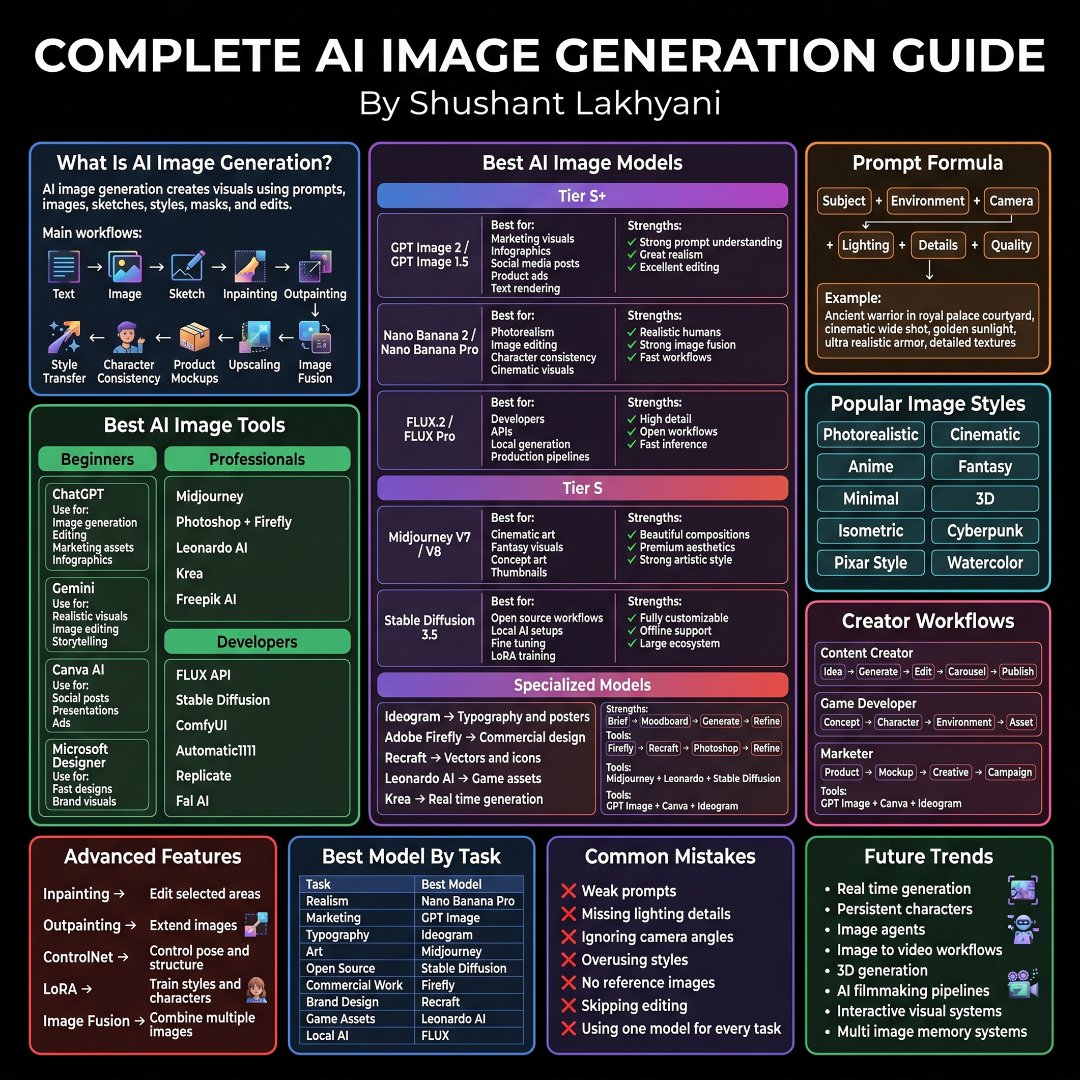
A comprehensive knowledge map covering AI image generation fundamentals, top models like GPT Image, Nano Banana, FLUX and Midjourney, prompt engineering, popular styles, tools, the developer stack, advanced features, creator workflows, common mistakes, future trends and mastery steps.

OpenAI

Source previews

These example images come from the original source. DROPIDEA has not independently tested these examples; results depend on the model and settings.

Ready to personalize

Your prompt

English

Replace the red variables with your information. Copy the full prompt and use it with your preferred agent.

TXT MD English version
Most people blame the AI. The real problem is they never learned the workflow Here's the complete AI image generation guide everyone should bookmark. 📂 AI Image Generation ┃ ┣ 📂 Fundamentals ┃ ┣ 📂 What Is AI Image Generation ┃ ┣ 📂 Text To Image ┃ ┣ 📂 Image Editing ┃ ┣ 📂 Sketch To Image ┃ ┣ 📂 Inpainting ┃ ┣ 📂 Outpainting ┃ ┣ 📂 Style Transfer ┃ ┣ 📂 Character Consistency ┃ ┣ 📂 Product Mockups ┃ ┣ 📂 Upscaling ┃ ┗ 📂 Image Fusion ┃ ┣ 📂 Best AI Models ┃ ┣ 📂 GPT Image 2 ┃ ┣ 📂 GPT Image 1.5 ┃ ┣ 📂 Nano Banana 2 ┃ ┣ 📂 Nano Banana Pro ┃ ┣ 📂 FLUX.2 ┃ ┣ 📂 FLUX Pro ┃ ┣ 📂 Midjourney V7 ┃ ┣ 📂 Midjourney V8 ┃ ┗ 📂 Stable Diffusion 3.5 ┃ ┣ 📂 Model Selection ┃ ┣ 📂 Marketing Visuals ┃ ┣ 📂 Social Media Posts ┃ ┣ 📂 Product Ads ┃ ┣ 📂 Photorealism ┃ ┣ 📂 Character Design ┃ ┣ 📂 Cinematic Visuals ┃ ┣ 📂 Concept Art ┃ ┣ 📂 Thumbnails ┃ ┣ 📂 Open Source Workflows ┃ ┗ 📂 Local Generation ┃ ┣ 📂 Prompt Engineering ┃ ┣ 📂 Subject ┃ ┣ 📂 Environment ┃ ┣ 📂 Camera ┃ ┣ 📂 Lighting ┃ ┣ 📂 Details ┃ ┣ 📂 Quality ┃ ┣ 📂 Composition ┃ ┣ 📂 Mood ┃ ┣ 📂 Textures ┃ ┗ 📂 Style Direction ┃ ┣ 📂 Popular Styles ┃ ┣ 📂 Photorealistic ┃ ┣ 📂 Cinematic ┃ ┣ 📂 Anime ┃ ┣ 📂 Fantasy ┃ ┣ 📂 Minimal ┃ ┣ 📂 3D ┃ ┣ 📂 Isometric ┃ ┣ 📂 Cyberpunk ┃ ┣ 📂 Pixar Style ┃ ┗ 📂 Watercolor ┃ ┣ 📂 AI Tools ┃ ┣ 📂 ChatGPT ┃ ┣ 📂 Gemini ┃ ┣ 📂 Canva AI ┃ ┣ 📂 Microsoft Designer ┃ ┣ 📂 Midjourney ┃ ┣ 📂 Photoshop Firefly ┃ ┣ 📂 Leonardo AI ┃ ┣ 📂 Krea ┃ ┣ 📂 Freepik AI ┃ ┗ 📂 FLUX Ecosystem ┃ ┣ 📂 Developer Stack ┃ ┣ 📂 FLUX API ┃ ┣ 📂 Stable Diffusion ┃ ┣ 📂 ComfyUI ┃ ┣ 📂 Automatic1111 ┃ ┣ 📂 Replicate ┃ ┗ 📂 Fal AI ┃ ┣ 📂 Specialized Models ┃ ┣ 📂 Ideogram ┃ ┣ 📂 Adobe Firefly ┃ ┣ 📂 Recraft ┃ ┣ 📂 Leonardo AI ┃ ┣ 📂 Krea ┃ ┗ 📂 Typography Generation ┃ ┣ 📂 Advanced Features ┃ ┣ 📂 Inpainting ┃ ┣ 📂 Outpainting ┃ ┣ 📂 ControlNet ┃ ┣ 📂 LoRA Training ┃ ┣ 📂 Pose Control ┃ ┣ 📂 Structure Control ┃ ┣ 📂 Character Training ┃ ┗ 📂 Multi Image Fusion ┃ ┣ 📂 Best Models By Task ┃ ┣ 📂 Realism → Nano Banana Pro ┃ ┣ 📂 Marketing → GPT Image ┃ ┣ 📂 Typography → Ideogram ┃ ┣ 📂 Art → Midjourney ┃ ┣ 📂 Open Source → Stable Diffusion ┃ ┣ 📂 Commercial Work → Firefly ┃ ┣ 📂 Brand Design → Recraft ┃ ┣ 📂 Game Assets → Leonardo AI ┃ ┗ 📂 Local AI → FLUX ┃ ┣ 📂 Creator Workflows ┃ ┣ 📂 Idea Generation ┃ ┣ 📂 Character Creation ┃ ┣ 📂 Environment Design ┃ ┣ 📂 Product Mockups ┃ ┣ 📂 Creative Assets ┃ ┣ 📂 Carousels ┃ ┣ 📂 Campaign Visuals ┃ ┣ 📂 Publishing ┃ ┗ 📂 Content Production ┃ ┣ 📂 Common Mistakes ┃ ┣ 📂 Weak Prompts ┃ ┣ 📂 Missing Lighting Details ┃ ┣ 📂 Ignoring Camera Angles ┃ ┣ 📂 Overusing Styles ┃ ┣ 📂 No Reference Images ┃ ┣ 📂 Skipping Editing ┃ ┗ 📂 Using One Model For Everything ┃ ┣ 📂 Future Trends ┃ ┣ 📂 Real Time Generation ┃ ┣ 📂 Persistent Characters ┃ ┣ 📂 Image Agents ┃ ┣ 📂 Image To Video ┃ ┣ 📂 3D Generation ┃ ┣ 📂 AI Filmmaking ┃ ┣ 📂 Interactive Visual Systems ┃ ┗ 📂 Multi Image Memory Systems ┃ ┗ 📂 Mastery ┣ 📂 Learn Prompting ┣ 📂 Pick The Right Model ┣ 📂 Build Repeatable Workflows ┣ 📂 Edit Outputs ┣ 📂 Create Consistent Assets ┗ 📂 Scale Content Production
Preview results

Your prompt

Most people blame the AI. The real problem is they never learned the workflow Here's the complete AI image generation guide everyone should bookmark. 📂 AI Image Generation ┃ ┣ 📂 Fundamentals ┃ ┣ 📂 What Is AI Image Generation ┃ ┣ 📂 Text To Image ┃ ┣ 📂 Image Editing ┃ ┣ 📂 Sketch To Image ┃ ┣ 📂 Inpainting ┃ ┣ 📂 Outpainting ┃ ┣ 📂 Style Transfer ┃ ┣ 📂 Character Consistency ┃ ┣ 📂 Product Mockups ┃ ┣ 📂 Upscaling ┃ ┗ 📂 Image Fusion ┃ ┣ 📂 Best AI Models ┃ ┣ 📂 GPT Image 2 ┃ ┣ 📂 GPT Image 1.5 ┃ ┣ 📂 Nano Banana 2 ┃ ┣ 📂 Nano Banana Pro ┃ ┣ 📂 FLUX.2 ┃ ┣ 📂 FLUX Pro ┃ ┣ 📂 Midjourney V7 ┃ ┣ 📂 Midjourney V8 ┃ ┗ 📂 Stable Diffusion 3.5 ┃ ┣ 📂 Model Selection ┃ ┣ 📂 Marketing Visuals ┃ ┣ 📂 Social Media Posts ┃ ┣ 📂 Product Ads ┃ ┣ 📂 Photorealism ┃ ┣ 📂 Character Design ┃ ┣ 📂 Cinematic Visuals ┃ ┣ 📂 Concept Art ┃ ┣ 📂 Thumbnails ┃ ┣ 📂 Open Source Workflows ┃ ┗ 📂 Local Generation ┃ ┣ 📂 Prompt Engineering ┃ ┣ 📂 Subject ┃ ┣ 📂 Environment ┃ ┣ 📂 Camera ┃ ┣ 📂 Lighting ┃ ┣ 📂 Details ┃ ┣ 📂 Quality ┃ ┣ 📂 Composition ┃ ┣ 📂 Mood ┃ ┣ 📂 Textures ┃ ┗ 📂 Style Direction ┃ ┣ 📂 Popular Styles ┃ ┣ 📂 Photorealistic ┃ ┣ 📂 Cinematic ┃ ┣ 📂 Anime ┃ ┣ 📂 Fantasy ┃ ┣ 📂 Minimal ┃ ┣ 📂 3D ┃ ┣ 📂 Isometric ┃ ┣ 📂 Cyberpunk ┃ ┣ 📂 Pixar Style ┃ ┗ 📂 Watercolor ┃ ┣ 📂 AI Tools ┃ ┣ 📂 ChatGPT ┃ ┣ 📂 Gemini ┃ ┣ 📂 Canva AI ┃ ┣ 📂 Microsoft Designer ┃ ┣ 📂 Midjourney ┃ ┣ 📂 Photoshop Firefly ┃ ┣ 📂 Leonardo AI ┃ ┣ 📂 Krea ┃ ┣ 📂 Freepik AI ┃ ┗ 📂 FLUX Ecosystem ┃ ┣ 📂 Developer Stack ┃ ┣ 📂 FLUX API ┃ ┣ 📂 Stable Diffusion ┃ ┣ 📂 ComfyUI ┃ ┣ 📂 Automatic1111 ┃ ┣ 📂 Replicate ┃ ┗ 📂 Fal AI ┃ ┣ 📂 Specialized Models ┃ ┣ 📂 Ideogram ┃ ┣ 📂 Adobe Firefly ┃ ┣ 📂 Recraft ┃ ┣ 📂 Leonardo AI ┃ ┣ 📂 Krea ┃ ┗ 📂 Typography Generation ┃ ┣ 📂 Advanced Features ┃ ┣ 📂 Inpainting ┃ ┣ 📂 Outpainting ┃ ┣ 📂 ControlNet ┃ ┣ 📂 LoRA Training ┃ ┣ 📂 Pose Control ┃ ┣ 📂 Structure Control ┃ ┣ 📂 Character Training ┃ ┗ 📂 Multi Image Fusion ┃ ┣ 📂 Best Models By Task ┃ ┣ 📂 Realism → Nano Banana Pro ┃ ┣ 📂 Marketing → GPT Image ┃ ┣ 📂 Typography → Ideogram ┃ ┣ 📂 Art → Midjourney ┃ ┣ 📂 Open Source → Stable Diffusion ┃ ┣ 📂 Commercial Work → Firefly ┃ ┣ 📂 Brand Design → Recraft ┃ ┣ 📂 Game Assets → Leonardo AI ┃ ┗ 📂 Local AI → FLUX ┃ ┣ 📂 Creator Workflows ┃ ┣ 📂 Idea Generation ┃ ┣ 📂 Character Creation ┃ ┣ 📂 Environment Design ┃ ┣ 📂 Product Mockups ┃ ┣ 📂 Creative Assets ┃ ┣ 📂 Carousels ┃ ┣ 📂 Campaign Visuals ┃ ┣ 📂 Publishing ┃ ┗ 📂 Content Production ┃ ┣ 📂 Common Mistakes ┃ ┣ 📂 Weak Prompts ┃ ┣ 📂 Missing Lighting Details ┃ ┣ 📂 Ignoring Camera Angles ┃ ┣ 📂 Overusing Styles ┃ ┣ 📂 No Reference Images ┃ ┣ 📂 Skipping Editing ┃ ┗ 📂 Using One Model For Everything ┃ ┣ 📂 Future Trends ┃ ┣ 📂 Real Time Generation ┃ ┣ 📂 Persistent Characters ┃ ┣ 📂 Image Agents ┃ ┣ 📂 Image To Video ┃ ┣ 📂 3D Generation ┃ ┣ 📂 AI Filmmaking ┃ ┣ 📂 Interactive Visual Systems ┃ ┗ 📂 Multi Image Memory Systems ┃ ┗ 📂 Mastery ┣ 📂 Learn Prompting ┣ 📂 Pick The Right Model ┣ 📂 Build Repeatable Workflows ┣ 📂 Edit Outputs ┣ 📂 Create Consistent Assets ┗ 📂 Scale Content Production

What you get

  • An organized knowledge tree covering AI image generation from fundamentals to mastery.
  • A curated list of top AI models, tools and the developer stack with technical names preserved.
  • Guidance for selecting the right model per task type.
  • Dedicated sections for common mistakes and future trends.

Use cases

  • A bookmarkable reference for creators and marketers learning AI image workflows.
  • A learning roadmap for beginners moving from basics to advanced techniques like ControlNet and LoRA training.
  • A quick model-picking guide for design, marketing and content production projects.
  • Educational content for social media posts or training courses.

How to use

  • Start with the Fundamentals section to understand core concepts like text-to-image, image editing and style transfer.
  • Use the Model Selection section to pick the right model for your task such as photorealism or product ads.
  • Study Prompt Engineering to build strong prompts covering subject, environment, camera, lighting and composition.
  • Check Best Models By Task to match the right tool to each goal, e.g. Ideogram for typography and Midjourney for art.
  • Avoid common mistakes like weak prompts, missing reference images and overusing styles.
  • Follow the Mastery path by building repeatable workflows, editing outputs and scaling content production.

Related prompts