Skip to content
ImagesFree

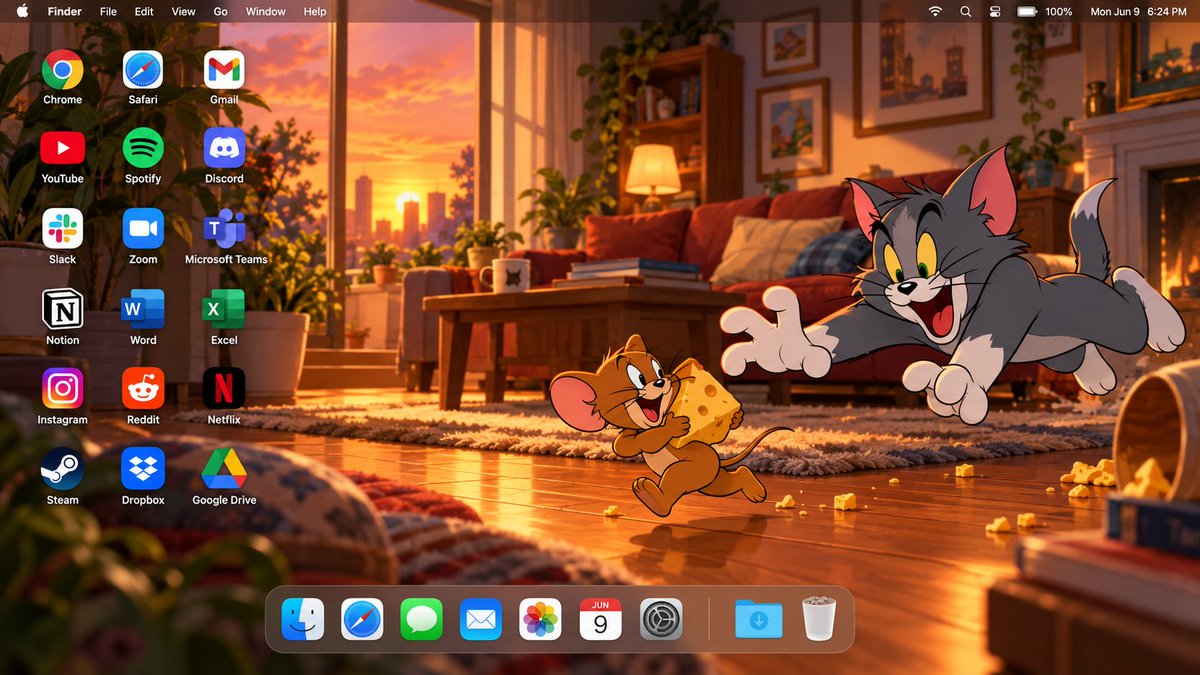
Cinematic Tom and Jerry macOS Desktop Wallpaper

Prompt to generate a full 16:9 macOS desktop wallpaper screenshot featuring Tom and Jerry in a warm cartoon setting with native menu bar, dock, and icons.

OpenAI

Source previews

These example images come from the original source. DROPIDEA has not independently tested these examples; results depend on the model and settings.

Ready to personalize

Your prompt

English

Replace the red variables with your information. Copy the full prompt and use it with your preferred agent.

TXT MD English version
Create a high-end 16:9 macOS desktop wallpaper screenshot featuring Tom and Jerry as the main characters. Build an original cinematic cartoon living-room scene at sunset, with warm window light entering from one side, wooden flooring, cozy furniture, soft shadows, scattered playful objects, and subtle atmospheric depth. Keep the environment original and polished, like a premium animated-film background. Place Tom and Jerry together on the RIGHT side of the desktop in an expressive playful storytelling moment. Preserve their recognizable classic cartoon appearance, proportions, colors, facial expressions, and original 2D animation aesthetic. Tom should react dramatically while Jerry appears mischievous. Keep both characters fully visible, not cropped, with faces, hands, tails, and important details clearly shown. Keep them clearly cartoon-styled, not realistic or redesigned. Reserve the LEFT side for desktop shortcuts. Add exactly 18 desktop application icons, arranged in 3 columns and 6 rows, with clean alignment, identical sizing, generous spacing, and crisp white labels. The applications must be: Chrome | Safari | Gmail YouTube | Spotify | Discord Slack | Zoom | Microsoft Teams Notion | Word | Excel Instagram | Reddit | Netflix Steam | Dropbox | Google Drive Do not add extra icons, do not duplicate icons, and do not omit any of them. Add a realistic translucent macOS menu bar across the full top edge. Include: Apple logo, Finder, File, Edit, View, Go, Window, Help on the left; and Wi‑Fi, battery, control icons, and a clock on the right. Keep it thin, elegant, and clearly macOS-style. Add a floating translucent macOS Dock along the bottom, positioned slightly toward the LEFT so Tom and Jerry remain unobstructed on the right. Dock icons: Finder, Safari, Messages, Mail, Photos, Calendar, System Settings, separator, Downloads, Trash. Use warm golden-orange lighting mixed with deep brown, cream, muted red, and soft blue accents. Add subtle cinematic lighting, depth, and atmosphere while keeping the overall image clearly cartoon-styled and clean. Final result: a premium edge-to-edge high-resolution 16:9 macOS desktop image combining a cinematic cartoon wallpaper with a realistic macOS interface. Balanced composition, strong character integration, polished lighting, clean typography, and clear negative space. Do not include: laptop frame, monitor frame, keyboard, mouse, open app windows, extra characters, duplicate icons, large titles, advertisements, banners, or watermark.
Preview results

Your prompt

Create a high-end 16:9 macOS desktop wallpaper screenshot featuring Tom and Jerry as the main characters. Build an original cinematic cartoon living-room scene at sunset, with warm window light entering from one side, wooden flooring, cozy furniture, soft shadows, scattered playful objects, and subtle atmospheric depth. Keep the environment original and polished, like a premium animated-film background. Place Tom and Jerry together on the RIGHT side of the desktop in an expressive playful storytelling moment. Preserve their recognizable classic cartoon appearance, proportions, colors, facial expressions, and original 2D animation aesthetic. Tom should react dramatically while Jerry appears mischievous. Keep both characters fully visible, not cropped, with faces, hands, tails, and important details clearly shown. Keep them clearly cartoon-styled, not realistic or redesigned. Reserve the LEFT side for desktop shortcuts. Add exactly 18 desktop application icons, arranged in 3 columns and 6 rows, with clean alignment, identical sizing, generous spacing, and crisp white labels. The applications must be: Chrome | Safari | Gmail YouTube | Spotify | Discord Slack | Zoom | Microsoft Teams Notion | Word | Excel Instagram | Reddit | Netflix Steam | Dropbox | Google Drive Do not add extra icons, do not duplicate icons, and do not omit any of them. Add a realistic translucent macOS menu bar across the full top edge. Include: Apple logo, Finder, File, Edit, View, Go, Window, Help on the left; and Wi‑Fi, battery, control icons, and a clock on the right. Keep it thin, elegant, and clearly macOS-style. Add a floating translucent macOS Dock along the bottom, positioned slightly toward the LEFT so Tom and Jerry remain unobstructed on the right. Dock icons: Finder, Safari, Messages, Mail, Photos, Calendar, System Settings, separator, Downloads, Trash. Use warm golden-orange lighting mixed with deep brown, cream, muted red, and soft blue accents. Add subtle cinematic lighting, depth, and atmosphere while keeping the overall image clearly cartoon-styled and clean. Final result: a premium edge-to-edge high-resolution 16:9 macOS desktop image combining a cinematic cartoon wallpaper with a realistic macOS interface. Balanced composition, strong character integration, polished lighting, clean typography, and clear negative space. Do not include: laptop frame, monitor frame, keyboard, mouse, open app windows, extra characters, duplicate icons, large titles, advertisements, banners, or watermark.

Variable guide

Tom and Jerry

Cartoon characters and their interaction

Within the first and second paragraphs describing the featured characters

Example value

Tom and Jerry

at sunset, with warm window light entering from one side

Scene time and lighting ambiance

Within the room setting description in the first paragraph

Example value

at sunset, with warm window light entering from one side

What you get

  • A full 16:9 macOS desktop wallpaper screenshot combining cinematic illustration and realistic UI elements.
  • Classic 2D animation style rendering of Tom and Jerry integrated naturally into the environment.
  • Realistic translucent macOS top menu bar, aligned 3x6 desktop icon grid, and floating dock.

Use cases

  • Personalized Mac and PC desktop wallpapers.
  • Design mockups and UI presentation visual backdrops.
  • Creative fan art showcasing classic animation nostalgia within a modern tech environment.

How to use

  • Copy the complete prompt into an AI image generator capable of handling detailed compositions and UI text.
  • Optionally replace the characters or lighting scenario while retaining the desktop layout structure.
  • Ensure the output aspect ratio is set to 16:9 to match native widescreen monitors.

Related prompts