Skip to content
ImagesFree

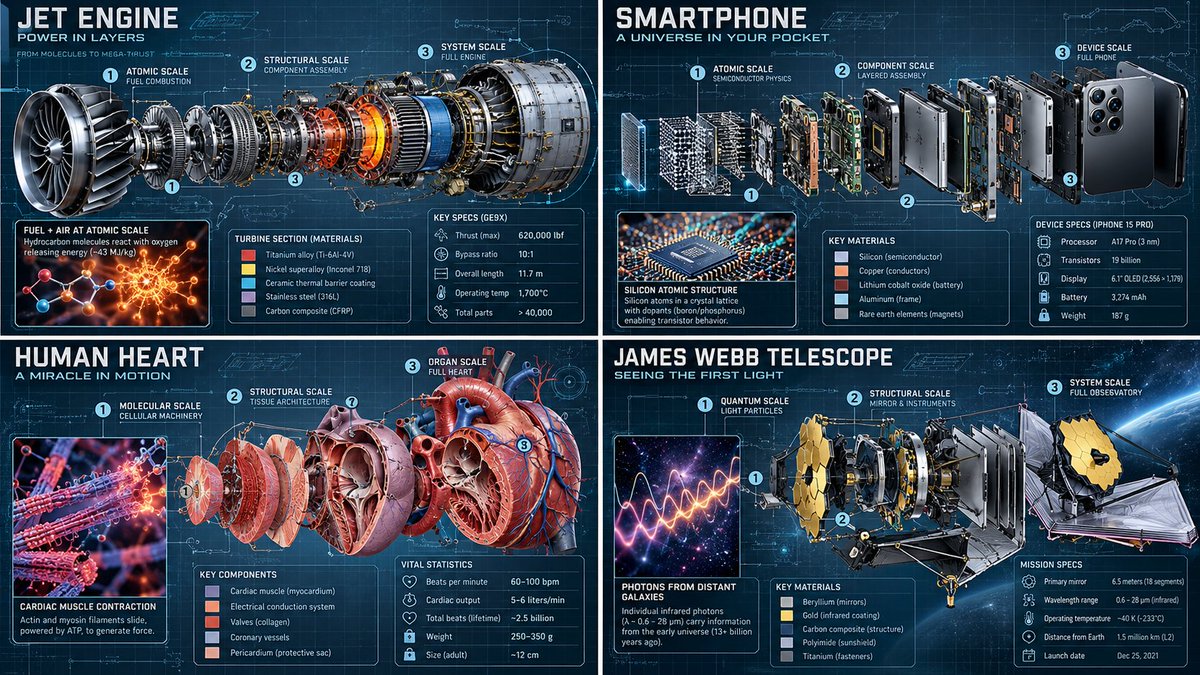
Multiscale Technical Editorial Exploded Infographic

A pseudocode-styled prompt generating a 3-layer exploded technical infographic with UI overlays for any subject.

Image generation

Source previews

These example images come from the original source. DROPIDEA has not independently tested these examples; results depend on the model and settings.

Ready to personalize

Your prompt

English

Replace the red variables with your information. Copy the full prompt and use it with your preferred agent.

TXT MD English version
2x2 grid, 16:9, AI picks topics: class Multiscale_Technical_Editorial: def __init__(self, subject="[$SUBJECT]"): self.canvas = "Precision graph paper background (0.5mm grid), faint blueprint cyan tint, 30° axonometric view." self. lighting = "Cryo-EM inspired macro-lighting, harsh chamfer highlights." def execute_exploded_render_progression(self): # AI AUTO-INFERENCE: Deconstruct [$SUBJECT] into 3 distinct functional layers core = infer_innermost_components(self.subject) meso = infer_structural_framework(self.subject) macro = infer_outer_shell_or_environment(self.subject) # The Render Gradient (Prompt 4 + 3) layer_1 = f"INNERMOST CORE: {core} rendered as pure fundamental science (atomic interactions, quantum states, glowing mathematical Lagrangians)." layer_2 = f"MIDDLE EXPLOSION: {meso} floating in axial alignment, rendered as Technical CAD, color-coded by material (titanium, copper, lipid bilayer)." layer_3 = f"OUTERMOST SHELL: {macro} rendered photorealistically, showing micro-scale surface details, wear patterns, and environmental atmosphere." return [layer_1, layer_2, layer_3] def overlay_ui(self): vectors = "Dotted assembly vectors with sequential numbering connecting the exploded parts." cards = f"Hovering holographic data cards inferring exact material grades, genomic lengths, or operating temperatures of {self.subject}." return [vectors, cards] render_infographic(Multiscale_Technical_Editorial())
Preview results

Your prompt

2x2 grid, 16:9, AI picks topics: class Multiscale_Technical_Editorial: def __init__(self, subject="[$SUBJECT]"): self.canvas = "Precision graph paper background (0.5mm grid), faint blueprint cyan tint, 30° axonometric view." self. lighting = "Cryo-EM inspired macro-lighting, harsh chamfer highlights." def execute_exploded_render_progression(self): # AI AUTO-INFERENCE: Deconstruct [$SUBJECT] into 3 distinct functional layers core = infer_innermost_components(self.subject) meso = infer_structural_framework(self.subject) macro = infer_outer_shell_or_environment(self.subject) # The Render Gradient (Prompt 4 + 3) layer_1 = f"INNERMOST CORE: {core} rendered as pure fundamental science (atomic interactions, quantum states, glowing mathematical Lagrangians)." layer_2 = f"MIDDLE EXPLOSION: {meso} floating in axial alignment, rendered as Technical CAD, color-coded by material (titanium, copper, lipid bilayer)." layer_3 = f"OUTERMOST SHELL: {macro} rendered photorealistically, showing micro-scale surface details, wear patterns, and environmental atmosphere." return [layer_1, layer_2, layer_3] def overlay_ui(self): vectors = "Dotted assembly vectors with sequential numbering connecting the exploded parts." cards = f"Hovering holographic data cards inferring exact material grades, genomic lengths, or operating temperatures of {self.subject}." return [vectors, cards] render_infographic(Multiscale_Technical_Editorial())

Variable guide

[$SUBJECT]

The technical, physical, or biological object to deconstruct

Inside the subject argument in __init__ and within code comments

Example value

Quantum Processor Core

What you get

  • A 16:9 multi-panel or exploded technical editorial illustration.
  • Three-layer visualization showing the fundamental scientific core, CAD exploded components, and macro surface realism.
  • Overlay technical graphics including numbered vector paths and holographic data cards.

Use cases

  • High-end editorial illustrations for scientific and tech magazines.
  • Futuristic hardware, device, and concept visualization.
  • Educational infographics explaining structural mechanics and advanced materials.

How to use

  • Replace the placeholder [$SUBJECT] with any mechanical, biological, or technological topic.
  • Paste the entire pseudocode structure directly into your AI image generator.
  • Ensure the aspect ratio is set to 16:9 as requested by the prompt header.
  • Generate and examine the three-tier visual progression from quantum core to CAD meso-structure and photorealistic exterior.

Related prompts