Skip to content
ImagesFree

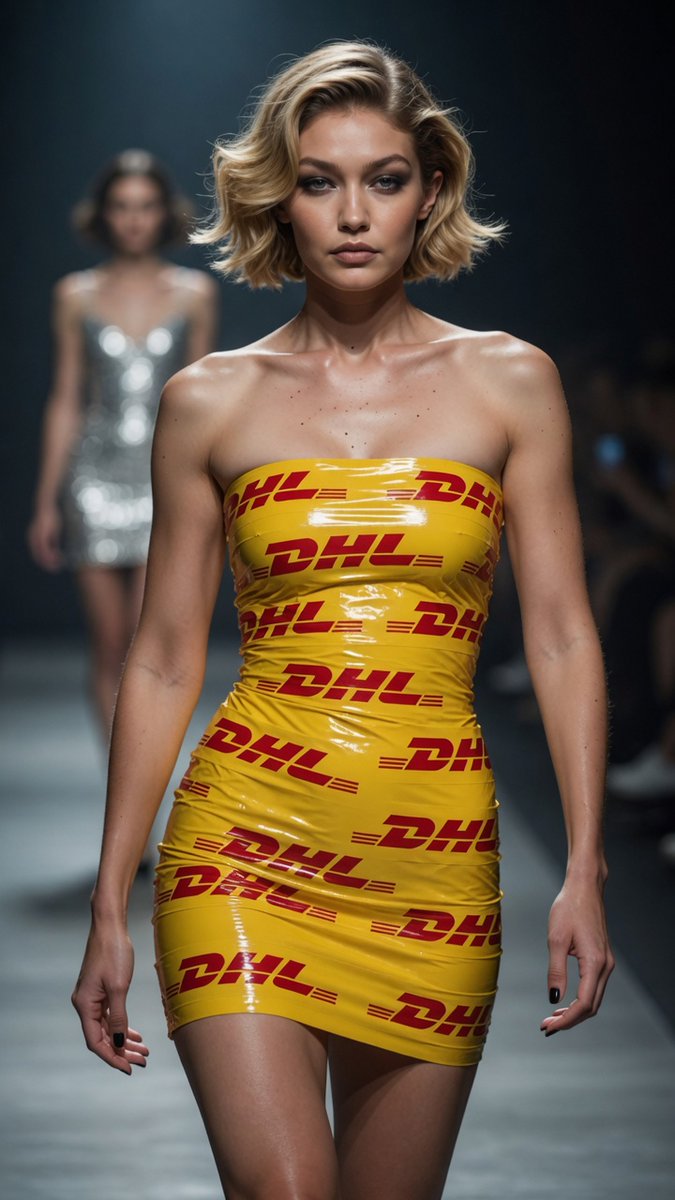
Photorealistic Runway Photo of Gigi Hadid in DHL Tape Dress

A Grok prompt generating a photorealistic fashion runway image of Gigi Hadid in a form-fitting dress made of glossy yellow DHL shipping tape, with variations for angle, lighting, and expression.

Image generation

Source previews

These example images come from the original source. DROPIDEA has not independently tested these examples; results depend on the model and settings.

Ready to personalize

Your prompt

English

Replace the red variables with your information. Copy the full prompt and use it with your preferred agent.

TXT MD English version
[Grok Prompt] Photorealistic fashion runway photo of Gigi Hadid walking confidently on a dimly lit runway, wearing a tight strapless mini dress completely made of glossy bright yellow DHL shipping tape wrapped around her body, red 'DHL' logos visible all over the tape, the dress is form-fitting and ends high on the thighs, her skin has a slight sheen, short wavy blonde bob haircut, bold eye makeup, neutral lip, serious expression, arms relaxed at her sides with dark nail polish, soft dramatic lighting with bokeh background, another model blurred in the distance wearing a silver dress, high fashion editorial style, sharp details, 8k --ar 2:3 --stylize 250 --v 6 Variations you can add: For a different angle: "side view, three-quarter pose" For more dramatic: "cinematic lighting, fog on runway, spotlights" For fun: "Gigi Hadid smirking at camera" or "full body shot from lower angle"
Preview results

Your prompt

[Grok Prompt] Photorealistic fashion runway photo of Gigi Hadid walking confidently on a dimly lit runway, wearing a tight strapless mini dress completely made of glossy bright yellow DHL shipping tape wrapped around her body, red 'DHL' logos visible all over the tape, the dress is form-fitting and ends high on the thighs, her skin has a slight sheen, short wavy blonde bob haircut, bold eye makeup, neutral lip, serious expression, arms relaxed at her sides with dark nail polish, soft dramatic lighting with bokeh background, another model blurred in the distance wearing a silver dress, high fashion editorial style, sharp details, 8k --ar 2:3 --stylize 250 --v 6 Variations you can add: For a different angle: "side view, three-quarter pose" For more dramatic: "cinematic lighting, fog on runway, spotlights" For fun: "Gigi Hadid smirking at camera" or "full body shot from lower angle"

Variable guide

Gigi Hadid

The model/celebrity name in the image.

Start of the template and in the fun variations line.

Example value

Kendall Jenner

glossy bright yellow DHL shipping tape

The dress material and color.

The phrase "glossy bright yellow DHL shipping tape" in the template.

Example value

glossy pink shipping tape

side view, three-quarter pose

Alternate camera angle option.

The 'For a different angle' line in the variations section.

Example value

"full body shot from lower angle"

cinematic lighting, fog on runway, spotlights

Alternate dramatic lighting option.

The 'For more dramatic' line in the variations section.

Example value

"backstage neon glow"

Gigi Hadid smirking at camera

Alternate playful expression option.

The 'For fun' line in the variations section.

Example value

"laughing with the audience"

What you get

  • A photorealistic high-fashion editorial image at 8k quality.
  • A model walking confidently on a dimly lit runway in a form-fitting dress made of glossy yellow shipping tape with red logos.
  • A soft bokeh background with a second blurred model in a silver dress.
  • Sharp detail in makeup, hairstyle, and dramatic lighting.

Use cases

  • Inspiring avant-garde fashion design and upcycling concepts.
  • Social media posts and fashion content.
  • Editorial photography trend research.
  • Ideas for bold brand-marketing campaigns.

How to use

  • Copy the template as-is and paste it into Grok or Midjourney v6 to generate the image.
  • Replace only the model's name or the tape color if you want customization while keeping the rest of the description.
  • Append one of the quoted variations (angle, lighting, or expression) to the end of the description before the output settings.
  • Keep the technical settings unchanged: --ar 2:3, --stylize 250, and --v 6 for the expected result.
  • Generate several versions and pick the best; results are stochastic and may vary between attempts.

Related prompts