Skip to content
ImagesFree

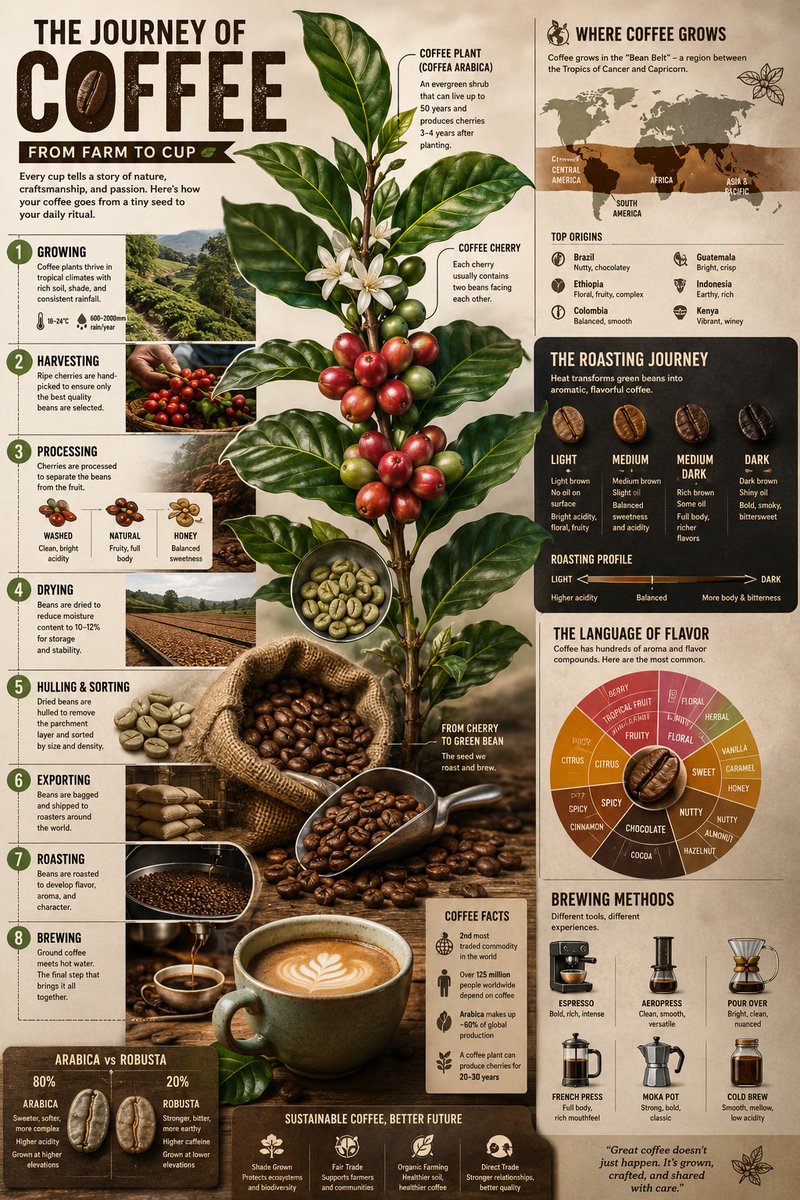
Coffee Journey Farm to Cup Infographic

A detailed prompt for generating a premium magazine-style infographic documenting coffee's journey through production stages, centered on a photorealistic coffee plant and surrounded by processing diagrams, roasting profiles, a flavor wheel, brewing methods, an origin map, and concise annotations in a bold editorial earthy style.

OpenAI

Source previews

These example images come from the original source. DROPIDEA has not independently tested these examples; results depend on the model and settings.

Ready to personalize

Your prompt

English

Replace the red variables with your information. Copy the full prompt and use it with your preferred agent.

TXT MD English version
Create a visually rich infographic showing the journey of coffee from farm to cup. Research each production stage online. Center a highly detailed photorealistic coffee plant with cherries and roasted beans, surrounded by illustrated processing diagrams, roasting profiles, flavor wheel, brewing methods, origin map, and concise annotations. Blend photorealism with bold editorial graphics, icons, layered composition, geometric shapes, and earthy color blocking. Dense, tactile, premium magazine infographic.
Preview results

Your prompt

Create a visually rich infographic showing the journey of coffee from farm to cup. Research each production stage online. Center a highly detailed photorealistic coffee plant with cherries and roasted beans, surrounded by illustrated processing diagrams, roasting profiles, flavor wheel, brewing methods, origin map, and concise annotations. Blend photorealism with bold editorial graphics, icons, layered composition, geometric shapes, and earthy color blocking. Dense, tactile, premium magazine infographic.

Variable guide

coffee

The infographic's main topic

Template start: «journey of coffee from farm to cup»

Example value

chocolate

earthy color blocking

The dominant color style

Near template end: «earthy color blocking»

Example value

muted neutral color blocking

What you get

  • A dense, information-rich premium magazine-style infographic.
  • A centered photorealistic coffee plant with cherries and roasted beans.
  • Surrounding illustrated elements: processing diagrams, roasting profiles, a flavor wheel, brewing methods, an origin map, and concise annotations.
  • A blend of photorealism, bold editorial graphics, geometric shapes, and earthy color blocking.

Use cases

  • Educational posters for cafés and coffee roasters.
  • Marketing content for specialty coffee brands.
  • Visual assets for magazine articles about coffee.
  • Presentations on agricultural supply chains.

How to use

  • Copy the full Arabic template into an image or content generation tool that supports infographics.
  • To change the topic, replace the word «coffee» and its related terms in the template with another subject and adjust its production stages accordingly.
  • To change the mood, replace «earthy color blocking» with an alternative color style that suits your taste.
  • Keep technical style directives like «photorealism» and «layered composition» unchanged if you want the same premium editorial look.
  • Attach reference images if your tool supports them to fine-tune detail and flavor accuracy.
  • Regenerate several times and pick the best composition, since generative results vary each run.

Related prompts