Skip to content
ImagesFree

Realistic Low-Angle Selfie With Identity Lock

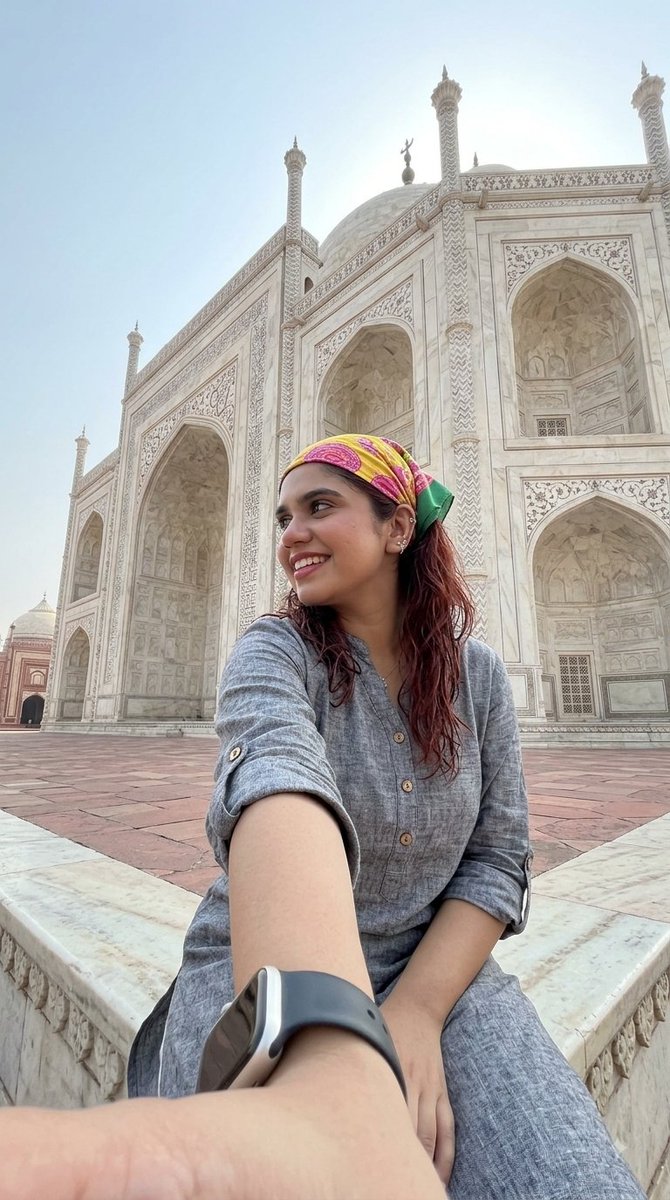
Instructions to generate a realistic 9:16 extreme low-angle POV selfie at a Mughal marble mausoleum, preserving the uploaded face identity exactly, with specified outfit, ultra-wide smartphone perspective, and natural daylight.

Image generation

Source previews

These example images come from the original source. DROPIDEA has not independently tested these examples; results depend on the model and settings.

Ready to personalize

Your prompt

English

Replace the red variables with your information. Copy the full prompt and use it with your preferred agent.

TXT MD English version
IDENTITY LOCK: Use the uploaded face photo as the only identity reference. Recreate the exact same woman with identical facial features, skin tone, hair, facial hair (if any), proportions, and natural texture. No beautification, reshaping, aging, or identity changes. Create a realistic 9:16 extreme low-angle POV selfie at a grand white marble Mughal-style mausoleum. Her extended arm reaches toward the camera, with the foreground hand/wrist appearing naturally larger and an Apple Watch visible. Behind it, she sits casually on a marble ledge in three-quarter profile, looking left with a warm genuine smile. Keep the pose relaxed, playful, spontaneous, and anatomically believable. She wears a loose grey textured linen kurti with wooden toggle buttons and rolled sleeves, plus a colorful yellow/pink patterned bandana with a bright green knot or trailing fabric. Set the scene among ornate white marble arches, carved floral details, finial-topped structures, a central dome, and geometric red-sandstone/marble flooring beneath a bright pale-blue sky. Use an ultra-wide smartphone selfie perspective around 13–16mm with realistic foreground exaggeration, mild edge distortion, deep focus, natural HDR, and subtle handheld imperfections. Strong natural daylight creates realistic marble highlights and a subtle sunburst near the upper-right. Preserve authentic skin, fabric, watch, marble, patterns, and shadows. Avoid: altered identity, beauty filters, plastic skin, malformed hands/fingers, broken arm anatomy, disconnected limbs, warped watch, extreme fisheye, stretched face, warped architecture, fake sun flare, excessive HDR, oversaturation, cinematic grading, studio lighting, or AI-looking textures.
Preview results

Your prompt

IDENTITY LOCK: Use the uploaded face photo as the only identity reference. Recreate the exact same woman with identical facial features, skin tone, hair, facial hair (if any), proportions, and natural texture. No beautification, reshaping, aging, or identity changes. Create a realistic 9:16 extreme low-angle POV selfie at a grand white marble Mughal-style mausoleum. Her extended arm reaches toward the camera, with the foreground hand/wrist appearing naturally larger and an Apple Watch visible. Behind it, she sits casually on a marble ledge in three-quarter profile, looking left with a warm genuine smile. Keep the pose relaxed, playful, spontaneous, and anatomically believable. She wears a loose grey textured linen kurti with wooden toggle buttons and rolled sleeves, plus a colorful yellow/pink patterned bandana with a bright green knot or trailing fabric. Set the scene among ornate white marble arches, carved floral details, finial-topped structures, a central dome, and geometric red-sandstone/marble flooring beneath a bright pale-blue sky. Use an ultra-wide smartphone selfie perspective around 13–16mm with realistic foreground exaggeration, mild edge distortion, deep focus, natural HDR, and subtle handheld imperfections. Strong natural daylight creates realistic marble highlights and a subtle sunburst near the upper-right. Preserve authentic skin, fabric, watch, marble, patterns, and shadows. Avoid: altered identity, beauty filters, plastic skin, malformed hands/fingers, broken arm anatomy, disconnected limbs, warped watch, extreme fisheye, stretched face, warped architecture, fake sun flare, excessive HDR, oversaturation, cinematic grading, studio lighting, or AI-looking textures.

Variable guide

uploaded face photo

The only identity reference; a matching face photo must be uploaded.

Start of template: "IDENTITY LOCK: Use the uploaded face photo..."

Example value

uploaded face photo

grand white marble Mughal-style mausoleum

Editable architectural location.

Second paragraph

Example value

grand white marble Mughal-style mausoleum

loose grey textured linen kurti with wooden toggle buttons and rolled sleeves

Editable clothing description.

Third paragraph: "She wears a loose grey..."

Example value

loose grey textured linen kurti

colorful yellow/pink patterned bandana

Bandana colors and pattern.

Third paragraph after the kurti description

Example value

yellow/pink pattern with bright green knot

around 13–16mm

Artistic lens specs; ultra-wide 13–16mm.

Fourth paragraph: "around 13–16mm"

Example value

around 13–16mm

What you get

  • A realistic 9:16 extreme low-angle POV selfie
  • Identity preserved exactly from the uploaded face photo, no beautification
  • A Mughal marble mausoleum scene with arches, dome, and carved details
  • Realistic technical cues: mild edge distortion, natural HDR, subtle sunburst

Use cases

  • Realistic-looking social media imagery
  • Travel and tourism content in an authentic selfie style
  • Testing identity preservation in image generation models
  • Creative visuals blending portraiture with historic architecture

How to use

  • Upload a clear, high-quality face photo of the woman; it is the only identity reference.
  • Copy the full template and adjust editable values such as location, outfit, or bandana if desired.
  • Keep technical numbers (9:16 and 13–16mm) exactly as digits; do not convert them to words.
  • Paste the template into an image generation tool that supports image references.
  • Check the output against the Avoid list for hand deformities or identity drift.
  • Regenerate with minor pose or lighting tweaks until satisfied.

Related prompts