Skip to content
ImagesFree

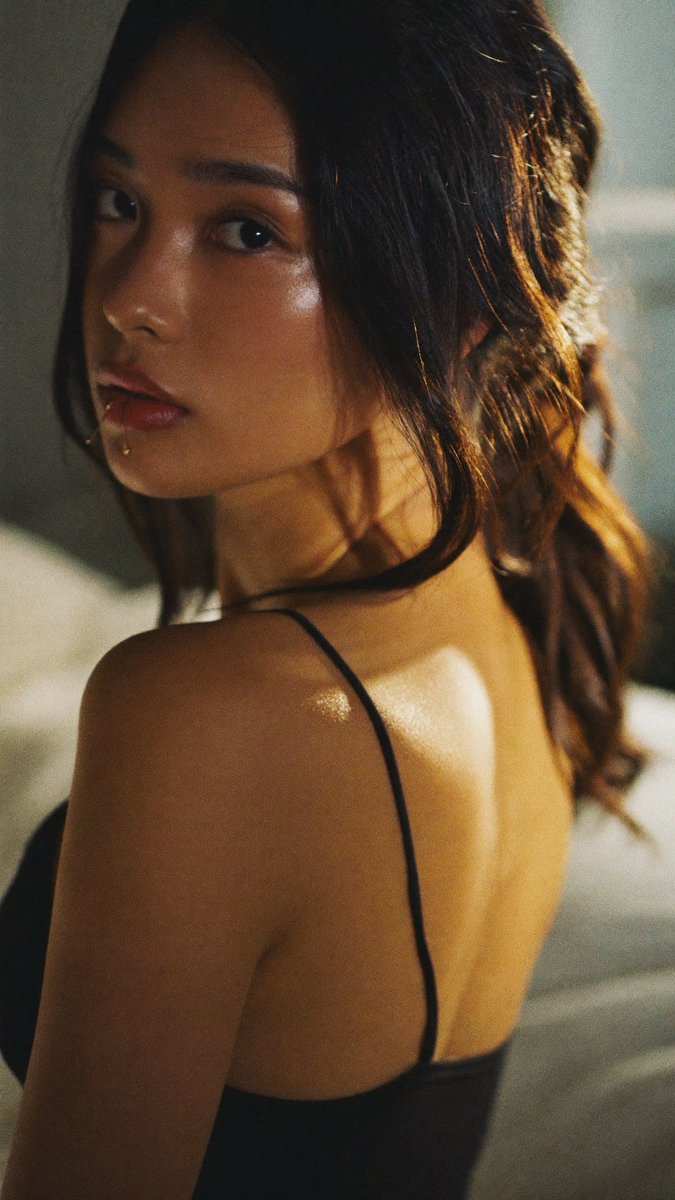
Photorealistic Cinematic Portrait of an East Asian Woman in Warm Light

A detailed prompt for generating a photorealistic cinematic portrait of a young East Asian woman with dramatic golden hour window lighting, authentic skin texture, and shallow depth of field.

Midjourney

Source previews

These example images come from the original source. DROPIDEA has not independently tested these examples; results depend on the model and settings.

Ready to personalize

Your prompt

English

Replace the red variables with your information. Copy the full prompt and use it with your preferred agent.

TXT MD English version
Photorealistic cinematic portrait of a young East Asian woman with long, slightly messy dark brown hair with warm highlights, looking back over her left shoulder toward the camera with a soft, slightly mysterious expression. She has delicate features, pale skin with natural texture, defined dark eyes, and glossy pink lips. She wears a simple black spaghetti-strap camisole. Strong warm window light from the right side creates dramatic highlights on her hair, cheek, and bare shoulder while leaving the left side of her face and back in soft shadow. Shallow depth of field, film-like grain, soft glow, natural skin texture, intimate and elegant atmosphere, shot on 85mm lens, golden hour indoor lighting, highly detailed, 8k. Negative prompt (optional): blurry, low quality, extra fingers, deformed face, over-smoothed skin, plastic look, cartoon, watermark, text, extra limbs You can drop the positive prompt into Flux, Midjourney, or Grok Imagine and tweak lighting or hair length if you want variations.
Preview results

Your prompt

Photorealistic cinematic portrait of a young East Asian woman with long, slightly messy dark brown hair with warm highlights, looking back over her left shoulder toward the camera with a soft, slightly mysterious expression. She has delicate features, pale skin with natural texture, defined dark eyes, and glossy pink lips. She wears a simple black spaghetti-strap camisole. Strong warm window light from the right side creates dramatic highlights on her hair, cheek, and bare shoulder while leaving the left side of her face and back in soft shadow. Shallow depth of field, film-like grain, soft glow, natural skin texture, intimate and elegant atmosphere, shot on 85mm lens, golden hour indoor lighting, highly detailed, 8k. Negative prompt (optional): blurry, low quality, extra fingers, deformed face, over-smoothed skin, plastic look, cartoon, watermark, text, extra limbs You can drop the positive prompt into Flux, Midjourney, or Grok Imagine and tweak lighting or hair length if you want variations.

Variable guide

young East Asian woman

Ethnicity or demographic of the main character

In the first line, after 'Photorealistic cinematic portrait of a'

Example value

young East Asian woman

long, slightly messy dark brown hair with warm highlights

Hair length, texture, and highlights description

In the first line, right after the subject description

Example value

long, slightly messy dark brown hair with warm highlights

simple black spaghetti-strap camisole

Wardrobe style and color

In the sentence beginning with 'She wears a'

Example value

simple black spaghetti-strap camisole

Strong warm window light from the right side

Light source, direction, and intensity

At the start of the lighting description

Example value

Strong warm window light from the right side

85mm

Focal length of the simulated camera lens

Inside the phrase 'shot on 85mm lens'

Example value

85mm

What you get

  • A cinematic, photorealistic portrait rendering that replicates an authentic 85mm photo shoot.
  • Dramatic lighting highlights balanced with subtle shadows across facial contours.
  • High-definition skin micro-textures and hair details avoiding plastic over-smoothing.

Use cases

  • Creating high-end visual assets and avatars for editorial or social media projects.
  • Lighting and posing inspiration for real-life portrait photography sessions.
  • Concept art and character moodboards for visual storytelling.

How to use

  • Copy the positive prompt and paste it into your AI generator (Flux, Midjourney, or Grok Imagine).
  • If your tool supports negative prompts, paste the provided negative prompt into the designated field.
  • Customize variables such as lighting, hairstyle, or attire to generate tailored variations.
  • Apply a portrait aspect ratio (such as --ar 4:5 or --ar 2:3 in Midjourney) for optimal framing.

Related prompts