Skip to content
ImagesFree

Turn any outfit reference into a reusable fashion poster prompt ✨ I broke down this Korean-style lookbook layout into a GPT Image

Turn any outfit reference into a reusable fashion poster prompt ✨ I broke down this Korean-style lookbook layout into a GPT Image

OpenAI

Source previews

These example images come from the original source. DROPIDEA has not independently tested these examples; results depend on the model and settings.

Ready to personalize

Your prompt

Source text

Replace the red variables with your information. Copy the full prompt and use it with your preferred agent.

TXT MD English version
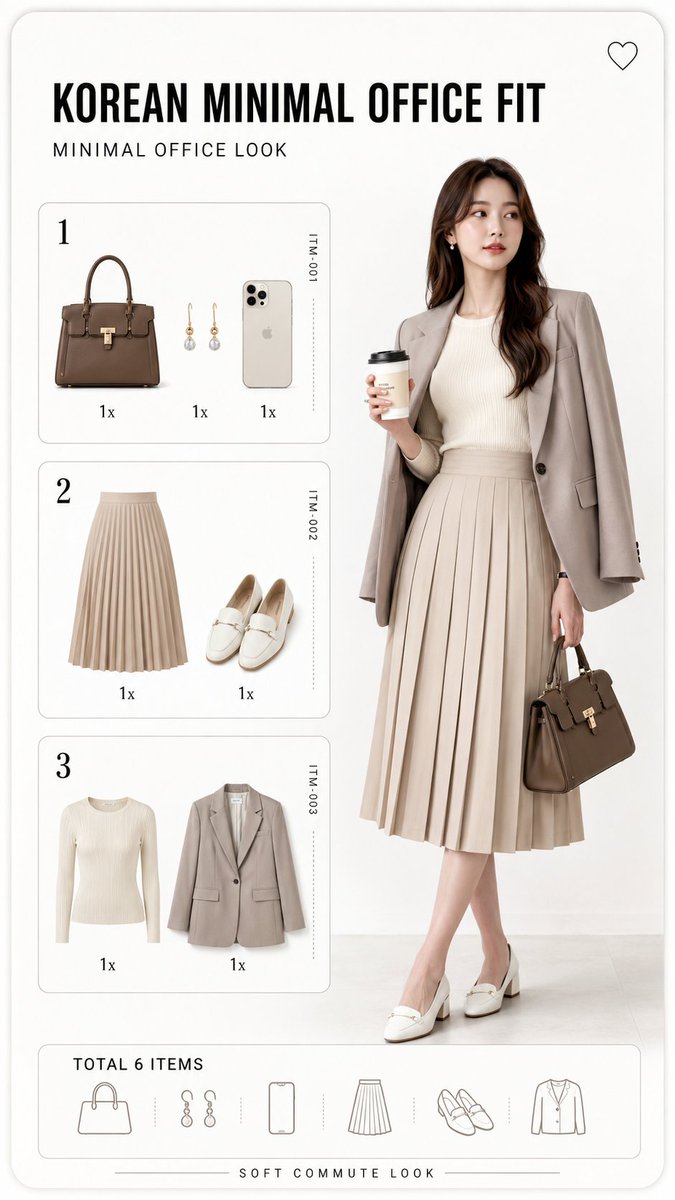
Turn any outfit reference into a reusable fashion poster prompt ✨ I broke down this Korean-style lookbook layout into a GPT Image 2 prompt template — with variables for text language, title, outfit items, model styling, checklist panels, and captions. Copy the structure, swap the variables, and build your own fashion prompt series 👇 ``` Create a vertical 9:16 fashion outfit breakdown poster in a clean Korean Y2K lookbook style. Design the image as a rounded-corner mobile fashion card on a bright white studio background. Use a minimal editorial layout with lots of negative space, soft gray panel borders, subtle shadows, crisp typography, pastel colors, and a polished fashion app UI feeling. Important text rule: All visible text in the image must be rendered in [TEXT_LANGUAGE], including the main title, subtitle, panel labels, quantity labels, total item label, and bottom caption. Use the exact following text: - Main title: "[MAIN_TITLE]" - Subtitle: "[SUB_TITLE]" - Bottom caption: "[BOTTOM_CAPTION]" - Total label: "[TOTAL_LABEL]" Top area: Add a bold main title in large typography, with the subtitle underneath in smaller clean uppercase or matching style depending on the language. Add a small outline heart icon in the top-right corner. Right side: Show a full-body adult female fashion model, early 20s, non-sexualized, cute confident pose, standing in soft studio lighting. She is holding a smartphone as if taking a selfie. Outfit: [OUTFIT_DESCRIPTION]. Keep the model realistic but slightly glossy and doll-like, like a premium digital fashion catalog. Left side: Create three stacked outfit checklist panels labeled “1”, “2”, and “3”. Panel 1 shows: [PANEL_1_ITEMS]. Panel 2 shows: [PANEL_2_ITEMS]. Panel 3 shows: [PANEL_3_ITEMS]. Each item should appear as an isolated product icon with a quantity label such as “1x”. Add tiny vertical item codes on the right side of each panel, like a fashion inventory card. Bottom-left area: Add the total item summary using “[TOTAL_LABEL]”, with small minimalist line icons representing all outfit items. Overall visual direction: playful fashion infographic, product flat-lay icons plus full-body model, white background, clean commercial poster composition, high-resolution, sharp details, legible text, no real brand logos, no watermark, no extra characters, no messy background. ```
Preview results

Your prompt

Turn any outfit reference into a reusable fashion poster prompt ✨ I broke down this Korean-style lookbook layout into a GPT Image 2 prompt template — with variables for text language, title, outfit items, model styling, checklist panels, and captions. Copy the structure, swap the variables, and build your own fashion prompt series 👇 ``` Create a vertical 9:16 fashion outfit breakdown poster in a clean Korean Y2K lookbook style. Design the image as a rounded-corner mobile fashion card on a bright white studio background. Use a minimal editorial layout with lots of negative space, soft gray panel borders, subtle shadows, crisp typography, pastel colors, and a polished fashion app UI feeling. Important text rule: All visible text in the image must be rendered in [TEXT_LANGUAGE], including the main title, subtitle, panel labels, quantity labels, total item label, and bottom caption. Use the exact following text: - Main title: "[MAIN_TITLE]" - Subtitle: "[SUB_TITLE]" - Bottom caption: "[BOTTOM_CAPTION]" - Total label: "[TOTAL_LABEL]" Top area: Add a bold main title in large typography, with the subtitle underneath in smaller clean uppercase or matching style depending on the language. Add a small outline heart icon in the top-right corner. Right side: Show a full-body adult female fashion model, early 20s, non-sexualized, cute confident pose, standing in soft studio lighting. She is holding a smartphone as if taking a selfie. Outfit: [OUTFIT_DESCRIPTION]. Keep the model realistic but slightly glossy and doll-like, like a premium digital fashion catalog. Left side: Create three stacked outfit checklist panels labeled “1”, “2”, and “3”. Panel 1 shows: [PANEL_1_ITEMS]. Panel 2 shows: [PANEL_2_ITEMS]. Panel 3 shows: [PANEL_3_ITEMS]. Each item should appear as an isolated product icon with a quantity label such as “1x”. Add tiny vertical item codes on the right side of each panel, like a fashion inventory card. Bottom-left area: Add the total item summary using “[TOTAL_LABEL]”, with small minimalist line icons representing all outfit items. Overall visual direction: playful fashion infographic, product flat-lay icons plus full-body model, white background, clean commercial poster composition, high-resolution, sharp details, legible text, no real brand logos, no watermark, no extra characters, no messy background. ```

Related prompts