Skip to content
ImagesFree

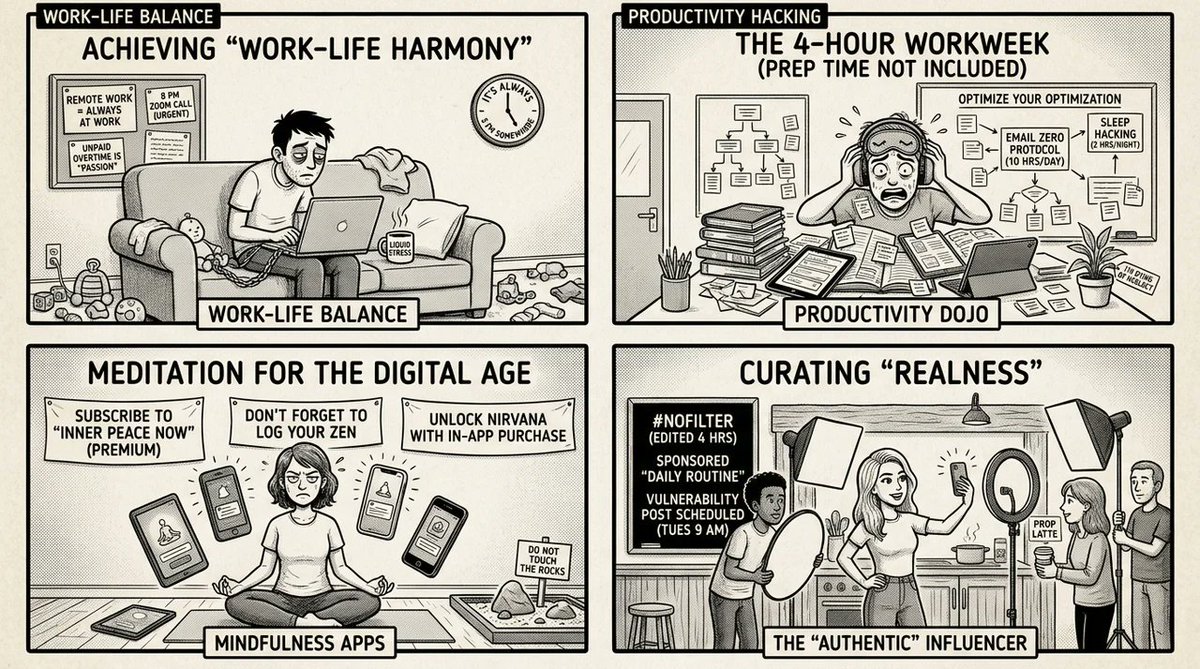
Deadpan Editorial 2x2 Satirical Cartoon Grid

An image-generation prompt producing a four-panel 16:9 satirical editorial cartoon with deadpan style, detailed time-stepped guidance for panels, characters, captions and props, in black and white with no color.

Gemini

Source previews

These example images come from the original source. DROPIDEA has not independently tested these examples; results depend on the model and settings.

Ready to personalize

Your prompt

English

Replace the red variables with your information. Copy the full prompt and use it with your preferred agent.

TXT MD English version
2x2 grid, 16:9, do this for 4 witty topics picked by AI: I(0) = blank white sheet with faint 2×2 grid guides. I(1) = the complete satirical cartoon grid. ∂I/∂t = Δ(I, $ SUBJECT, pools, optional variables) Guidance steps: t=0.0–0.1: Thick black panel borders appear, 2×2 layout locked. t=0.1–0.3: Characters materialize in each panel—exhausted, confused, dead‑eyed—their poses set by the inferred contradiction. t=0.3–0.55: Institutional settings grow around them: help centers, productivity command rooms, authenticity factories, etc., with walls covered in signs and dashboards. t=0.55–0.75: Bold handwritten captions snap into place above each panel; smaller labels and micro‑text populate the backgrounds and props. t=0.75–0.9: Props (laptops, coffee cups, conveyor belts, timers) appear around the characters, each with tiny ironic labels. t=0.9–1.0: Crosshatching and stipple shading refine; line weights adjust; final polish. No color, no photorealism, no AI text artifacts. Output I(1): the complete deadpan editorial internet cartoon, 10× richer, all pools fused coherently, instantly readable, painfully relatable.
Preview results

Your prompt

2x2 grid, 16:9, do this for 4 witty topics picked by AI: I(0) = blank white sheet with faint 2×2 grid guides. I(1) = the complete satirical cartoon grid. ∂I/∂t = Δ(I, $ SUBJECT, pools, optional variables) Guidance steps: t=0.0–0.1: Thick black panel borders appear, 2×2 layout locked. t=0.1–0.3: Characters materialize in each panel—exhausted, confused, dead‑eyed—their poses set by the inferred contradiction. t=0.3–0.55: Institutional settings grow around them: help centers, productivity command rooms, authenticity factories, etc., with walls covered in signs and dashboards. t=0.55–0.75: Bold handwritten captions snap into place above each panel; smaller labels and micro‑text populate the backgrounds and props. t=0.75–0.9: Props (laptops, coffee cups, conveyor belts, timers) appear around the characters, each with tiny ironic labels. t=0.9–1.0: Crosshatching and stipple shading refine; line weights adjust; final polish. No color, no photorealism, no AI text artifacts. Output I(1): the complete deadpan editorial internet cartoon, 10× richer, all pools fused coherently, instantly readable, painfully relatable.

Variable guide

$ SUBJECT

The satire subject the four panels will be built around

In the equation line ∂I/∂t = Δ(I, $ SUBJECT, pools, optional variables); replace the $ SUBJECT token with your subject

Example value

Corporate productivity culture

4 witty topics picked by AI

The number of witty topics and how they are chosen

In the template's opening sentence, the phrase “4 witty topics picked by AI”

Example value

6 witty topics I pick myself

What you get

  • A complete satirical cartoon grid in a 2×2 layout at 16:9.
  • Exhausted, confused, dead-eyed characters inside institutional settings covered in signs and dashboards.
  • Bold handwritten captions above each panel with tiny labels and micro-text in backgrounds and props.
  • Crosshatching and stipple shading in black and white with refined line weights and final polish.

Use cases

  • Satirical posts on social media
  • Critical op-eds and blogs about work and productivity culture
  • Deadpan comedic content for digital magazines and newsletters
  • Visual commentary satirizing institutions and bureaucracy

How to use

  • Choose your satire subject and replace the $ SUBJECT token in the equation line with it.
  • Edit the phrase “4 witty topics picked by AI” if you want to control the number or type of topics, or pick them yourself.
  • Paste the full template into your image-generation tool and make sure the aspect ratio is set to 16:9.
  • Leave the time-stepped guidance from t=0.0 to t=1.0 unchanged; it sequences how the panels are built.
  • Review the output I(1) and verify the constraints: no color, no photorealism, no AI text artifacts.

Related prompts