Skip to content
ImagesFree

Premium Painterly Anime Character From Uploaded Reference Photos

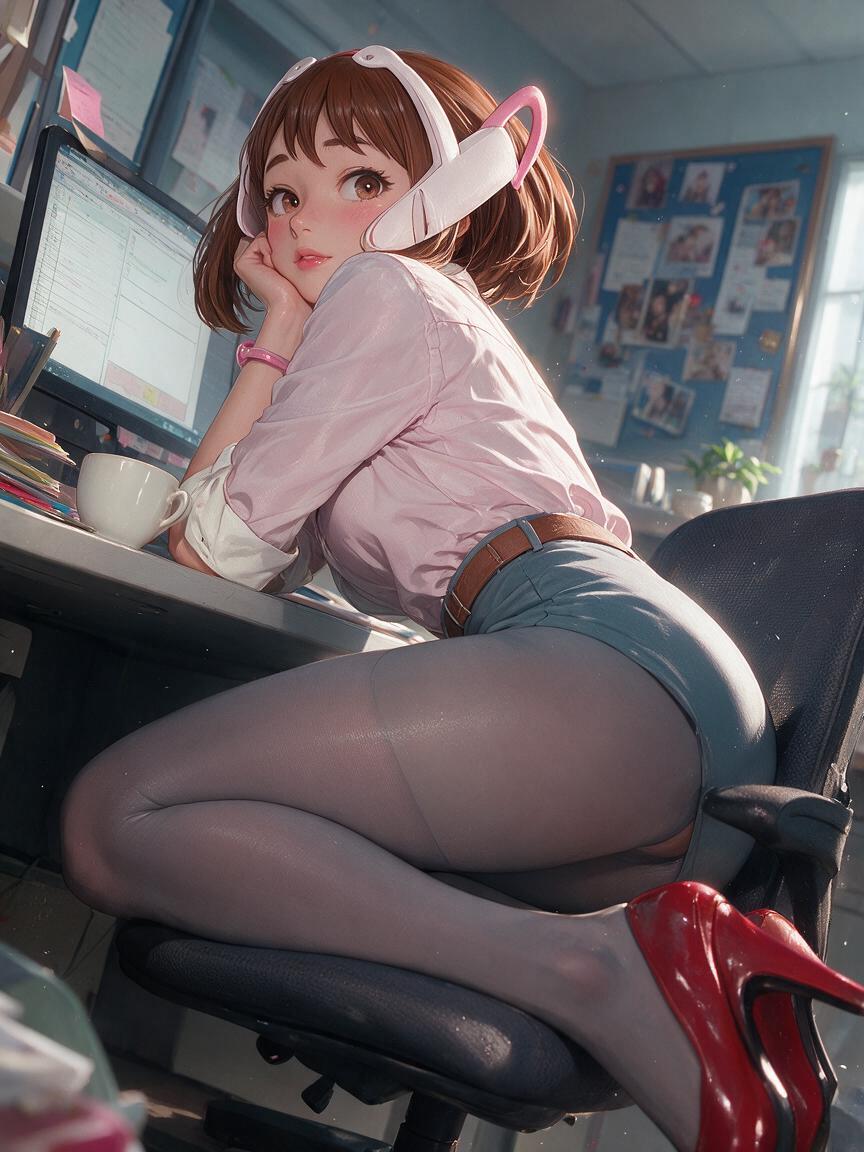
A prompt that transforms your character from an uploaded reference photo into a premium painterly, semi-realistic anime illustration, copying the pose and scenario aesthetic from two other uploaded girl-character reference images. It produces a vertical 9:16 close immersive framing with 75% of the body visible, a detailed lively background, cinematic lighting and ray traced shadows. Three image uploads are required: two pose/aesthetic references and one character reference.

Image generation

Source previews

These example images come from the original source. DROPIDEA has not independently tested these examples; results depend on the model and settings.

Ready to personalize

Your prompt

English

Replace the red variables with your information. Copy the full prompt and use it with your preferred agent.

TXT MD English version
Draw character in image 3(your character refrence) in the same pose and scenario aesthetic as girl characters in image 1 and 2(reference images) Art style: premium painterly anime illustration, glossy semi-realistic rendering, delicate hand-drawn line art, soft but clean facial anatomy, luminous skin sheen, subtle blush, glossy lips, elegant eye rendering, detailed eyelashes, refined hair strand painting, smooth cel-painterly hybrid shading, cinematic rim light, soft specular highlights on skin and fabric, subtle over-texture shader, gentle grain, high-end character concept art. Use a vertical 9:16 anime composition with a close, immersive framing. The character is centered or slightly off-center, with her face placed in the upper third of the frame and her body creating strong depth toward the camera. Foreground elements such as knees, hands, sleeves, cup, shoes, in a cadid image pose, cool angles, 2-point lower upper or side angles instead of boring camera angles , emphasizing the close POV feeling. detailed background, should feel brimming with life, highly rendered surrounding, realistic feel, anime character, 1 point perspective, dramatic pov, peering to someone's life feel, dynamic lighting, ray traced shadows, particles in air, cinematic composition, event should feel lively but no the focus, the character should feel like is in between doing something, not too close, 75%body visible, strong perspective distortion, dynamic low/high camera angles, exaggerated foreground #fyp #foryoupage #anime #trend
Preview results

Your prompt

Draw character in image 3(your character refrence) in the same pose and scenario aesthetic as girl characters in image 1 and 2(reference images) Art style: premium painterly anime illustration, glossy semi-realistic rendering, delicate hand-drawn line art, soft but clean facial anatomy, luminous skin sheen, subtle blush, glossy lips, elegant eye rendering, detailed eyelashes, refined hair strand painting, smooth cel-painterly hybrid shading, cinematic rim light, soft specular highlights on skin and fabric, subtle over-texture shader, gentle grain, high-end character concept art. Use a vertical 9:16 anime composition with a close, immersive framing. The character is centered or slightly off-center, with her face placed in the upper third of the frame and her body creating strong depth toward the camera. Foreground elements such as knees, hands, sleeves, cup, shoes, in a cadid image pose, cool angles, 2-point lower upper or side angles instead of boring camera angles , emphasizing the close POV feeling. detailed background, should feel brimming with life, highly rendered surrounding, realistic feel, anime character, 1 point perspective, dramatic pov, peering to someone's life feel, dynamic lighting, ray traced shadows, particles in air, cinematic composition, event should feel lively but no the focus, the character should feel like is in between doing something, not too close, 75%body visible, strong perspective distortion, dynamic low/high camera angles, exaggerated foreground #fyp #foryoupage #anime #trend

Variable guide

image 3

The upload slot number holding the character you want drawn; must be uploaded with the request.

First sentence: 'Draw character in image 3' — replace the 3 with your uploaded image number.

Example value

image 3

image 1 and 2

The two uploaded reference images showing the pose and aesthetic to copy.

First sentence: 'as girl characters in image 1 and 2'.

Example value

image 5 and 6

cup

The tangible object in the foreground that strengthens the close POV feeling.

Second paragraph in the foreground list: 'knees, hands, sleeves, cup, shoes'.

Example value

phone

#fyp #foryoupage #anime #trend

Social hashtags at the end of the prompt; adjust per platform or trend.

Last line: '#fyp #foryoupage #anime #trend'.

Example value

#fyp #foryoupage #anime #art

What you get

  • A premium painterly anime illustration of your character with glossy semi-realistic rendering and delicate hand-drawn line art.
  • A vertical 9:16 composition with close immersive framing, the face in the upper third and 75% of the body visible.
  • A candid pose inspired by the two reference images with dynamic low, high or side 2-point camera angles.
  • A detailed lively background with cinematic lighting, ray traced shadows and air particles that never steals focus from the character.

Use cases

  • Redrawing your original character (OC) in a premium anime style for social media.
  • Creating vertical trending content for TikTok, Reels and Shorts.
  • Turning a personal photo or avatar into high-end concept art.
  • Designing character cards or profile artwork in a semi-realistic anime style.

How to use

  • Upload three images with your request: two reference images showing girl characters in the desired pose and scenario aesthetic, and one image containing the character you want drawn.
  • Make sure the image numbers in the prompt match your upload order: 'image 3' for your character and 'image 1 and 2' for the references.
  • Optionally customize the foreground prop 'cup' and the hashtags at the end, while keeping the technical values (9:16, 75%, 2-point, 1 point perspective) unchanged.
  • Paste the complete prompt into an image generation tool that supports reference images and run it.
  • Generate several versions and pick the best result; output is stochastic and may vary between runs.

Related prompts