كيفية تغيير شكل الفيسبوك إلى الشكل الجديد 2020 وتفعيل الوضع المظلم للفيسبوك
 بقلم الأدمن
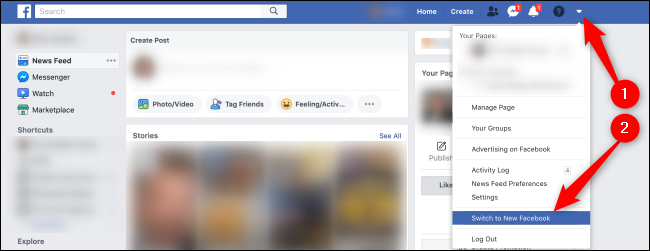
طريقة تغيير شكل الفيسبوك إلى الشكل الجديد مقال متعلق: كيفية منع ارسال طلبات الصداقة نهائياً إلى ملفك الشخصي على فيسبوك اقرأ أيضاً : شرح تفعيل الوضع المظلم Dark Mode لكل البرامج والأجهزة وأنظمة التشغيل لديك فيسبوك ماسنجر للويندوز بشكل جديد كما قامت فيسبوك بتعميم الشكل الجديد على تطبيقاتها المختلفة عبر جميع المنصات وأصبح الشكل الجديد متاحاً عبر تطبيق Facebook Messenger للويندوز حيث أضافت العديد للميزات هنا تختلف حتى عن نسخة الويب مثل: تلقي الإشعارات الخاصة بالرسائل الجديدة الوضع المظلم للفيسبوك ماسنجر دعم الصور المتحركة GIF داخل المحادثات دعم أكبر في محادثات الفيديو الجماعية
Group Calls مزامنة الأحداث في الوقت الفعلي بين جميع الأجهزة هذه الخيارات يمكن الحصول عليها بمجرد تحميل التطبيق عبر متجر التطبيقات المدعوم في نظام التشغيل لديك بالبحث عن كلمة Messenger وتحميل النسخة الرسمية من فيسبوك. فيسبوك ماسنجر – Windows
فيسبوك ماسنجر – MacOS
دروب أيديا - DROPIDEA
نأمل أن تكون هذه المقالة قد أضافت لك قيمة حقيقية. في دروب أيديا نسعى دائمًا لتقديم محتوى عربي عالي الجودة يساعدك على النمو والتطور في المجال الرقمي. تابعنا للمزيد من المقالات والشروحات المفيدة.
الأدمن
DROPIDEA
أحدث المقالات

كروزو تلغي صفقة بـ1.25 مليار دولار لتوربينات مراكز البيانات

خصم 50% على تذكرة ثانية لمؤتمر TechCrunch Disrupt 2026

ميتا تكشف عن تطويرات كبيرة لمساعدها الذكي Muse في مؤتمر Connect

رئيس وزراء اليونان يتحدث بصراحة: نحن نخوض معركة الأمس في زمن الذكاء الاصطناعي