التكنولوجيا
 بقلم الأدمن
May 31, 2025
204 مشاهدة
بقلم الأدمن
May 31, 2025
204 مشاهدة
اضافة تعليق في البوربوينت – استخدام خاصية Callout للمعلومات داخل Powerpoint
بقلم الأدمن
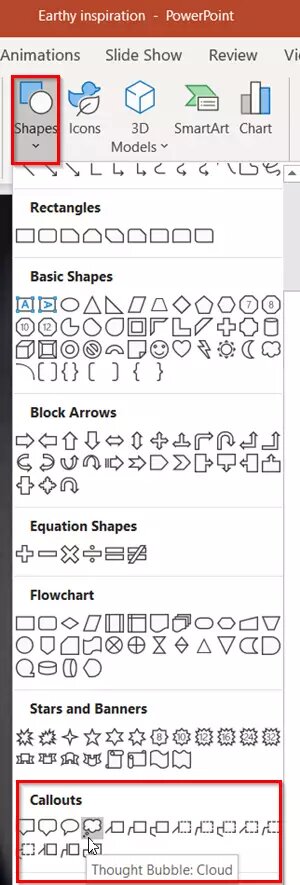
تتكون تعليقات Callout داخل بوربوينت بتعدد الخصائص حيث تأتي بصيغ ( أشكال/صناديق/صور ) ويمكنك إستخدامها لإضافة المعلومات والتوضيحات بشكل تعليقات Callout داخل العروض التقديمية. ويمكنك إستخدامها بشكل ثابت أو بشكل حركي مع إضافة المؤثرات المتعددة. اقرأ أيضاً : 10 نصائح لـ عمل عرض بوربوينت احترافي مميز اقرأ أيضا|
افضل 10 مواقع لتحميل قوالب بوربوينت جاهزة اقرأ أيضاً : – أقوى بدائل مجانية للبوربوينت – 7 برامج لإنشاء العروض التقديمية
دروب أيديا - DROPIDEA
نأمل أن تكون هذه المقالة قد أضافت لك قيمة حقيقية. في دروب أيديا نسعى دائمًا لتقديم محتوى عربي عالي الجودة يساعدك على النمو والتطور في المجال الرقمي. تابعنا للمزيد من المقالات والشروحات المفيدة.
الأدمن
DROPIDEA
أحدث المقالات

كروزو تلغي صفقة بـ1.25 مليار دولار لتوربينات مراكز البيانات
منذ 16 ساعة

خصم 50% على تذكرة ثانية لمؤتمر TechCrunch Disrupt 2026
منذ يوم

ميتا تكشف عن تطويرات كبيرة لمساعدها الذكي Muse في مؤتمر Connect
منذ يومين

رئيس وزراء اليونان يتحدث بصراحة: نحن نخوض معركة الأمس في زمن الذكاء الاصطناعي
منذ 3 أيام

مهندس متاجر آبل يشكّك في رهان وادي السيليكون على تسوق الذكاء الاصطناعي
منذ 4 أيام