Wordfence أم Sucuri؟ المميزات والعيوب وتحديد الإضافة الأقوى
 بقلم الأدمن
يعتبر كل من Sucuri و Wordfence من أكثر الإضافات شيوعاً واستخداماً لحماية وآمان مواقع الووردبريس وهناك الكثير من المقارنات التي تربك صاحب الموقع في اختيار الأنسب له، سواءًا الإصدار المجاني أو المدفوع للإضافة. هناك العديد من المميزات المتشابهة بين الإضافتين وكذلك هناك بعض المميزات والعيوب لكل واحدة على مثاليتها.
سنقدم لك في هذه المقالة مقارنة شاملة بين كل من Sucuri و Wordfence وسنتحدث عن الفروقات في الميزات وآلية كل إضافة لمسح البرامج الضارة والاختلافات في جدران الحماية وكذلك باقي أدوات الأمان التي توفرها كل الإضافتين سواءًا بالنسخة المجانية أم النسخة المدفوعة.
Wordfence أم Sucuri؟
هذا السؤال، يطرح كثيراً بين أصحاب مواقع الووردبريس، من هي الإضافة الأفضل لموقعي؟ هل أختار Sucuri أم اختار Wordfence؟ ما الذي ستقدمه كلا الاضافتين من ناحية الحماية لموقعي؟
بشكل عام فإن إضافتي Wordfence و Sucuri من أهم الإضافات في مجال حماية مواقع الووردبريس وتقدمان العديد من خدمات الحماية الموثوقة في النسختين: المجانية والمدفوعة، وتساعدك كل واحدة منهما في حماية موقعك من التهديدات المختلفة من
البرامج الضارة وهجموم القوة العمياء
ومختلف أنواع الاختراقات. لا يوجد بشكل عام إضافة شاملة تقدم كل شيء، فكلا الاضافتين تقدمان بعض أدوات الحماية الفعالة لتأمين موقعك، فمثلًا يمكننا القول أن Wordfence تتميز من خلال تدابير الأمان الوقائية ومن خلال الإعداد السهل والميزات المجانية التي تقدمها والتي تحتاج في Sucuri للدفع مقابل الحصول عليها، وفي المقابل تتميز Sucuri في مراقبة الموقع ومسح / إزالة البرامج الضارة وفي الخطط المميزة التي تقدمها مثل حماية WAF، وحماية DDoS. من الأمور التي يجب وضعها في الحسبان كذلك، هو فارق السعر بين الإضافتين في الإصدار المدفوع، فتاتي أسعار Wordfence بدءًا من 99.99 دولارًا في السنة و Sucuri مقابل 299.99 دولارًا في السنة، لذلك لا بد لك من التمعن والإطلاع جيداً على المواصفات والمتطلبات التي تريدها قبل الإختيار.
ودعنا الآن نتحدث بشكلٍ أعمق عن الفروقات بين كل من Wordfence و Sucuri، يمكننا الإنتقال والحديث بشكل أعمق عن الإختلافات وأخذ جولة سريع عن مميزات كل إضافة بما يأتي. ماذا تقدم إضافة Wordfence؟ Wordfence، هي الإضافة الأكثر شيوعاً للحماية والآمان في الووردبريس، يوفر لك جدار حماية وماسح ضوئي للبرامج الضارة بالإضافة إلى وظائف إضافية أخرى، حيث يقدم Wordfence العديد من الخدمات الأساسية بشكل مجاني، وكذلك لديه العديد من الخطط المدفوعة مع ميزات إضافية.
يقدم لك Wordfence ميزات، مثل: جدار حماية تطبيقات الويب (WAF) الماسح الضوئي للبرامج الضارة المراقبة والتحذير من السلامة إصلاح البيانات مراقبة المستخدمين في الوقت الحقيقي اقرأ أيضاً: الدليل الشامل لاستخدام وتهيئة إضافة Wordfenc
ماذا تقدم إضافة Sucuri؟
في المقابل تقوم إضافة Sucuri على نظام سحابي يمكن أن يعمل مع أي نظام إدارة محتوى، وكذلك تقدم Sucuri بعض الميزات بشكل مجاني، وتقدم الميزات الأكثر تقدماً بشكل مدفوع. يقدم لك Sucuri ميزات، مثل: فحص البرامج الضارة في موقعك مراقبة القائمة السوداء إرسال إشعارات أمنية إجراءات ما بعد الاختراق عندما تريد الإختيار، ستبحث عن من يقدم لك خدماته مجاناً أو من يوفر لك دعماً كاملاً أو من يمكن إعداده بسهولة أو من يكون سعره أقل مقابل الميزات ومن يوفر تجربة مستخدم جيدة وحماية ممتازة وغير ذلك.
اقرأ أيضاً:
شرح شامل لتأمين وحماية موقعك باستخدام Sucuri أهم الفروقات بين Wordfence و Sucuri دعنا الآن نتحدث عن أهم الفروقات أو الميزات التي تقدمها كلا الإضافتين من ناحية إعدادات الأمان الأساسية وسهولة الاستخدام لغير المتخصصين وكذلك كافة خصائص الحماية التي تقدمها كلا الإضافتين،
لتعرف نقاط قوة ونقاط ضعفة كل إضافة منهما في جزئية معينة. 1- سهولة الاستخدام من الأمور الهامة التي عليك التفكير فيها، هي مدى سهولة استخدام الإضافة وكذلك مدى سهولة إعداد الإضافة والتحكم بها حتى تستطيع إدارة أمان موقعك دون الحاجة لكتابة أكواد برمجية أو بعض المهارات المتقدمة.
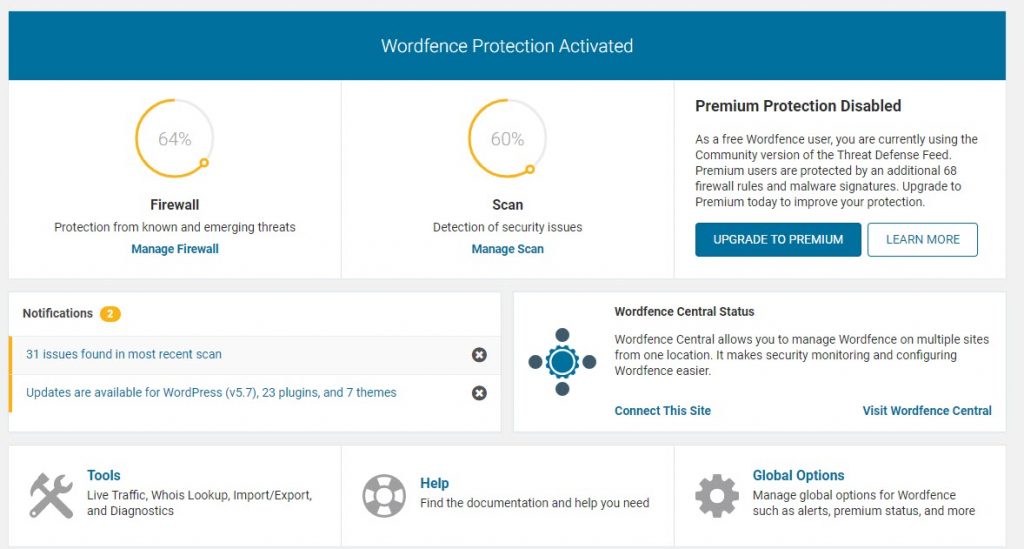
ولنأخذ جولة في لوحة تحكم كل إضافة منهما فيما يلي: Wordfence تأتي إضافة Wordfence بلوحة تحكم سهلة لا تطلب الكثير من الخبرة التقنية، فبمجرد الإضافة، سيطلب منك إضافة بريدك الإلكتروني لتلقي إشعارات الأمان، وكذلك تحتوي اللوحة الرئيسية لWordfence على الخصائص الأساسية في شاشة واحدة، بحيث تظهر لك الإشعارات ونتائج عمليات الفحص ونتائج عملية المسح وملخص عمل جدار الحماية وغيرها من المعلومات الهامة.
سيعمل جدار الحماية في Wordfence على وضع التعلم ( learning mode ) وسيقوم بإجراء اختبار تلقائي ومسح في الخلفية لموقعك ومن ثم يعرض لك النتائج، وبذلك ستجد أن الواجهة الرئيسة لإضافة Wordfence تناسب المستخدم العادي، حيث تحوي على الكثير من الخيارات والإعدادات وتحتاج إلى القليل من التعلم. Sucuri في المقابل تقدم لك Sucuri أيضًا لوحة تحكم سهلة وبسيطة، حيث بمجرد تفعيل الإضافة سيتم عمل مسح ضوئي سريع، ويظهر لك النتائج على لوحة التحكم، وبالطبع هناك الكثير من الخيارات التي تحتاج إلى معرفتها والبحث فيها جيداً ولكن الخيارات العامة للإعداد سهلة للمبتدئين.
بالنسبة لجدار الحماية فإنه يعتمد على التقنيات السحابية ويعمل بشكل منفصل عن الخادم الخاص بك. وبالتالي يمكننا القول بأن كل الإضافتين توفر واجهة سهلة وبسيطة للمستخدم العادي الذي لا يحتاج إلى امتلاك مهارات مسبقة لاستخدامة أي منهما.
2- جدار الحماية (WAF)
يعتبر جدار الحماية (WAF) من أهم الأدوات التي تعتمد في إضافة الحماية الخاصة بموقعك ، فعن طريق جدار الحماية، يمكنك مراقبة موقعك ومنع تهديدات الأمان الشائعة وكذلك تتبع حركة المرور إلى موقعك وغيرها. دعنا نتعرف على مميزات جدار الحماية في كلٍ من Wordfence و Sucuri بما يلي: Wordfence
يعتبر جدار الحماية في Wordfence، جدار حماية مستند إلى التطبيق (application based)، فعند تثبيت الإضافة سيعمل جدار الحماية على وضع التعلم وبعد ذلك يمكنك تهيئة الإعدادات بشكل يدوي. سيراقب جدار الحماية حركة الزيارات لموقعك ولن يسمح بمرور الزيارات الضارة أو من روبتات الاختراق المعروفة، وبالتالي يعتبر جدار حماية لـ Wordfence جدار حماية نقطة النهاية، أي أنه عندما تصل الزيارات إلى خادم الاستضافة سيقوم Wordfence بحظر الزيارات غير المرغوب فيها. Sucuri
يعتبر جدار الحماية في Sucuri، جدار حماية يعتمد على التقنيات السحابية، أي أنه سيتمكن من حظر الزيارات الغير مرغوب فيها حتى قبل الوصول إلى خادم الاستضافة وهذا يرفع مستوى أداء حماية موقعك، حيث يختلف عن Wordfence، بأنه لا يحوي على نظام تعلم كبداية أو موسع، بل بمجرد إعداد الإضافة، سيبدأ Sucuri WAF في تأمين الزيارات التي تأتي إلى موقعك. لدى Sucuri أيضًا خوادم شبكة توصيل المحتوى ( CDN ) موزعة عبر مناطق مختلفة، لذلك من المفترض أن يساعد ذلك أيضًا في زيادة سرعة الاستجابة وحماية أفضل للموقع.
بالتالي يمكننا القول أن Sucuri تستخدم خوارزميات تعلم آلي أكثر فاعلية لمنع الزيارات الضارة أكثر من جدار الحماية الخاص ب Wordfence، إلا أن جدار حماية Sucuri في النسخة المدفوعة فقط، أما جدار Wordfence فمتوفر بالنسخة المجانية. 3- إشعارات الأمان والمراقبة تقدم كلا الإضافتين، إمكانية مراقبة موقعك بشكل مستمر وكذلك إرسال الإشعارات والرسائل البريدية لرصد أي نشاط مشبوه في موقعك وإخبارك به على الحال لاتخاذ الإجراء المناسب
Wordfence ستظهر لك الإشعارات في لوحة التحكم (Dashboard)، وكذلك سيقوم Wordfence بإرسال إشعارات البريد الإلكتروني لإخطارك بأهم التهديدات التي قد تواجه موقعك، وكذلك يمكنك تخصيص إعدادات والتنبيهات للبريد الإلكتروني وإيقافها وتشغيلها. Sucuri
بالنسبة Sucuri، سيتم عرض جميع التنبيهات والتحديثات والسجلات على الشاشة الرئيسية وكذلك تحوي Sucuri على نظام لإدارة التنبيهات والتحكم بها بشكل لحظي وأسرع في الإخطار بكافة النشاطات من Wordfence، وتحتوي النسخة المدفوعة على نظام مسح يعمل بمعدل مرتفع بحسب الخطة التي تشترك بها.
بالتالي يمكننا القول، أن كلا الإضافتين تقدمان ميزات هامة للمراقبة ورصد الأنشطة المشبوهة في موقعك إلا أن Sucuri تمتاز نظام لإدارة التنبيهات أسرع من Wordfence خصوصًا بالإصدار المدفوع. 4- البحث عن البرامج الضارة كذلك من أهم المعايير التي تحتاج إليها في إضافة الحماية هو البحث وإزالة البرامج الضارة، حيث تقوم كلا الإضافتين بالبحث عن البرامج الضارة في موقعك أو
اكتشاف الأوامر البرمجية التي قد تشكل تهديدات أمنية في موقعك، ويختلف كل منهما في أساليب البحث عن البرامج الضارة بما يلي: Wordfence تقوم Wordfence، بالبحث داخل الملفات موقعك وملفات القوالب والإضافات والبحث في نقاط الضعف الأمنية وكذلك كافة محتويات الموقع، وتتم عملية الفصح التقائي في النسخة المجانية وإخطارك بكافة نتائج الفصح، أما بالنسبة للإصدار المدفوع سيكون لديك المزيد من خيارات الفحص. Sucuri
تقوم إضافة Sucuri بعملية مسح شاملة لموقعك، وفحصه بحثاً عن البرامج الضارة أو أي خطأ موجود بالموقع وكذلك البحث عن المشاكل الأمنية في حال وجودها وإخطارك بها فورًا، وكذلك يمكنك جدولة عملية الفحص أو مقارنة ملفاتك للتأكد منها ومن صلاحيتها وعدم إختراقها أو تحديد ملفات معينة لعدم مسحها وغيرها الكثير. بالتالي يمكننا القول، أن كلا الإضافتين تقدمان ميزات هامة لفصح ملفات موقعك بشكل دوري وتختلف درجات الفحص في كلا الإضافتين سواءًا في الإصدار المجاني أو المدفوع لكل منهما.
5- تنظيف الموقع المخترق
توفر كل من Sucuri و Wordfence، إمكانية تنظيف موقعك في حال إختراقه، وتتولى الإضافة حذف الملفات الخبيثة بشكل كامل. Wordfence
هذه الخدمة ليست جزءاً من خطة Wordfence المجانية أو المدفوعة، بل يعتبر منتجًا يتم بيعه بشكل منفصل، حيث يقوم بفحص الصفحات والمواقع بحثاً عن البرامج الضارة ومن ثم إزالةهذه الملفات. Sucuri تحتوي جميع خطط Sucuri المدفوعة، إمكانية تنظيف موقعك.
حيث يتضمن ذلك تنظيف الصفحة وحذف القائمة السوداء وإصلاح الرسائل غير المرغوب وغيرها. وبالتالي فإنّ كلا الإضافتين تقدمان ميزات هامة في النسخة المدفوعة لتنظيف الموقع المخترق وفحصه بحثاً عن البرامج الضارة وغيرها من الأمور المتعلقة بحماية الموقع.
الخلاصة
بشكل عام تعتبر إضافة Sucuri إضافة موثوقة في مستوى الأمان الذي تقدمه لأصحاب المواقع من ناحية آلية فحص الملفات وقوة أدوات الأمان التي تعتمد عليها في الإصدارات المدفوعة من الإضافة، أما النسخة المجانية فهي محدودة الخيارات. في المقابل فإن Wordfence توفر لك خيارات حماية مثالية بشكل مجاني تستطيع الإعتماد عليها، ولكن لا تعتمد على نفس تقنيات Sucuri في الإصدار المدفوع. وبالتالي يمكننا القول أنه إذا كان لديك الإمكانية لدفع بعض المال، فإن Sucuri تعتبر الخيار الأفضل لك، وأما إذا كنت تبحث عن إضافة مجانية لتأمين موقعك بشكل مجاني فإن Wordfence ستكون هي الخيار الأمثل لك.
دروب أيديا - DROPIDEA
نأمل أن تكون هذه المقالة قد أضافت لك قيمة حقيقية. في دروب أيديا نسعى دائمًا لتقديم محتوى عربي عالي الجودة يساعدك على النمو والتطور في المجال الرقمي. تابعنا للمزيد من المقالات والشروحات المفيدة.
الأدمن
DROPIDEA
أحدث المقالات

هل تصيّد ماسك إطلاق أداة «Dots» من OpenAI عبر نطاق dot.com؟

بيك إكس في ترفع سقف استثماراتها البذرية إلى 5 ملايين دولار

عشاء مرتقب بين رئيس أنثروبيك ودونالد ترامب وسط خلافات حول أمان الذكاء الاصطناعي

جوجل تختبر الشراء المباشر من فليبكارت عبر Gemini في الهند



