WinX YouTube Downloader: تحميل الفيديوهات من اي موقع بأعلى جودة حتى 4K
 بقلم الأدمن
الإنترنت مليء بمقاطع الفيديو المنشورة على المنصات المختلفة. لذا في مرحلة ما قد ترغب في تنزيل بعضًا من هذه المقاطع على الكمبيوتر من أجل مشاهدتها لاحقًا أو حرقها على اسطوانات أو إستخراج الصوت منها أو تحويل صيغ المقطع، وغيرها من المهام الأخرى. إذًا، الجواب هو WinX YouTube Downloader أفضل برنامج يساعدك على تحميل الفيديوهات من اي موقع.
هناك الكثير من أدوات تحميل مقاطع الفيديو من الإنترنت على الكمبيوتر وإجراء مهام أخرى إضافية مثل تحويلها إلى صيغ متعددة أو قص جزء منها أو إستخراج المحتوى الصوتي فقط، لكن بالتأكيد ليست مجانية وأحيانًا يواجه المُستخدمين صعوبة فى إستعمالها، ربما بسبب الخطوات المعقدة التي يجب أن تتم لإنهاء العملية، أو واجهة المُستخدم السيئة… وخلافه. ولكن إذا كنت تبحث عن وسيلة رائعة وسهلة الاستخدام تمكنك من تحميل الفيديوهات من اي موقع وبجودة عالية، فإليك برنامج WinX YouTube Downloader المتميز والذي هو أحد برامج شركة WinXDVD الرائدة في مجال توفير برامج الوسائط المتعددة، وقد قدمت الكثير من البرامج المبتكرة لأكثر من 8 مليون مستخدم في جميع أنحاء العالم.
دعونا فى هذا المقال نسلط الضوء على WinX YouTube Downloader ونرى الأسباب التي تدفع لاستعماله دونًا عن أي أداة أخرى. ما الذي يجعل برنامج WinX YouTube Downloader استثنائيًا برنامج
WinX YouTube Downloader
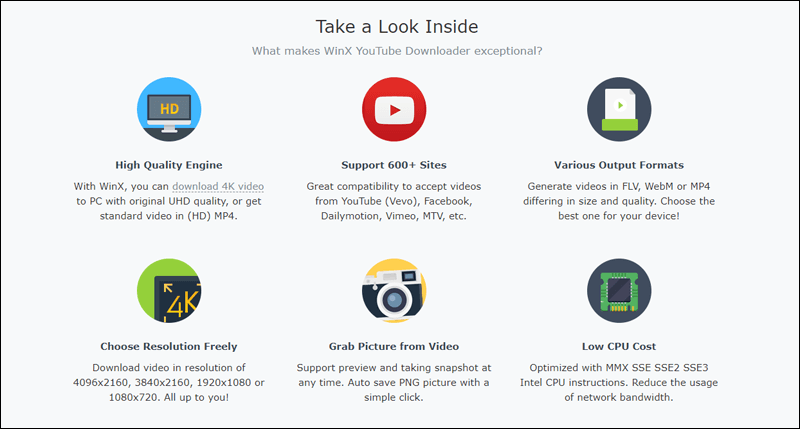
هو برنامج مجاني تمامًا لأجهزة نظام تشغيل ويندوز 10 فيما أقل. من خلاله يستطيع المُستخدم أن يحمل على الكمبيوتر الخاص به مقاطع الفيديو من مواقع عديدة مثل فيسبوك، ويوتيوب، وديلي موشن، وفيمو، وانستجرام… وأكثر من 600 موقع آخر (راجع القائمة الكاملة للمواقع المدعومة).
علاوة على ذلك، يسمح لك بتحميل الفيديو بالجودة الأصلية حتى ولو كانت 4K دون ملاحظة أي تشويش على الفيديو أثناء المشاهدة. جنبًا إلى جنب، يمكنك تحميل الفيديو وتحويله إلى صيغ مختلفة غير MP4 مثل FLV أو WebM وما إلى ذلك وفقًا لنوع الجهاز الذي تريد مشاهدة الفيديو من خلاله. كما أنه لا يستهلك موارد الجهاز بكثرة وحتى إستهلاك الإنترنت سيكون محدود للمحافظة على الباقة.
من المميزات الرائعة التي يتمتع بها حقًا WinX YouTube Downloader هو أنه يمكنك تسجيل بث مباشر على اليوتيوب وحفظه على جهازك، بالإضافة إلى إتاحة إمكانية تحميل فيديو بالترجمة إذا كانت متوفرة. كل هذا وأكثر يمكنك الحصول عليه مجانًا من خلال واجهة مُستخدم نظيفة وبسيطة.
كيف يتم تحميل الفيديوهات من اي موقع في
بادئ ذي بدء، ستحتاج اولًا إلى تحميل نسختك من برنامج WinX YouTube Downloader وتثبيته على النظام، بعد ذلك قم بتشغيله للمرة الأولى لتظهر لك واجهة مُستخدم بسيطة وسهلة جدًا وتحتوي على نافذة توضح لك كيفية الاستعمال. على الجهة اليُمنى ستجد معاينة للفيديو الذي تحاول تحميله بالإضافة إلى زر تسجيل الدخول إلى اليوتيوب أو فيمو لإضافة الفيديوهات المحملة إلى قائمة “المشاهدة الاحقًا Watch Later” بالإضافة إلى إمكانية تحديد الـ Output Folder أو المجلد الذي سيتم حفظ الفيديو فيه عقب الإنتهاء من التحميل. افتراضيًا، يتم حفظ الفيديوهات في مجلد خاص بالبرنامج على بارتيشن C ولكن يمكنك تغييره بالضغط على زر Browse.
أما زر Download Now فيمكنك النقر عليه لبدء تحميل الفيديوهات المتضمنة فى القائمة. لبدء استخدام البرنامج فى تحميل الفيديوهات من اي موقع. ستحتاج أولًا إلى نسخ رابط الفيديو من الموقع سواء فيسبوك أو يوتيوب أو غيره، ولاحظ أنه يمكنك أيضًا تحميل قائمة تشغيل كاملة، فقط قم بنسخ الرابط الخاص بها.
بعد ذلك، اذهب إلى البرنامج واضغط على زر Add URL من الشريط العلوي، ثم اضغط على زر Paste URL & Analyze بحيث يتم لصق رابط الفيديو وتحليله ثم عرض الفيديو أمامك على النافذة. إذا كنت تنوي تحميل قائمة تشغيل، فسوف تظهر لك جميع الفيديوهات بشكل فردي على الجانب الأيسر. عمومًا، أسفل الفيديو ستقوم بتحديد الجودة التي تريد تحميل الفيديو بها مع العلم أن هناك
جودة 4K Ultra متوفرة إذا كان الفيديو نفسه مرفوع بهذه الجودة. وإذا كنت تريد عرض المزيد من الخيارات اضغط على خيار Show All.
أما إذا كان الفيديو يحتوى على ترجمة وتريد دمجها مع الفيديو، فاضغط على زر Search أمام Subtitles وحدد الترجمة وفقًا للغة التي تريدها. بالضغط على زر Download Selected Videos سوف يتم إضافة الفيديو إلى قائمة التحميل فورًا. بعد الضغط على زر Download Selected Videos سيتم إضافة الفيديو إلى قائمة التحميل، لكن البرنامج لم يقم بتحميلها على الكمبيوتر فعليًا ما لم تضغط على زر Download Now المتواجد على الجهة اليُمنى، فبعد النقر على هذا الزر سوف يبدأ تحميل الفيديو على جهازك مباشرًة.
ولاحظ أن البرنامج يستطيع تحميل أكثر من فيديو فى نفس الوقت بسهولة فى حالة كنت تقوم بتحميل قائمة تشغيل. عمومًا، بعد الإنتهاء يمكنك النقر على علامة “المجلد” على الجهة اليُمنى للتوجه إلى مكان تواجد الفيديو حيث يمكنك تشغيله باستخدام برنامج الوسائط المُثبت على جهازك. تستطيع أيضًا النقر على زر Convert to MP3 لاستخراج الصوت من الفيديو أو 4K to 1080p لتحويل جودة الفيديو من 4k إلى 1080p بغرض تقليل المساحة.
وبهذه الطريقة قد تمكنت من تحميل الفيديوهات من اي موقع. بالضغط على أيقونة (⚙) ستظهر لك قائمة الخيارات حيث تضغط على Settings لتظهر لك نافذة الإعدادات. من هنا ستتمكن من تحديد مكان حفظ الفيديوهات تلقائيًا، أو الصيغة الافتراضية لمقاطع الفيديو سواء MP4 أو FLV وغيرها.
يمكنك أيضًا تحديد الجودة الافتراضية التى سيتم تحديدها عندما تريد تحميل فيديو جديد بواسطة البرنامج. جميع هذه الخيارات مفيدة وتجعل عملية الفيديوهات أسهل وأسرع دون الحاجة إلى ضبطها فى كل مرة تريد فيها تحميل فيديو.
هل برنامج WinX YouTube Downloader يكفي ؟
على الرغم من أن برنامج WinX YouTube Downloader يقدم الكثير من المميزات الكافية لأي مُستخدم لتحميل الفيديوهات من الإنترنت ومن مختلف المواقع؛ إلا أن الشركة المطورة له تقترح على المُستخدمين الحصول على برنامج VideoProc أيضًا كمصاحب له لتحقيق الإستفادة القصوى مثل دعم مواقع أكثر، تحويل مقاطع الفيديو إلى صيغ جديدة، التخلص من الاهتزازات فى الفيديو، إعادة تحجيم وقص وقطع الفيديو…وغيرها من الميزات الأخرى.
لذا، عندما تقوم بتجربة برنامج WinX YouTube Downloader وترغب فى الحصول على ميزات أكثر قم بتحميل VideoProc.
دروب أيديا - DROPIDEA
نأمل أن تكون هذه المقالة قد أضافت لك قيمة حقيقية. في دروب أيديا نسعى دائمًا لتقديم محتوى عربي عالي الجودة يساعدك على النمو والتطور في المجال الرقمي. تابعنا للمزيد من المقالات والشروحات المفيدة.
الأدمن
DROPIDEA
أحدث المقالات

هل تصيّد ماسك إطلاق أداة «Dots» من OpenAI عبر نطاق dot.com؟

بيك إكس في ترفع سقف استثماراتها البذرية إلى 5 ملايين دولار

عشاء مرتقب بين رئيس أنثروبيك ودونالد ترامب وسط خلافات حول أمان الذكاء الاصطناعي

جوجل تختبر الشراء المباشر من فليبكارت عبر Gemini في الهند



