تثبيت قالب ووردبريس بدون أخطاء على الموقع
 بقلم الأدمن
الووردبريس من أنظمة إدارة المحتوى المرنة والقابلة للتخصيص بشكل كبير، مع وجود أكثر من 8 قالب مختلف، وإمكانية التعديل عليها بشكل كامل من أجل الحصول على تصميم الموقع الذي تريده، في هذا المقال سنتعرف على مجموعة من المعلومات المهمة حول تثبيت قالب ووردبريس بدون أخطاء.
ما هو قالب الووردبريس؟
– لماذا تحتاج إلى قالب ووردبريس؟ طريقة تثبيت قالب ووردبريس بدون أخطاء 1- تثبيت قالب الووردبريس من داخل لوحة تحكم الووردبريس
2- رفع قالب ووردبريس إلى الموقع 3- تثبيت قالب ووردبريس من داخل لوحة تحكم cpanel أشياء يجب الشروع فيها قبل تثبيت قالب الووردبريس
– تسجيل التعديلات على القالب – تعرف على أماكن القوائم الجانبية
– نسخ أكواد التعقب
– عمل نسخة احتياطية من موقع الووردبريس – ضع الموقع في وضع الصيانة
الخاتمة
ما هو قالب الووردبريس؟ القالب (Theme) هو عبارة عن الشكل الظاهر من الموقع الإلكتروني للمستخدمين، حيث يتم التفاعل معه من قبلهم بالنقرات والتمرير ويظهر المحتوى لهم المشتملة على النصوص والفيديوهات والصور وغيرها من أنواع المحتوى.
وهو مهم للغاية لارتباطه الوثيق بتجربة المستخدم. حيث إذا ما كان القالب احترافي فهذا يعني تجربة المستخدم ستكون جيدة، وبالتالي يحصل على وقت استخدام أطول من قبل الزوار ويقل معدل الارتداد ويساهم بقوة في زيادة المبيعات والأرباح داخل المتجر. والجدير بالإشارة أنه يوجد مجموعة مختلفة من القوالب التي تتناسب مع أي نوع موقع إلكتروني، فعلى سبيل المثال نجد قوالب مخصصة للمدونات وأخرى للمتاجر الإلكتروني وقوالب للجرائد والمواقع الاخبارية والمواقع التعريفية.
متوفرة في مجموعة من المتاجر على سبيل المقال متجر الووردبريس الرسمي للقوالب أو عبر المتاجر الخارجية مثل ThemeForest ، ولأختيار القالب المناسب لك طالع هذه المقالات: أفضل قالب إخباري ووردبريس أو قالب مدونة أفضل قوالب ووردبريس عربية مجانية 2022 او تدعم اللغة العربية أفضل 10 قوالب ووردبريس احترافية عربية واجنبية WordPress Templates – لماذا تحتاج إلى قالب ووردبريس؟ في البداية يجب أن تعلم بأن قالب الووردبريس من العناصر المهمة للموقع الإلكتروني، ومن دون أن يكون لديك قالب يعني أنه ليس لديك موقع إلكتروني في الأصل، وفي الأسطُر التالية سنتعرف على مجموعة من الفوائد التي تجنيها من قالب الووردبريس:
التميز عن المواقع الأخرى : إذا كان موقعك الإلكتروني شبيه بالمواقع الأخرى ففي هذه الحالة لن يكون لديك الفرصة للتميز عنهم والظهور بشكل احترافي ما يخدم موقعك وعلامتك التجارية. بالتالي اختيار قالب الووردبريس سيضمن لك ذلك. التحسين من تجربة المستخدم : الشيء الجميل الآخر في قالب الووردبريس أنه يمنحك الفرصة من أجل التحسين من تجربة المستخدم وجعلها أكثر سلاسة، فالموقع من دون قالب لن يقدم تجربة مستخدم جيدة.
زيادة ترتيب الموقع في محركات البحث: قالب ووردبريس الجيد، لديه تأثير بشكل مباشر وغير مباشر على ترتيب الموقع في صفحة النتائج . ففي البداية نجده يحسّن من تجربة المستخدم ويزيد من سرعة الموقع وايضًا يضمن خلوه من الأخطاء البرمجية. للحصول على الموقع الذي تريده : قالب الووردبريس يتيح لك الفرصة للحصول على شكل الموقع الإلكتروني الذي تريده سواء كان مجلة إلكترونية أو متجر أو مدونة أو موقع تعريفي أو غيرها من أنواع المواقع الإلكترونية.
طريقة تثبيت قالب ووردبريس بدون أخطاء الآن، سنتعرف على مجموعة من الطرق التي تتيح لك تثبيت قالب الووردبريس بسهولة ويُسر، والجدير بالإشارة أن هذه الطرق بإمكانك استخدامها جميعًا أو أيّ واحدة منها لتثبيت القالب على موقعك، وإليك لها: 1- تثبيت قالب الووردبريس من داخل لوحة تحكم الووردبريس
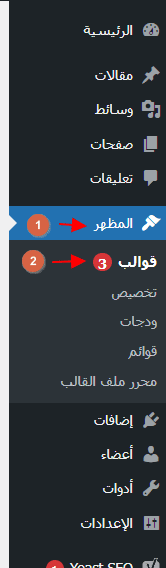
هذه الطريقة مناسبة في حال كُنت تريد تثبت قالب الووردبرس من داخل مكتبة قوالب الووردبرس، حث تتيح لك استكشاف كافة القوالب المتاحة والمجانية وتثبيتها مباشرة على الموقع الإلكتروني. ومن أجل الشروع في ذلك ستحتاج للدخول إلى لوحة تحكم الووردبريس. انقر على خيار المظهر > ثم قوالب.
من بعد ذلك، بإمكانك البحث عن القالب الذي تريد تثبيته على الموقع الخاص بك، أو الاختيار من بين الخيارات المعروضة في نافذة مكتبة الووردبريس. بعد تحديد القالب الذي تريد تثبيته على الموقع، بإمكانك النقر على خيار تفعيل من أجل تثبيته على موقع الووردبريس.
2- رفع قالب ووردبريس إلى الموقع
الطريقة الثانية التي تتيح لك تثبيت قالب ووردبريس بدون أخطاء، فبدلًا من استخدام الطريقة السابقة من أجل تثبت قوالب من لوحة تحكم الووردبريس، ففي بعض الأحيان يتم تحميل القالب على الموقع في ملف مضغوط وبالتالي لا بد من رفعه على الموقع عبر هذه الخطوات: في البداية عليك التوجه إلى لوحة تحكم الووردبريس، وانقر على
المظهر > ثم قوالب، من بعد ذلك في الواجهة اليُسرى اضغط على خيار أضف جديد. من بعد ذلك، انقر على رفع القالب. اختر ملف القالب من جهاز الكمبيوتر، ومن بعد ذلك انقر على التنصيب الآن.
3- تثبيت قالب ووردبريس من داخل لوحة تحكم cpanel إذا ما كُنت طريقة ثالثة من أجل تثبيت قالب ووردبريس بدون أخطاء فبإمكانك ذلك عبر داخل تحكم cpanel، ولكن هذه الطريقة ليست للمبتدئين وتحتاج لخبرة في بعض الجوانب التقنية. في البداية ستحتاج تنزيل ملف zip على جهاز الكمبيوتر، ومن بعد ذلك فك الضغط عن الملف.
توجه إلى لوحة تحكم cpanel. انقر على wp-content. حدّد على خيار theme.
انقر على Upload. في النافذة التالية اضغط على خيار select file أو اسحب القالب وارفعه إلى الموقع. من بعد ذلك، تكون قد تمكنت من تثبيت قالب ووردبريس بدون أخطاء، على الموقع الإلكتروني.
أشياء يجب الشروع فيها قبل تثبيت قالب الووردبريس تثبيت قالب ووردبريس بدون أخطاء يجب أن يتم قبله مجموعة من الخطوات أو المهام من أجل ضمان تثبيت القالب بالطريقة الصحيحة والحفاظ على الموقع الإلكتروني، والمشتلة على الآتي: – تسجيل التعديلات على القالب في الكثير من الأحيان يخصص أصحاب مواقع الووردبريس القوالب الخاصة بهم، عن طريقة إضافة أكواد أو تعليمات برمجية إلى ملفات القالب.
وهذا الأمر قد يكون رائع من أجل إضافة الميزات التي تريدها إلى موقعك الإلكتروني. لكن في حال تغيير قالب الموقع سوف تفقد هذه الإضافات وبالتالي من المهم حفظها. قياس أداء الموقع الحالي: قبل تغيير تثبيت قالب ووردبريس على الموقع الإلكتروني عليك قياس سرعة تحميل الموقع وأيضًا أدائه من أجل مقارنة أداء الموقع الإلكتروني بعض تثبت القالب، ولأن سرعة الموقع تلعب دورًا كبيرًا في التحسين من ترتيب الموقع في محركات البحث ففي هذه الحالة يجب عليك اختيار القالب المناسب لك.
– تعرف على أماكن القوائم الجانبية القوائم في الموقع الإلكتروني تُستخدم لإضافة عناصر واجهة مستخدم تفاعلية، على سبيل المثال الاشتراك في قوام البريد الإلكتروني وأزرار منصات التواصل والمقالات الشائعة وغيرها. وعند تغيير القالب يتم تغيير أماكن هذه القوائم أو إزالتها بالكامل من الموقع وبالتالي من الضروري لتعرف على أماكنها في الموقع من أجل إضافتها بعد تغيير القالب. – نسخ أكواد التعقب عند استخدام موقع الووردبريس يجب أن تكون هناك مجموعة من الرموز والأكواد التي يجب إضافتها إلى الموقع الإلكتروني، وعند تثبت قالب ووردبريس، فإن هذه الأكواد تُزال وفي هذه الحالة من الضروري نسخ هذه الأكواد والاحتفاظ بها في مستند على جهاز الكمبيوتر.
– عمل نسخة احتياطية من موقع الووردبريس من الجيد دائمًا إجراء نسخ احتياطي لموقع الووردبريس الخاص بك، قبل تثبيت قالب ووردبريس على موقعك الإلكتروني، لأنه في الكثير من الأحيان تحصل العديد من المشاكل جراء تغيير القالب على سبيل المثال قد تفقد محتوى الموقع أو الإضافات أو حتى قواعد البيانات وبإمكانك تدارك ذلك عبر عمل نسخ احتياطية من الموقع الإلكتروني. – ضع الموقع في وضع الصيانة عند التغيير في شكل الموقع الإلكتروني فمن الأفضل وضع الموقع في وضع الصيانة، بحيث تتمكن من إشعار زوار موقعك بأن الموقع تحت الصيانة الآن، وتجنب حصلوهم على تجربة مستخدم سيئة.
الخاتمة
لقد كانت هذه مجموعة من المعلومات التي تتيح لك تثبيت قالب ووردبريس بدون أخطاء، وتغيير شكل موقعك الإلكتروني ليتناسب مع المستخدمين أو حتى التطورات في شكل المحتوى. وإذا ما كُنت تريد التعرف على طريقة تثبيت الإضافات بإمكانك مطالعة مقال طريقة تثبيت إضافات ووردبريس بطرق صحيحة .
**********************
دروب أيديا - DROPIDEA
نأمل أن تكون هذه المقالة قد أضافت لك قيمة حقيقية. في دروب أيديا نسعى دائمًا لتقديم محتوى عربي عالي الجودة يساعدك على النمو والتطور في المجال الرقمي. تابعنا للمزيد من المقالات والشروحات المفيدة.
الأدمن
DROPIDEA
أحدث المقالات

هل تصيّد ماسك إطلاق أداة «Dots» من OpenAI عبر نطاق dot.com؟

بيك إكس في ترفع سقف استثماراتها البذرية إلى 5 ملايين دولار

عشاء مرتقب بين رئيس أنثروبيك ودونالد ترامب وسط خلافات حول أمان الذكاء الاصطناعي

جوجل تختبر الشراء المباشر من فليبكارت عبر Gemini في الهند



