المواقع الالكترونية والتطبيقات
 بقلم الأدمن
June 1, 2025
222 مشاهدة
بقلم الأدمن
June 1, 2025
222 مشاهدة
طريقة حظر اليوتيوب في الايفون والايباد للأطفال أو تحديد مدة إستخدام
بقلم الأدمن
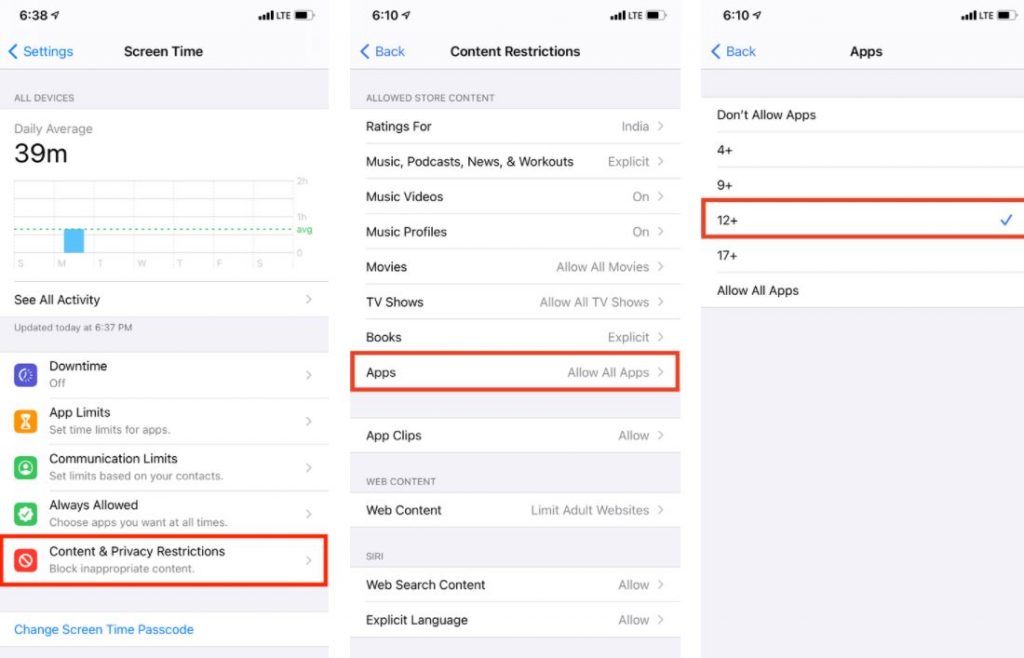
شاهد أيضاً: زيادة متابعين يوتيوب عبر تطبيق YouberUp | مشتركي YouTube مجانًا ولهذا السبب إليك كيفية حظر اليوتيوب على متصفحات الانترنت: في البداية نقوم بفتح الإعدادات ونضغط على Screen Time. ثم ننقر فوق قيود المحتوى والخصوصية ونتأكد من تمكينها.
ثم ننقر فوق قيود المحتوى بعدها نختار محتوى الويب. بعد ذلك نختار Limit Adult Websit قد يعجبك:
كيفية تعطيل وضع تقييد المحتوى باليوتيوب على الكمبيوتر او الاندرويد
دروب أيديا - DROPIDEA
نأمل أن تكون هذه المقالة قد أضافت لك قيمة حقيقية. في دروب أيديا نسعى دائمًا لتقديم محتوى عربي عالي الجودة يساعدك على النمو والتطور في المجال الرقمي. تابعنا للمزيد من المقالات والشروحات المفيدة.
الأدمن
DROPIDEA
أحدث المقالات

هل تصيّد ماسك إطلاق أداة «Dots» من OpenAI عبر نطاق dot.com؟
منذ ساعة

بيك إكس في ترفع سقف استثماراتها البذرية إلى 5 ملايين دولار
منذ يوم

عشاء مرتقب بين رئيس أنثروبيك ودونالد ترامب وسط خلافات حول أمان الذكاء الاصطناعي
منذ يومين

جوجل تختبر الشراء المباشر من فليبكارت عبر Gemini في الهند
منذ 3 أيام

كروزو تلغي صفقة بـ1.25 مليار دولار لتوربينات مراكز البيانات
منذ 4 أيام


