توقف! قبل بيع الايفون، واتبع هذه الخطوات الأساسية: دليل شامل
 بقلم الأدمن
الخطوة الأولى: النسخ الاحتياطي – حصّن ذكرياتك الرقمية كيف تُنشئ نسخة احتياطية؟ iCloud: iTunes: Finder: شرحنا هذه الخطوات بالتفصيل في مقالنا : الدليل الشامل لإجراء النسخ الاحتياطي للايفون ما البيانات التي يجب تضمينها في النسخ الاحتياطي؟
الصور ومقاطع الفيديو: جهات الاتصال: الرسائل: التطبيقات: الموسيقى والكتب الصوتية: الإعدادات: نصيحة إضافية: نقل البيانات مباشرة إلى هاتفك الجديد الخطوة الثانية: نقل بيانات الايفون الى هاتف أو كمبيوتر بعد أن ضمنت سلامة بياناتك من خلال النسخ الاحتياطي، قد ترغب في نقلها إلى هاتفك الجديد أو جهاز الكمبيوتر الخاص بك. لا تقلق، فالعملية أسهل مما تتخيل! إليك بعض الطرق المُختلفة لنقل بياناتك بسرعة وسهولة: 1.
إلى iPhone جديد: Quick Start: إذا كان لديك iPhone جديد، فيمكنك استخدام ميزة “Quick Start” لنقل بياناتك لاسلكيًا من iPhone القديم. ما عليك سوى تقريب الجهازين من بعضهما البعض واتباع التعليمات التي تظهر على الشاشة.
Move to iOS: إذا كنت تنتقل من هاتف Android إلى iPhone، فيمكنك استخدام تطبيق “Move to iOS” لنقل بياناتك بسهولة. سيقوم التطبيق بنقل جهات الاتصال، والرسائل، والصور، ومقاطع الفيديو، والمزيد.
( مقال مخصص عن أداة Move To iOS ) 2.
إلى جهاز الكمبيوتر: كابل USB:
أسهل طريقة ل نقل الصور ومقاطع الفيديو من ايفون للكمبيوتر هي باستخدام كابل USB. قم بتوصيل iPhone بالكمبيوتر وانتظر حتى يتم التعرف عليه، ثم انقل الملفات يدويًا.
iCloud Photos: إذا كنت تستخدم iCloud Photos، فإن جميع صورك ومقاطع الفيديو مُخزنة أصلًا على iCloud. يمكنك الوصول إليها وتنزيلها من أي جهاز آخر باستخدام حساب Apple ID الخاص بك.
خدمات التخزين السحابي: يمكنك أيضًا استخدام خدمات التخزين السحابي الأخرى مثل Google Drive أو Dropbox لنقل الملفات من iPhone إلى الكمبيوتر. 3.
نقل محادثات WhatsApp: إنشاء نسخة احتياطية: قبل بيع iPhone، تأكد من إنشاء نسخة احتياطية من محادثات WhatsApp الخاصة بك على iCloud أو Google Drive.
استعادة النسخة الاحتياطية:
بعد إعداد WhatsApp على هاتفك الجديد، ستتمكن من استعادة محادثاتك من النسخة الاحتياطية. ( اتبع مقالنا عن نقل محادثات الواتس اب للايفون /Android ) لمزيد من التفاصيل عن نقل بيانات واتساب.
4. نصائح لنقل أنواع أخرى من البيانات: الملاحظات: يمكنك مزامنة ملاحظاتك مع iCloud أو حساب بريد إلكتروني لنقلها إلى جهاز آخر.
جهات الاتصال: يمكنك مزامنة جهات اتصالك مع iCloud أو حساب بريد إلكتروني، أو تصديرها كملف vCard. التقويم:
يمكنك مزامنة التقويم الخاص بك مع iCloud أو حساب بريد إلكتروني. الخطوة الثالثة: فك الارتباط: ازالة iPhone قبل البيع من حساباتك
تسجيل الخروج من iCloud:
تسجيل الخروج من خدمات Apple الأخرى: App Store: iMessage: FaceTime: إلغاء ربط الحسابات الأخرى: حسابات التواصل الاجتماعي: حسابات البريد الإلكتروني: حسابات التطبيقات البنكية وخدمات الدفع: إلغاء إقران الأجهزة المُتصلة: إليك كيفية إلغاء إقران الأجهزة المُتصلة:
Apple Watch: AirPods: اف أجهزة Bluetooth الأخرى: 4.
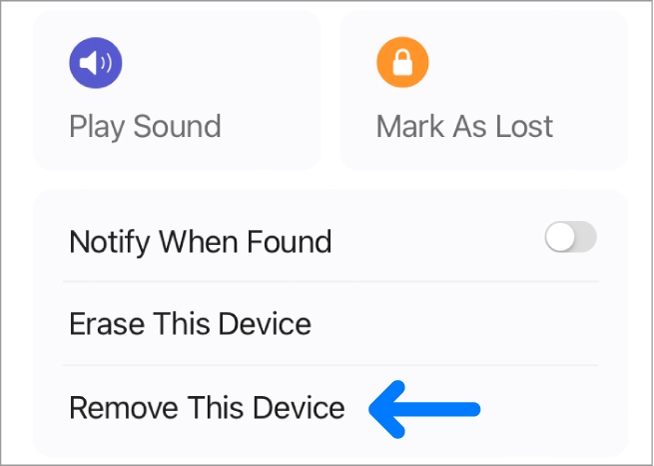
تعطيل خاصية Find My iPhone وهي من الخطوات المهمة التى يجب أن تقوم بها قبل بيع الايفون ، فإذا سبق لك وقمت بتفعيل خاصية Find My iPhone كخطوة لـ حماية الايفون الخاص بك من السرقة فهذا هو الوقت المناسب لتعطيلها، فإن لم تقم بذلك لن يستطيع الشخص المشتري استخدام خصائص الايفون قبل إدخال الـ Apple ID الخاص بالمُستخدم الاصلي وهي طريقة رائعة من من أجل حماية الجهاز عند السرقة، ولكن بما أنك على وشك بيعه فعليك بتعطيل هذه الخاصية اولاً وذلك بعد إتباع الخطوات الآتية: فتح الإعدادات Settings من الشاشة الرئيسية. اضغط على iCloud.
اضغط على Find My iPhone. قم بتعطيل خاصية Find My iPhone. ادخل رمز التحقق Apple ID للتأكيد.
اضغط على زر Turn Off. والآن خاصية Find My iPhone لم تُعد ممكنة فى جوالك بعد الآن.
الخطوة الرابعة: مسح الهوية: إعادة iPhone إلى نقطة
الصفر ( ضبط المصنع) كيف تُعيد ضبط iPhone إلى إعدادات المصنع؟ من خلال الإعدادات: باستخدام الكمبيوتر: تأكد من مسح جميع البيانات: اللمسات الأخيرة: تجهيز iPhone للبيع
تنظيف الجهاز: إزالة الملحقات:
تجهيز العلبة الأصلية:
تحديد سعر البيع: اختيار منصة البيع: eBay: Facebook Marketplace: مواقع الإعلانات المُصنفة: ماذا لو فات الأوان؟ استعادة السيطرة بعد بيع iPhone إليك ما يمكنك فعله: محو iPhone عن بُعد: قفل iPhone عن بُعد: تغيير كلمة مرور Apple ID: تعطيل Apple Pay عن بُعد: إزالة iPhone من Apple ID: إلغاء تسجيل iMessage: تذكر: مصدر اضافي للإطلاع : دعم آبل عن نصائح قبل بيع الايفون/الايباد تحديث المقال : تم تحديث المقال بتاريخ نوفمبر 2024 مع تضمين صور ومعلومات جديدة بناء على نظام iOS 18 .
دروب أيديا - DROPIDEA
نأمل أن تكون هذه المقالة قد أضافت لك قيمة حقيقية. في دروب أيديا نسعى دائمًا لتقديم محتوى عربي عالي الجودة يساعدك على النمو والتطور في المجال الرقمي. تابعنا للمزيد من المقالات والشروحات المفيدة.
الأدمن
DROPIDEA
أحدث المقالات

هل تصيّد ماسك إطلاق أداة «Dots» من OpenAI عبر نطاق dot.com؟

بيك إكس في ترفع سقف استثماراتها البذرية إلى 5 ملايين دولار

عشاء مرتقب بين رئيس أنثروبيك ودونالد ترامب وسط خلافات حول أمان الذكاء الاصطناعي

جوجل تختبر الشراء المباشر من فليبكارت عبر Gemini في الهند



