تحميل وينامب 2022 Winamp – عودة مشغل الميديا بشكل جديد
 بقلم الأدمن
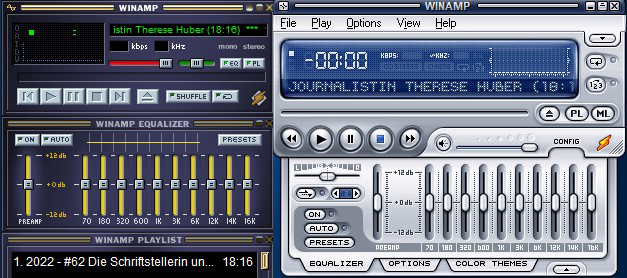
بكل تأكيد هناك جيل بالكامل نشأ على منصات الصوتيات الاون لاين وبث المحتوى مثل سبوتيفاي وانغامي ومنصات البودكاست وخلافه، ولكن بالرجوع الي الخلف قليلا سنجد جيل اخر كان مصدر سماعه للموسيقى والصوتيات عبر التحميل والتخزين، واستخدام برامج الميديا المختلفة، من اهم هذه التطبيقات هو برنامج Winamp، واليوم مع اصداره الجديد وينامب 2022 ليعود مره اخرى الي الساحة. نظرة علي برنامج وينامب 2022 Winamp عاد برنامج وينامب Winamp مع نفس الفلسفة المحببة لمستخدمينه من الثيمات والقوالب المختلفة والتي تجعل التطبيق مختلف وغير ممل.
واجهة البرنامج هي المألوفة ولم يتم تغييرها، بالاضافة الي مميزات برنامج الميديا المعروفة. والتي تتكون من تحميل مكتبتك الخاصة المخزنة علي حاسوبك، او يمكنك سماع بعض المحطات المختلفة لبث الاغاني، ايضا يتوفر قنوات متعدده للبودكاست في مجالات متعدده. مازال برنامج وين امب يتمتع بالبساطة المعتاد عليها، لتجد جميع الاختيارات والاقسام امامك بشكل منظم ويمكنك تعديلها وتنظيمها كما تريد.
تحميل برنامج وينامب 2022 يمكنك الان تحميل الاصدار الجديد Winamp 5.9999 لعام 2022 للكومبيوتر او اللابتوب بشكل مجاني من هنا عبر المدونة الرسمية. لا يحتاج تنصيب البرنامج علي حاسوبك الشخصي اي كلمات سر او تعقيدات فالتطبيق مجاني بشكل كامل وخفيف جدا ويمكن استخدامه على اصدارات ويندوز 7 ،ويندوز 8، ويندوز 10، ويندوز 11.
تحميل ثيمات برنامج وينامب 2022 بشكل مجاني كما تعلم ان اكبر نقاط التميز في برنامج وين امب هو امكانية التخصيص الواسعة في الشكل. يوفر لك برنامج الميديا بعض القوالب بشكل مسبق ويمكنك استخدامها عن طريق الخطوات الاتية افتح برنامج Winamp، ثم انتقل الي الشريط العلوي للبرنامج واختار كلمة Options ثم اختيار Skins، ثم بالضغط على Skin Browser. سيفتح لك البرنامج نافذه تحتوى علي الثيمات المتوفرة للتطبيق، ويمكنك تحميل المزيد بالضغط على كلمة Get Skins باللون الازرق اسفل النافذة المفتوحة.
والتي بدورها ستفتح لك المتصفح مع اختيارات متعدده من المواقع المجانية لتحميل الثيمات المختلفة . طريقة اضافة القوالب والثيمات المجانية لبرنامج Winamp 2022 بعد تحميل قوالب وثيمات جديدة كما ذكرنا بالاعلى، ستحتاج الي الذهاب لمسار البرنامج على حاسوبك لوضع الملف الذي قمت بتحميله. يمكنك الذهاب الي مسار البرنامج عن طريق ضغط كليك يمين بالماوس علي التطبيق ثم اختيار Open File Location.
او عن طريق الذهاب الي المسار الاتى: C-Program Filesx86-Winamp-skins بعد الوصول الي مجلد التطبيق يمكنك وضع ملفات القوالب والثيمات المحمله في مجلد Skins داخل مجلد Winamp. وبعدها يمكنك اعادة تشغيل البرنامج ثم الذهاب الي القوالب والثيمات بنفس الطريقة المذكورة بالاعلى لتجد جميع القوالب التي قمت بتحميلها بشكل مجاني للبرنامج.
دروب أيديا - DROPIDEA
نأمل أن تكون هذه المقالة قد أضافت لك قيمة حقيقية. في دروب أيديا نسعى دائمًا لتقديم محتوى عربي عالي الجودة يساعدك على النمو والتطور في المجال الرقمي. تابعنا للمزيد من المقالات والشروحات المفيدة.
الأدمن
DROPIDEA
أحدث المقالات

هل تصيّد ماسك إطلاق أداة «Dots» من OpenAI عبر نطاق dot.com؟

بيك إكس في ترفع سقف استثماراتها البذرية إلى 5 ملايين دولار

عشاء مرتقب بين رئيس أنثروبيك ودونالد ترامب وسط خلافات حول أمان الذكاء الاصطناعي

جوجل تختبر الشراء المباشر من فليبكارت عبر Gemini في الهند



