تغيير سعر البيع حسب كمية مشتريات العميل ليقوم بالدفع أكثر
 بقلم الأدمن
لا يشترط أن تنفق المزيد من الأموال على الحملات الإعلانية لتجني المزيد من المبيعات، ولكن هناك بعض الأفكار المبتكرة التي يمكنك الاستفادة منها داخل متجرك لإقناع العملاء بالشراء بكمية أكبر وبالتالي زيادة العملاء، ومن هذه الطرق هي تغيير سعر المنتج حسب كمية مشتريات العميل. اختلاف سعر البيع على حسب كمية المنتجات التي يقوم العميل بإضافتها إلى سلة المشتريات من أكثر التعديلات التي يمكنك تطبيقها في متجرك لتشجيع العملاء علىشراء المزيد للحصول على خصم أو نقاط شراء أو أي مميزات أخرى تحددها له. في هذه المقالة سنتعرف على استخدام استراتيجية تغيير سعر البيع بناءًا على كمية المنتجات داخل متجر ووكومرس، وتأثيرة على مضاعفة مبيعات المتجر، وكذلك سنقوم بالتطبيق العملي باستخدام إضافات ووردبريس المتخصصة في هذا الأمر.
كيف يمكنك تغيير سعر البيع حسب كمية مشتريات العميل، وما فوائد ذلك؟ يتم تغيير الأسعار داخل المتجر على حسب كمية المنتجات التي يقوم العميل بإضافتها إلى السلة، أو على حسب السعر الإجمال للسلّة، أو كذلك على حسب إجمال وزن المنتجات، وغيرها من الخصائص التي يمكنك تطبيق تغيير الأسعار داخل المتجر بناءً عليها. مثلاً إذا كان لديك منتج ما داخل متجرك سعره 100$، يمكنك تطبيق هذه الاستراتيجية بحيث إذا قام العميل
بطلب 5 كميات من المنتج، فإنه يحصل على خصم 50% للمنتج الواحد مما يعني أنه سيدفع 250$ للحصول على الخمسة معاً، بينما إذا طلب كمية 1 فقط فسيحصل عليه بالسعر العادي 100$. لا يتم تغيير الأسعار فقط على حسب كمية المشتريات، ولكن بإمكانك تطبيقه على حسب الوزن أو إجمالي سعر المشتريات داخل السلّة، وإليك أبرز فوائد تطبيق تنويع سعر المنتجات داخل المتجر: تشجيع الزبائن على إضافة كميات أكبر من المنتجات إلى سلة الشراء للحصول على الخصم المستهدف.
توفير تسعيرة المنتجات تناسب كل العملاء بمختلف الميزانيات. رفع نسبة مبيعات المتجر بشكل كامل بسبب رغبة الزبائن في مضاعفة الطلبات للاستفادة من الخصم. تحسين تجربة الشراء داخل المتجر، وهو ما يشجع الزبائن على العودة مرة أخرى لتكرار الشراء.
وبالتالي فإن تنويع أسعار المنتجات داخل المتجر يعتبر أحد الأشياء التي من شأنها أن ترفع نسبة مبيعاتك وارباحك بصورة لا تتخيلها إذا قمت بتوظيفها بشكل صحيح ويناسب نوعية العملاء في متجرك. إضافات ووردبريس تساعدك على تغيير سعر المنتج حسب حالة الشراء توجد العديد من إضافات ووردبريس التي تساعدك على تطبيق تنويع أسعار المنتجات بعضها بشكل مجاني وبعضها بشكل مدفوع وسنتحدث عنهم كما يلي إضافة ELEX Dynamic pricing
واحدة من الإضافات التي يمكنك الاعتماد عليها بشكل مجاني هي
إضافة ELEX Dynamic pricing .
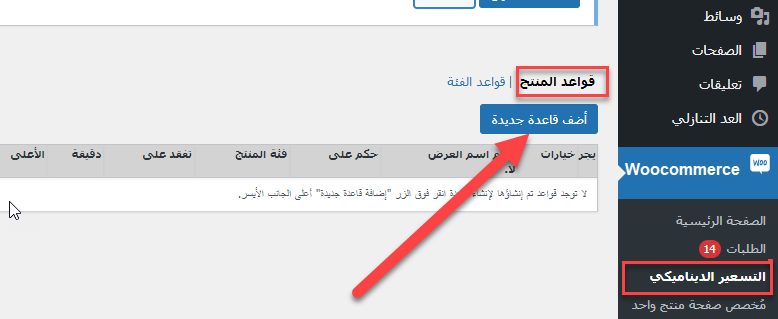
وسوف نقوم باستخدام الإضافة في شرح تنويع الاسعار داخل المتجر بشكل عملي. بعد تنصيب وتفعيل الإضافة على موقعك ، سننتقل إلى تبويب (التسعير الديناميكي)الذي يظهر داخل تبويب الـ ووكومرس مباشرة بعد تفعيل الإضافة، ثم قم بالنقر على زر ( أضف قاعدة جديدة )، لكي تبدأ في تعيين قاعدة عامة لتنويع الاسعار للمنتجات: سنقوم الآن بتعيين قاعدة تنويع الأسعار للمنتج. سنقوم على سبيل المثال بتعيين قاعدة خصم في حال قام الزبون بطلب المنتج بكمية من (2) إلى (5)، حيث سنوفر له خصم بقيمة 20% في هذه الحالة، وإذا طلب كمية أقل من (2) سيقوم بدفع السعر الافتراضي للمنتج.
لذلك سنقوم بإكمال البيانات في الصفحة كالتالي: اسم العرض: في هذه الخانة تقوم بكتابة عنوان للخصم، حيث يظهر هذا العنوان للادمن فقط داخل لوحة التحكم.
القاعدة المطبقة على: هنا تختار من بين ثلاث اختيارات، الأول هو (المنتجات في عربة التسوق) وفي هذه الحالة سيتم تطبيق الخصم بناء على المنتجات التي يتم إضافتها داخل داخل سلة الشراء، بينما يوجد خيار ثانِ ( منتجات مختارة) حيث يمكنك تطبيق الخصم على بعض المنتجات التي تقوم بإختيارها بنفسك، والخيار الثالث (الفئة المختارة) ومنه تستطيع تطبيق الخصم على تصنيف معين للمنتجات دوناً عن التصنيفات الأخرى ليتم تطبيق الخصم عليه.
تحقق من:
في هذا الخيار تقوم بتحديد إما (كمية) ليتم تطبيق الخصم بناء على كمية المنتج داخل سلة الشراء، أو (وزن) ليتم تطبيق الخصم بناء على الوزن الإجمالي للمنتجات المطلوبة، أو (سعر) لتقوم بتعيين الخصم بناء على السعر الإجمالي داخل سلة المشتريات. الكمية الدنيا: تقوم بتحديد الحد الأدني لعدد المنتجات الذي يجب على العميل الوصول إليه للاستفادة بالخم.
الكمية القصوى: تقوم بتعيين الحد الأقصى لكمية المنتجات التي يمكن للعميل الاستفادة بالخصم خلالها.
نوع الخصم:
يمكنك الاختيار من بين إما (نسبة الخصم) والتي يمكنك تعيين نسبة مئوية للخصم من خلالها مثل 10% أو 20%، أو (سعر ثابت) الذي تقوم من خلالها بتطبيق سعر ثابت للخصم مثل 10$ أو 20$ دولار. نسبة الخصم: تقوم فيها بكتابة النسبة المئوية أو سعر الخصم الذي ترغب في تطبيقه على سلة المشتريات للعميل الذي يستوفي شروط قاعدة الخصم التي تقوم بتعيينها في كافة الخطوات السابقة.
في تلك الخطوة نقوم بإنشاء قاعدة تنويع أسعار المنتجات التي يتم إضافتها داخل سلة الشراء، بحيث إذا طلب العميل كمية من 2 وحتى 5 من أي منتج، فسوف يحصل على نسبة خصم 20% على كل منتج. بعد حفظ قاعدة تنويع الاسعار هذه، ننتقل إلى تجربة شراء أحد المنتجات في المتجر، حيث سنقوم بإضافة أحد المنتجات بكمية (1) فقط داخل سلة الشراء علماً بأن سعر المنتج الإفتراضي هو 100 دولار، وفي هذه الحالة سيظهر السعر الإفتراضي لأن الكمية المطلوبة أقل من الكمية التي حددناها في قاعدة تنويع الأسعار والتي تبدأ من (2) وحتى (5): سنقوم الآن بمضاعفة الكمية المطلوبة من المنتج إلى (4) وفي هذه الحالة نلاحظ تطبيق الخصم 20% على كل طلب ليكون سعر الطلب الواحد 80$ بدلاً من 100$ وفي النهاية سيكون السعر الإجمالي هو 320$ بدلا من 400: بهذه الطريقة تستطيع إنشاء أي عدد من قواعد تنويع الاسعار داخل متجرك، سواء على حسب كمية المشتريات في السلًة، أو على حسب السعر الإجمالي، أو حتى على حسب التصنيف أو نوعية المنتجات. كذلك يمكنك تعيين نوعية العملاء المسموح لهم بالاستفادة من تنويع الأسعار، وكذلك يمكنك تعيين تاريخ بداية ونهاية لعروض تنويع الأسعار، وذلك من خلال الدخول على تبويب الأدوار والتاريخ المسموح بها: الأدوار المسموح بها : من خلال هذا الخيار بإمكانك اختيار نوعية الأدوار المسموح لها بالاستفادة من خصومات تنويع الأسعار، مثل الزوار الغير مسجلين، أو العملاء المسجلين بالمتجر، أو غيرها من الأدوار التي تختلف باختلاف نوعية متجرك.
صالحة من تاريخ : تقوم هنا بكتابة تاريخ بدء تطبيق قواعد تنويع الاسعار للمنتجات. تاريخ الإنتهاء: تحدد فيه تاريخ انتهاء عروض تنويع الأسعار .
إضافة Wholesale Tiered Pricing تعتبر إضافة Wholesale tiered pricing واحدة من الإضافات المدفوعة والموجودة على متجر الإضافات الرسمي من ووكومرس، والتي تقوم بإتاحة الفرصة لصاحب المتجر لتطبيق تنويع الأسعار على مختلف المنتجات والتصنيفات بصورة إحترافية، حيث يمكن استخدام الإضافة لتطبيق تغيير السعر على منتجات مختارة بعينها، أو على مجموعة متنوعة من تصنيفات المنتجات، وكذلك تتيح تنويع الاسعار بطريقة الخصم المباشر، أو بطريقة الخصم بالنسبة المئوية.وكذلك توفر خيار تنويع الاسعار بناء على نوع المستخدم وأدواره المختلفة داخل المتجر.
واليك مجموعة من أهم الخيارات التي توفرها الإضافة: تنويع الاسعار بناء على رتبة المستخدم داخل المتجر وساء كان زائر عادي، أو عميل مسجل، أو مدير بالموقع، أو غيره من الأدوار. خيارات متنوعة للتحكم في أسعار البيع بالجملة، أو البيع بالقطعة. خيار تطبيق الخم باستخدام النسبة المئوية بالزيادة، أو النسبة المئوية بالنقصان، وكذلك إمكانيات تعيين سعر خصم ثابت.
إمكانية تعيين الحد الأدنى والأقصى لكمية المنتج المطلوب لتطبيق تنويع الاسعار بالمتجر. إمكانية إظهار جدول يحتوي على الأسعار المتنوعة داخل صفحة المنتج، مع خيارات للتحكم في شكل الجدول ومظهره باستخدام مجموعة متنوعة من التنسيقات الجاهزة. خاصية إخفاء السعر للزوار غير المسجلين، أو اختيار أدوار معينة من المستخدمين لأخفاء السعر وكذلك زر الإضافة إلى السلة.
خيارات التحكم في النص الخاص بسعر المنتج وكذلك النص الخاص بزر أضف إلى السلة. متوافقة مع خاصية المنتجات المتنوعة، حيث يمكن تعيين أسعار متغيره على حسب كل نوع من أنواع المنتجات المتوفرة.
إضافة Price By Quantity Plugin
تعتبر اضافة Price By Quantity Plugin من الإضافات المميزة في تطبيق تنويع الاسعار داخل المتجر، وتوفر إمكانية عرض جدول الأسعار المتنوعة للمنتج داخل صفحة المنتج نفسه بحيث يستطيع العميل الاطلاع على الأسعار المتوقعة بناء على الكميات التي يقوم بتعيينها، وذلك قبل التوجه إلى صفحة إتماما الطلب، مع إمكانية تعيين الاسعار المتنوعة على حسب رتبة المستخدم أو العميل داخل المتجر، وهذه قائمة أهم الخيارات التي توفرها الإضافة: توفر الإضافة خيارات تنويع الاسعار على حسب الكمية التي يختارها العميل أثناء الطلب.
عرض جدول الأسعار المتنوعة داخل صفحة المنتج قبل التوجه إلى إتماما الطلب، ويوفر الجدول خيارات تعيين الكميات المطلوبة للإطلاع على السعر النهائي للطلب. يمكن تطبيق خيارات تنويع الأسعار على المنتجات البسيطة، أو المنتجات متعددة الأنواع، وتوفر إمكانية تعيين تنوع السعر لكل نوع من أنواع المنتج على حده. إمكانية التحكم في تاريخ بداية ونهاية أسعار الخصم على الكميات.
وبالنهاية كانت نوعية المنتجات داخل متجرك تسمع بطلب كميات مضاعفة من المنتج، فأحرص على تجربة تطبيق هذه الاستراتجية لإقناع العملاء بالشراء أكثر. ونرجو أن تكون قد تعرفت داخل المقالة على الخطوات العملية لتطبيق تنويع الأسعار سواء باستخدام الإضافات، وكذلك قم بإبراز رسالة تسويقية واضحة تقنع العميل بأخذ هذا الإجراء وابدأ بتحليل حركة المبيعات في متجرك بعد تطبيق تنويع الأسعار بطريقة تشجّع العميل على إضافة المزيد من الكميات للمنتج المطلوب للاستفادة بالأسعار المخفّضة التي سيحصل عليها عند مضاعفة الكمية.
ويمكنك أيضًا المشاركة في موضوع:
أساليب مختلفة لتحصيل الأموال من عملاء متجرك الإلكتروني على منتدى عرب ووردبريس
دروب أيديا - DROPIDEA
نأمل أن تكون هذه المقالة قد أضافت لك قيمة حقيقية. في دروب أيديا نسعى دائمًا لتقديم محتوى عربي عالي الجودة يساعدك على النمو والتطور في المجال الرقمي. تابعنا للمزيد من المقالات والشروحات المفيدة.
الأدمن
DROPIDEA
أحدث المقالات

هل تصيّد ماسك إطلاق أداة «Dots» من OpenAI عبر نطاق dot.com؟

بيك إكس في ترفع سقف استثماراتها البذرية إلى 5 ملايين دولار

عشاء مرتقب بين رئيس أنثروبيك ودونالد ترامب وسط خلافات حول أمان الذكاء الاصطناعي

جوجل تختبر الشراء المباشر من فليبكارت عبر Gemini في الهند



