تغيير رابط صفحة الدخول للووردبريس wp-admin وتفعيل reCAPTCHA
 بقلم الأدمن
يأتي رابط تسجيل الدخول إلى أي موقع ووردبريس بصورة افتراضية عامًّا ومعروفًا للجميع، حيث يكون على الشكل: (www.DomainName.com/wpadmin). ولكن لم قد يكون رابط صفحة الدخول عامل قلق بالنسبة لك؟ ولم يجب عليك التفكير في تغيير رابط الدخول للوردبريس وإضافة أداة Captcha إليه؟
في الواقع يمكن أن يشكّل الإبقاء على رابط تسجيل الدخول كما هو خطورةً محتملة على أمان موقعك، فليس من الجيد سهولة توقع صفحة تسجيل الدخول وكذلك زيادة محاولات اختراق تلك الصفحة التي تعتبر بوابة إلى كافة إعدادات موقعك، لذلك سنشرح لك تأمين هذه الصفحة عن طريق تغيير ذلك الرابط الافتراضية وإضافة خاصية التحقق الآلي ( reCAPTCHA ). لماذا تغيير رابط صفحة تسجيل الدخول؟ إن كنت تريد زيادة درجة الأمان وحماية موقع الووردبريس الخاص بك فإحدى أهم الطرق لتحقيق ذلك هي تعديل رابط صفحة تسجيل الدخول وجعله مُتاحًا فقط للأعضاء أو المشرفين في الموقع.
تخصيص رابط الصفحة ليكون متاحًا فقط لأشخاص معينين فقط من شأنه أن يحمي موقعك من أي محاولة قرصنة أو دخول غير مصرّح به، والذي قد يؤثر على سرعة موقعك وأداءه، أو حتى على أمان الموقع ويعرّض بيانات المستخدمين للخطر. من أشهر الهجمات التي تتعرض لها مواقع الووردبريس هي هجمات brute force attack، والتي تتضمن سلسلة من محاولات توقع حسابات تسجيل الدخول من خلال تلك الصفحة الرئيسية بهدف اختراق الموقع وسرقة بياناته أو حتى حجب بيانات الموقع والمستخدمين، وبالتالي فإن تغييرك لهذا الرابط الافتراضي يُفشِل كافة تلك المحاولات.
يمكننا توضيح أن الآلية التي يتّبعها معظم القراصنة أثناء محاولة اختراق موقعك عبر رابط تسجيل الدخول العام، وذلك من خلال الخطوات التالية: الوصول إلى رابط الموقع الأساسي: www.Example.com تحديد إذا ما كان الموقع قد تم تصميمه وتطويره باستخدام الووردبريس أم منصة أخرى، وذلك عن طريق إحدى الأدوات أو عبر التحقق من بعض الملفات المعروفة والتي تكون داخل ووردبريس، مثل /wp-content و /wp-includes وغيرها.
التأكد من أن الموقع تم تصميمه عبر منصة الووردبريس، يكون من السهل توقع صفحة تسجيل الدخول إلى لوحة التحكم الافتراضية إذا لم يكن قد تم تغييرها، وهي /wp-admin. بعد الوصول إلى صفحة تسجيل الدخول يبدأ المقرصنون بتخمين اسم المستخدم وكلمة المرور، ويكون ذلك سهلًا للغاية في حال كانت بيانات تسجيل الدخول هي البيانات الإفتراضية واسم المستخدم هو Admin، وبالطبع إن كنت على أدنى دراية بكيفية تصميم موقع على الووردبريس فلن تبقي على كلمة السر تلك كما هي. بعد تخمين اسم المستخدم وكلمة المرور ونجاحهم في الدخول إلى لوحة تحكم الموقع، يمكنهم إلحاق الضرر بالكثير من ملفات الموقع وبيانات مستخدميه.
بعد هذا الاستعراض السريع لأبرز الأخطار التي قد يتعرض لها موقعك من خلال رابط تسجيل الدخول العام، وأهمية تغيير ذلك الرابط في تأمين موقعك، وكذلك نفس الأمر في إضافة نظام التحقق البشري reCAPTCHA في صفحة تسجيل الدخول، وهذا ما سنشرحه في السطور القادمة.
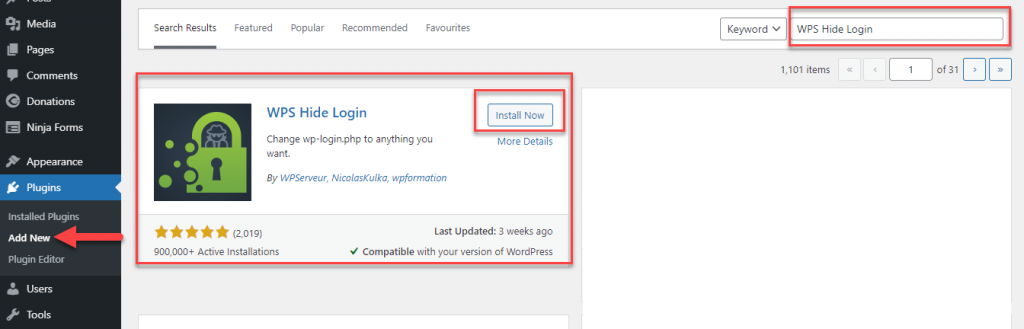
تغيير رابط تسجيل الدخول إلى لوحة تحكم الووردبريس /wp-admin دعنا الآن نستعرض إحدى الطرق لتغيير رابط صفحة تسجيل الدخول إلى لوحة تحكم الووردبريس باستخدام إحدى الإضافات سهلة الاستخدام، وهي إضافة WPS Hide Login والتي تساعدك في تغيير الرابط من داخل لوحة التحكم.
في البداية سنقوم بتنصيب الإضافة من خلال لوحة تحكم الووردبريس، ثم الذهاب إلى: إضافات
دروب أيديا - DROPIDEA
نأمل أن تكون هذه المقالة قد أضافت لك قيمة حقيقية. في دروب أيديا نسعى دائمًا لتقديم محتوى عربي عالي الجودة يساعدك على النمو والتطور في المجال الرقمي. تابعنا للمزيد من المقالات والشروحات المفيدة.
الأدمن
DROPIDEA
أحدث المقالات

هل تصيّد ماسك إطلاق أداة «Dots» من OpenAI عبر نطاق dot.com؟

بيك إكس في ترفع سقف استثماراتها البذرية إلى 5 ملايين دولار

عشاء مرتقب بين رئيس أنثروبيك ودونالد ترامب وسط خلافات حول أمان الذكاء الاصطناعي

جوجل تختبر الشراء المباشر من فليبكارت عبر Gemini في الهند



