ماهو Grain – الغرين وكيف ولماذا عليك أن تستخدمه في أعمالك القادمة
 بقلم الأدمن
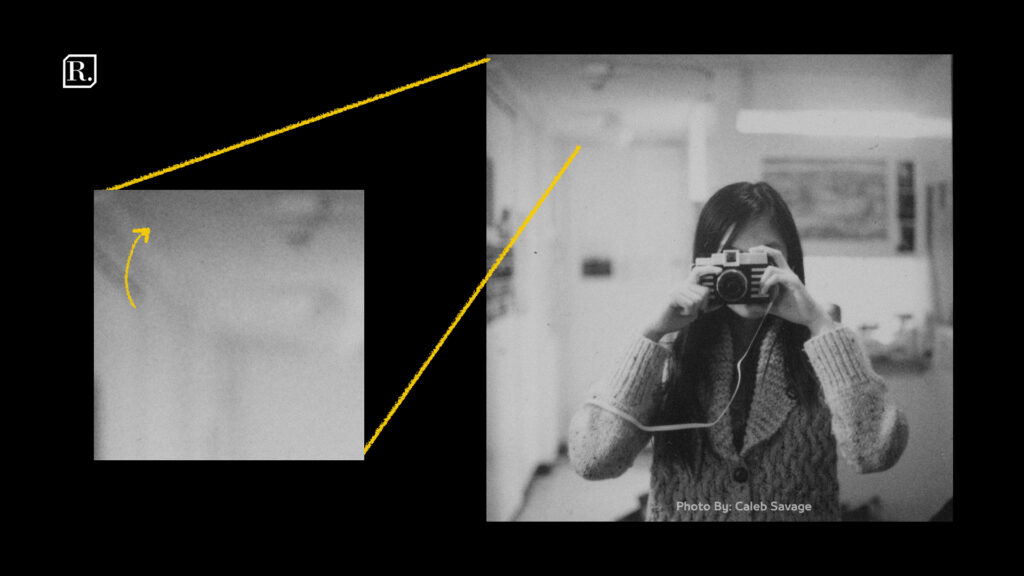
في كل مرة نقوم بنشر مقالة في مدونة رديف نقوم بنشر مجموعة من التصاميم على حسابات السوشل ميديا الخاصة بالمدونة لإعلام المتابعين بوجود محتوى جديد في الموقع، وردنا ذات مرة سؤال مهم حول تلك التصاميم، وكان على الشكل التالي : كيف تضيفون النويز إلى تصاميمكم، وهل هنالك طريقة لإضافتها للفيديو؟ في هذه المقالة سأحاول الإجابة بشكل كامل عن هذا السؤال، والتعريف بماهية Grain – الغرين وأصل هذه الإضافة الصغيرة في المحتوى البصري ولماذا قد نستخدمها وكيف نقوم بذلك في التصاميم الثابتة والصور وكذلك الفيديو. ماهو Grain – الغرين في بداية التصوير الفوتوغرافي والتصوير السينمائي كانت الصور تُلتقط عن طريق كاميرات الفيلم، كانت بكرات الأفلام تختلف من نوع لآخر بحسب حساسيتها للضوء، فكان هنالك بكرات/أفلام بقيمة حساسية ISO
خاصة غير قابلة للتعديل. عندما كان يتم التصوير بتلك الكاميرات، أكان التصوير فوتوغرافياً أم سينمائياً، كانت تلك الأفلام تضيف نوعا ما من الضجيج للصورة، كما في الصورة التالية : حينها، كان المصورون يسعون بشكل كبير لتفادي ذلك الضجيج، لكن ومع تطور الكاميرات من كاميرات فيلم إلى كاميرات إلكترونية، لم يعد Grain – الغرين موجود في الصور، وإنتقل من كونه تأثير مصحوب بنوع الفيلم ذاته، إلى كونه عبارة عن ضجيج ملون يحصل بسبب زيادة التيار الكهربائي على مستشعر الكاميرا ما يسبب ضجيج ملون في الصورة وهو ما نسميه تأثير ال ISO على الصور. في الفيديو Grain – الغرين هو عبارة عن بكسلات صغيرة تتحرك بشكل عشوائي، وهي غير ثابتة، إذا كان Grain – الغرين في الفيديو عبارة عن صورة أو طبقة بكسلات ثابتة، فسيظهر في الفيديو وكأننا نقوم بمشاهدة الفيديو من خلال لوح زجاجي متسخ.
لماذا يستخدم Grain – الغرين حتى الآن في الفيديو التالي من Nerdwriter1 هنالك لفتة جميلة جداً لأهمية وسبب إستخدام Grain – الغرين حتى الآن في الأفلام والصور، فمع تطور التكنولوجيا وإستبدال الميكانيك بالقطع الإلكترونية، أصبح هنالك حنين للقطع القديمة على إعتبارها جزء من الذكريات، تحدث الكاتب جيمس برايدل “كما ذُكر في المقطع التالي” عن ظاهرة غريبة نوعا ما. حيث أن القراء الذين إعتادوا قراءة الكتب المطبوعة، وإنتقلوا إلى قراءة الكتب الإلكترونية، أصبح لديهم حنين لرائحة ورق الكتب، الذي لم يلتفت له أحد قبل وجود ما يسمى الكتب الإلكترونية، هذا الحنين هو ما ينطبق تماماً على الصور والأفلام، فبعد وجود الكاميرات الإلكترونية أصبح هنالك حنين للتأثيرات التي تضيفها الكاميرات القديمة إلى الصورة، وذلك لخلق حالة من الراحة عند مشاهدة الصورة/الفيديو بتلك التأثيرات.
من أسباب إستخدام Grain – الغرين هو أنه يقوم على دمج كل الطبقات التي تدنوه بشكل جذاب كما يحافظ على رباطة التصميم / الصورة / الفيديو ككل. كيف تضيف Grain – الغرين إلى الصور بواسطة برنامج Adobe Photoshop لإضافة Grain – الغرين إلى التصاميم أو الصور عن طريق برنامج Adobe Photoshop، عليك التأكد أنك قد أتممت وأنهيت كامل التصميم/العمل، حيث أن طبقة Grain – الغرين ستكون أعلى وفوق جميع الطبقات في القائمة. لإضافة تلك الطبقة إضغط : Ctrl + shift + N أو لإجهزة الماك com +shift + N وذلك لإنشاء طبقة جديدة.
سيظهر لديك نافذة بمجموعة من الخصائص، مانريده هو إنشاء طبقة بلون رمادي متوسط، وتحديد نمط تلك الطبقة على Soft light. حالما قمت بإختيار نمط Soft light سيظهر لديك خيار لملئ تلك الطبقة باللون الرمادي المتوسط، سنقوم بتأكيد ذلك الخيار عبر الضغط على المربع الفارغ بجانب الكلام المكتوب.
سنلاحظ بعد إنشاء تلك الطبقة أنه لم يحصل أي تغيير على جو التصميم، وكأننا لم نقم بأي عمل يذكر، في الحقيقة ما قمنا به هو إنشاء طبقة شفافة لإضافة التأثيرات عليها لتؤثر على كامل الطبقات التي تليها. الآن نذهب إلى قائمة Filter ثم نختار من قائمة Noise خيار Add Noise ومنه ستفتح لنا النافذة التالية : الآن المشكلة التي لدينا هو أن هنالك الكثير من الضجيج – النويز في الصورة، وهو ملون وكثيف جداً لذلك دعونا نقوم بتعديل مجوعة من الخيارات للوصول إلى القيم الصحيحة. أولا سنقوم بإختيار خيار Gaussian عوضاً عن الخيار Uniform، ثم سنختار الخيار Monochromatic أسفل النافذة وذلك لجعل الضجيج – النويز باللونين الأبيض والأسود.
الآن علينا تقديم كمية الضجيج من خلال السلايدر أو الأرقام الواضحة في الصورة أعلاه، وحقيقة ليس هنالك آلية لتحديد الكمية الصحيحة لكمية الضجيج – النويز، حيث أن هذا الموضوع يختلف من صورة لصورة بحسب الأبعاد وعدد البكسلات في التصميم. شخصياً أفضل القليل فقط من الضجيج – النويز في الصورة دون خسارة أي تفاصيل ودون إلحاق أي تشويش في الصورة الأساسية.
كيف تضيف Grain – الغرين إلى الفيديو بواسطة
برامج تحرير الفيديو هنالك عدة طرق لإضافة Grain – الغرين في الفيديو وكل طريقة تختلف من برنامج تحرير إلى آخر : بواسطة Adobe Premiere بواسطة Davinci Resolve بواسطة Final Cut إلى هنا أتمنى أن تكون هذه المقالة السريعة قد أجابت على السؤال بشكل كامل، تذكر أنه ليس من الضروري إستخدام Grain – الغرين في مشروع، لكن تذكر ما القيمة التي من الممكن أن يضفيها للصورة واستغل هذه القيمة بحسب المشروع الذي تعمل عليه. إلى حين لقائنا في مقالة جديدة، أود تذكيركم أنه وفي حال وجدتم أي إستفسار، بإمكانكم إرسال إستفساراتكم عبر حساباتنا في مواقع التواصل الإجتماعي فيسبوك ،
تويتر ، إنستاغرام ، كما بإمكانكم الإشتراك
بقناة التلغرام
ليصلكم محتوى حصري ومتابعة جديدنا أولاً بأول. دمتم مبدعين.
هل أعجبتك المقالة ؟
شاركها مع أصدقائك..
دروب أيديا - DROPIDEA
نأمل أن تكون هذه المقالة قد أضافت لك قيمة حقيقية. في دروب أيديا نسعى دائمًا لتقديم محتوى عربي عالي الجودة يساعدك على النمو والتطور في المجال الرقمي. تابعنا للمزيد من المقالات والشروحات المفيدة.
الأدمن
DROPIDEA
أحدث المقالات

هل تصيّد ماسك إطلاق أداة «Dots» من OpenAI عبر نطاق dot.com؟

بيك إكس في ترفع سقف استثماراتها البذرية إلى 5 ملايين دولار

عشاء مرتقب بين رئيس أنثروبيك ودونالد ترامب وسط خلافات حول أمان الذكاء الاصطناعي

جوجل تختبر الشراء المباشر من فليبكارت عبر Gemini في الهند



