كيفية تضمين صفحات ومنشورات التواصل الاجتماعي في موقعك الووردبريس
 بقلم الأدمن
كثيراً ما يتجه رواد الأعمال إلى نشر وتنمية نشاطاتهم عبر الإنترنت وبشكلٍ خاص تبدو وسائل التواصل الاجتماعي ونشرها الجانب الأكثر اهتماماً، وأشهر الطرق التي أصبحت منتشرة اليوم هي تضمين صفحات التواصل الاجتماعي داخل صفحات المواقع الإلكترونية، الأمر الذي سيجلب الكثير من الفوائد في صالح حساباتك على وسائل التواصل الاجتماعي وبالتالي في صالح العمل. سنتحدث بالتفصيل عن فوائد وطرق تضمين صفحات أو منشورات وسائل التواصل الاجتماعي وبالتحديد: الفيس بوك، وتويتر، وانستغرام، وتخصيص طيقة الظهور في الموقع؛ حتى تتناسب مع الغرض المطلوب.
فوائد تضمين صفحات التواصل الاجتماعي في الموقع السؤال
البديهي الذي ربما يتبادر إلى أذهان الكثير هو: لماذا قد أحتاج إلى تضمين صفحات أو منشورات وسائل التواصل الاجتماعي في موقعي الالكتروني، في الواقع هناك العديد من الفوائد التي يمكن الحصول عليها من خلال وجود وسائل التواصل الاجتماعي بشكلٍ مباشر في الموقع، نذكر فيما يلي أبرزها: 1.
زيادة المتابعين
عندما يكون لديك عدد كبير من الزيارت في موقعك فلمَ لا تُستغل في زيادة المتابعين على حساباتك على مواقع التواصل الاجتماعي، ما يزيد من نشاطها وقوتها والتفاعل عليها، بالإضافة لانتشارها وزيادة شهرتها فتُصبح الاستفادة من الزوار استفادة مزدوجة. 2.
سهولة الوصول
من المؤكد أن زوار المواقع الالكترونية في الغالب يتجهون لاتباع الطرق الأسهل، ووجود صفحات ومنشورات وسائل التواصل الاجتماعي داخل صفحات موقعك الإلكتروني حينها بلا شك أن الأمر سيكون أفضل وأسهل بالنسبة لهم؛ حيث بإمكانهم الوصول إلى الصفحات ومشاهدة محتواها دون الاضطرار لمغادرة الموقع. 3.
توفير الوقت
كنتيجة للنقطة السابقة يكون توفير الوقت المُستغرق للزائر من جهة حيث تسجيل الإعجاب وإمكانية التعليق والمشاركة من خلال الموقع نفسه، وعلى أكثر من منصة إذا كان الموقع يُتيح لك ذلك دون الحاجة إلى فتح كل منصة على حدة ومن جهة أخرى لك أنت كمدير موقع حيث تُدير كل المنصات من مكان واحد وما عليك سوى نشر المحتوى ويُضمّن تلقائياً في الموقع . 4. التنافسية
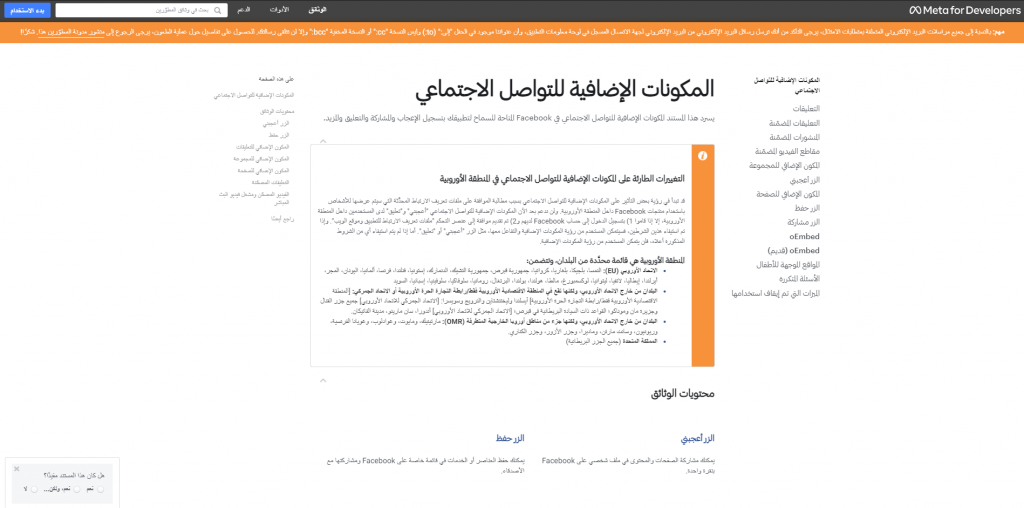
من المُحبذ أن يحتوي موقعك على ميزات تنافسية تُميزه عن المواقع الأخرى المنتشرة عبر الانترنت خاصة وإن كانت في نفس المجال، وإضافة حسابات التواصل الاجتماعي من شأنها أن تفي بهذا الغرض، وهذا بدوره سيجلب لك التنافسية لحسابات التواصل الاجتماعي نفسها حيث زيادة شهرتها ومتابعيها. تضمين صفحة أو منشور فيس بوك داخل موقعك على ووردبريس يُعتبر الفيسبوك أحد أضخم المواقع العالمية وأكثرها شهرة واحتواءً للمستخدمين، ولا شك أن إدراجه بشكلٍ مباشر في الموقع سيصنع فرقاً كبيراً، وتتعد طرق تضمين الفيس بوك في المواقع الإلكترونية المبنية باستخدام الوورد بريس؛ لكن سنستخدم الآن الطريقة المباشرة والأسهل في تضمين صفحات أو منشورات الفيس بوك في صفحات الموقع، وهي من خلال تضمين أكواد html مخصصة لهذا الغرض: إضافة خلاصات صفحة فيس بوك كاملة 1 – نذهب لصفحة المطورين الخاصة بشركة “ميتا” التي تضم الفيس بوك والانستغرام. 2 – المكون الذي نريد تضمينه هو “المكون الإضافي للصفحة”.
3 – نذهب لصفحة الفيس بوك المُراد تضمين خُلاصاتها في الموقع وننسخ الرابط الخاص بها لاستخدامه في الخطة التالية. 4 – الصق الرابط في المكان المخصص له في صفحة المطورين ثم اضبط كافة الإعدادات بما يُناسب غرض الاستخدام وطريقة الظهور، مثل العرض (بحد أدنى 180 بيسكل وحد أقصى 500 بيسكل) والارتفاع (بحد أدنى 70 بيسكل)، واستخدام عنوان قصير أو إخفاء صورة الغلاف وإظهار الأصدقاء.
5 – ستظهر لك الآن في شاشة المعاينة طريقة ظهور الصفحة في الموقع ثم اضغط على زر “الحصول على الرمز”. 6 – من النافذة المنبثقة هناك مقطعين من الأكواد البرمجية ننسخ كل مقطع على حدة حتى نلصقه بالترتيب الظاهر أمامك. 7 – اذهب للموقع واضغط على تحرير الصفحة ثم إضافة مكوّن، واختر عنصر “html مخصص” أو عنصر “كود قصير” (short code).
8 – الصق الكود الأول ثم انسخ الكود الثاني والصقه. 9 – والآن أصبح لديك صفحة فيس بوك مضمنة داخل موقعك على ووردبريس.
إضافة منشور فيس بوك لإضافة منشور عليك تكرار
نفس الخطوات السابقة لكن بالذهاب إلى القسم الخاص بتضمين منشور ثم تنسخ رابط المنشور المُراد تضمينه وتلصقه داخل الموقع من خلال عنصر “html مخصص”. ملاحظة/ يُمكن تضمين منشور فيس بوك بشكلٍ مباشر من خلال الضغط على النقاط الثلاثة في أعلى المنشور ثم الضغط على خيار “تضمين”، ونسخ الكود البرمجي الذي سيظهر لك، ثم تكرار الخطوات رقم 7 ورقم 8.
2 – يمكن أيضاً تضمين أزرار الإعجاب والمشاركة وكذلك تضمين التعليقات أو الاقتباسات وتضمين الفيديوهات ومشغل فيديو البث المباشر وزر حفظ الصفحة من تكرار خلال نفس الخطوات السابقة. تضمين صفحة أو تغريدة تويتر داخل موقع وورد بريس موقع تويتر أيضاً لا يقل أهمية عن الفيس بوك بوك فهو لديه قاعدة قوية من المستخدمين حول العالم لا يمكن تجاهلهم، وقياساً على الفوائد التي ذكرناها فإن النتائج ستكون أفضل من مختلف الجوانب، وتضمين تويتر داخل موقع الووردبريس له طرقه الخاصة أيضاً؛ وأفضل الطرق التي يمكن استخدامها والتي تتميز ببساطتها عن غيرها هي تضمين تويتر من خلال موقع تويتر الرسمي الذي يُقدم قسم خاص بالمطورين، تابع معي الخطوات التالية: 1 –
اذهب لصفحة “ twitter publish ” الخاصة بالنشر والتابعة لموقع تويتر الرسمي، وستجد صندوق مخصص لوضع روابط حسابات أو تغريدات تويتر المُراد تضمينها في صفحات الموقع، بالإضافة لوجود خيارات لنوع الرابط الذي سيتم تضمينه مثل تويتر أو حساب شخصي أو هاشتاق وغيرها، وكذلك تظهر لك خيارات وأشكال التضمين. 2 – انسخ رابط الحساب الذي تريد تضمينه.
3 – نلصق الرابط في المكان المخصص له، ثم نضغط على زر السهم.
4 –
بعد تحديد نوع الرابط المُراد تضمينه سواء كان حساب تويتر كامل أم زر تويتر، ويمكن تحديد الزر المناسب كما تريد بالضغط على خيار “Twitter buttons”، ثم تحديد نوع الزر كما هو ظاهر أعلاه، في حالتنا هذه سنحدد خيار “Embedded Timeline” حتى يظهر الحساب بما فيه من تغريدات. 5 – يُفضل تخصيص طريقة الظهور في الموقع من خلال الضغط على خيار “set customization options”.
6 – الآن نبدأ بضبط الإعدادات وتخصيصها مثل: أبعاد الطول والعرض ولون الظهور فاتح أو داكن واللغة حيث يمكن تركها على الخيار التلقائي، يمكنك المعاينة وتحديد الخيارات المناسبة من خلال شاشة المعاينة الظاهرة، ثم اضغط على “update”. 7 – الآن نُسخ الرابط الخاص بالتضمين، وستظهر لك رسالة تُأكد لك ذلك. 8 – نذهب للموقع ونضغط إضافة مكون ثم نختار مكون “html مخصص” وتلصق الرابط الذي نسخته، ويمكن إرفاق عنصر عنوان يدل على المحتوى الذي ضمنته ما سيعطي نتيجة أفضل للزائر.
9 – أخيراً أصبح لديك محتوى تويتر مُضمن في الموقع. تضمين صفحة أو منشور انستغرام داخل صفحات الموقع فيما يتعلق بالانستغرام فالأمر مختلف قليلاً عن الفيس بوك وتويتر، حيث موقع انستغرام للمطورين لا يدعم حالياً تقديم أكواد برمجية جاهزة لتضمين محتوى الانستغرام داخل موقعك بشكل مباشر، يمكن استخدام إضافة ووردبريس متخصصة في هذا الشأن مثل إضافة “ Social Feed Gallery “؛ حيث إنها إضافة تحديثها مستمر وعدد جيد من التنصيبات.
يمكنك البحث عنها في إضافات ووردبريس كما 1 – أولاً يجب تنصيب الإضافة وذلك بالذهاب إلى “إضافات” ثم ابحث عن “ Social Feed Gallery “، ثم اضغط على “ التنصيب الآن “.
2 –
يجب تفعيل الإضافة للاستفادة من كامل مميزاتها في الموقع وذلك بالضغط على “تفعيل”. 3 – سيظهر لديك الآن تبويب جديد في لوحة التحكم بعنوان “Social Feed Gallery” اضغط عليه؛ لتنبثق لك شاشة الإعدادات الخاصة بالإضافة، وتختار “Accounts” ثم “Add Personal Account” أو الخَيار الآخر “Add Business Account” إذا كان لديك حساب عمل لتتمكن من إضافة الحساب الذي تريد تضمينه في الموقع.
4 – والآن تدخل اسم المستخدم وكلمة المرور المتعلقان بالحساب ثم تسجيل الدخول “log in”. 5 –
بعد تسجيل الدخول بالحساب إلى الإضافة، يلزم إضافة تضمن لهذا الحساب من خلال الضغط على خيار “Feeds” ثم على زر “+Feed”. 6 – وبالتأكيد يجب ضبط إعدادات العرض؛ فأولاً من خلال الإعدادات العامة “General”، ويمكنك اختيار ما يناسبك من طُرق العرض الموضحة أعلاه، ثم تحديد عدد الصور التي ستظهر بالَإضافة إلى عدد الأعمدة، وقبل ذلك يجب اختيار اسم الحساب الذي أضفته في الخطوات السابقة، ويمكن تحديد نوع المحتوى الذي سيُضمن إما طريقة ظهور الحساب أو ذكر الحساب عن طريق “التاغ”.
7 – ومن خيار “ Profile ” نستطيع تخصيص الإعدادات المتعلقة بالحساب نفسه، مثل الاسم ووصف قصير، وإمكانية إرفاق صورة. 8 – من خيار “settings” يمكن تخصيص الزر الذي سيظهر بعد محتوى حساب الانستغرام، مثل: إظهار الزر أو إخفاؤه، وتغيير لونه وتخصيص المحتوى النصي بداخله، ويمكن ضبط الإعدادات الأخرى من باقي الخيارات مثل المسافة بين محتوى الانستجرام الذي سيُعرض في الموقع، وتضغط
( save ). 9 – كخطوة أخيرة يمكنك تحديد وقت تحديث المحتوى بشكل تلقائي من تبويب “ setting “. 10 – ثم من “ Feeds ” انسخ الكود القصير لمحتوى الحساب المُراد تضمينه والذي أضفناه في خطوة رقم 5.
11 – الآن تذهب للمكان الذي تريد تضمين المحتوى فيه وتضيف مكون من نوع “كود قصير” (short code). 12 – الصق الكود في المكان المخصص له، ثم اضغط “نشر”.
13 – وأخيراً أصبح لدينا محتوى انستغرام مُضمَّن ومخصَّص في موقعنا على ووردبريس، والنتيجة النهائية موضحة أعلاه. ملاحظة / يمكن تسجيل الدخول بأكثر من حساب انستغرام وإنشاء محتوى مُضمن للحساب الذي نريده وفي المكان المطلوب. إضافات أخرى لتضمين صفحات التواصل الاجتماعي هناك العديد من الإضافات المخصصة لتضمين صفحات التواصل الاجتماعي على اختلافها، حيث إن هناك إضافات تُمكن من تضمين أكثر من موقع وسيلة تواصل اجتماعي في الموقع، وفيما يلي أبرزها: 1.
Smash Balloon يحتوي موقع Smash Balloon على 4 إضافات رئيسية متخصصة في تضمين وسائل التواصل الاجتماعي في مواقع الووردبريس، حيث تحتوي على خيار للفيس بوك وتويتر وانستغرام واليوتيوبن ويمكن أيضاً تضمين مجموعات الفيس بوك، لكن كل من هذه الخيارات له خطة مدفوعة يجب الاشتراك بها أولاً. Spotlight
.2 هذه الإضافة مُخصصة بشكلٍ أساسي لموقع انستغرام، حيث توفر درجة عالية من التخصيص وتشكيلة واسعة من التصاميم والنماذج وطرق العرض للخلاصات مع عدد لا نهائي منها، كل ذلك إلى جانب تحديد طريقة عرض المنشورات من حسب التاريخ أو غيره، وتخصيص شكل ومحتوى الزر المُرفق، وغيرها العديد من الخصائص. Embed Social .3 تدعم حالياً وسائل التواصل الاجتماعي الآتية Instagram و Facebook و TikTok و Google و Twitter و Vimeo و Yelp و YouTube، وتحتوي على درجة عالية من التخصيص والتحديث المستمر للخلاصات دون الحاجة لإعادة تحديثها يدوياً في الموقع، وحتى تحديد كَم المحتوى المسموح بعرضه وملائمته لنموذج العرض الذي اخترته.
Juicer .4 ما
يُميّز هذه الإضافة بالفعل هو العديد الكبير من وسائل التواصل الاجتماعي التي تدعمها مثل: Facebook و Twitter و Instagram و YouTube و Google Plus و Tumblr و Pinterest وغيرها العديد من المواقع الأخرى، ويمكن ضبط عوامل التصفية وطريقة الظهور وتخصيصها كما تريدها. Ray Social Feeds .5
إضافة تُركز على موقع تويتر بشكلٍ خاص، وهي تُقدم إمكانية تضمين خلاصات تويتر قابلة للتخصيص إلى حدٍ كبير، بالإضافة لإمكانية عرضها في أي مكان على موقعك على شكل قائمة أو شريط تمرير باستخدام الطرق التي ذكرناها (رمز قصير أو عنصر واجهة مستخدم html)، ومن الجدير بذكره أن هذه الخلاصات سريعة الاستجابة ومتوافقة مع مختلف الأجهزة. وبهذا نكون قد ذكرنا لك فيما سبق طُرق مختلفة لتضمين المنشورات أو صفحات مواقع التواصل الاجتماعي وبشكلٍ خاص الفيس بوك وتويتر وانستجرام مع اقتراح أفضل الطُرق والخيارات التي تتمكن من ذلك، يمكنك اختيار ما يُناسبك منها ويُلائم طبيعة عملك.
دروب أيديا - DROPIDEA
نأمل أن تكون هذه المقالة قد أضافت لك قيمة حقيقية. في دروب أيديا نسعى دائمًا لتقديم محتوى عربي عالي الجودة يساعدك على النمو والتطور في المجال الرقمي. تابعنا للمزيد من المقالات والشروحات المفيدة.
الأدمن
DROPIDEA
أحدث المقالات

بيك إكس في ترفع سقف استثماراتها البذرية إلى 5 ملايين دولار

عشاء مرتقب بين رئيس أنثروبيك ودونالد ترامب وسط خلافات حول أمان الذكاء الاصطناعي

جوجل تختبر الشراء المباشر من فليبكارت عبر Gemini في الهند

كروزو تلغي صفقة بـ1.25 مليار دولار لتوربينات مراكز البيانات