كيفية ازالة category من الرابط في ووردبريس
 بقلم الأدمن
محركات البحث تبحث دائماً عن الأمور الحصرية والمميزة وتبتعد كل البعد عن المحتوى المكرر والكلمات المكررة، معظمنا وعندك انشاء أي قسم جديد في مدونته سيكون القسم مسبوق بكلمة category وهو الأمر الذي أدى الى تكرار هذه الكلمة ملايين المرات في ملايين المدونات، وكنا بحاجة القيام بازالة category من الرابط في ووردبريس نحن هنا لا نقوم أن هذا خطأ أو أن المدونة لن تلاقي نجاحاً إذا ما أبقت على الكلمة، لكن ازالة هذه الكلمة من الروابط ستعطي موقعنا تميزاً أكبر وأيضاً سيكون لدينا روابط حصرية بدون كلمات مكرر. أما من ناحية سيو أو تحسين محركات البحث، فإن جوجل لديها القدرة على التمميز بأن هذا الرابط يوجه لقسم ولكن اعطاء جوجل روابط مميزة سيسرّع عملية الأرشفة وسيقوّي نتائج البحث، بالإضافة إلى أهمية حجم الروابط وهنا أنا أتحدث عن قياسها بالبات فإزالة هذه الكلمة سيعطينا روابط أخف وأكثر مرونة للتعامل معها من قبل محركات البحث وأيضاً المتصفحات.
اليوم سنقوم بشرح أنسب الطرق وأسرعها وأكثرها أماناً لإزالة هذه الكلمة. منذ فترة ليست بالبعيدة قمنا بعمل
“ شرح إضافة WordPress SEO by Yoast ” وقد قمنا بتفصيل وتبيين أهمية ما تقوم به هذه الإضافة الرائعة على مدونات ووردبريس من ناحية ضبط إعدادات السيو و تحسين محركات البحث، واليوم سنذكر واحدة من مميزات هذه الإضافة التي ستمكننا من تغيير شكل الرابط وجعله أكثر ملائمة لمحركات البحث وتناسباً مع تقنيات سيو الحديثة.
خطوات ازالة category من الرابط في ووردبريس
الخطوة الأولى : نقوم بتحميل إضافة WordPress SEO by Yoast يمكنكم مراجعة الشرح المقدم لمعرفة طريقة التحميل والتنصيب على المدونة.
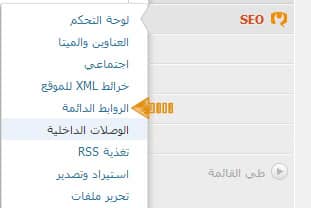
الخطوة الثانية : نقوم باتباع الدليل التالي للوصول لخيار الروابط الدائمة التي ستسمح لنا بتغيير شكل روابط الأقسام في مدونات ووردبريس لوحة التحكم > SEO > الروابط الدائمة
الخطوة الثالثة:
سنجد العديد من الخيارات واحد من هذه الخيارات هو “ حذف أساس التصنيف (غالباً category) من رابط التصنيف. ” ونقوم بالتعليم على هذا الخيار كما هو موضح بالصورة التالية : تحديث : تم إزالة هذا العنصر والسبب أنه لم يعد مهم في عملية سيو .
5/5/2014 #ازالةcategoryمنالرابطفيووردبريس #ووردبريسسيو
دروب أيديا - DROPIDEA
نأمل أن تكون هذه المقالة قد أضافت لك قيمة حقيقية. في دروب أيديا نسعى دائمًا لتقديم محتوى عربي عالي الجودة يساعدك على النمو والتطور في المجال الرقمي. تابعنا للمزيد من المقالات والشروحات المفيدة.
الأدمن
DROPIDEA
أحدث المقالات

بيك إكس في ترفع سقف استثماراتها البذرية إلى 5 ملايين دولار

عشاء مرتقب بين رئيس أنثروبيك ودونالد ترامب وسط خلافات حول أمان الذكاء الاصطناعي

جوجل تختبر الشراء المباشر من فليبكارت عبر Gemini في الهند

كروزو تلغي صفقة بـ1.25 مليار دولار لتوربينات مراكز البيانات