كيفية إدارة مجموعة مواقع ووردبريس من خلال لوحة تحكم واحدة
 بقلم الأدمن
إن إدارة عدد كبير من مواقع الووردبريس من داخل لوحة التحكم الخاصة بكل موقع على حدة يعتبر من الأمور المستهلكة للوقت والمجهود بشكل كبير، حيث تحتاج في كل مرة إلى تسجيل الدخول إلى الموقع الذي تريد إدارته. في هذه المقالة ستجد دليلاً إرشاديًا كاملاً حول طريقة التحكم بمجموعة مختلفة من مواقع الووردبريس التي تمتلكها أو تديرها ولكن من داخل لوحة تحكم رئيسية واحدة فقط.
حيث يمكنك من خلال لوحة التحكم الموحدة هذه الدخول إلى لوحة التحكم الخاصة بأي موقع، وكذلك يمكنك تطبيق العديد من التغييرات على مجموعة من المواقع جملة واحدة، مثل تحديث الإضافات في عدة مواقع في نفس الوقت، وغيرها من الإجراءات المميزة. دعنا نخبرك بأن أهم المميزات التي تحصل عليها في حال إدارة عدد من مواقع الووردبريس من داخل لوحة تحكم رئيسية واحدة: تسجيل الدخول إلى أي موقع بنقرة واحدة فقط من داخل لوحة التحكم الرئيسية دون الحاجة إلى تسجيل الدخول باسم المستخدم وكلمة المرور في كل مرة. التنقل بين موقع وموقع آخر بسهولة وفي وقت قصير.
إمكانية تحديث نسخ الووردبريس والإضافات والقوالب بنقرة واحدة فقط دون الحاجة إلى تسجيل الدخول إلى كل موقع على حدة لتطبيق التحديثات المطلوبة. إمكانية عمل نسخ احتياطي لكافة المواقع بسهولة من داخل لوحة التحكم الرئيسية. تطبيق الإجراءات الأمنية مثل عمل مسح أمني لمجموعة من المواقع في نفس الوقت.
إدارة الأعضاء في كافة المواقع وإنشاء أعضاء جدد في أي من المواقع من داخل لوحة التحكم الرئيسية. القيام بنشر مقالات أو صفحات داخل أكثر من موقع في نفس الوقت. إمكانية رفع صور أو ملفات داخل مكتبة الوسائط لأكثر من موقع في نفس الوقت.
أهم الإضافات والأدوات المستخدمة لإدارة عدد كبير من مواقع الووردبريس من داخل لوحة تحكم واحدة توجد الكثير من الأدوات التي تساعدك على إنشاء لوحة تحكم رئيسية موحدة لإدارة عدد كبير من مواقع الووردبريس في نفس الوقت.
أحد أشهر تلك الإضافات هي iThemes Sync
التي توفر إمكانية إنشاء لوحة تحكم رئيسية لإدارة عدة مواقع بنفس الوقت. حيث يمكنك إضافة مواقعك الووردبريس داخلها والتحكم بها بسهولة وتطبيق التعديلات عليها جملة واحدة، كما توفر الإضافة بعض الخيارات الإضافية مثل عمل مسح أمني للمواقع، وإمكانية عمل نسخ احتياطي للمواقع.
كذلك توجد إضافة mainwp التي
توفر لك لوحة تحكم رئيسية لإدارة عدد كبير وغير محدود من مواقع الووردبريس بشكل مجاني، لكن قد تحتاج إلى شراء إصدار مدفوع منها عند حاجتك إلى التمتع بالمميزات الاضافية التي توفرها مثل عمل نسخ احتياطية لموقعك أو تحسين سيو المواقع SEO أو غيرها من الإجراءات المتقدمة. أيضا هناك أداة infinitewp التي تتمتع بشهرة كبيرة بين مديري مواقع الووردبريس، حيث تستخدم تلك الأداة من قبل شركات ومؤسسات كبيرة وشهيرة، وهي توفر خيارات كثيرة للغاية للتحكم في مجموعة مواقع مشغلة بالووردبريس من مكان واحد، كما أنها توفر العديد من الخيارات المتعلقة بالأمان والنسخ الاحتياطي وغيرها.
استخدام أداة infinitewp
سنعتمد في شرحنا العملي على أداة infinitewp نظرًا لشهرتها الواسعة وثقة المستخدمين بها، وكذلك لكونها توفر نسخة مجانية يمكن للكثير من مديري المواقع البدء بها، ثم بعد ذلك يمكنك الاشتراك في أحد الإصدارات المدفوعة للتمتع بمزيد من الخيارات التي تتيحها الأداة لأصحاب مواقع الووردبريس المتعددة.
تعبر أداة InfiniteWP هي عبارة عن
تطبيق ويب (Web application) أو إضافة برمجية مخصصة لتعمل بالتزامن مع إضافة ووردبريس Infinitewp-client . ولكي تقوم بتحميلها على موقع ووردبريس الخاص بك عليك اتباع الخطوات التالية:
أولا تحتاج إلى الدخول للموقع الرسمي للإضافة
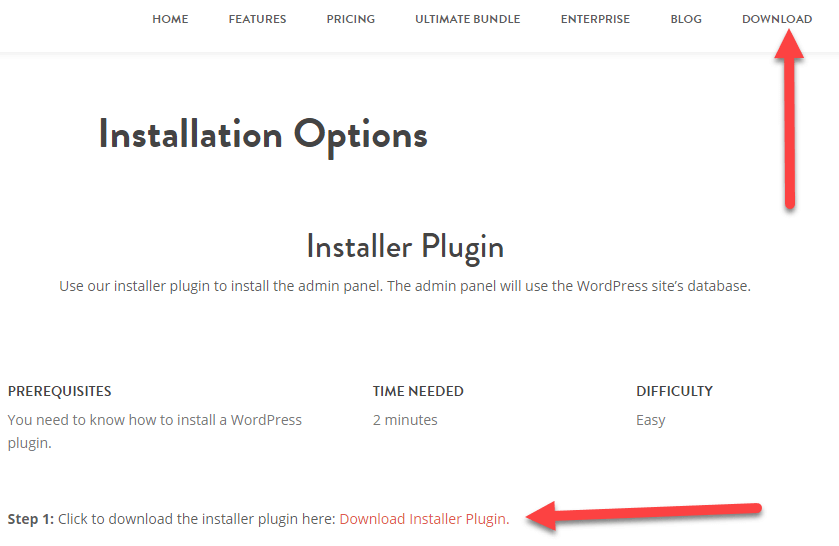
و تسجيل حساب جديد باستخدام بياناتك الشخصية. ثم قم بعد ذلك بالتوجه إلى تبويب Download أعلى الصفحة وستجد بداخله رابط تحميل التطبيق كما هو مبين في الصورة التالية.
عند النقر على رابط التحميل ( Download Installer Plugin ) سيتم تحميل التطبيق بشكل ملف مضغوط على جهازك المحلي. بمجرد الانتهاء من التحميل قم بالدخول إلى لوحة تحكم أحد مواقع الووردبريس لديك، وانتقل إلى إ ضافات
دروب أيديا - DROPIDEA
نأمل أن تكون هذه المقالة قد أضافت لك قيمة حقيقية. في دروب أيديا نسعى دائمًا لتقديم محتوى عربي عالي الجودة يساعدك على النمو والتطور في المجال الرقمي. تابعنا للمزيد من المقالات والشروحات المفيدة.
الأدمن
DROPIDEA
أحدث المقالات

هل تصيّد ماسك إطلاق أداة «Dots» من OpenAI عبر نطاق dot.com؟

بيك إكس في ترفع سقف استثماراتها البذرية إلى 5 ملايين دولار

عشاء مرتقب بين رئيس أنثروبيك ودونالد ترامب وسط خلافات حول أمان الذكاء الاصطناعي

جوجل تختبر الشراء المباشر من فليبكارت عبر Gemini في الهند



