خدع وحيل تيليجرام: 24 طريقة لاستخدام التطبيق بشكل احترافي
 بقلم الأدمن
نستعرض فى هذا المقال أفضل خدع وحيل تيليجرام المفيدة التي ستساعدك على تحقيق أقصى استفادة أثناء استخدام التطبيق وإجراء المحادثات. من خلال هذه الحيل، تستطيع الحفاظ على خصوصية بياناتك، وتعزيز تجربتك مع التطبيق.
هل تبحث عن طرق لجعل تجربتك في تيليجرام
أكثر إثارة و متعة و كفاءة؟ هل ترغب في إتقان فنون التواصل عبر التطبيق بشكل احترافي؟ إذا كانت إجابتك نعم، فأنت في المكان الصحيح!
فمع هذا الدليل الشامل، ستُصبح خبيرًا في تيليجرام وتستطيع استخدام التطبيق بشكل احترافي. اهم خدع وحيل تيليجرام للمبتدئين والمحترفين استعد لرحلة مثيرة داخل عالم تيليجرام السحري واكتشف إمكانياته الهائلة!
من خلال هذه الحيل، ستتعلم: كيف تُحافظ على خصوصيتك بشكل أفضل. كيف تُعزز تفاعلك مع أصدقائك وعائلتك.
كيف تُنظم محادثاتك بشكل أكثر كفاءة.
كيف تُضفي لمسة من المرح على محادثاتك. كيف تُنشئ محتوى جذابًا لجذب المزيد من المتابعين.
كيف تُدير قنواتك بشكل احترافي.
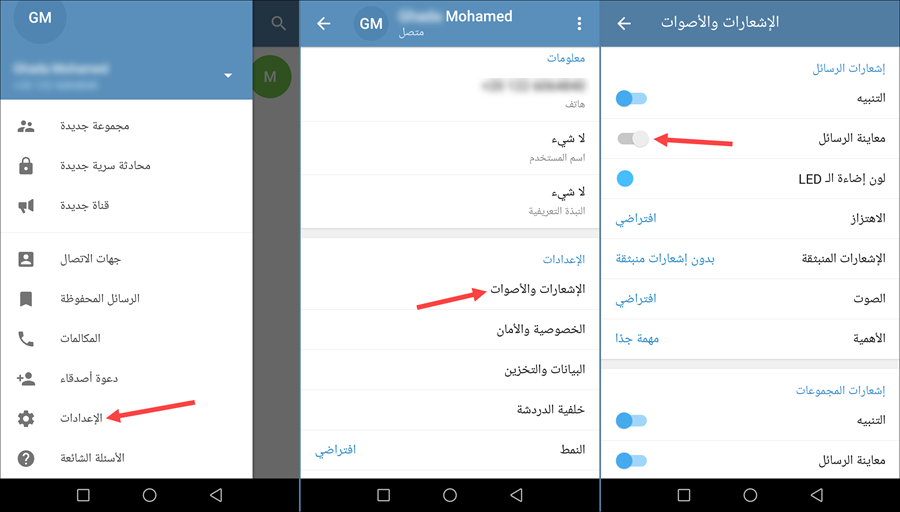
كيف تُستخدم تيليجرام لأغراض العمل. و… المزيد! 1- تعطيل معاينة الرسائل حفاظًا على الخصوصية هناك أوقات قد تلتقي فيها زملائك أو أصدقائك أو تكون فى مكان عام مليء بالناس حولك، ثم تتفاجئ أثناء استخدام الهاتف بظهور رسالة من شخص ما ويتم عرضها فى نافذة منبثقة على الشاشة، فإذا كان هناك شخصًا يُلقي نظرة على شاشة هاتفك، سيتمكن من قراءة محتوى الرسالة.
لذلك، وكمُستخدم قلقًا بشأن خصوصيته، يمكنك تعطيل هذه الميزة فى تيليجرام، بحيث لا يتم عرض معاينة الرسالة فى نافذة منبثقة، بل بشكل خفي فى لوحة الإشعارات. تحتاج ببساطة إلى فتح التطبيق على هاتفك، ثم تضغط على زر القائمة أعلى اليسار وتختار “الإعدادات – Settings” ثم من هناك انتقل إلى قسم “الإشعارات والأصوات – Notification and Sounds”، ثم قم بتعطيل ميزة “معاينة الرسائل – Message Preview” أسفل جزئية “إشعارات الرسائل”. بهذه الطريقة تضمن عدم الإفصاح عن محتوى الرسائل التي تأتيك عبر تطبيق تيليجرام.
2- البحث عن كلمة، عبارة، جملة داخل المحادثات إنه أمر ممل ومرهق للغاية أن تعثر على الرسائل القديمة التي سبق لك وقمت بإرسالها في إحدى المحادثات، قد يستغرق الأمر بعض الوقت للتمرير إلى الأسفل للبحث عن رسالة مُعينة ترغب في التحقق منها أو الرد عليها. لذلك، يشمل تطبيق تيليجرام ميزة البحث داخل المحادثات، من خلال هذه الميزة يمكنك الوصول بشكل اسرع إلى كلمة، أو عبارة، أو جملة طويلة قمت بإرسالها منذ فترة عبر التطبيق. كل ما عليك هو: فتح التطبيق، ثم الدخول إلى المحادثة التي تريد البحث بداخلها، ثم اضغط على زر الثلاثة نقاط أعلى اليمين لتختار من القائمة “بحث – Search” بعد ذلك مباشرةً، ستظهر لك لوحة المفاتيح حيث تقوم بكتابة ما تريد البحث عنه وتضغط على زر Enter، وعلى الفور سيتم تحديد النص الذي تبحث عنه.
أعلم أن تطبيق واتساب لديه نفس الميزة، لكن تيليجرام لديه إضافة آخري، حيث يمكنك تحديد الوقت والتاريخ الذي أرسلت فيه هذه الرسالة حتى يتم العثور عليها بشكل أسرع وهذا ما لا يتوفر فى تطبيق واتساب. 3- تغيير اسم المُستخدم إذا كنت لا ترغب في مشاركة تفاصيل الاتصال الخاصة بك مثل: اسمك الحقيقي، رقم هاتفك. فيمُكنك بسهولة تعيين أو تغيير اسم المُستخدم الخاص بحسابك بحيث يتم إنشاء رابط تستطيع نسخه ومشاركته مع أي شخص ليبدأ المحادثة معك من خلاله مباشرةً دون معرفة معلومات الحساب الحقيقية.
ما تحتاج ان تقوم به هو فتح التطبيق، ثم النقر على زر القائمة المتواجد فى الزاوية العلوية اليسرى، ثم تضغط على خيار “الإعدادات – Settings” ومن ثم تضغط على “اسم المُستخدم – Username” ومن هناك يمُكنك تعيين اسم المستخدم الذي تريده باللغة الإنجليزية متضمنًا أكثر من 5 أحرف. وبعد الانتهاء اضغط “حفظ – Save” ليتم إنشاء الرابط المميز الخاص بحسابك. 4- إدارة تحميل الوسائط تلقائيًا يسمح لك تطبيق تيليجرام بإدارة الوسائط والبيانات التى يتم تخزينها على هاتفك بكفاءة أكبر، فالتطبيق يسمح لك بإرسال أكثر من 1 جيجابايت من الملفات بسهولة، وتلك فى حد ذاتها ميزة كبيرة يتفرد بها عن أي تطبيق مراسلة آخر.
لكن وبشكل إفتراضي، يتم ضبط تحميل وتخزين الملفات تلقائيًا على الهاتف سواء كنت متصلًا بالإنترنت عبر الواي فاي أو بيانات الجوّال. يمُكنك تغيير ذلك وإدارة الوسائط والتخزين بسهولة بعد فتح التطبيق، ثم التوجه إلى “الإعدادات – Settings” ثم الذهاب إلى قسم “البيانات والتخزين – Data and Storage” ثم تعطيل خيار “تنزيل الوسائط تلقائيًا – Automatic media download”. لاحظ أن تطبيق تيليجرام يسمح لك ايضًا بوضع حد مُعين لحجم الصور والرسائل الصوتية ومقاطع الفيديو والملفات والموسيقى التى يتم تحميلها تلقائيًا على الجهاز؛ بمعنى إذا تلقيت فيديو حجمه 10 ميجابايت فيتم تنزيله تلقائيًا وحفظه على ذاكرة الهاتف – بافتراض انك وضعت حدًا 10 ميجابايت – بينما إذا كان الفيديو بحجم 20 ميجابايت لن يتم تنزيله.
كل ما عليك هو الذهاب إلى قسم “البيانات والتخزين – Data and Storage” ثم النقر على نوع الملفات الذي تريد وضع حدًا لتحميله، ثم تقوم بتحديد الحجم من خلال شريط Limit by Size. 5- التحكم في من يستطيع رؤية آخر ظهور لك تُعتبر هذه الميزة مفيدة للغاية فى تطبيقات المراسلة، حيث أنها تتيح لك معرفة متى آخر مرة كان فيها أصدقائك ومعارفك متصلين بالإنترنت ويستخدمون التطبيق. وبالتأكيد تستطيع أن تعطل هذه الميزة إذا كنت ستسبب إحراجاً لك.
عندما تريد فعل ذلك على تطبيق تيليجرام، انتقل إلى “الإعدادات – Settings” ثم إلى قسم “الخصوصية والأمان – Privacy and Security” ثم تضغط على “آخر ظهور – Last Seen” ولاحظ أن التطبيق إفتراضيًا يقوم بضبط الإعداد على “الجميع” بينما تستطيع تغيير ذلك وجعل “آخر ظهور لك” يظهر لجهات الإتصال المسجلة فقط أو تقوم بتعطيلها ومنع ظهورها عند الجميع. وعلى عكس تطبيق واتساب، فإذا قام المستخدم بتعطيل رؤية “آخر ظهور” عن الجميع، لن يتمكن هو الآخر من رؤية آخر ظهور للآخرين ايضًا. لكن فى تيليجرام، يمُكنك اختيار جهات اتصال مُعينة بحيث تمنحها هي فقط القدرة على رؤية آخر ظهور لك.
6- منع حفظ الوسائط تلقائيًا فى المعرض عندما يقوم احد اصدقائك بإرسال صورة او فيديو لك فى الرسائل وتقوم بفتحها وتحميلها على الجهاز، فإنها تظهر تلقائيًا فى تطبيق الأستوديو أو المعرض الإفتراضي على الهاتف، هذا ايضًا قد سبب إحراج عند البعض، لذلك يمكنك منع التطبيق من إظهار الوسائط فى المعرض بينما تبقى محفوظة على ذاكرة الهاتف بدون مشاكل. ما عليك سوى الانتقال إلى “الإعدادات – Settings” ثم التمرير إلى الأسفل وتعطيل خيار “حفظ في المعرض – Save to Gallery”. من خلال القيام بذلك، سوف تمنع تيليجرام من عرض الوسائط تلقائيًا فى المعرض.
7- قفل محادثات التيليجرام تعتبر هذه أفضل ميزة موجودة في تطبيق تيليجرام، وأتمنى أن تكون متوفرة فى جميع تطبيقات المراسلة الأخرى، حيث تمُكنك من إغلاق التطبيق ومنع الوصول إلى المحادثات إلا بعد تأكيد الهوية بواسطة البصمة أو كلمة السر أو رمز الـ PIN. فى الواقع، هناك تطبيقات طرف ثالث متعددة تساعدك على تحقيق ذلك؛ لكن الأفضل أن تكون الحماية من طرف التطبيق نفسه وليس تطبيق خارجي حتى تضمن الحماية بنسبة 100% من المتطفلين. ولتفعيل الميزة، قم بفتح التطبيق واذهب إلى “الإعدادات – Settings” ثم انتقل إلى قسم “الخصوصية والأمان – Privacy and Security” ثم اضغط على خيار “رمز القفل – Passcode Lock” اسفل جزئية “الأمان” وبعدها قم بتفعيل الميزة وحدد طريقة تحديد الهوية مثل كلمة السر او رمز PIN أو حتى من خلال النمط.
8- تسجيل الدخول بأكثر من حساب إذا كان لديك اكثر من حساب على تيليجرام للفصل بين المحادثات الشخصية والعمل، فيمُكنك استخدام الحسابين من خلال نفس الهاتف بكل سهولة دون الحاجة إلى استنساخ التطبيق بواسطة ادوات طرف ثالث. كل ما عليك هو الضغط على زر القائمة أعلى اليسار، ثم تضغط على زر السهم المتجه إلى الأسفل أمام اسم الحساب، بعد ذلك تضغط على “أضف حساب” لتقوم بإدخال رقم الهاتف الخاص بالحساب الآخر حتى يتم إضافته.
كيفية الاستخدام: الوصول: كيفية الاستخدام: اضغط على رسالة
جديدة ثم “new secret chat” أو اتبع التالي, الوصول: القنوات: المجموعات: كيفية الاستخدام: إنشاء قناة: إنشاء مجموعة: الوصول: متعلق: دليل يشرح كيفية العثور على افضل جروبات تيلجرام كيفية الاستخدام: اتبع تعليمات البوت. الوصول: كيفية الاستخدام: الوصول: كيفية الاستخدام: الوصول: كيفية الاستخدام: الوصول: كيفية الاستخدام: الوصول: كيفية الاستخدام: الوصول: كيفية الاستخدام: استطلاعات الرأي: وضع الاختبار Quiz Mode: كيفية الاستخدام: متعلق: شرح تفعيل الوضع المظلم Dark Mode لكل البرامج والأجهزة كيفية الاستخدام: الوصول: كيفية الاستخدام: الوصول: 24.
كيفية استخدام ميزة التدمير الذاتي للرسائل كيفية الاستخدام
الوصول: كما يمكنك أيضاً ارسال رسالة واتس تحذف بعد أيام وهي ميزة تتواجد حالياً في أغلب تطبيقات المحادثة. نتمنى أن يكون هذا المقال قد ساعدك على فهم تيليجرام بشكل أفضل وإتقان فنون التواصل عبره.
تذكر أن تيليجرام هو تطبيق مليء بالميزات والإمكانيات، ولا تتوقف عن التعلم واكتشاف المزيد من أسراره. شاركنا تجربتك مع خدع وحيل تيليجرام في التعليقات! مقالات متعلقة: برامج لفتح تطبيق تيليجرام للكمبيوتر بواجهة افضل تحديث المقال مايو 2024: تمت مراجعة المقال بواسطة مدير التحرير.
واضافة شرح مميزات أخرى في تيليجرام ليصبح المقال أكثر شمولية. كما اعتمدنا في المقال على تجاربنا الخاصة مع التطبيق وعلى دعم Telegram في توضيح الخطوات.
دروب أيديا - DROPIDEA
نأمل أن تكون هذه المقالة قد أضافت لك قيمة حقيقية. في دروب أيديا نسعى دائمًا لتقديم محتوى عربي عالي الجودة يساعدك على النمو والتطور في المجال الرقمي. تابعنا للمزيد من المقالات والشروحات المفيدة.
الأدمن
DROPIDEA
أحدث المقالات

جوجل تطلق Gemini 4 Argon نموذجها الأقوى المتخصّص في الأمن السيبراني

هل تصيّد ماسك إطلاق أداة «Dots» من OpenAI عبر نطاق dot.com؟

بيك إكس في ترفع سقف استثماراتها البذرية إلى 5 ملايين دولار

عشاء مرتقب بين رئيس أنثروبيك ودونالد ترامب وسط خلافات حول أمان الذكاء الاصطناعي



