دليلك الشامل حول استخدام القوائم الضخمة (Mega menu) في ووردبريس والمواضع الصحيحة لذلك
 بقلم الأدمن
أصبحت عناصر تجربة الاستخدام وسهولة التصفح من أهم العناصر التي تميز موقع ما عن الآخر، ولا شك في أن زوار موقعك أو متجرك الإلكتروني يستحقون منك أن تقدم لهم تجربة استخدام جذابة، ولا شك أيضًا في أن عنصر تصميمي مثل القائمة العملاقة المدمجة Mega Menu يجب أن يجد طريقه إلى موقعك. يمكنك من خلال قوائم Mega Menu أن تحسن تجربة استخدام موقعك بشكل كبير، حيث إنها تسمح للزوار بالوصول لعشرات العناصر من مكان واحد وبشكل مرتب أيضًا، وتعرف تلك القوائم بأنها أحد عناصر التصفح كذلك (Navigation)، وسواء كنت تمتلك موقعًا حيًا أو تخطط لبناء موقع جديد فإنه من الواجب عليك أن تنتبه لكل صغيرة وكبيرة في تجربة الاستخدام، لأن هذا هو ما يميزك عن الآخرين.
محتويات المقالة
مكونات القوائم الضخمة العلاقة بين Mega Menu وتجربة الاستخدام استخدمها عندما تكون متوقعة استخدمها عندما تدعم الشكل الجمالي للموقع متى تتجنب استخدام القوائم العملاقة (Mega menus)؟ استخدام قوائم Mega Menu في ووردبريس تكوين Mega Menu عبر إضافة Max Mega Menu إنشاء Mega Menu عبر إضافة Elementor أفضل الإضافات لإنشاء Mega Menu في ووردبريس 1.
إضافة UberMenu 2. إضافة WP Mega Menu 3.
إضافة Mega Main Menu 4.
بدائل أخرى توافق قوائم Mega Menu مع الهواتف الذكية إضافة WP Responsive Menu إضافة WP Mobile Menu إضافة QuadMenu قوالب ووردبريس التي تدعم Mega Menu أهم الأسئلة المتعلقة بالقوائم العملاقة ما المقصود بالملاحة في المواقع؟ ما هي القوائم المنسدلة؟ القوائم المنسدلة والقوائم الضخمة ما سبب شهرة وانتشار القوائم الضخمة؟
ما هي طرق إضافة قائمة عملاقة Mega Menu؟ ما هي القوائم العملاقة Mega Menus؟ لعلك تعرضت للقوائم العملاقة عشرات المرات سابقًا دون أن تدرك، وذلك حيث أنها عنصر أساسي في المتاجر الإلكترونية، ومواقع التسوق، والمجلات الإلكترونية، وغيرها، وذلك نظرًا لأنها تكون عادةً موجودة في أي موقع يضم كمًا ضخمًا من المحتويات، أو محتويات متشعبة يجب ربطها ببعضها البعض.
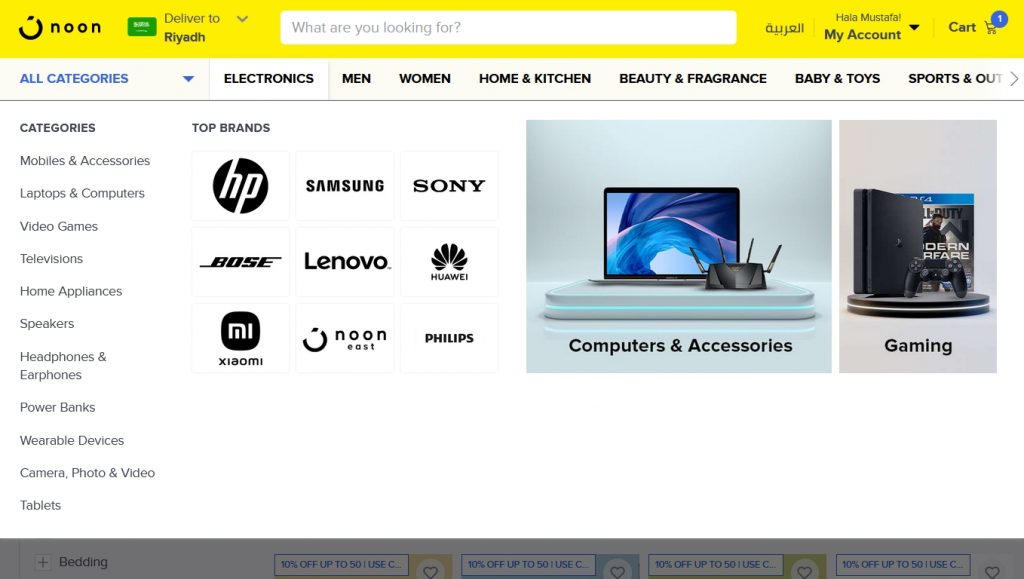
وإن حاولنا تعريف هذا العنصر بشكل سهل فإننا قادرون على وصفه بأنه ( قائمة ملاحة وتصفح ) تستخدم في الوصول إلى عدد كبير من العناصر في نفس الوقت بسهولة، وعادة ما يتم تقسيم المحتويات بشكل أفقي أو رأسي. ويمكننا أن نأخذ مثالًا على ذلك من منصة “نون” للتسوق، والتي تظهر لك قائمة عملاقة بمجرد وضع مؤشر الفأرة بالقرب من أي قسم من الأقسام المشار إليها في القائمة العلوية: ومثلها مثل أي عنصر فني أو تصميمي فإن القوائم العملاقة، Mega Menus، تأتي بأشكال وتصميمات مختلفة ومتباينة، ويمكنك أن تلاحظ أن موقع ووردبريس بالعربية يستخدم ذلك النوع من القوائم أيضًا، جرب أن تضع مؤشر الفأرة على أي قسم من الأقسام المشار إليها في القائمة العليا!
مكونات القوائم الضخمة
كما اتفقنا، يمكن أن تتباين أشكال القوائم الضخمة بشكل كبير بين كل موقع وآخر، إلا أن المبدأ الرئيسي خلف هذا العنصر يلزمه أن يحتوي على كافة المحتويات المراد عرضها بشكل منظم ومتشابك. أي أن إنشاء قائمة ضخمة لعرض محتويات قسم “تقنية” في مجلتك الإلكترونية يلزمك أن تجعل كافة الأقسام الفرعية ظاهرة بشكل منظم، إلى جانب أهم مقالات القسم، وربما أيضًا اختيارات المحررين، وغيرها. ومن القواعد الذهبية بالنسبة للقوائم الضخمة هي عدم الحاجة لتحريكها، أي أن المستخدم يجب أن يرى كافة المحتويات منذ أن يفتح القائمة، ولا يحتاج للتمرير أو الحركة.
وعلى الرغم من أن هذه القواعد سهلة التنفيذ ومنطقية، إلا أنها ليست إجبارية، ويحتفظ صاحب الموقع بحريته في التطبيق، لكن يجب أن يتم مراعاة تجربة المستخدم لأقصى حد ممكن. العلاقة بين Mega Menu وتجربة الاستخدام نحن الآن نعيش في عصر مليء بالمنافسة، مهما كان مجال موقعك فإن هناك عشرات المواقع المنافسة له!
ولذلك فإن الاهتمام بتجربة الاستخدام وجمالية التصميم أصبح إجباريًا وليس اختياريًا، والمستخدم في عصرنا الحديث أصبح يبحث أيضًا عن المواقع والمتاجر التي تقدم تجربة استخدام ممتازة، خصوصًا أنه معرض لمئات المواقع للاختيار فيما بينها. وببساطة شديدة، وبدون تعقيد، تقاطع الطرق بين تجربة الاستخدام (User Experience — UX) والقوائم العملاقة (Mega Menus) يظهر في الإجابة على سؤال واحد شديد الأهمية: ”هل استخدام قائمة Mega Menu في موقعي يجعل تصفحه أسهل بالنسبة للزوار؟‟ إن كانت إجابتك هي لا فإنك للأسف لا تستفيد بأي شكل من القائمة التي أضفتها، ويجب أن تحسنها وتعمل عليها حتى تقدم تجربة استخدام أفضل بشكل فعلي، لا يجب عليك أبدًا أن تضيف Mega Menu فقط لأن الجميع يضيفها، الأمر ليس موضة أو حدث عابر بقدر كونه عنصر مفيد يجب استغلاله بشكل سليم.
ولا ينتهي “ امتحان ” موقعك عند السؤال السابق، بل إن هناك سؤالًا آخرًا يجب أن يتم الجواب عليه بـ”نعم”، وهو: ”هل استخدام قائمة Mega Menu في موقعي سيساعد في تحقيق الأهداف؟‟ يجب عليك أن تسأل نفسك هذا السؤال قبل أن تتخذ قرارك في استخدام Mega Menu في موقعك، كما أن سؤاله يظل واجبًا حتى عند مراجعة موقعك ونتائجه بين كل فينة وأخرى، وأما عن المقصود بالأهداف فإن النقاط التالية تقدم مثالًا: تحقيق المبيعات وزيادتها دفع المستخدمين لبقاء وقت أطول في الموقع دفع المستخدمين على إعادة زيارة موقعك (لأن العناصر ضمن Mega Menu كانت مثيرة للاهتمام مثلًا) المساعدة في إنشاء مجتمع من العملاء أو القراء زيادة عدد الصفحات الذي يزورها كل مستخدم وغيرها حسب مجال موقعك… مقال قد يهمك : تصميم شريط المنتجات المتحرك داخل متجر ووكومرس لزيادة مبيعات المتجر
متى يجب عليك استخدام القوائم العملاقة Mega Menus؟ في النقاط السابقة أوضحنا ماهية القوائم العملاقة Mega Menus إلى جانب النقاط الأساسية بشأنها، وفيما يلي نوضح بعض الحالات الصحيحة لاستخدام القوائم العملاقة، وذلك حيث إننا قد أشرنا إلى أهميتها الفعلية، لكننا أيضًا أشرنا إلى عدم الحاجة لاستخدامها على الرغم من عدم وجود حاجة لها.
استخدمها عندما تكون متوقعة
بعض المستخدمين يتوقعون وجود قوائم Mega Menus بشكل افتراضي في بعض المواقع، وعلى رأسها المتاجر الإلكترونية بطبيعة الحال، ولذلك وإن كان موقعك يقدم محتويات متشعبة ومتشابكة فإن إدراج هذا النوع من القوائم هو قرار في محله. وفي مثال على ذلك نجد أحد مواقع التسوق والذي يقوم بعرض أعدادًا ضخمة من الأصناف ضمن قائمة عملاقة، ونلاحظ أنه يتبع الشروط السالف مناقشتها: استخدمها عندما تكون القوائم التقليدية غير مناسبة اعتدنا استخدام القوائم المنسدلة التقليدية في مواقعنا، وهي قوائم Drop-Down Menu، وفي حالة كون موقعك يضم محتويات ضخمة ومتنوعة – كما سلف الذكر – فإن هذه القائمة ستكون أطول كثيرًا من اللازم.
وفي حالة وصولها إلى طول غير مقبول فإن هذا سوف يخرب تجربة الاستخدام بشكل واضح، وحسب دراسة تم إجراؤها من جهات متخصصة فإن القوائم الطويلة عمومًا تؤثر سلبًا على تجربة الاستخدام، في حين إن القوائم العملاقة المنظمة تحسن منها. قد يهمك أن تقرأ: تخصيص تصميم صفحة تسجيل دخول الووردبريس لتجربة أفضل للأعضاء
استخدمها عندما تدعم الشكل الجمالي للموقع تحدثنا فيما سبق عن أهمية الشكل الجمالي لأي موقع ووردبريس، وذلك سواء كان موقعًا للمحتوى المكتوب، أو متجرًا إلكترونيًا، أو حتى موقع لشركة أو مؤسسة، ولا شك في أن استخدام القوائم العملاقة في ظل دعمها لتصميم وجمالية الموقع هو خيار موفق لأي مدير موقع. كما أن استخدامها بشكل جميل، وبالاعتماد على بعض الحيل النفسية البسيطة، وتحديدًا سلوك المستهلك ، فإن هذه الخطوات قد تزيد من المبيعات، وفي مثال على ذلك فإن المتاجر الإلكترونية التي تضيف صورًا لمتجاتها ضمن القوائم الضخمة تحظى بفرص أكبر في المبيعات، أو حتى زيارات لصفحات المنتجات.
متى تتجنب استخدام القوائم العملاقة (Mega menus)؟ الأمور هنا حقًا أكثر بساطة، لا يجب عليك استخدام القوائم الضخمة Mega Menus فقط في حالة أن الشروط السابقة، والنقاط التي ناقشناها، لا تنطبق على موقعك بأي شكل من الأشكال، ويمكننا تلخيص ذلك في نقاط بسيطة: عندما لا يكون لديك كثير من المحتوى، الأقسام، أو حتى الروابط عندما تكون الصور والعناصر في موقعك قليلة، فبالتالي إضافة عشرات الروابط ضمن القائمة الضخمة لن يكون خيارًا موثقًا، ولعل موقع الحكومة الإنجليزية
يعطي مثالًا على ذلك. لا داعي لاستخدام القوائم الضخمة إن كنت تهدف إلى توجيه أكبر عدد ممكن من الزوار إلى صفحة معينة، مثل صفحات الهبوط الموجهة لتسويق وبيع منتج معين، وذلك لأن هذه القوائم تعرض عشرات الروابط ولا يمكنها التركيز على رابط معين لا تستخدم القوائم الضخمة ضمن إصدار الهاتف الذكي من موقعك إلا إذا كانت مصممة بشكل صحيح ومناسب. وبشكل عام، وتأكيدًا على المعلومة التي يجب أن تمتلكها، يصح استخدام القوائم الضخمة في معظم نوعيات المواقع، وكذلك في المتاجر الإلكترونية، لكن إن لم تطبقها بشكل صحيح فإنها قد تكون بدون أي فائدة، وقد يصل الأمر لكونها مضرة!
ونشارككم أمثلة في الصورة التالية: استخدام قوائم Mega Menu في ووردبريس تحدثنا فيما سبق عن أهمية القوائم العملاقة Mega Menus وأهم استخداماتها، والآن نتحدث عن كيفية إضافتها إلى موقعك الووردبريس، وهنا – وكعادة هذه المنصة – يمكننا أن نجد عشرات الطرق والأدوات التي تتيح لنا فعل ذلك. ويتم إضافة قوائم Mega Menu إما بالاعتماد على إضافات متخصصة لذلك، أو من خلال القالب الذي يستخدمه موقعك، وبطبيعة الحال فإننا غير قادرين على تغطية جميع القوالب المتاحة، ولذلك ننصح بتصفح دليل استخدام القالب الخاص بك ، لكن إن كنت تفضل سلك مسلك الإضافات فإننا سنوضح ذلك بشكل مفصل، ويمكنك استخدام الإضافات في صناعة قوائم ضخمة حتى ولو كان القالب الخاص بك يدعم إضافتها.
يُذكر أن الأوضاع الافتراضية في منصة ووردبريس تسمح فقط بإدراج قوائم منسدلة تقليدية Drop Menus وليس قوائم عملاقة. تكوين Mega Menu عبر إضافة Max Mega Menu
تتميز إضافة Max Mega Menu
بكونها أفضل الإضافات المجانية المتاحة لمنصة ووردبريس والتي تسمح بإضافة قوائم Mega Menu بسهولة بالغة، وبطبيعة الحال فإن خطوتنا الأولى هي تنصيب الإضافة. ودائمًا ما تكمن الطريقة الأسهل في تنصيب الإضافات في البحث عنها مباشرةً من خلال قسم الإضافات في ووردبريس بدلًا من تحميلها ورفعها مرة أخرى، ولك باتباع الخطوات التالية: توجه إلى لوحة تحكم موقعك الووردبريس توجه إلى قسم “ الإضافات ” ومن ثم “ أضف جديد “ ابحث عن إضافة Max Mega Menu والآن وبعد تنصيب الإضافة لا تنسى تفعيلها، وذلك حيث إنها لا تُفعّل بشكل افتراضي بعد التنصيب، وبمجرد تنصيبها فأنت الآن حصلت عليها، وعليك بالتوحه مباشرةً إلى الإعدادات الخاصة بها، والتي تظهر ضمن خانة مخصصة في لوحة تحكم ووردبريس، وذلك كما يلي: وعند التوجه إلى الصفحة الرئيسية لإعدادات الإضافة، وذلك بالضغط على “ Mega Menu ” ضمن القائمة الجانبية، سيتم توجيهك مباشرةً إلى الإعدادات العامة، ومن هناك عليك أن تقوم أولًا بتحديد القائمة التي تود عرض Mega Menu خلالها من ضمن القوائم التي يمتلكها موقعك، وتحتاج أيضًا إلى تفعيل الإضافة: تتيح الإضافة عشرات الإعدادات التخصيصية، وذلك أمر طبيعي، لكن إعداداتها الافتراضية تأتي مناسبة لمعظم المواقع، لكن لعلك تلاحظ في الصفحة الرئيسية لإعدادات الإضافة وجود خيارات “ Menu Themes ” ومن خلالها يمكنك تخصيص الألوان والأشكال: ويمكنك أن تلاحظ ظهور بعض الإعدادات الهامة أسفل خانة “ Menu Bar ” وذلك كما يلي: ضمن الخيارات تجد خيار “ Menu Height ” والذي يسمح بالتحكم في ارتفاع القائمة، وذلك إلى جانب خيار “ Menu Background ” وهو الآخر شديد الأهمية، نظرًا لأنه يسمح لك بتعديل ألوان خلفية القائمة لتتماشى مع القالب الخاص بك. وضمن الإضافة يمكنك أن تلاحظ وجود عشرات – وربما مئات – التعديلات الممكن تنفيذها، لكن الشكل الافتراضي للقائمة يظل مناسبًا، ويمكنك أن تبحر في التعديلات كما تريد.
وبعد ضبط الإعدادات بالشكل المناسب لموقعك فإن الإضافة تصبح جاهزة للاستخدام، ولا يتم استخدام الإضافة من خلال صفحة الإعدادات الخاصة بها، بل من خلال محرّك القوائم المدمج في ووردبريس نفسه، ويمكنك أن تصل إليه بالتوجه إلى قسم “ المظهر “، ومن ثم قسم “ القوائم “ والآن تجد أنه ما زال أمامك عدد من الخيارات والتعديلات التي يمكنك تنفيذها أيضًا، وهي واحدة من أهم مميزات ووردبريس بلا شك! لكن لكي تكون الأمور سليمة بشكل كامل فعليك أن تتأكد مرة أخرى من أن الإضافة مفعلة وأنك تعمل على القائمة المناسبة. والآن حرك مؤشر الفأرة ناحية العنصر الذي تود إدراج قائمتك الضخمة عنده، وحينها ستلاحظ ظهور خيار Mega Menu كما بالصورة التالية: وبالضغط على هذا الخيار ستظهر لك نافذة منبثقة تسمح لك بإضافة كافة العناصر والتطبيقات المصغرة Widgets ضمن تلك القائمة الضخمة، ويمكنك هنا أن تطلق العنان لإبداعك لكن مع الاهتمام لكافة الملاحظات والتفاصيل التي تحدثنا عنها أعلاه: من ضمن القائمة المنسدلة العلوية يمكنك أن تختار من ضمن أكثر من شكل وتصميم للقائمة العملاقة، ونحن هنا اخترنا Mega Menu – Grid Layout، وبعدها ومن خلال زر + Column يمكنك إضافة عمود، ومن خلال زر +Row يمكنك إضافة صف.
وفي مثال توضيحي وتبسيطي، إن كان لديك عنصر ضمن القائمة الرئيسية يحمل الاسم “تقنية” فإنك قادر على إضافة قائمة عملاقة تضم صفوفًا للمقالات البارزة، وعواميد منفصلة تضم صورًا لمنتجات تقنية أنت تبيعها. ا قرأ أيضًا : تعرّف على نظام CRM لإدارة عملاء متجرك الووكومرس باحترافية أكبر
إنشاء Mega Menu عبر إضافة Elementor
تعرف إضافة Elementor بقدراتها الكبيرة في إنشاء وتنسيق المكونات ضمن مواقع ووردبريس، وتتيح لك – مع بعض الإضافات الصغيرة – إنشاء قائمة عملاقة مخصصة وتنسيقها بالطريقة التي تراها مناسبة لموقعك وتوجهاته التصميمية. تتيح لك إضافة Elementor إنشاء عناصر متنوعة ضمن موقعك الووردبريس بدون خبرة برمجية، وفقط بالاعتماد على السحب والإفلات، ولكي تقوم بإنشاء القوائم العملاقة على ووردبريس بالاعتماد على تلك الإضافة فأنت بحاجة لإضافة JetMenu from Crocoblock
والتي يمكن اعتبارها كإضافة مخصصة
لمنصة Elementor نفسها. إلا أنها إضافة مدفوعة . وخطوات الإعداد والتنفيذ تظل بسيطة، حيث إنها تبدأ بتنصيب كلًا من Elementor و JetMenu بالطريقة السالف ذكرها، ومن ثم التوجه مرة أخرى لقسم “ القوائم ” أسفل قسم “ المظهر ” ضمن لوحة تحكم ووردبريس.
ونلاحظ أن تجربة الاستخدام لا تختلف كثيرًا عن الإضافة السالف ذكرها، على الأقل من حيث الإعدادات وطريقة الاستخدام، ولكن ونظرًا لأن الإضافة هي جزء من منصة Elementor فإن التحكم في القوائم الضخمة وإضافتها بعد ذلك يكون أسهل، خصوصًا في القوالب الأكثر تعقيدًا: ولذلك فإننا نقترح استخدام الإضافة الأولى، Max Mega Menu، نظرًا لكونها مجانية، لكن إن كنت من مستخدمي Elementor بالفعل فإن تجربة الإضافة الثانية تظل خيارًا ممتازًا. ملحوظة هامة : تتوفر إضافة ElementsKit البديلة عبر منصة إضافات ووردبريس وهي متاحة للتحميل المجاني حاليًا، وتظل مناسبة لمستخدمي Elementor.
أفضل الإضافات لإنشاء Mega Menu في ووردبريس تحدثنا فيما سبق عن أهمية القوائم العملاقة وتأثيرها على تجربة الاستخدام وترتيب المحتويات في أي موقع أو متجر إلكتروني، كما تحدثنا عن كيفية إضافتها بالاعتماد على الإضافة الأكثر شهرة Max Mega Menu أو حتى عبر محرّك Elementor، لكن فضاء ووردبريس يظل واسعًا. وذلك حيث إن عشرات الإضافات الأخرى تأتي لخدمة نفس الهدف، وكما هو الحال دائمًا فإن بعض تلك الإضافات يقدم تجربة استخدام أو خواص أفضل من الأخرى، ويمكنك الاعتماد على إضافتين في نفس الوقت في بعض الأحيان.
وسواء كانت تطلعاتك مرتفعة، أو كانت الطرق السابقة غير مناسبة، أو حتى كنت تود تجربة أكثر من خيار فلك ذلك، حيث إننا سنشاركك الآن أفضل الإضافات التي تتيح إنشاء قوائم Mega Menu في منصة ووردبريس: مقال قد يهمك : شرح WooCommerce لإنشاء متجر إلكتروني متكامل – خطوة بخطوة 1. إضافة UberMenu
تأتي إضافة UberMenu كإضافة مدفوعة عالية الأداء، وهي تتوفر بسعر $25 كما أن مطوريها يوفرون خصومات متكررة عليها، وتسمح هذه الإضافة – كما يمكنك أن تستنتج – بإضافة قوائم ضخمة. وتتميز القوائم التي يتم إنشائها بالاعتماد على تلك الإضافة بكونها متجاوبة إلى أقصى حد ممكن، إلى جانب أنها تتيح كمًا ضخمًا من التعديلات والتخصيصات، ولذلك وإن كنت تبحث عن إضافة تؤدي الغرض سريعًا فإن هذه قد لا تكون مناسبة، وننصحك في هذه الحالة بالبقاء مع الإضافات المجانية. 2.
إضافة WP Mega Menu نعود مرة أخرى للإضافات المجانية عالية الأداء مع إضافة WP Mega Menu، وهي إضافة تتيح لك عددًا من الخصائص التي تجدها حصرًا في الإضافات المدفوعة مثل إضافة شعار مخصص أو مربع بحث وخلافه. ومثلها مثل كافة الإضافات شديدة التخصيص فإنها تقدم مئات الخصائص، إلا أن تجربة الاستخدام النهائية الخاصة بها تظل ممتازة، وهي متاحة ضمن منصة إضافات ووردبريس الرسمية،
ويمكنك تحميلها بالبحث عنها أيضًا من خلال لوحة التحكم كما سلف الذكر. 3. إضافة Mega Main Menu
تناسب هذه الإضافة أصحاب المواقع الذين لا يريدون إمضاء ساعات من وقتهم في تخصيص القوائم العملاقة Mega Menus، حيث إنها تأتي مع تجربة استخدام بالغة السهولة، وتأتي الإضافة مع 10 تصميمات وتنسيقات معدة مسبقًا للاستخدام من بينها، كما أنها تتيح لك أكثر من 1,600 أيقونة للاختيار فيما بينها. يمكن إنشاء أنواع مختلفة من القوائم العملاقة عبر تلك الإضافة إلا أنها ليست مجانية، لكنها ومن ناحية أخرى أرخص من الإضافة المدفوعة السالف ذكرها، وتتوفر عبر Code Canyon . 4.
بدائل أخرى تتوفر مجموعة كبيرة من الإضافات البديلة والتي تهدف نفس الأهداف مع اختلاف في التصميم أو آلية العمل بالطبع، وبطبيعة الحال فإن الإضافات الأعلى أداءًا تأتي بأسعار أعلى، ونشارككم أهم الإضافات فيما يلي: Hero Menu WP Mega Menu Pro Sky Mega Menu Menu Management Enhancer اقرأ أيضًا: أهم إجراءات زيادة سرعة موقعك الووردبريس | دليل شامل
ما هي القوائم الطائرة Fly Menus يشار إلى القوائم الطائرة، Fly Menus، بأنها “التريند” الجديد في تصميم القوائم، خصوصًا القوائم الضخمة والشاملة Mega Menus، وأما عن تجربة الاستخدام الخاصة بها فإنها تكون “مخبئة” حتى يضغط المستخدم على زر القائمة. وعلى سبيل المثال، عند ضغط المستخدم على زرّ القائمة “الهامبرغر” فإن القائمة تُسحب تملأ جزء من الشاشة وكأنها تخرج من الفراغ، وتحديدًا من الجهة اليمنى أو اليسرى كما لو أنها تُسحب.
وتكون هذه القوائم مفيدة إلى حد كبير في حالة أن الموقع موجه لمستخدمي الجوال أو لمستخدمي الشاشات اللمسية، إلا أنها تعمل بشكل مثالي على أي منصة أو جهاز، وعادةً ما تتيح الإضافات الخاصة بالقوائم الطائرة Fly Menus إنشاء قوائم ضخمة Mega Menus تقليدية. كيفية إنشاء قائمة طائرة يمكنك إنشاء القائمة الطائرة بالاعتماد على الإضافات كالعادة، ولعل واحدة من أشهر الإضافات على الإطلاق في هذا الصدد هي إضافة Superfly
والتي تتوفر بشكل مدفوع ويأتي سعرها في حدود 20 دولارًا أمريكيًا. وفي مثال توضيحي وكما بالصورة السابقة فإن صفحة الموقع الرئيسية هي تلك الصفراء والتي تضم الشعار Superfly، أما عن القائمة اليسرى والقائمة الفرعية منها فهم جميعًا قوائم طائرة ظهرت عند ضغط المستخدم على زر القائمة. توافق قوائم Mega Menu مع الهواتف الذكية
معظم، إن لمن يكن كافة، الإضافات السابق ذكرها تتكامل مع الهواتف الذكية بشكل كامل. وهذا يعني أن القوائم التي قمت بإنشائها عبر Max Mega Menu أو Elementor أو غيرها سوف تظهر على الهواتف الذكية بشكل طبيعي، وبنفس تصميمها. لكن إن كان تصميم قوائم الجوال هو همك الأكبر فإن هناك إضافات مخصصة بشكل أكبر لتصميم قوائم Mega Menu للجوال، ومنها إضافة Superfly السابق ذكرها بالمناسبة، وهي كالتالي: إضافة WP Responsive Menu
تسمح هذه الإضافة بإنشاء قوائم عملاقة Mega Menu للهواتف الذكية، وذلك إلى جانب أشكال مختلفة من القوائم الأخرى ثابتة كانت أو متحركة، وتتوفر الإضافة في إصدار مجاني وإصدار مدفوع، كما أنها تتكامل مع WooCommerce، ويمكنك تحميلها من منصة ووردبريس للإضافات . إضافة WP Mobile Menu كما يظهر من اسمها فإن تلك الإضافة متخصصة في إنشاء قوائم الهواتف الذكية والأجهزة اللوحية، وتقدم أيضًا خواصًا مطلوبة مثل القوائم المنزلقة أو إضافة الحقوق وغيرها، وتتوفر الإضافة بشكل مدفوع .
إضافة QuadMenu تعتبر إضافة QuadMenu واحدة من الإضافات الهامة في مجال إنشاء قوائم ووردبريس عمومًا، وقوائم الهواتف الذكية خصوصًا، ولحسن الحظ فإنها تتوفر في إصدار مجاني يضم عددًا من الخيارات الهامة، ويمكنك تجربته الآن . اقرأ أيضًا: أفضل قوالب الووردبريس للمدونات أو المواقع الإخبارية والمجلات
اقرأ أيضًا: ما هي قوالب الووردبريس، وكيف تعمل، وما استخدامها الأمثل؟ شرح شامل اقرأ أيضًا:
أفضل قوالب ووردبريس حسب نوع موقعك (+50 قالب) قوالب ووردبريس التي تدعم Mega Menu يمكنك أن تتوقع توافر خاصية Mega Menu في القوالب الحديثة الرائدة، وإن كنت تشتري قوالبك عبر منصة ثيم فورست فإن هذه الخاصية تظهر ضمن الخواص المدعومة، وذلك كما في الصورة التالية: ويمكنك استشفاف ذلك ببساطة شديدة عن طريق البحث ضمن محتوى صفحة وصف القالب على ثيم فورست وكتابة كلمة Mega Menu كما بالمثال السابق، لترى ما إذا كان المطور قد ذكر شيء حولها أو لا، والمثال أعلاه هو من قالب جنة.
ولا يوجد فوارق ضخمة بين دعم Mega Menu في القالب بشكل افتراضي أو الحصول عليها من خلال إضافة، لكن بعض المستخدمين يفضلون عدم استخدام إضافات ما دام من الممكن الحصول على الميزة بشكل افتراضي ضمن القالب، ولاحظ أيضًا أن بعض مطوري القوالب يستخدمون الإضافات ويدمجونها في قوالبهم. وهنا ننتهي إلى حقيقة أن لا فارق بين تشغيل القوائم العملاقة بالاعتماد على القالب أو الإضافة. وفيما يلي نشارككم قائمة مختصرة ببعض القوالب الداعمة لخصائص Mega Menu بشكل افتراضي: CyberWire – WooCommerce Mega Menu WordPress Theme Aspero – Business Mega Menu WordPress Theme Hitron – Creative Multipurpose Mega-Menu WordPress Theme Digiqole – News and Magazine Elementor WordPress Theme SolidBox – Modern Business Mega-Menu WordPress Theme NeSOS – Multipurpose WooCommerce WordPress Theme Digitech – Technology eCommerce Mega Menu WordPress Theme Stimutus – Creative Elementor Mega Menu WordPress Theme Pearl – Multi-Purpose Business Mega Menu WordPress Theme Subway – WordPress Mega Menu Theme هل يحدث تعارض بين الإضافات والأدوات بعضها البعض؟
كما لاحظنا أثناء تجربة إنشاء قائمة عملاقة بأنفسنا بالاعتماد على Max Mega Menu أعلاه فإن آلية عمل الإضافات تعتمد على القائمة نفسها، حيث إن الإضافة ترتبط بقائمة ومن ثم تبدأ في إحداث التغييرات عليها. ولذلك فإنه من المستبعد أن يحدث تضارب أو عدم توافق بين إضافات القوائم المختلفة، طالما أنك لا تستخدم أكثر من إضافة على نفس القائمة ، وكذلك فإنه من المستبعد أن يحدث تضارب بين الإضافة وبين خواص القوائم العملاقة في القالب إن وجدت. ما الفرق بين القوائم الضخمة والقوائم المنسدلة؟
القوائم الضخمة أو العملاقة Mega Menus هي قوائم شاملة تتكون عادةً من أكثر من عمود وصف، وفي كل جزئية من أجزائها يمكن إدرج أشكال مختلفة للمحتوى، بما في ذلك الروابط أو الصور. أما عن القوائم المنسدلة التقليدية Drop Down Menus فإنها القوائم التي تنسدل رأسيًا لتظهر عدد من الأقسام: أهم الأسئلة المتعلقة بالقوائم العملاقة
يمكن أن تكثر أسئلة المستخدمين حول هذا النوع من القوائم، وهذا الوضع مفهوم، ومن المعروف أن القوائم العملاقة ليست حديثة العهد وأنها مستخدمة منذ سنوات، لكن انتشارها الضخم هو أمر حديث نسبيًا. ما المقصود بالملاحة في المواقع؟ مصطلح الملاحة (Navigation) هو مصطلح شديد الانتشار عندما نتحدث عن تصميم المواقع وتطوير واجهاتها الأمامية، والملاحة هي عنصر تصميمي يساعد الزوار على التنقل بين صفحات وأقسام موقعك بسهولة.
ولذلك فإن له تأثيرًا كبيرًا جدًا على تجربة الاستخدام، وكلما تحسن أسلوب الملاحة، تحسن الأداء. ويتم الاعتماد على القوائم لتقديم عناصر ملاحة متوازنة، ومن ضمن تلك القوائم تأتي القوائم الضخمة Mega Menus بطبيعة الحال. ما هي القوائم المنسدلة؟
كما يظهر من اسمها، وكما أوضحنا سابقًا، القوائم المنسدلة هي القوائم البسيطة التي تفرد نفسها لأسفل بمجرد الضغط أو التعليم بمؤشر الفأرة عند مكانها، وعلى الرغم من شيوعها وكثرة استخدامها إلا أنها محدودة جدًا مقارنةً بالقوائم الضخمة، وتصلح فقط لتعداد 5-10 صفحات أو روابط ولكن بدون صور أو عناصر فنية في معظم الحالات. القوائم المنسدلة والقوائم الضخمة في مقابل القوائم المنسدلة، تسمح القوائم الضخمة بإضافة أي عناصر مطلوبة، كما أنها أكثر طولًا وعرضًا وذلك كما أوضحنا أكثر من مرة ضمن محتويات المقال أعلاه.
ما سبب شهرة وانتشار القوائم الضخمة؟ هناك الكثير من الأسباب التي جعلت القوائم الضخمة والعملاقة Mega Menus منتشرة في عدد كبير من المواقع سواء كانت عربية أو أجنبية، وذلك يعود لأسباب واضحة: سهولة إنشاؤها واستخدامها في الوقت الحالي مظهرها الجمالي المميز تنسيق العناصر مع الحفاظ على مساحة الصفحة دون إهدار تعمل – عادةً – على جميع الشاشات والأجهزة تجعل كافة العناصر ظاهرة في نفس الوقت تنسق المعلومات بشكل مفيد تستخدم العناصر الرسومية الجذابة المواقع والمنصات الأكثر استفادة منها لا شك في أن القوائم الضخمة قد تكون مفيدة لجميع أنواع المواقع، وذلك كما سلف الذكر، لكن هناك أنواعًا من المواقع تحتاج لاستخدام هذه القوائم بشكل دائم، ومنها: المتاجر الإلكترونية خصوصًا تلك التي تبيع منتجات كثيرة متاجر الملابس والموضة المجلات والمدونات الضخمة مواقع الشركات الكبرى ما هي طرق إضافة قائمة عملاقة Mega Menu؟
كما تحدثنا في متن المقال سابقًا فإن الحصول على قائمة عملاقة يمكن أن يتم بأكثر من طريقة، يمكنك على سبيل المثال أن تضيفها بنفسك إن كنت على علم بكيفية تصميم مواقع الويب. كما يمكنك أن تقوم بتوظيف مصمم متخصص لإنشائها لك، إلا أن هذا الحل يظل مكلفًا، والحل الأبسط هو استخدام الإضافات وخصوصًا Max Mega Menu، ويظل هناك حل ممتاز وهو اقتناء قالب يدعم هذا النوع من القوائم بشكل مسبق. اقرأ أيضًا: أفضل طريقة للحصول على قالب ووردبريس: تعيين مطور أم شراء قالب جاهز أم تعريب قالب؟
الخلاصة يستحق زوار موقعك أن يحصلوا على تجربة استخدام ممتازة على جميع الأجهزة والمنصات، وعليك أن تحرص على تنفيذ ذلك بشكل سليم، فإن تجربة الاستخدام المميزة قد تدفع المستخدم لقضاء وقت أطول في موقعك. ابدأ الآن في اختيار نوعية القوائم المناسبة بالنسبة لموقعك، وإن كنت قد اخترت قوائم عملاقة Mega Menu فابدأ في إضافتها بطريقة سليمة ومنمقة.
دروب أيديا - DROPIDEA
نأمل أن تكون هذه المقالة قد أضافت لك قيمة حقيقية. في دروب أيديا نسعى دائمًا لتقديم محتوى عربي عالي الجودة يساعدك على النمو والتطور في المجال الرقمي. تابعنا للمزيد من المقالات والشروحات المفيدة.
الأدمن
DROPIDEA
أحدث المقالات

هل تصيّد ماسك إطلاق أداة «Dots» من OpenAI عبر نطاق dot.com؟

بيك إكس في ترفع سقف استثماراتها البذرية إلى 5 ملايين دولار

عشاء مرتقب بين رئيس أنثروبيك ودونالد ترامب وسط خلافات حول أمان الذكاء الاصطناعي

جوجل تختبر الشراء المباشر من فليبكارت عبر Gemini في الهند



