الفرق بين الصفحات (Pages) والمقالات (Posts) في الووردبريس
 بقلم الأدمن
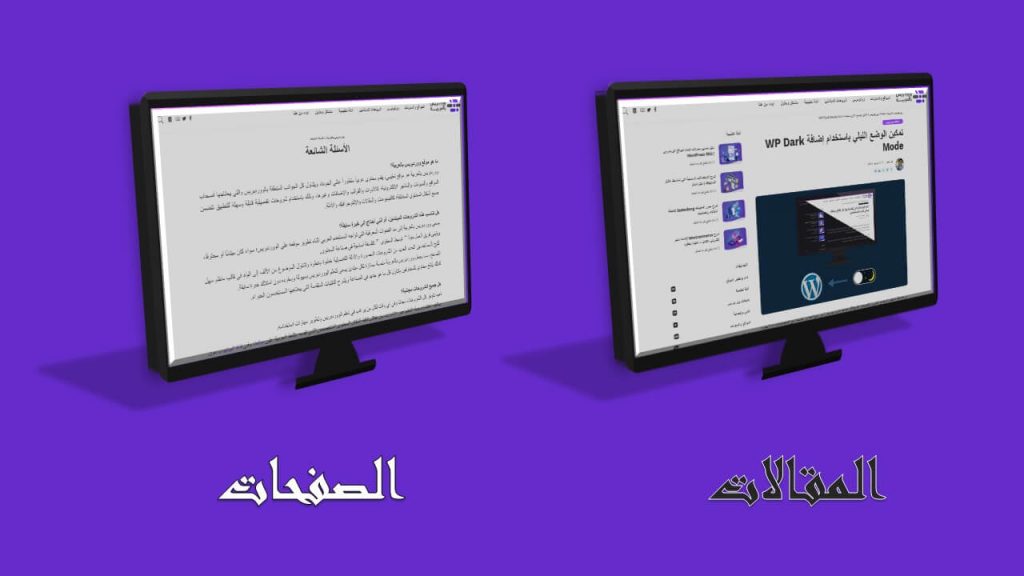
بعد أن تقوم بإنشاء موقعك باستخدام الووردبريس ستلاحظ وجود أداتين يمكن من خلالهما إضافة المحتوى إلى الموقع بشكل افتراضي، هما الصفحات ( Pages ) والمقالات ( Posts )، وبالرغم من أن إضافة المحتوى باستخدام هاتين الأداتين يتم بطريقتين متشابهتين، إلا أن هناك فرقًا بين المحتوى المخصص ليتم إضافته باستخدام الصفحات، وذاك المخصص ليتم إضافته من خلال المقالات، ولا بد من إضافة المحتوى بطريقة صحيحة من أجل الحفاظ على تنظيم موقع الويب وجعله استخدامه أكثر سهولة، وبالتالي رفع احتمالية نجاحه. لهذا، سنشرح لك هنا بشكل مفصَّل الفرق بين الصفحات والمقالات في الووردبريس، وكذلك سنلقي الضوء على بعض الأمثلة على كل منهما ضمن سياق المقالة، كما سنلخص الفروقات الرئيسية بينهما في جدول شامل.
ما هي الصفحات (Pages) في ووردبريس؟
الصفحات في الووردبريس هي أداة أو طريقة تُستخدَم لإضافة محتوى ثابت لا يتوقع أن يتم تحديثه بشكل مستمر ومتكرر (لكن يمكن أن يتم تحديثه عند الحاجة)، وله نفس الأهمية طوال الوقت، أي أن أهميته بالنسبة للزائرين لا تزداد أو تنقص مع مرور الزمن، وبالتالي لا يتم إظهار تاريخ نشر الصفحة في معظم الأحيان، وذلك بالرغم من أنه يتم تخزين التاريخ ضمن قاعدة بيانات موقع الووردبريس، كما لا تظهر صفحات الووردبريس في قوائم المقالات أو المنشورات للزوار، ويمكن إضافتها وتحريرها من تبويب “الصفحات” في لوحة تحكم الووردبريس. يوجد مثالان شائعان للمحتوى الذي يجب أن يُضاف إلى موقع الووردبريس باستخدام الصفحات، وهما معلومات الاتصال بإدارة موقعك التي يتم تنظيمها في صفحة “اتصل بنا” ، والمحتوى الذي يُعرِّف بالموقع وهدفه والقائمين عليه، والذي يتم تنظيمه ضمن صفحة “حول” أو “من نحن”، فمعلومات الاتصال بإدارة موقع الويب لا تهم فقط في وقت نشرها، بل يمكن أن يحتاج إليها الزائر في أي وقت، والأمر نفسه بالنسبة لمعلومات صفحة “من نحن” . وعادة ما تتضمن صفحات مواقع الووردبريس عنوانًا ومحتوى نصيًّا، بحيث يوضِّح العنوان ما يتضمنه المحتوى النصي للصفحة، لكن يمكن كذلك إضافة المزيد من أنواع المحتوى، مثل الصور والفيديوهات، كما يمكن أيضًا إضافة قسم التعليقات
إلى صفحات ووردبريس، إلا أن ظهور هذا القسم غير مفعل بشكل افتراضي لأن أصحاب المواقع لا يرغبون في معظم الأحيان أن يعلق الزائرون على صفحة “اتصل بنا” أو “من نحن” أو الصفحات الأخرى. ما هي المقالات (Posts) في ووردبريس؟ في المقابل فإن المقالات في ووردبريس هي أداة أو طريقة يشيع استخدامها في المدونات لإضافة المحتوى الذي يمكن أن تتأثر أهميته مع تغير الزمن، وهي التي تعرضها الصفحة الرئيسية للمدونة بترتيب زمني عكسي بدءًا من الأحدث، حيث يكون محتواها هو المحتوى الرئيسي الذي يُراد إيصاله إلى الزائر، وهي عادة ما تعرض في قوائم المقالات أو المنشورات، ويمكن أن يتم تعديلها أو إضافتها إلى موقع الويب أو المدونة من تبويب ( مقالات ) الموجود في لوحة تحكم ووردبريس.
يتم إضافة مختلف أنواع المواضيع التي يحتمل أن تتغير أهميتها أو محتواها مع الوقت من خلال المقالات، فإذا أردت أن تضيف موضوعًا يتحدث عن نظام إدارة المحتوى ووردبريس في موقعك، يجب أن تستخدم المقالات لأنك ستحتاج إلى تحديث الموضوع في المستقبل عندما يطرأ تغيير على النظام، كما أن محتوى الموضوع سيكون مهمًّا لزوار موقعك في أوقات معينة أكثر من غيرها، مثل عند إجراء تغييرات جذرية في نظام الووردبريس. تتضمن المقالة في ووردبريس عادة عنوانًا ومحتوى نصيًّا وصورًا، ويُضاف ضمنها في بعض الأحيان فيديوهات وصور متحركة، ويتم إظهار تاريخ كتابة المقالة أو تحديثها واسم كاتبها للزائر، لأن مثل هذه المعلومات قد تكون مهمة بالنسبة إليه. كما يتم تنظيم المقالات في الووردبريس باستخدام التصنيفات (Categories) والوسوم (Tags)
أو أحدهما على الأقل، ويتم إظهارها في صفحات الأرشيف المختلفة، مثل الصفحة التي تظهر كل المقالات التي تتبع لتصنيف معين، والصفحة التي تظهر كل المقالات التي تم وسمها بوسم معين. ولأن المواضيع التي تنشر عبر المقالات تشجع على المحادثة لأنها ترتبط بأفكار قابلة للنقاش، فإنها عادة ما تتضمن قسمًا مخصصًا لإضافة التعليقات من قبل مستخدمي وزوار المدونة، كما يتم إضافة أزرار المشاركة على وسائل التواصل الاجتماعي مثل فيسبوك (Facebook) وتويتر (Twitter) و لينكدإن (LinkedIn) في المقالة من أجل السماح للمستخدمين بمشاركتها بسهولة، لأن محتواها يكون اجتماعيًّا ومناسبًا للمشاركة مع الأصدقاء والمتابعين في كثير من الأحيان. الجدير بالذكر أيضًا أن مقالات ووردبريس تُضمن في خلاصات RSS، وهي عبارة عن ملفات يتم فيها تلخيص المحتوى الذي تم نشره في موقع الويب من أجل إرسال ملخص لما تمت إضافته مؤخرًا ضمن الموقع
إلى المشتركين عبر البريد الإلكتروني على شكل نشرات إخبارية يومية أو أسبوعية. اقرأ أيضًا: شرح RSS وكيف تستخدمه لموقعك الووردبريس
الفرق بين الصفحات والمقالات في الووردبريس
كما ربما تكون قد لاحظت من خلال قراءة الفقرتين السابقتين، توجد العديد من الاختلافات بين الصفحات والمقالات في الووردبريس. سنفصِّل في هذه الفقرة أهم الاختلافات التي تميز الصفحات والمقالات في الووردبريس عن بعضهما، ثم سنلخص في الفقرة التالية جميع الاختلافات الرئيسية في جدول شامل. 1.
الاختلاف في نوع المحتوى الفرق الأساسي بين الصفحات والمقالات في الووردبريس هو نوع المحتوى، فكما ذكرنا في الأعلى يتم نشر المحتوى الثابت غير القابل للنقاش الذي لا يتم تحديثه إلا نادرًا، والذي يمتلك المقدار نفسه من الأهمية بغض النظر عن تاريخ نشره من خلال الصفحات، في حين يتم نشر المحتوى الاجتماعي القابل للنقاش الذي يحتمل أن يتم تحديثه بشكل متكرر، والذي تختلف أهميته بمرور الوقت من خلال المقالات. وكما هو واضح، يحدِّد المحتوى الذي تريد نشره ونوعه الطريقة الصحيحة للنشر، فإذا كان لديك موقع إخباري وأردت نشر خبر ما عن حدث جارٍ حاليًّا عليك استخدام المقالات، أما إذا أردت نشر قوانين المشاركة في موقعك أو المصادر الأساسية التي يعتمد عليها لجلب المعلومات والإحصائيات، فيجب أن تستخدم الصفحات.
2. طريقة تنظيم الصفحات والمقالات تنظِّم التصنيفاتُ والوسومُ المقالات، حيث يمكنك أن تدرج مقالات ووردبريس ضمن تصنيف محدد في موقعك، أو أن تعطيها وسمًا محددًا، فإذا كنت تملك موقعًا علميًّا ينشر مقالات في مجالات العلوم المختلفة، سيكون بإمكانك أن تضع المقالات تحت تصنيف “فيزياء” أو “كيمياء” أو “رياضيات” أو “جغرافية” أو “علم أحياء”، أو أن تضع لها وسومًا محددة مناسبة مرتبطة بها، مثل “مبرهنة فيثاغورث” أو “تفاعل احتراق” أو ما شابه ذلك.
لكن لا يمكنك أن تضع صفحات ووردبريس ضمن التصنيفات أو أن تعطيها وسومًا، وبدلًا من ذلك يمكنك تنظيمها بشكل هرمي، أي أن يكون لديك صفحات فرعية (أولاد) ضمن صفحات رئيسية (آباء)، فإذا كنت تملك متجرًا إلكترونيًّا فيه قسم لبيع الملابس، قد يكون لديك الصفحة الرئيسية الخاصة بقسم الملابس التي تملك الرابط (yoursite.com/Apparel)، والصفحة الفرعية الخاصة بملابس الرجال (yoursite.com/Apparel/men) والصفحة الفرعية الخاصة بملابس النساء (yoursite.com/Apparel/Women). 3.
إظهار اسم الكاتب وتاريخ الكتابة في المقالات
كما أشرنا سابقًا، تاريخ إنشاء الصفحات ونشرها في ووردبريس غير مهم، ولذلك لا يتم إظهار تاريخ النشر للزوار، بينما قد يكون تاريخ كتابة المقالة مهمًّا جدًا للزائر لأنها قد تتضمن معلومات غير ثابتة. أيضًا لا يدرج اسم الكاتب في صفحات ووردبريس في حين يتم إدراجه ضمن مقالات ووردبريس، لأن الزائر قد يريد الاطلاع على من كتب المقالة لسبب ما قد يكون متعلقًا بالآراء الواردة بالمقالة أو غير ذلك. كذلك نود لفت الانتباه إلى أنه عادة ما يكون بالإمكان النقر على اسم كاتب المقالة للوصول إلى صفحته
على المدونة، والاطلاع على جميع المقالات التي قام بكتابتها ضمن هذه المدونة، بالإضافة بالطبع إلى بعض المعلومات عنه. مقارنة موجزة بين الصفحات والمقالات والآن بعد أن ألقينا الضوء على أهم الفروقات بين الصفحات والمقالات في الووردبريس، سنوضح في جدول شامل بشكل مختصر كل الاختلافات الرئيسية بينهما.
إلى هنا ننتهي من شرح الفرق بين الصفحات والمقالات في الووردبريس، ونحيطكم علمًا في الختام أن ووردبريس يتيح إمكانية إنشاء أدوات أخرى شبيهة بالصفحات والمقالات لنشر أنواع أخرى من المحتوى، وذلك باستخدام المكونات الإضافية أو بطرق أخرى، إلا أن المدونات ومواقع الويب العادية تستخدم في معظم الأحيان الصفحات والمقالات فقط لنشر المحتوى، في حين تستخدم مواقع الويب المتخصصة طرقًا أخرى، مثل المتاجر الإلكترونية التي تسمح بإنشاء منشورات من خلال أداة ( المنتجات ) من أجل تسهيل نشر المحتوى وإيصال المعلومات إلى العملاء والزائرين.
دروب أيديا - DROPIDEA
نأمل أن تكون هذه المقالة قد أضافت لك قيمة حقيقية. في دروب أيديا نسعى دائمًا لتقديم محتوى عربي عالي الجودة يساعدك على النمو والتطور في المجال الرقمي. تابعنا للمزيد من المقالات والشروحات المفيدة.
الأدمن
DROPIDEA
أحدث المقالات

هل تصيّد ماسك إطلاق أداة «Dots» من OpenAI عبر نطاق dot.com؟

بيك إكس في ترفع سقف استثماراتها البذرية إلى 5 ملايين دولار

عشاء مرتقب بين رئيس أنثروبيك ودونالد ترامب وسط خلافات حول أمان الذكاء الاصطناعي

جوجل تختبر الشراء المباشر من فليبكارت عبر Gemini في الهند



