احترافية ومجانية: أفضل 10 مواقع لتصوير الشاشة اونلاين (صور وفيديو)
 بقلم الأدمن
مواقع تصوير الشاشة أونلاين أفضل مواقع تصوير الشاشة اونلاين تنويه: تم تحديث هذا المقال في أغسطس 2024 ليشمل أحدث المعلومات والمواقع المتاحة لتصوير الشاشة وتسجيل الفيديو عبر الإنترنت. محرر الموقع.
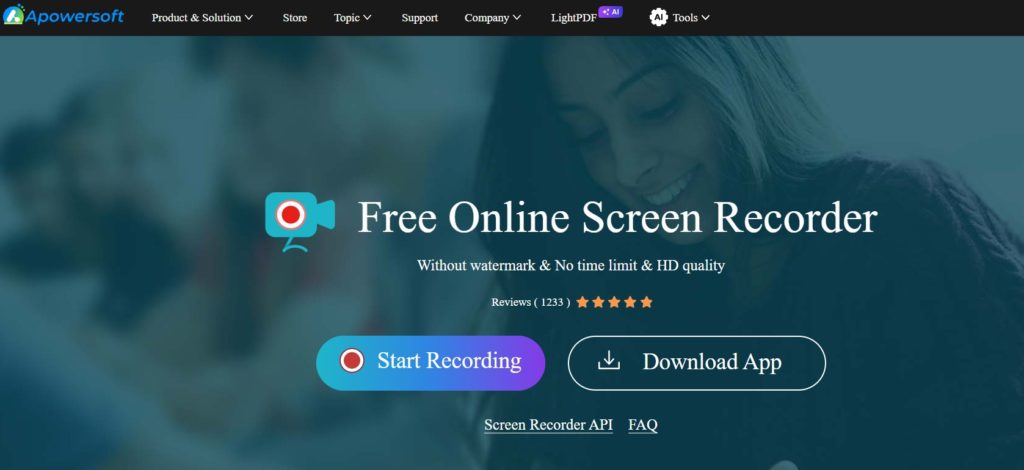
الميزات: سهولة الاستخدام: تسجيل عالي الجودة: خيارات تحرير وتخصيص متعددة: إمكانية جدولة التسجيلات: دعم تسجيل كاميرا الويب: العيوب: النسخة المجانية محدودة: قد تواجه بعض البطء في الأداء: النسخة المجانية مقابل المدفوعة: النسخة المجانية: النسخة المدفوعة: 2. screencapture.com الميزات: مجانية تمامًا: سهولة الاستخدام: لا علامات مائية: لا يتطلب أي تسجيل أو تنزيل: دعم لجميع أنظمة التشغيل: العيوب: لا يقدم خيارات تحرير: لا يدعم تسجيل الفيديو: قد لا يعمل بشكل جيد على جميع المتصفحات: النسخة المجانية مقابل المدفوعة: هذه الأداة مجانية تمامًا ولا توجد نسخة مدفوعة منها. الميزات: تسجيل عالي الجودة: خيارات تحرير متقدمة: إمكانية مشاركة التسجيلات بسهولة: دعم لتسجيل كاميرا الويب: واجهة سهلة الاستخدام: العيوب: النسخة المجانية محدودة: قد يتطلب تسجيل الدخول: 4.
Panopto Recorder الميزات: تسجيل متعدد المصادر: مشاركة سهلة: أدوات تحرير أساسية: تحليلات متقدمة: تكامل مع أنظمة إدارة التعلم: العيوب: الخدمة مدفوعة: قد يكون معقدًا بعض الشيء للمبتدئين: النسخة المجانية مقابل المدفوعة: لا توجد نسخة مجانية. متعلق : مراجعة AceThinker أفضل محرر فيديو اونلاين مجاني للمبتدئين الميزات: مجانية تمامًا: لا يتطلب أي تسجيل أو تنزيل: سهل الاستخدام: دعم لجميع أنظمة التشغيل: العيوب: جودة الصور والفيديوهات قد تكون أقل: لا يقدم خيارات تحرير متقدمة: النسخة المجانية مقابل المدفوعة: هذه الأداة مجانية تمامًا ولا توجد نسخة مدفوعة منها. متعلق : مراجعة Flexclip: إنشاء وتحرير مقاطع الفيديو اونلاين الميزات: واجهة سهلة الاستخدام: إمكانية تسجيل الشاشة والصوت: مكتبة وسائط غنية: أدوات تحرير متقدمة: مشاركة سهلة: العيوب: النسخة المجانية محدودة: قد يتطلب بعض الوقت لتعلم استخدام جميع الميزات: النسخة المجانية مقابل المدفوعة: النسخة المجانية: النسخة المدفوعة: الميزات: سهولة الاستخدام: تسجيل الشاشة والصوت: إضافة تعليقات صوتية ونصية: تحرير الفيديوهات: مشاركة سهلة: العيوب: النسخة المجانية محدودة: خيارات التحرير محدودة: الميزات: سهولة الاستخدام: إمكانية تسجيل الشاشة والصوت وكاميرا الويب: أدوات تحرير أساسية: مشاركة سهلة: تكامل مع Google Classroom: العيوب: يتطلب متصفح Chrome: النسخة المجانية محدودة: النسخة المجانية مقابل المدفوعة: النسخة المجانية: النسخة المدفوعة: .
تحميل الاضافة من متجر اضافات متصفح كروم الميزات: واجهة سهلة الاستخدام: إمكانية تسجيل الشاشة والصوت وكاميرا الويب: مكتبة وسائط غنية: أدوات تحرير متقدمة: تكامل مع خدمات Microsoft: العيوب: النسخة المجانية محدودة: قد يتطلب بعض الوقت لتعلم استخدام جميع الميزات: النسخة المجانية مقابل المدفوعة: النسخة المجانية: النسخة المدفوعة: 10. الميزات: العيوب: النسخة المجانية مقابل المدفوعة: النسخة المجانية: النسخة المدفوعة: توصيات بناءً على احتياجات المستخدم: بساطة وسرعة: ميزات تحرير متقدمة: تسجيل احترافي: تسجيل من الموبايل: التكامل مع متصفح كروم: نصيحة أخيرة: تصوير الشاشة على الكمبيوتر والموبايل: لجهاز الكمبيوتر: لجهاز الماك: لجهاز الآيفون: لتسجيل الألعاب على الهاتف: كيفية استخدام مواقع تصوير الشاشة أونلاين (بشكل عام): زيارة الموقع: بدء عملية الالتقاط: اختيار منطقة الالتقاط: الضغط على زر “التقاط” حفظ أو تعديل الصورة: نصائح لتحسين جودة لقطات الشاشة: اضبط الإضاءة: نظّم سطح المكتب: استخدم الدقة المناسبة: استخدم أدوات التحرير (إذا كانت متوفرة):
دروب أيديا - DROPIDEA
نأمل أن تكون هذه المقالة قد أضافت لك قيمة حقيقية. في دروب أيديا نسعى دائمًا لتقديم محتوى عربي عالي الجودة يساعدك على النمو والتطور في المجال الرقمي. تابعنا للمزيد من المقالات والشروحات المفيدة.
الأدمن
DROPIDEA
أحدث المقالات

هل تصيّد ماسك إطلاق أداة «Dots» من OpenAI عبر نطاق dot.com؟

بيك إكس في ترفع سقف استثماراتها البذرية إلى 5 ملايين دولار

عشاء مرتقب بين رئيس أنثروبيك ودونالد ترامب وسط خلافات حول أمان الذكاء الاصطناعي

جوجل تختبر الشراء المباشر من فليبكارت عبر Gemini في الهند



